
1. Увод
This manual provides detailed instructions for the installation, operation, and maintenance of your ESLYYDS Double Din Car Stereo. This advanced multimedia system offers a wide range of features including Apple CarPlay, Android Auto, Bluetooth connectivity, a high-definition touchscreen, and support for a backup camera, enhancing your in-car entertainment and navigation experience.

Figure 1.1: ESLYYDS Double Din Car Stereo Overview
2. Садржај пакета
Молимо вас да проверите да ли су све ставке наведене у наставку укључене у ваш пакет:
- ESLYYDS Double Din Car Stereo Unit
- Сет носача за монтажу
- Жица камере А
- Жица камере Б
- Steering Wheel Control Unit
- Жичани свежањ А
- Жичани свежањ Б
- Задњи-view Камера
- Ремоте Цонтрол
- Кориснички приручник (овај документ)

Figure 2.1: Stereo Dimensions and Included Accessories
3. Карактеристике производа
The ESLYYDS Double Din Car Stereo is equipped with a variety of features designed for convenience and enhanced driving experience:
- Компатибилност са Apple CarPlay-ом и Android Auto-ом: Seamlessly integrate your smartphone for navigation, music, calls, and messages using voice control.
- 7-inch HD Capacitive Touch Screen: A responsive and accurate display supporting 1080P video playback.
- Блуетоотх КСНУМКС: For stable and clear hands-free calling and audio streaming.
- Phone Mirror Link: Display your smartphone's screen directly on the stereo.
- Двоструки УСБ интерфејс: One port for media playback and another with 2.1A fast charging capability.
- Позади View Улаз камере: Supports the included 12 HD LED light, night vision, 170° viewing angle waterproof backup camera for safer reversing.
- Контрола на волану (SWC): Компатибилан са постојећим командама на волану за практично руковање.
- AM/FM Audio Receiver: Access to radio stations with user-friendly digital control.
- AUX IN Connectivity: За екстерне аудио уређаје.
- 7 Color LED Buttons: Customizable button illumination.
3.1 Apple CarPlay и Android Auto
Connect your smartphone via USB to access navigation, phone contacts, email, notifications, and music directly on the stereo display. This feature utilizes voice control technology for safe operation while driving.
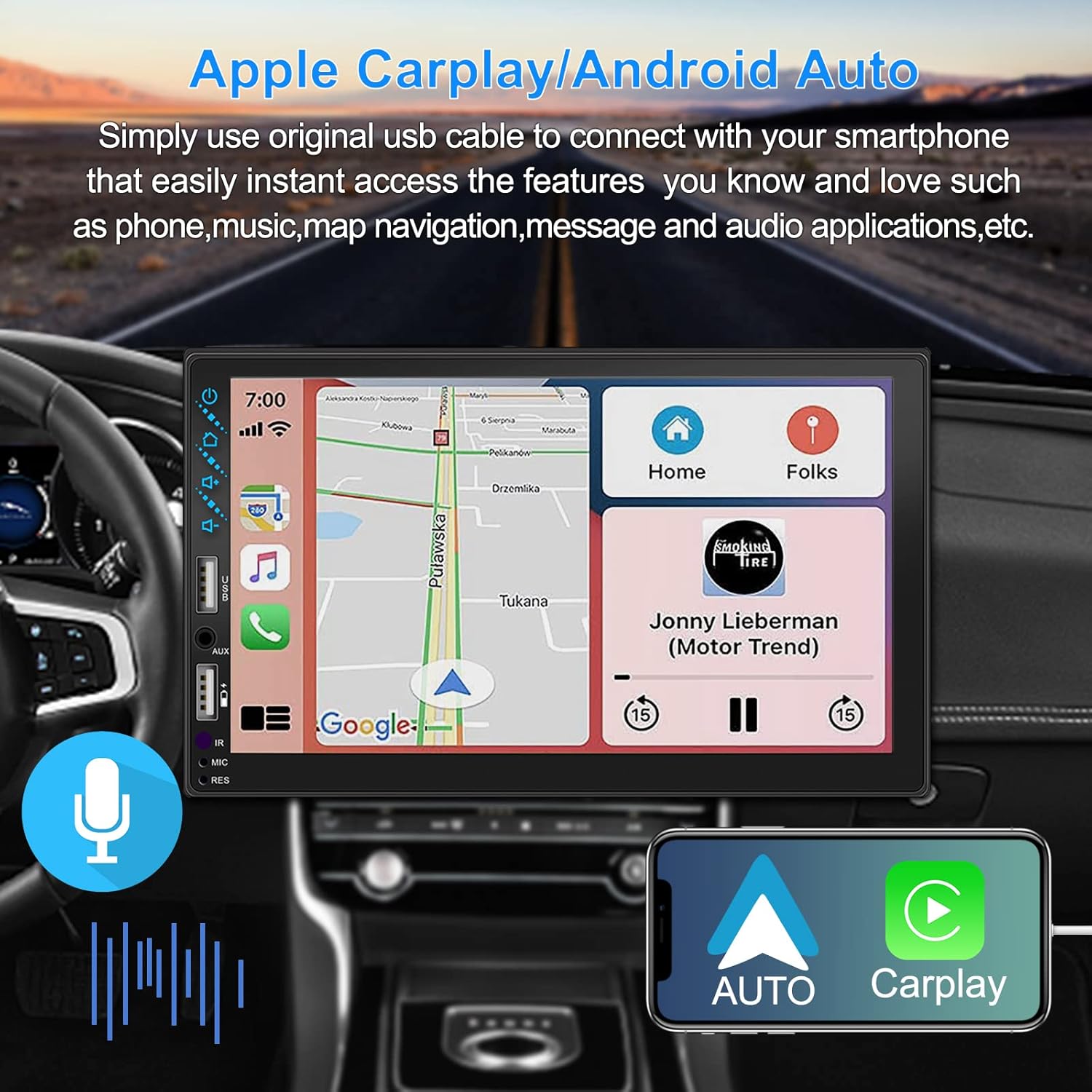
Слика 3.1: Интерфејс за Apple CarPlay и Android Auto
3.2 Управљање гласом
Utilize voice commands to control various functions such as making calls, playing music, and navigating, allowing you to keep your hands on the wheel and eyes on the road.

Слика 3.2: Функционалност гласовне контроле
3.3 Phone Mirror Link
The Mirror Link function allows you to display your smartphone's screen directly onto the stereo's touchscreen. This supports Android devices (version 10.1 and below) and iPhone devices (version 14.5 and below, including iPhone 12, 11, XR, and 8 series and below) with resolutions up to 1920x1080 pixels.
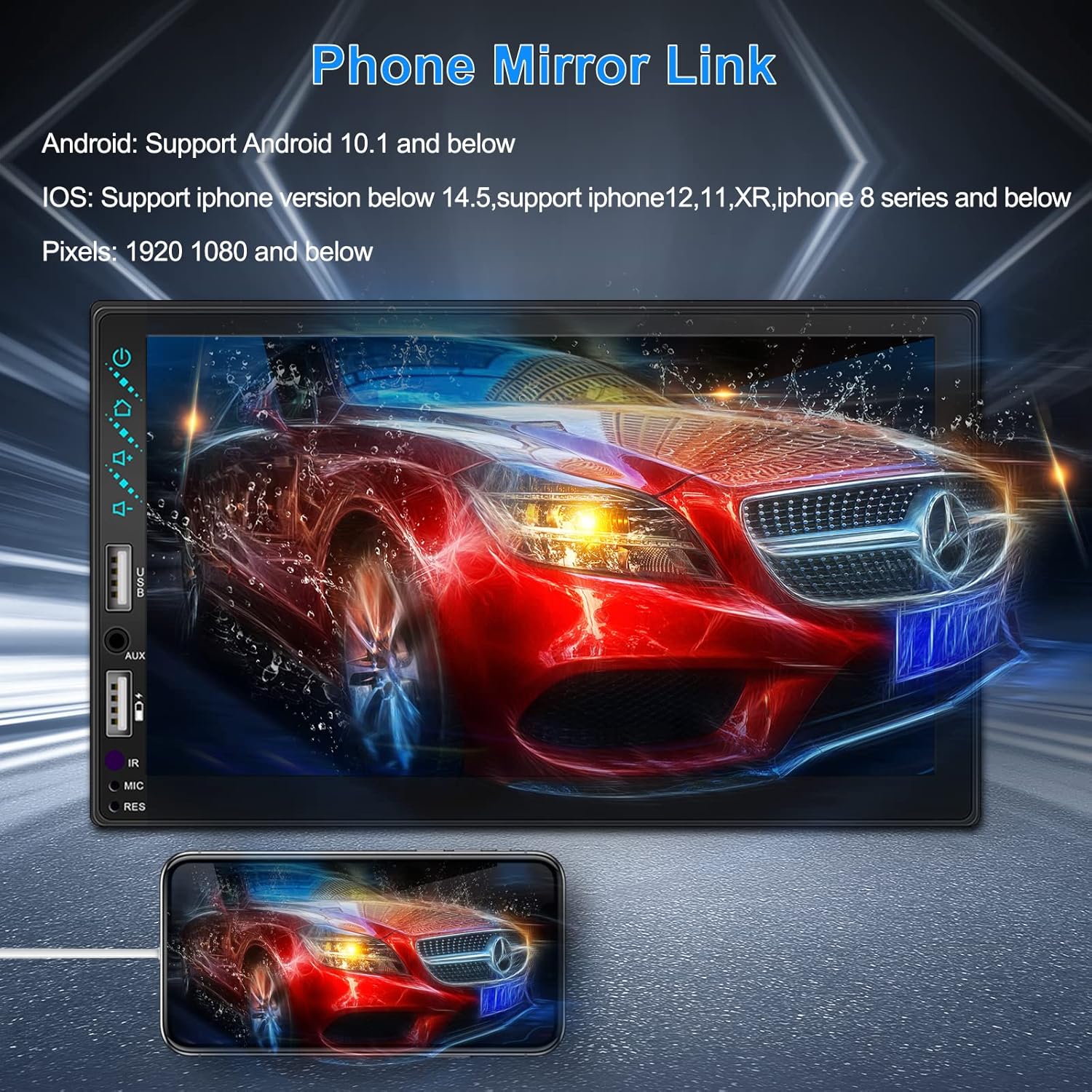
Figure 3.3: Phone Mirror Link
3.4 Реар View Камера
The included waterproof backup camera features 12 HD LED lights for night vision and a 170° viewing angle. When you shift into reverse, the system automatically displays the camera feed on the screen, providing optimal visibility in various weather conditions.
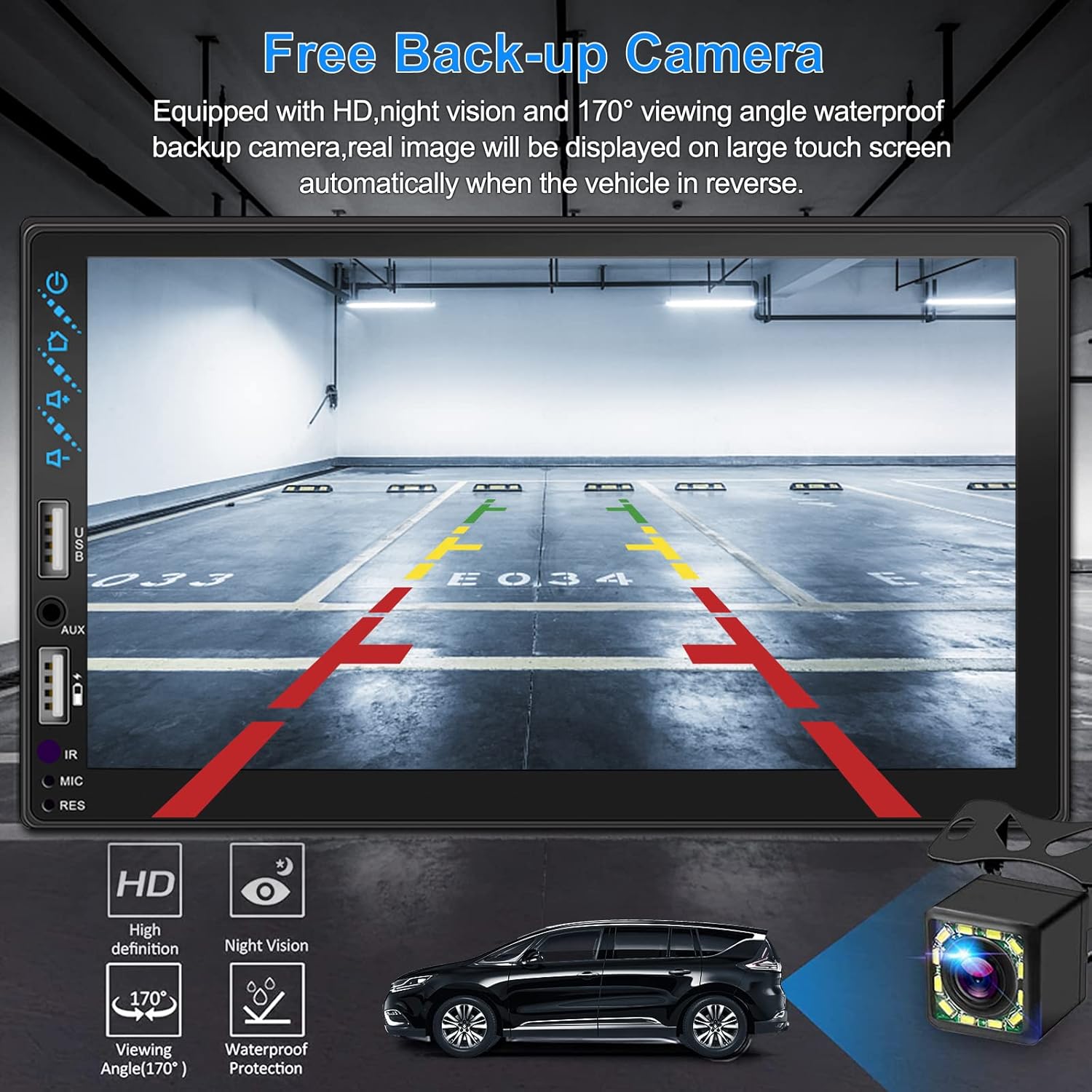
Слика 3.4: Задња страна View Екран камере
4. Водич за инсталацију
Proper installation is crucial for optimal performance. It is recommended to have the unit installed by a professional if you are unfamiliar with car audio wiring.
4.1 Димензије
The stereo unit has a standard double din size. Refer to Figure 2.1 for detailed dimensions.
- Ширина: 178 мм (7 инча)
- Висина: 102 мм (4 инча)
- Дубина: 60 мм (2.6 инча)
4.2 Дијаграм ожичења
Carefully follow the wiring diagram below to connect the stereo to your vehicle's electrical system. Ensure all connections are secure to prevent malfunctions.
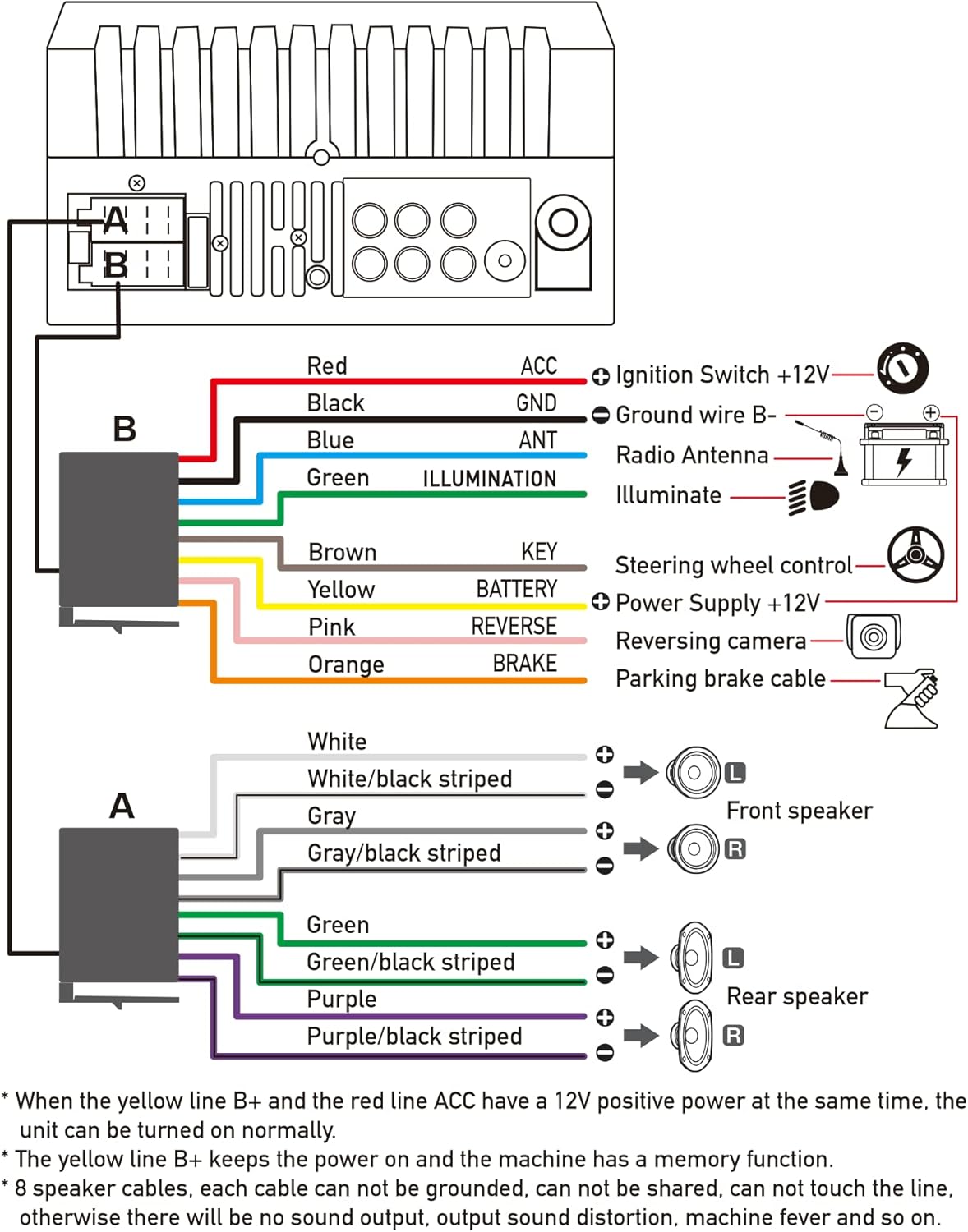
Слика 4.1: Главни дијаграм ожичења
- Red (ACC): Connect to Ignition Switch +12V.
- Црна (ГНД): Connect to Ground wire B-.
- Blue (ANT): Connect to Radio Antenna (if applicable).
- Green (ILLUMINATION): Connect to Illuminate wire.
- Brown (KEY): Connect to Steering wheel control.
- Yellow (BATTERY): Connect to Power Supply +12V.
- Pink (REVERSE): Connect to Reversing camera input.
- Orange (BRAKE): Connect to Parking brake cable.
Speaker Connections (8 speakers supported):
- White / White/black striped: Предњи леви звучник
- Gray / Gray/black striped: Предњи десни звучник
- Green / Green/black striped: Задњи леви звучник
- Purple / Purple/black striped: Задњи десни звучник
Важне напомене:
- The unit requires both the Yellow (BATTERY) and Red (ACC) wires to have a 12V positive power supply simultaneously for normal operation.
- The Yellow (BATTERY) wire keeps the power on and maintains memory functions.
- For speaker connections, each cable must not be grounded or shared with other cables. Incorrect wiring can lead to no sound output, sound distortion, or damage to the machine.
5. Упутство за употребу
5.1 Основне операције
- Укључивање/искључивање: Притисните дугме за напајање на предњој плочи или даљинском управљачу.
- Контрола јачине звука: Use the volume buttons on the front panel, steering wheel controls, or remote control.
- Избор извора: Tap the 'Source' or 'Mode' icon on the touchscreen to switch between Radio, Bluetooth, USB, AUX, CarPlay, and Android Auto.
5.2 Apple CarPlay / Android Auto Usage
- Connect your compatible iPhone or Android smartphone to the stereo's USB port using a certified USB cable.
- The stereo will automatically detect the connection and prompt you to launch CarPlay or Android Auto.
- Пратите упутства на екрану да бисте довршили подешавање.
- Once connected, you can access supported apps like Maps, Phone, Messages, and Music directly from the stereo's touchscreen or via voice commands.
5.3 Блуетоотх упаривање
- Укључите Блуетоотх на свом паметном телефону.
- На стерео уређају идите до менија Bluetooth.
- Тражи available devices on your smartphone. The stereo's Bluetooth name will typically be 'ESLYYDS' or similar.
- Select the stereo from your smartphone's list and confirm the pairing code if prompted.
- Једном упарени, можете бежично упућивати/примати позиве и стримовати аудио.
5.4 Phone Mirror Link Usage
- Повежите свој паметни телефон са УСБ портом стерео уређаја.
- Select the 'Mirror Link' option on the stereo's screen.
- Follow the specific instructions displayed on the stereo for your phone's operating system (Android or iOS) to enable screen mirroring. This may involve enabling USB debugging for Android or trusting the device for iOS.
5.5 Радио операције
- Select the 'Radio' source.
- Use the 'Scan' function to automatically search and save stations, or manually tune using the frequency controls.
- Сачувајте своје омиљене станице на унапред подешена дугмад за брз приступ.
5.6 Репродукција са УСБ-а
- Insert a USB drive containing audio or video files into the designated USB playback port.
- The stereo will automatically switch to USB mode or prompt you to select it.
- Browse and play your media files using the touchscreen controls.
6. Одржавање
Да бисте осигурали дуготрајност и оптималне перформансе вашег ауто стерео уређаја, пратите ова упутства за одржавање:
- Чишћење: Use a soft, dry cloth to clean the screen and exterior. For stubborn smudges on the screen, use a screen cleaner specifically designed for electronic displays. Avoid abrasive cleaners or solvents.
- температура: Избегавајте излагање уређаја екстремним температурама, и врућим и хладним, током дужег временског периода.
- Влага: Држите уређај сувим. Не излажите га води или прекомерној влажности.
- Ажурирања фирмвера: Проверите произвођача webпериодично проверавајте сајт за доступна ажурирања фирмвера како бисте побољшали перформансе и додали нове функције.
КСНУМКС. Решавање проблема
If you encounter issues with your ESLYYDS car stereo, please refer to the following common problems and solutions. If the problem persists, contact customer support.
| Проблем | Могући узрок | Решење |
|---|---|---|
| Нема струје | Неисправно ожичење; Прегорели осигурач; Проблем са акумулатором возила. | Check power (Yellow and Red) and ground (Black) wire connections. Inspect vehicle fuses. Ensure vehicle battery is charged. |
| Нема звука | Жице звучника су неправилно повезане; Јачина звука је прениска; Функција искључивања звука је активна. | Verify all speaker wire connections (ensure no shorts or grounds). Increase volume. Check if mute is enabled. |
| Блуетоотх се не повезује | Bluetooth not enabled on phone/stereo; Incorrect pairing process. | Ensure Bluetooth is active on both devices. Delete previous pairings and re-attempt pairing process. |
| CarPlay/Android Auto се не покреће | Faulty USB cable; Phone not compatible; Software issue. | Use a high-quality, certified USB cable. Ensure your phone's OS version is compatible. Restart both phone and stereo. |
| Задња камера не приказује слику | Camera wire disconnected; Reverse trigger wire not connected. | Check the camera's video input and power connections. Ensure the Pink (REVERSE) wire is correctly connected to the vehicle's reverse light trigger. |
| USB not reading media | Неподржано file format; Corrupted USB drive; USB port issue. | Осигурајте медије files are in supported formats (e.g., MP3, MP4, MKV). Try a different USB drive. |
8. Спецификације
| Феатуре | Спецификација |
|---|---|
| Димензије производа | 7 к 2.6 к 3.94 инча |
| Тежина артикла | 2.33 фунти |
| Број модела | L3 |
| Величина екрана | 7 инча (18 цм) |
| Дисплаи Типе | ХД капацитивни екран осетљив на додир |
| Технологија повезивања | Carplay, Android Auto, Mirror-Link, Bluetooth 5.2, USB, AUX |
| Тип контролера | Гугл асистент, иОС, Андроид |
| Посебне карактеристике | Touchscreen, RDS, Steering Wheel Control (SWC), Fast Charging USB (2.1A) |
| Компатибилни уређаји | Смартпхоне |
| Тип конектора | УСБ |
| Режим аудио излаза | Сурроунд |
| Конфигурација канала сурроунд звука | 5.1 |
| Подршка за видео кодирање | МКВ |
| Боја | Црно |
| Датум првог доступног | 25. септембра 2021. године |
9. Гаранција и подршка
ESLYYDS is committed to providing excellent customer service and technical support. For any inquiries or assistance, please contact our professional technical team.
- Гаранција поврата новца: 30-day period from purchase.
- Гаранција за замену: 12-month period for product replacement.
- техничка подршка: Обезбеђена је доживотна техничка подршка.
Please refer to your purchase documentation for specific contact details or visit the official ESLYYDS webсајт за информације о подршци.