
WAFERLOCK L310
WAFERLOCK L310 Smart Door Lever User Manual
Модел: ЛКСНУМКС
1. Увод
This manual provides detailed instructions for the installation, setup, operation, and maintenance of your WAFERLOCK L310 Smart Door Lever. The L310 is an electronic lock designed for doors without a deadbolt, offering multiple access methods including Bluetooth app control, RFID cards, and PIN codes. It meets ANSI A156.2 Grade 1 standards for robust security and durability.

Слика 1.1: Фронт view of the WAFERLOCK L310 Smart Door Lever, showing the keypad, keyhole, and handle.
2. Безбедносне информације
- Пажљиво прочитајте сва упутства пре инсталације и употребе.
- Не покушавајте да растављате или модификујете браву. То може поништити гаранцију и угрозити безбедност.
- Use only the specified battery type (4 AAA alkaline batteries). Do not mix old and new batteries or different types of batteries.
- Keep PIN codes and RFID cards secure. Do not share them with unauthorized individuals.
- Ensure the door frame and door are structurally sound before installation.
- Perform regular maintenance checks as described in this manual.
3. Садржај пакета
Проверите да ли су све компоненте присутне пре почетка инсталације.
- WAFERLOCK L310 Smart Door Lever (Exterior and Interior Assemblies)
- Латцх Мецханисм
- Strike Plate and Dust Box
- Mounting Hardware (Screws, Spindles)
- RFID Cards (Quantity may vary)
- Mechanical Keys (Quantity may vary)
- Шаблон за инсталацију
- Упутство за употребу
- 4 ААА батерије
4. Инсталација
4.1 Door Compatibility and Preparation
Before installation, ensure your door meets the required specifications for thickness and bore holes. The L310 is designed for doors without a separate deadbolt.

Слика 4.1: Technical diagram detailing door preparation measurements including backset (2 3/4" or 70mm), crossbore diameter (2 1/8" or 54mm), latch bore diameter (1" or 25mm), fixing holes diameter (5/16" or 8mm), and compatible door thickness (1 3/8" - 2" or 35-50mm).

Слика 4.2: Diagram illustrating compatible and incompatible door lock types. The WAFERLOCK L310 is suitable for doors where the security of a deadbolt is not required, replacing standard knob or lever locks.
4.2 Одређивање руковања вратима
The handing of your door (left or right) is determined from the outside perspective. Ensure you select the correct handed lever for your installation.

Слика 4.3: Illustrations demonstrating how to determine door handing (left or right) from the outside perspective. Doors in the diagram are shown as seen from the outside.

Слика 4.4: Image showing left and right-handed versions of the lock, emphasizing the need to choose the correct handing during installation.
4.3 Општи кораци инсталације
- Prepare the door according to the provided template and compatibility diagrams.
- Install the latch mechanism into the door edge.
- Mount the exterior assembly, ensuring the spindle aligns correctly.
- Install the interior assembly, connecting any necessary cables.
- Secure both assemblies with the provided screws.
- Install the strike plate and dust box on the door frame.
- Insert the 4 AAA batteries into the interior assembly.
- Test the lock's functionality with the mechanical key before proceeding to electronic setup.
5. Подешавање
5.1 WAFERKEY App Control
The WAFERKEY app allows for comprehensive control and management of your smart door lever. Download the free WAFERKEY app from your smartphone's app store.
- Упаривање: Follow the in-app instructions to pair your smartphone with the L310 lock via Bluetooth.
- Почетно подешавање: Set up administrator PIN codes and register initial RFID cards through the app.
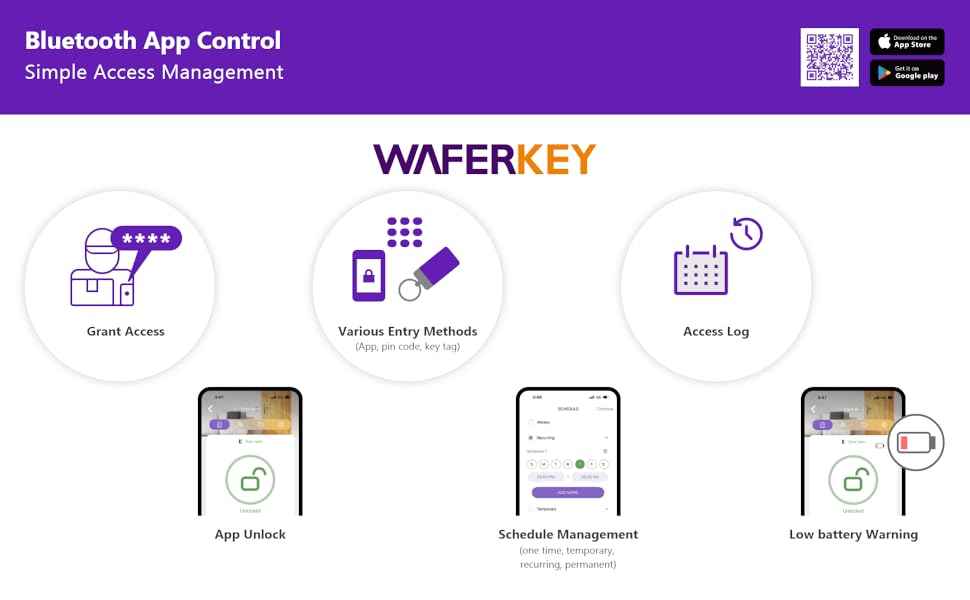
Слика 5.1: Infographic summarizing the WAFERKEY app features, including Grant Access, Various Entry Methods, Access Log, App Unlock, Schedule Management, and Low Battery Warning.
5.2 RFID Card and PIN Code Setup
After initial app pairing, you can add and manage RFID cards and PIN codes directly through the WAFERKEY application.
- Adding PIN Codes: Use the app to generate and assign permanent, temporary, or one-time PIN codes.
- Registering RFID Cards: Follow the app's prompts to register new RFID cards by presenting them to the lock's sensor.
6. Упутство за употребу
6.1 Методе откључавања
The WAFERLOCK L310 offers multiple convenient ways to unlock your door:
- ПИН код: Enter your registered PIN code on the keypad, then press the '#' key.
- РФИД картица: Принесите регистровану РФИД картицу подручју читача картица на брави.
- WAFERKEY App: Use the unlock function within the WAFERKEY app on your smartphone.
- Механички кључ: In case of emergency or battery depletion, use the physical key provided.

Слика 6.1: Three panels illustrating unlocking methods: PIN code entry on the keypad, RFID card tap, and unlocking via the WAFERKEY mobile application.
6.2 Функција аутоматског закључавања
The lock features an adjustable auto-lock function. After the door closes, the lock will automatically engage after a set period, providing added security and peace of mind. This setting can be configured via the WAFERKEY app.
7. Управљање приступом
The WAFERKEY app provides robust tools for managing access permissions for various users.
- Granting Access: Share permanent, recurring, temporary, or one-time access to family, friends, renters, or colleagues.
- Управљање распоредом: Set specific times and days for recurring access permissions.
- Дневник приступа: Monitor lock activity, including who unlocked the door and when.
- Revoking Access: Easily remove or modify access permissions for any user at any time.

Слика 7.1: Screenshots of the WAFERKEY app interface, demonstrating schedule management for access and a list of users with granted access.
8. Одржавање
8.1 Замена батерије
The L310 Smart Door Lever provides up to 1.5 years of battery life (based on 10 openings per day at 68°F). The WAFERKEY app will provide an alert when battery power is low. Additionally, an acoustic low power warning will sound from the lock itself.
- When the low battery warning appears, replace all four AAA alkaline batteries promptly.
- To replace, remove the battery cover on the interior assembly, replace the old batteries with new ones, and reattach the cover.
8.2 Приступ у хитним случајевима
If the batteries completely deplete, you can still gain emergency access:
- 9-Volt Battery: Touch a 9-volt battery to the emergency power contacts on the exterior assembly to temporarily power the lock and enter your PIN code or use an RFID card.
- Механички кључ: Use the provided mechanical key to unlock the door.
8.3 Чишћење
Очистите спољашњост браве меком крпомamp крпом. Избегавајте абразивна средства за чишћење или раствараче који би могли оштетити завршну обраду или електронске компоненте.
КСНУМКС. Решавање проблема
- Брава не реагује: Проверите ниво напуњености батерија. Замените батерије ако су празне. Уверите се да је брава правилно постављена и да су сви прикључци безбедни.
- ПИН код не ради: Verify the correct PIN code is being entered. Ensure the lock is not in a lockout mode. Re-sync with the app if necessary.
- RFID card not recognized: Ensure the card is properly registered in the WAFERKEY app. Present the card firmly to the reader.
- Проблеми са повезивањем апликације: Ensure Bluetooth is enabled on your smartphone and you are within range of the lock. Restart the app or your phone if issues persist.
- Lever not turning: Check for any obstructions in the door mechanism. Ensure the lock is properly aligned and installed.
10. Спецификације

Слика 10.1: Detailed dimensional drawing of the WAFERLOCK L310 Smart Door Lever, showing overall length, height, and depth measurements in both inches and millimeters.
| Феатуре | Спецификација |
|---|---|
| Бранд | ВАФЕРЛОЦК |
| Назив модела | Л310 |
| Број модела | L310-B05-2 |
| Тип закључавања | Electronic Key Lock |
| Посебна карактеристика | Кеилесс Ентри |
| Материјал | Цинк |
| Финисх Типе | Брусхед Ницкел |
| Димензије артикла (Д к Ш к В) | 6.3 к 8.26 к 7.67 инча |
| Тежина артикла | 7.7 фунте (3.5 килограма) |
| Цоннецтивити Протоцол | Блуетоотх |
| Контролни метод | App, Hand Control, Mechanical Knob |
| Извор напајања | 4 AAA алкалне батерије (укључене) |
| Трајање батерије | Up to 1.5 years (10 openings/day at 68°F) |
| Компатибилност дебљине врата | 1 3/8" - 1 9/16" (35-40mm) for this variant, up to 2" (50mm) for other variants |
| АНСИ стандард | АНСИ А156.2 Оцена 1 |
11. Гаранција и подршка
For warranty information, technical support, or service inquiries, please refer to the contact details provided with your product packaging or visit the official WAFERLOCK webсајту. Сачувајте рачун о куповини за гаранције.
Ask a question about this manual
Ask about setup, troubleshooting, compatibility, parts, safety, or missing instructions. Manuals+ will review the question and use this page’s manual context to help answer it.