
Увод
This manual provides detailed instructions for the use and maintenance of your KINGONE Upgraded Stylus Pen. Designed for precision and ease of use, this stylus offers features such as palm rejection, tilt sensitivity, and fast charging, enhancing your digital writing and drawing experience on compatible iPad models.

Image: The KINGONE Upgraded Stylus Pen in white, showcasing its sleek design, accompanied by replacement nibs and charging port covers. A colorful streak illustrates its use for drawing.
Подешавање и компатибилност
Charging the Stylus Pen
The KINGONE Stylus Pen features fast charging capabilities. Use the provided USB-C cable to charge the pen. The LED indicators will show the charging status and remaining power.
- A 5-minute charge provides approximately 2 hours of use.
- A full charge (approximately 13 minutes) provides over 10 hours of continuous use.
- The pen has a standby time of up to 180 days.

Image: The stylus pen connected to a USB-C charging cable, illustrating the fast charging feature and the LED battery indicator lights.
Power Display and Sleep Mode
The stylus is equipped with an LED power display to easily monitor battery levels. To conserve power, the pen will automatically enter "Sleep Mode" after 5 minutes of inactivity.
Компатибилност
This KINGONE Stylus Pen is compatible exclusively with specific iPad models from 2018 and later. It is not compatible with iPad models released before 2018, Android tablets, iPhones, or other smartphones. Ensure your iPad's iOS system is updated to version 12.2 or above for optimal performance.
Before using, navigate to your iPad's Settings > Notes and disable "Draw with Apple Pencil only" if this option is present.
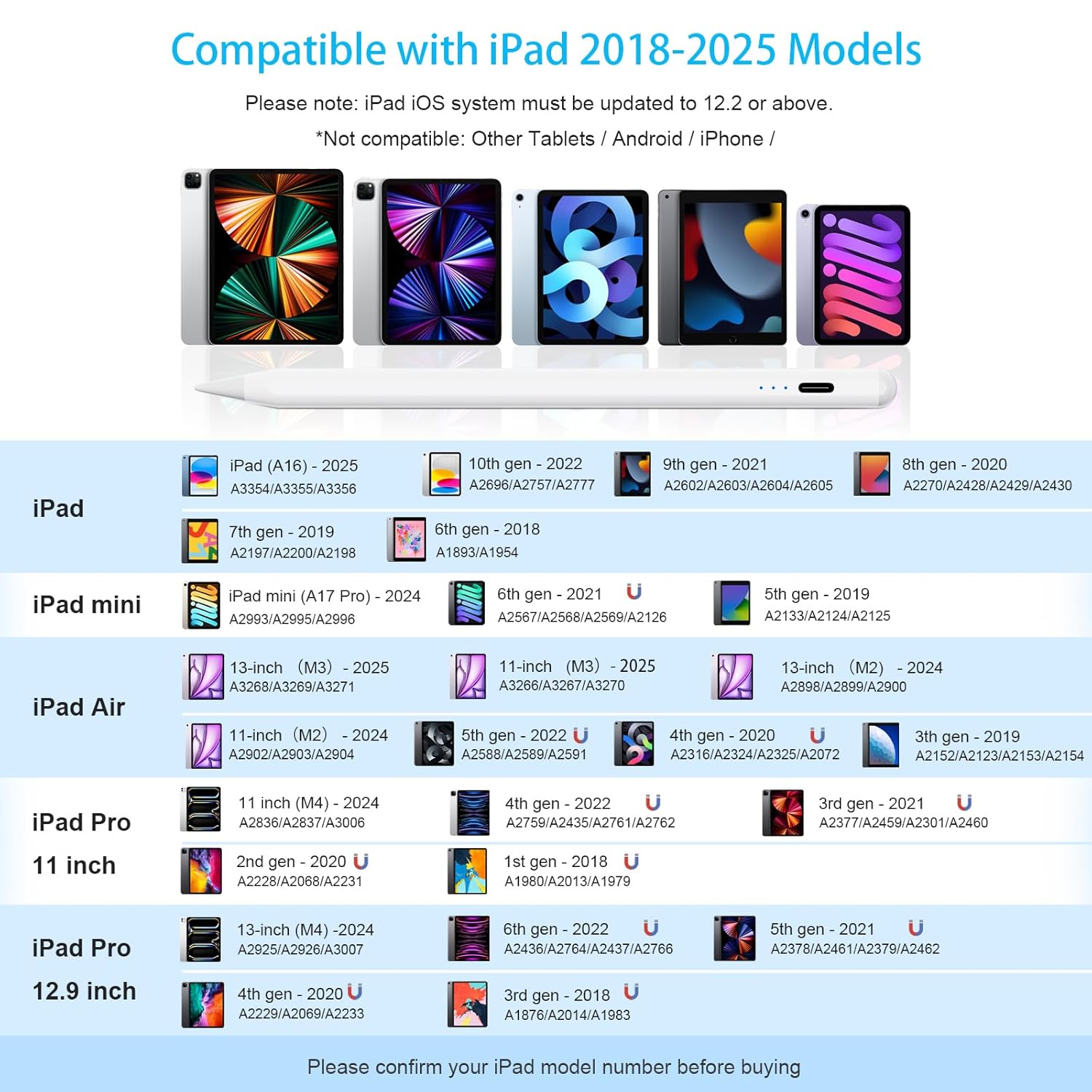
Image: A detailed compatibility chart listing various iPad, iPad mini, iPad Air, and iPad Pro models from 2018 to 2025, along with their model numbers, indicating which devices are compatible with the stylus.
Compatible iPad Models (2018-2025):
| Уређај | Model (Year/Generation) | Model Numbers (Axxxx) |
|---|---|---|
| иПад | iPad (A16) - 2025 | А3354/А3355/А3356 |
| 10th Gen - 2022 | А2696/А2757/А2777 | |
| 9th Gen - 2021 | А2602/А2603/А2604/А2605 | |
| 8th Gen - 2020 | А2270/А2428/А2429/А2430 | |
| 7th Gen - 2019 | А2197/А2200/А2198 | |
| 6th Gen - 2018 | А1893/А1954 | |
| иПад мини | iPad mini (A17 Pro) - 2024 | А2993/А2995/А2996 |
| 6th Gen - 2021 | А2567/А2568/А2569/А2126 | |
| 5th Gen - 2019 | А2133/А2124/А2125 | |
| иПад Аир | 13-inch (M3) - 2025 | А3268/А3269/А3271 |
| 11-inch (M3) - 2025 | А3266/А3267/А3270 | |
| 13-inch (M2) - 2024 | А2898/А2899/А2900 | |
| 11-inch (M2) - 2024 | А2902/А2903/А2904 | |
| 5th Gen - 2022 | А2588/А2589/А2591 | |
| 4th Gen - 2020 | А2316/А2324/А2325/А2072 | |
| 3rd Gen - 2019 | А2152/А2123/А2153/А2154 | |
| иПад Про 11 инча | 11 inch (M4) - 2024 | А2836/А2837/А3006 |
| 4th Gen - 2022 | А2759/А2435/А2761/А2762 | |
| 3rd Gen - 2021 | А2377/А2459/А2301/А2460 | |
| 2nd Gen - 2020 | А2228/А2068/А2231 | |
| 1st Gen - 2018 | А1980/А2013/А1979 | |
| иПад Про 12.9 инча | 13-inch (M4) - 2024 | А2925/А2926/А3007 |
| 6th Gen - 2022 | А2436/А2764/А2437/А2766 | |
| 5th Gen - 2021 | А2378/А2461/А2379/А2462 | |
| 4th Gen - 2020 | А2229/А2069/А2233 | |
| 3rd Gen - 2018 | А1876/А2014/А1983 |
Note: Please confirm your iPad model number before purchasinг да би се осигурала компатибилност.
Упутство за употребу
Укључивање/искључивање
The stylus pen features a double-tap ON/OFF mechanism to prevent accidental activation or deactivation. Simply double-tap the end of the pencil to turn it on or off. No Bluetooth pairing is required for operation.
Палм Рејецтион Тецхнологи
The integrated palm rejection technology allows you to rest your hand comfortably on the iPad screen while writing or drawing, without interfering with the stylus's input. This eliminates the need for special gloves.

Image: A visual comparison demonstrating the palm rejection feature, where a user can comfortably rest their hand on the screen while writing, unlike other pens that might require gloves.
Осетљивост нагиба
The stylus supports tilt-sensing technology, allowing you to vary line thickness and shading by simply adjusting the angle at which you hold the pen, similar to a traditional pencil.
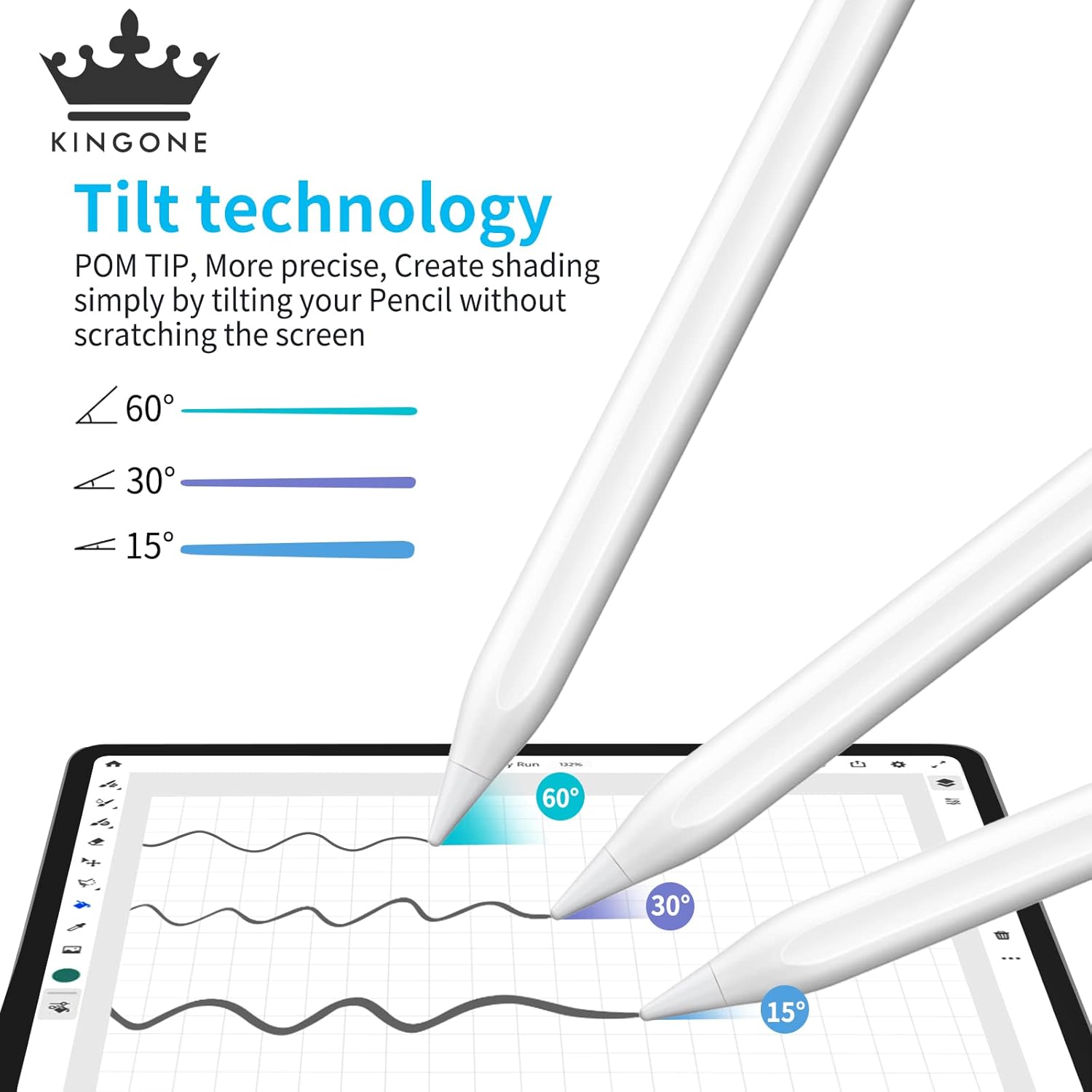
Image: An illustration demonstrating the tilt technology, showing how different angles (60°, 30°, 15°) of the stylus produce varying line weights and shading effects on the screen.
Магнетиц Адсорптион
For convenient storage and to prevent loss, the stylus can magnetically attach to the side of compatible iPad Pro models (3rd Gen and later). It also features a flat surface to prevent rolling.
Сценарији коришћења
The KINGONE Stylus Pen is versatile and suitable for various activities:
- ради: Ideal for annotating documents, presentations, and digital whiteboarding.
- студирање: Perfect for note-taking, highlighting textbooks, and solving problems.
- Цртеж: Enables precise and fluid artistic creation with tilt sensitivity.
- Играње: Enhances gaming experiences that benefit from precise touch input.
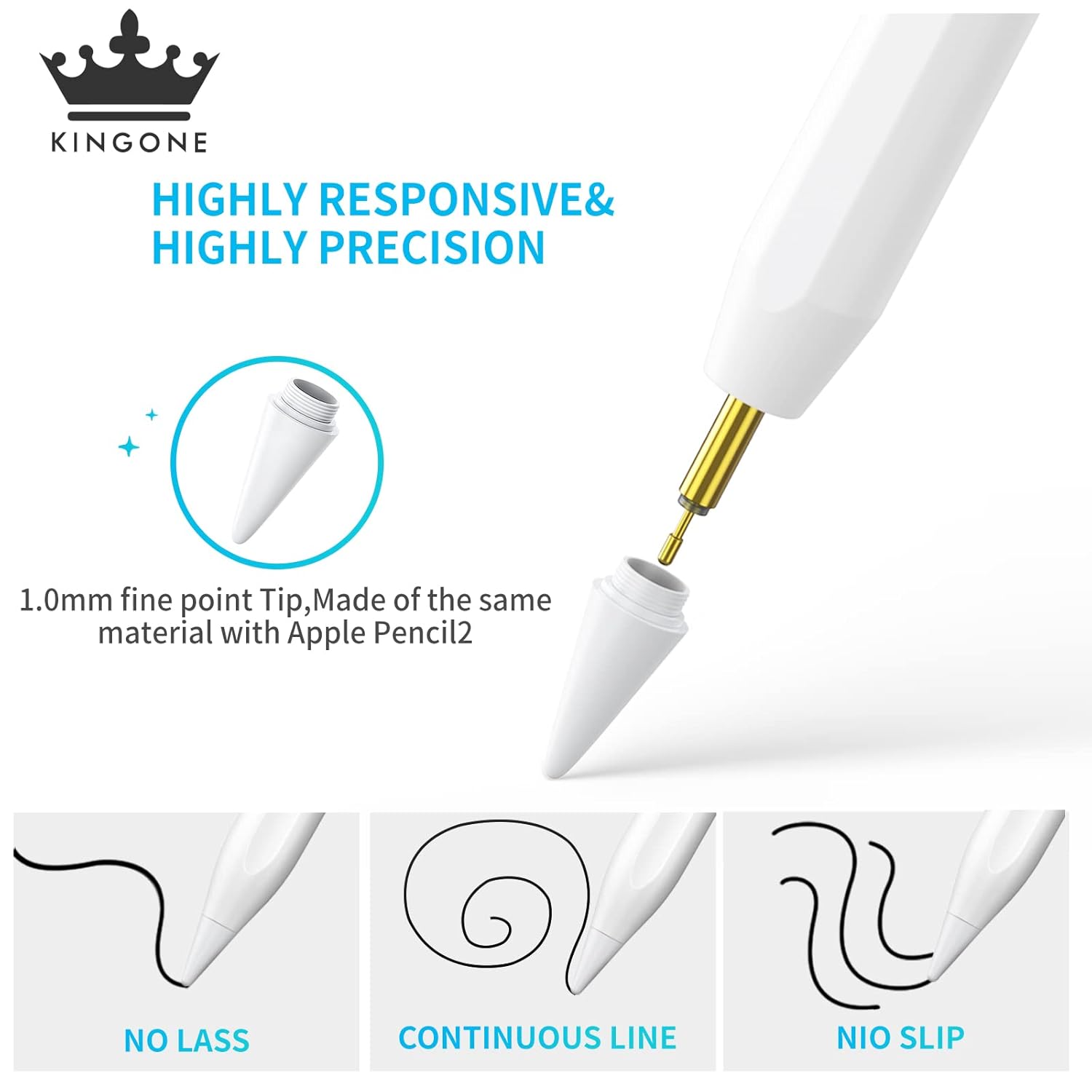
Image: A collage of four images demonstrating the stylus in different use cases: working on a tablet, studying, digital drawing, and playing a game, highlighting its versatility.
Одржавање
Чишћење
To maintain optimal performance, gently wipe the stylus body with a soft, dry, lint-free cloth. Avoid using harsh chemicals or abrasive materials. Do not submerge the pen in water.
Замена пера
The stylus comes with replacement nibs to ensure long-term precision and sensitivity. If the nib becomes worn or damaged, it can be easily replaced. Gently twist the old nib counter-clockwise to remove it, then twist a new nib clockwise until secure.

Слика: Детаљна view of the stylus tip, highlighting its 1.0mm fine point and the process of replacing the nib, along with images of replacement nibs.
Складиштење
Store the stylus in a cool, dry place away from direct sunlight and extreme temperatures. Utilize its magnetic adsorption feature with compatible iPads for secure storage when not in use.
Решавање проблема
| Проблем | Могући узрок | Решење |
|---|---|---|
| Оловка не реагује. | Battery is low or depleted. Stylus is off. Incompatible iPad model. "Draw with Apple Pencil only" setting enabled. | Charge the stylus. Double-tap to turn on. Verify iPad compatibility using the table above. Go to iPad Settings > Notes and disable "Draw with Apple Pencil only". |
| Inaccurate or lagging input. | Worn-out nib. Screen protector interference. Software glitch. | Replace the nib. Ensure screen protector is properly installed and not too thick. Restart your iPad. |
| Accidental touches from palm. | Palm rejection not functioning. | Ensure your iPad's iOS is updated to 12.2 or above. Restart the stylus and iPad. |
| Stylus not charging. | Faulty cable or adapter. Charging port obstruction. | Try a different USB-C cable and power adapter. Check the charging port for debris and clean gently if necessary. |
If you encounter issues not listed here or require further assistance, please refer to the Support section below.
Спецификације
| Феатуре | Детаљ |
|---|---|
| Бранд | Kingone |
| Број модела | 722 |
| Димензије производа | 16.8 к 1 к 1 цм |
| Тежина артикла | 70 г |
| Материјал | Бакар |
| Тип батерије | 1 литијум-јонска батерија (укључена) |
| Време пуњења | Approx. 13 minutes for full charge (5 mins for 2 hours use) |
| Континуирано радно време | Approx. 10 hours (after full charge) |
| Време приправности | Приближно 180 дана |
| Метод активације | Double-tap ON/OFF |
| Карактеристике | Palm Rejection, Tilt Sensitivity, Magnetic Adsorption, LED Power Display |
| Компатибилни уређаји | iPad (6th, 7th, 8th, 9th, 10th Gen), iPad Pro (11-inch 1st-4th Gen, 12.9-inch 3rd-6th Gen), iPad Air (3rd, 4th, 5th Gen), iPad mini (5th, 6th Gen), and newer 2024/2025 models. |
Гаранција и подршка
KINGONE is committed to providing high-quality products and excellent customer service. For any product-related inquiries, technical support, or warranty claims, please contact us using the information below.
- Е-пошта корисничке службе: инд-суппорт@кингонеглобал.цом
- ВхатсАпп подршка: Scan the QR code below or click the link to connect with our support team. Please provide your Order ID and a description of the issue, including photos or videos if possible, for faster resolution.

Image: A QR code for instant WhatsApp support. Users can scan it to send their Order ID and issue for quick resolution.
Direct WhatsApp Link: https://wa.me/qr/DK7LFUVEZOUUC1