
PPLEE CR1018I
PPLEE Extra Loud Vibrating Alarm Clock with Bed Shaker
Model: CR1018I
1. Производ је готовview
The PPLEE Extra Loud Vibrating Alarm Clock is designed to provide effective wake-up solutions for deep sleepers, individuals with hearing impairment, and the deaf. It features multiple wake-up modes, a large digital display, dual alarm settings, and convenient charging capabilities.

Image 1.1: The PPLEE Extra Loud Vibrating Alarm Clock with its bed shaker accessory.
Кључне карактеристике:
- Strong Bed Shaker & Loud Alarm Buzzer: Offers three wake-up modes: loud buzzer, strong bed shaker, or a combination of both.
- 8.7" Large Mirror LED Display: Provides clear time visibility and can also function as a makeup mirror.
- Dual Alarms with Snooze Function: Allows setting two independent alarms with a 9-minute snooze option.
- Adjustable Brightness & Volume: Features 8 levels of display brightness and 7 levels of alarm volume.
- УСБ пуњач: Conveniently charge your mobile devices directly from the clock.
- Резервна батерија: Одржава подешавања времена и аларма током нестанка струјеtages (CR2032 battery included).
- 12/24H Mode & DST Function: Supports both 12-hour and 24-hour time formats, along with Daylight Saving Time adjustment.
2. Садржај пакета
Молимо вас да означите поље за следеће ставке:
- 1 x PPLEE Mirror Alarm Clock
- 1 x Bed Shaker
- 1 x Power Plug with USB Cable
- 1 к Упутство за употребу
- 1 x CR2032 Cell Coin Battery (pre-installed or separate)

Image 2.1: All components included in the product package.
3. Водич за подешавање
3.1 Прикључак за напајање
- Connect the USB cable to the alarm clock's power input port.
- Plug the power adapter into a standard electrical outlet. The clock display will illuminate.
- Ensure the CR2032 backup battery is installed in its compartment. This battery preserves time and alarm settings during power interruptions.

Слика 3.1: Позади view of the alarm clock showing the AC power input and backup battery compartment.
3.2 Bed Shaker Placement
The bed shaker provides a strong vibration to assist in waking. For optimal effectiveness, place the bed shaker in one of the following locations:
- Under your pillow.
- Under your fitted sheet.
- Between your mattress and box spring.

Image 3.2: Recommended placements for the bed shaker to maximize vibration effectiveness.
4. Упутство за употребу
4.1 Подешавање времена
- Притисните и држите ВРЕМЕНСКИ СКЛОП дугме док цифре сати не почну да трепћу.
- Користите ХОУР и МИНУТЕ дугмад за подешавање времена.
- Притисните ВРЕМЕНСКИ СКЛОП поново да бисте потврдили и изашли из режима подешавања времена.
4.2 Setting Alarms (Alarm 1 & Alarm 2)
The clock supports two independent alarms.
- Притисните и држите АЛАРМ 1 or АЛАРМ 2 дугме док цифре времена аларма не почну да трепћу.
- Користите ХОУР и МИНУТЕ дугмад да бисте подесили жељено време аларма.
- Притисните АЛАРМ 1 or АЛАРМ 2 поново да бисте потврдили време аларма.
- To activate or deactivate an alarm, short press the corresponding АЛАРМ 1 or АЛАРМ 2 дугме. Икона аларма ће се појавити/нестати на екрану.

Image 4.1: The dual alarm feature allows setting two separate wake-up times.
4.3 Функција одлагања
Када се огласи аларм, притисните дугме СНООЗЕ дугме да бисте привремено утишали аларм на 9 минута. Аларм ће се поново огласити након периода одлагања.
4.4 Turning Off Alarms
- Temporary Turn Off: Притисните тастер АЛАРМ ОФФ button once when the alarm is sounding to stop it for the current day. It will reactivate the next day.
- Permanent Turn Off: Притисните и држите АЛАРМ ОФФ button to deactivate the alarm permanently. The alarm icon will disappear from the display.
4.5 Подешавање осветљености екрана
The display has 8 levels of brightness. Short press the ДИММЕР button repeatedly to cycle through the brightness levels (OFF, Level 1-7). When in 'OFF' mode, the red indicator on top will remain on.
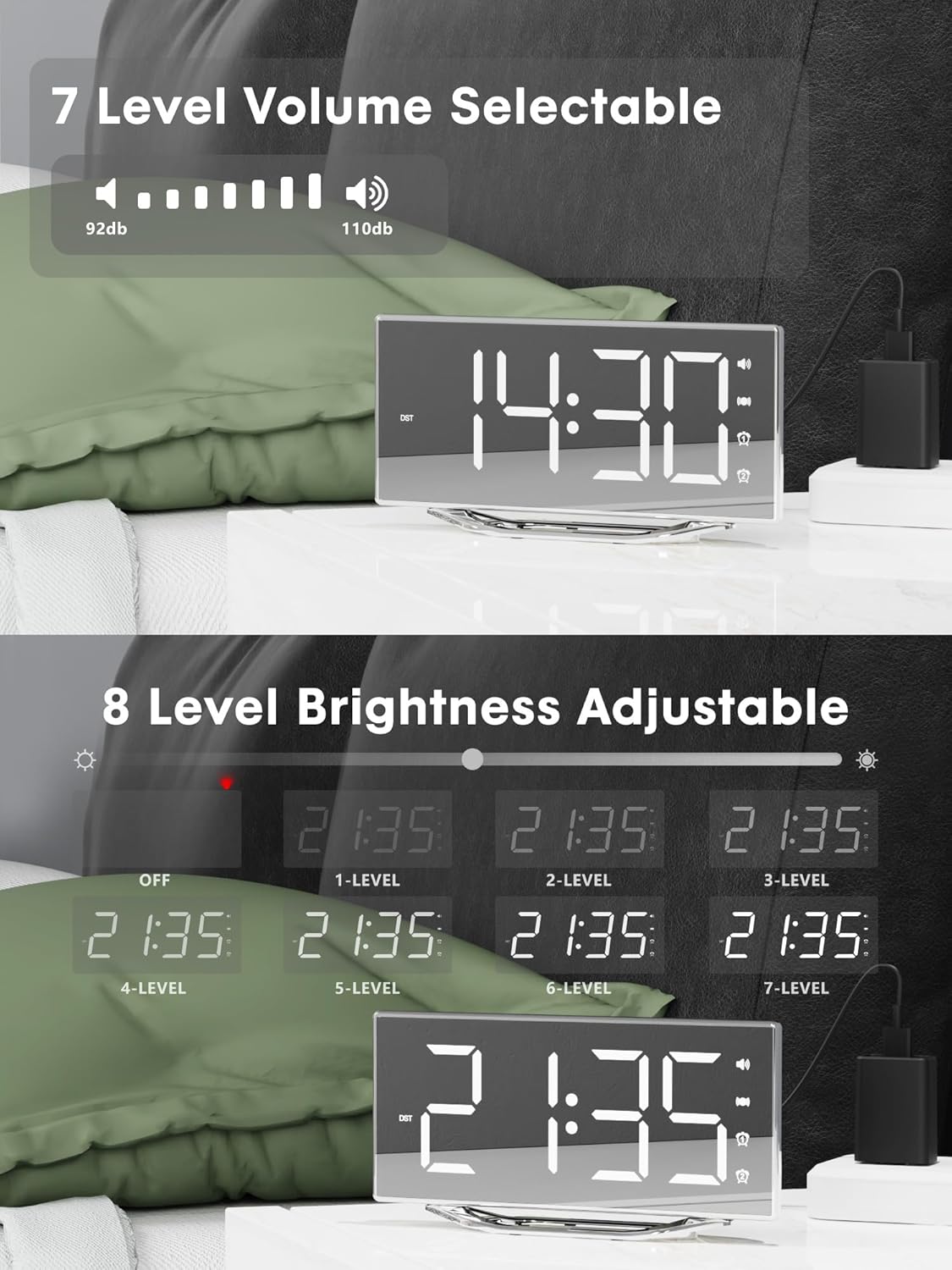
Image 4.2: Visual representation of the 8-level brightness adjustment for the LED display.
4.6 Подешавање јачине звука аларма
The alarm buzzer has 7 adjustable volume levels. Short press the ВОЛУМЕ button repeatedly to cycle through the volume levels.

Image 4.3: The alarm volume can be adjusted across 7 levels, from 92dB to 110dB.
4.7 Selecting Wake-Up Mode
Притисните тастер BUZZ/VIB button to select your preferred wake-up method:
- Loud Buzzer only
- Strong Bed Shaker only
- Both Buzzer and Shaker

Image 4.4: The alarm clock offers three distinct wake-up modes for personalized use.
4.8 12/24 Hour Format & DST
- Формат 12/24 сата: Кратко притисните на 12/24Х button to switch between 12-hour and 24-hour time display.
- ДСТ функција: Кратко притисните на ДСТ button to activate or deactivate Daylight Saving Time.

Image 4.5: The clock supports both 12-hour and 24-hour time formats, and features a USB charging port.
4.9 УСБ прикључак за пуњење
The integrated USB charging port allows you to charge your smartphone or other USB-powered devices directly from the alarm clock. Simply connect your device's USB charging cable to the port on the clock.
5. Одржавање
- Clean the clock surface with a soft, dry cloth. Avoid using abrasive cleaners or solvents.
- Keep the clock away from water and high humidity.
- Do not expose the clock to direct sunlight or extreme temperatures.
- If the clock will not be used for an extended period, consider removing the backup battery to prevent leakage.
КСНУМКС. Решавање проблема
| Проблем | Могући узрок | Решење |
|---|---|---|
| Приказ сата је искључен. | Нема напајања; кабл за напајање је лабав. | Ensure the power adapter is securely plugged into the clock and a working outlet. Check if the dimmer is set to 'OFF'. |
| Аларм се не оглашава/не вибрира. | Alarm not activated; volume too low; bed shaker not connected or placed incorrectly. | Verify alarm is activated (icon visible). Increase alarm volume. Ensure bed shaker is securely plugged in and properly placed. |
| Време/подешавања се ресетују након нестанка струјеtage. | Резервна батерија је празна или није инсталирана. | Replace the CR2032 backup battery. Ensure it is installed correctly. |
| УСБ пуњење не ради. | Device not compatible; cable faulty; clock not powered. | Ensure the clock is powered. Try a different USB cable. Verify your device is compatible with standard USB charging. |
7. Спецификације
| Феатуре | Детаљ |
|---|---|
| Бранд | ППЛЕЕ |
| Број модела | CR1018I |
| Боја | Silver Surface (with Bed Shaker) |
| Дисплаи Типе | Дигитал ЛЕД |
| Димензије производа | 8.7"W x 8.7"H (Display size) |
| Извор напајања | Цордед Елецтриц |
| Резервна батерија | 1 к ЦР2032 (укључено) |
| Материјал | Пластика |
| Тежина артикла | 7 унци (0.2 килограма) |
| Режими аларма | Buzzer, Vibration, Buzzer + Vibration |
| Дисплаи Бригхтнесс | 8 Levels (including OFF) |
| Јачина звука аларма | 7 нивоа |
| Формат времена | 12H/24H избор |
| Посебне карактеристике | Dual Alarms, Snooze, USB Charging Port, DST Function, Mirror Surface |
8. Гаранција и подршка
PPLEE is committed to providing high-quality products and customer satisfaction.
- 1-годишња гаранција: The product is covered by a 1-year warranty from the date of purchase against manufacturing defects.
- 90-дневна гаранција поврата новца: If you are unsatisfied with the product, you may be eligible for a full refund within 90 days of purchase.
- Lifetime Free Support: PPLEE offers free lifetime user support for any questions or concerns regarding the product.
- 24-Hour Response Service: For any inquiries, please contact us via Amazon. We aim to respond within 24 hours.

Image 8.1: Summary of warranty and support offerings.
Ask a question about this manual
Ask about setup, troubleshooting, compatibility, parts, safety, or missing instructions. Manuals+ will review the question and use this page’s manual context to help answer it.