
Увод
Thank you for choosing the Galax Slider-04 Optical Wired Gaming Mouse. This manual provides essential information for setting up, operating, maintaining, and troubleshooting your new gaming mouse. Please read it carefully to ensure optimal performance and longevity of your device.
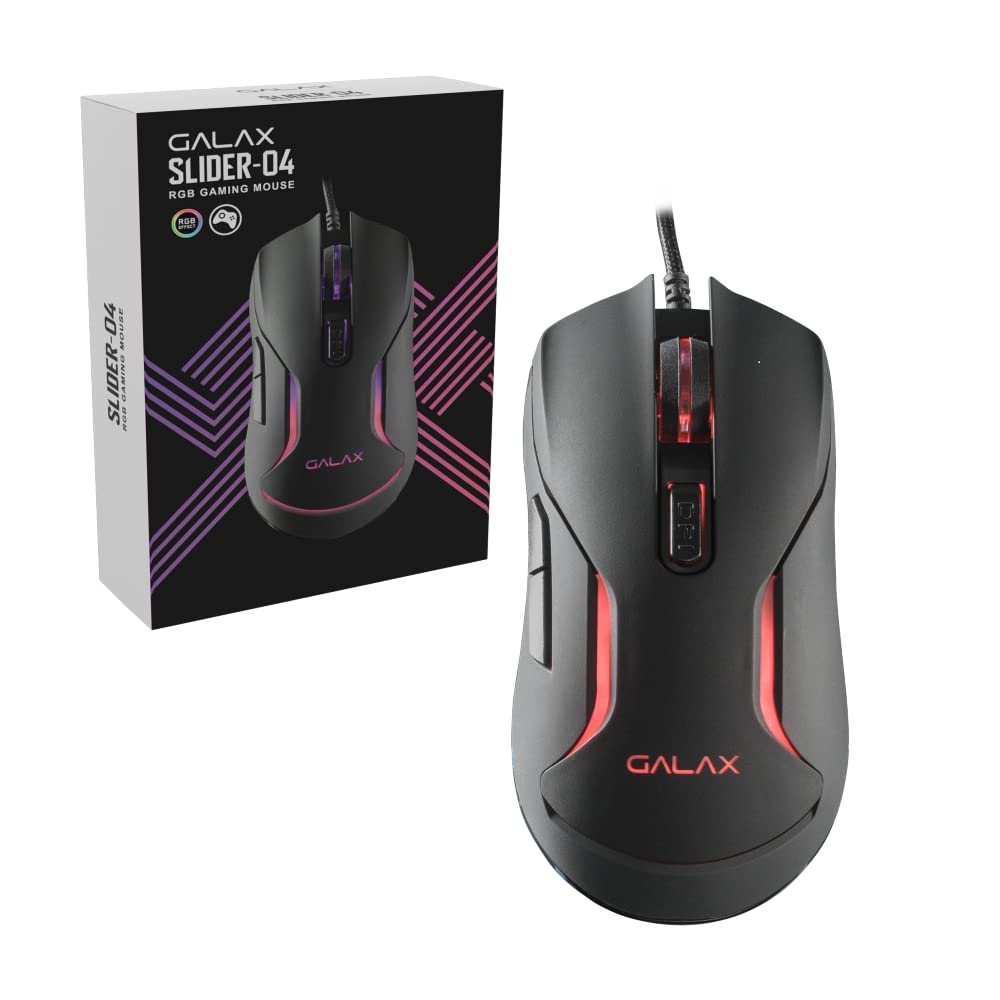
Слика: Врх view of the Galax Slider-04 Optical Wired Gaming Mouse, showcasinњегов ергономски дизајн и централни точак за скроловање.
Сетуп
The Galax Slider-04 Gaming Mouse is designed for simple plug-and-play functionality, requiring no additional software installation for basic use.
- Распакујте миш: Пажљиво извадите миш из паковања.
- Повежите се са рачунаром: Plug the USB connector of the mouse into an available USB port on your desktop, laptop, or PC.
- Препознавање система: Your operating system (Windows, macOS, Unix) will automatically detect and install the necessary drivers. This process usually takes a few seconds.
- Спреман за употребу: Када се драјвери инсталирају, миш је спреман за тренутну употребу.

Image: The Galax Slider-04 mouse with its braided USB cable, ready for connection to a computer.
Упутство за употребу
The Galax Slider-04 features multiple buttons and customizable settings to enhance your gaming and productivity experience.
Функције дугмета
The mouse is equipped with 6 function keys for versatile control:
- 1. Left Mouse Button: Стандардна функција примарног клика.
- 2. Right Mouse Button: Standard secondary click function (context menu).
- 3. Scroll Wheel: Scrolls up/down, and acts as a middle click button.
- 4. Forward Button: Навигација напред у web претраживачи или file истраживачи.
- 5. Дугме за назад: Навигација уназад web претраживачи или file истраживачи.
- 6. DPI Button: Cycles through DPI sensitivity settings.

Image: A detailed diagram illustrating the location and numbering of the 6 function keys on the Galax Slider-04 mouse.
ДПИ Адјустмент
Adjust the mouse sensitivity (DPI) to match your preference and task requirements. The Slider-04 offers four preset DPI levels:
- 1000 ДПИ
- 1600 ДПИ
- 3200 ДПИ
- 6400 ДПИ
Притисните тастер Дугме ДПИ (Button 6) located behind the scroll wheel to cycle through these settings. Each change will typically be indicated by a change in the mouse's RGB lighting color.

Image: Visual representation of the four selectable DPI settings available on the Galax Slider-04 mouse.
РГБ ЛЕД осветљење
The Galax Slider-04 features dynamic RGB LED lighting that enhances your gaming setup's aesthetics. The lighting effects cycle automatically, often changing color to indicate the current DPI setting.
Video: A short demonstration of the Galax Slider-04 mouse's RGB LED lighting effects, showcasing the dynamic color changes.

Image: The Galax Slider-04 mouse displayed with various RGB color presets, illustrating the range of lighting options.
Ергономски дизајн
The mouse is designed with ergonomics to provide comfort and reduce hand fatigue during prolonged use. Its shape supports both fingertip and claw grip styles, promoting a natural hand posture.

Image: A diagram demonstrating how the ergonomic design of the Galax Slider-04 mouse accommodates both fingertip and claw grip styles.
Одржавање
Proper care will extend the life and performance of your Galax Slider-04 Gaming Mouse.
- Чишћење: Користите меку, суву крпу да обришете површину миша. За тврдокорну прљавштину, благо обришитеampИсперите крпу водом. Избегавајте јаке хемикалије или абразивна средства за чишћење.
- Оптички сензор: Одржавајте оптички сензор на доњој страни миша чистим и без прашине или прљавштине како бисте осигурали прецизно праћење.
- Нега каблова: Avoid sharply bending or twisting the braided USB cable. Store the cable neatly to prevent tangling and damage.
- Складиштење: Када се не користи, чувајте миш на чистом и сувом месту, даље од екстремних температура.
Решавање проблема
If you encounter issues with your Galax Slider-04 Gaming Mouse, refer to the following common solutions:
- Mouse Not Detected:
- Уверите се да је USB кабл безбедно прикључен у исправан USB порт.
- Покушајте да прикључите миш на други УСБ порт на рачунару.
- Поново покрените рачунар.
- Check your computer's Device Manager (Windows) or System Information (macOS) to see if the mouse is listed.
- DPI се не мења:
- Ensure you are pressing the dedicated DPI button (Button 6).
- Проверите да ли је миш правилно повезан и да ли га систем препознаје.
- РГБ светла не раде:
- Уверите се да је миш правилно повезан са рачунаром.
- The RGB lighting is typically automatic and cycles through colors. If no lights appear, try reconnecting the mouse or restarting your computer.
- Нетачно праћење:
- Очистите оптички сензор на доњој страни миша.
- Use the mouse on a clean, uniform surface or a quality mouse pad.
- Adjust the DPI setting to a level suitable for your surface and preference.
Спецификације
Below are the technical specifications for the Galax Slider-04 Optical Wired Gaming Mouse:
| Феатуре | Детаљ |
|---|---|
| Бранд | Galax |
| Назив модела | СЛИДЕР |
| Број модела | MGS04UX26RG2B0 |
| Боја | Црно |
| Технологија повезивања | УСБ (жични) |
| Технологија детекције покрета | Оптицал |
| Mouse Maximum Sensitivity | 6400 ДПИ |
| ДПИ подешавања | 1000 / 1600 / 3200 / 6400 |
| Количина дугмета | 6 |
| Буттон Лифеспан | 3 милиона кликова |
| Поллинг Рате | 125Хз |
| Посебне карактеристике | Ergonomic Design, RGB LED Lights, Lightweight |
| Цабле Ленгтх | 1.5 метара (плетено) |
| Компатибилни уређаји | Персонал Цомпутер |
| Подршка за оперативни систем | Unix, Windows 7/8/10, macOS 10.12 Sierra and above |
| Тежина артикла | 250 грама |
| Димензије артикла (Д к Ш) | 12.9 Д x 4.1 Ш центиметара |
| Извор напајања | Цордед Елецтриц |
| Материјал кућишта | Пластика |
| Product Finish Type | Мат |

Image: A table summarizing the key specifications of the Galax Slider-04 gaming mouse.
Гаранција и подршка
The Galax Slider-04 Optical Wired Gaming Mouse comes with a 1 године гаранције произвођача од дана куповине.
За рекламације у вези са гаранцијом или техничком подршком, контактирајте:
- Произвођач: Galax Technology, Galaxy Microsystems Ltd., Hong Kong, Kowloon Bay, Sheung Yuet Rd, 3號企業廣場二期
- Увозник (Индија): Technology And Gadgets, Gala no.142/143, 1st Floor, Building no.6, Mittal Industrial Estate, Marol, Andheri (East), Mumbai - 400059., Mumbai, India, Maharashtra
Молимо вас да сачувате рачун као доказ о куповини у сврху гаранције.