
Увод
Thank you for choosing the IMICE T98 Wired Gaming Mouse. This manual provides detailed instructions on how to set up, operate, and maintain your new gaming mouse. Please read this manual carefully before use to ensure optimal performance and a satisfying gaming experience.
Карактеристике производа
- Сензор високе прецизности: Up to 7200 DPI for accurate tracking.
- Подесиви ДПИ: Six adjustable DPI levels (1200, 1600, 2400, 3200, 4800, 7200) to suit various tasks and games.
- 6 програмабилних дугмади: Includes Left, Right, DPI, Scroll Wheel, Forward, and Backward buttons for enhanced control.
- Dynamic RGB LED Lighting: Features 6 colorful LED lights for an immersive gaming atmosphere.
- Ергономски дизајн: Comfortable grip for extended use, designed for both left and right-handed users.
- Lightweight Honeycomb Shell: Reduces weight and enhances airflow to prevent hand sweat.
- Уграђена меморија: Stores up to four custom configurations without requiring driver software after initial setup.
- Durable USB Cable: High-quality 1.5-meter wired USB connection.
Водич за подешавање
- Распакујте миш: Carefully remove the IMICE T98 Gaming Mouse from its packaging.
- Повежите се са рачунаром: Plug the USB connector of the mouse into an available USB port on your computer or laptop.
- Инсталација драјвера: The mouse is plug-and-play and typically does not require additional drivers for basic functionality. Your operating system (Windows, Mac, Vista) will automatically detect and install the necessary drivers.
- Проверите функционалност: Once connected, the mouse's LED lights should illuminate, and the cursor should respond to movement.
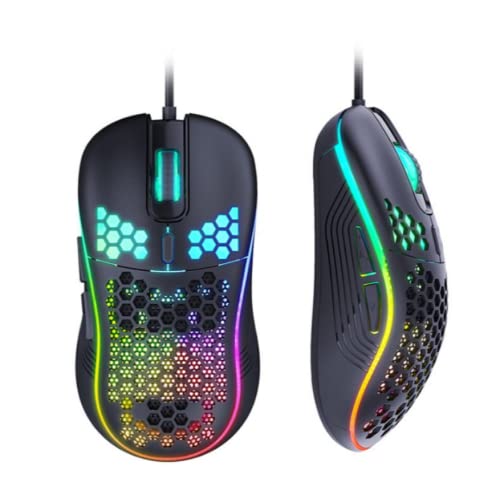
Image: The IMICE T98 Gaming Mouse with its USB cable, ready for connection.
Упутство за употребу
Основне функције
- Леви клик: Примарно дугме за акцију.
- Десни клик: Дугме за секундарну акцију, обично за контекстне меније.
- Точак за померање: Scroll up or down in documents and web странице. Такође се може притиснути за функцију клика средњим тастером миша.
- Дугмад за напред/назад: Located on the side, these buttons typically navigate forward or backward in web претраживачи или file истраживачи.
ДПИ Адјустмент
The IMICE T98 mouse features a dedicated DPI button to cycle through six sensitivity levels. Press the Дугме ДПИ (usually located behind the scroll wheel) to change the cursor speed. Each press will switch to the next DPI setting:
- 1200 DPI (Default for browsing)
- 1600 DPI (Daily office/design)
- 2400 DPI (MOBA games)
- 3200 ДПИ
- 4800 DPI (FPS games)
- 7200 ДПИ

Image: The DPI button and visual representation of the six adjustable DPI speeds.
ЛЕД осветљење
The mouse features dynamic RGB LED lighting. The lighting patterns are pre-programmed and enhance the aesthetic appeal of the mouse. Some lighting modes might be adjustable via the customization software.

Image: Two IMICE T98 mice displaying their vibrant RGB LED lighting.
Прилагођавање и софтвер
The IMICE T98 mouse supports customization through dedicated macro definition software. This software allows you to:
- Поновно мапирање дугмета: Reset mouse buttons as multimedia buttons or assign custom macro functions.
- Управљање макроима: Record and manage macros according to your personal preferences for complex operations.
- Напредна подешавања: Adjust mouse pointer speed, fire speed, return rate, and DPI values.
- ЛЕД подешавања: Customize backlight modes and colors.
The mouse also features onboard memory, allowing it to store up to four configurations. Once configured using the software, these settings can be used on other computers without needing the driver software installed.

Image: Screenshot of the IMICE macro definition software, showing options for button settings, macros, advanced settings, and LED control.
Одржавање
To ensure the longevity and optimal performance of your IMICE T98 Gaming Mouse, follow these maintenance guidelines:
- Чишћење: Користите меку, суву крпу да обришете површину миша. За тврдокорну прљавштину, благо обришитеampОбришите крпу водом или благим раствором за чишћење. Избегавајте употребу јаких хемикалија или абразивних материјала.
- Брига о сензорима: Keep the optical sensor on the underside of the mouse clean from dust and debris. Use a cotton swab or compressed air if necessary.
- Управљање кабловима: Избегавајте оштра савијања или прекомерно повлачење USB кабла како бисте спречили оштећења.
- Складиштење: Када се не користи, чувајте миш на чистом и сувом месту, даље од екстремних температура.
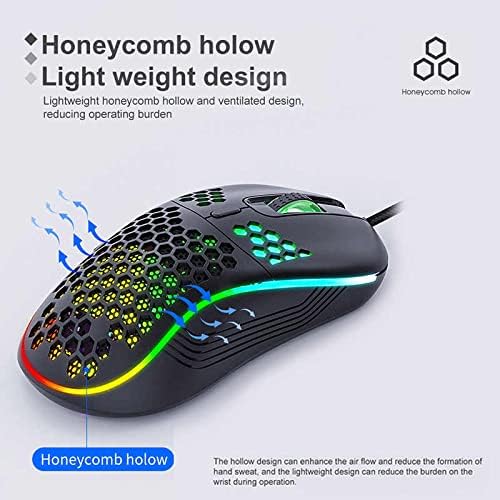
Image: The honeycomb hollow design of the IMICE T98 mouse, which aids in ventilation and reduces hand sweat.
Решавање проблема
| Проблем | Могуће решење |
|---|---|
| Миш не реагује |
|
| Покрет курсора је неправилан или спор |
|
| ЛЕД светла не раде |
|
| Buttons are not working or performing incorrectly |
|
Спецификације
| Феатуре | Детаљ |
|---|---|
| Бранд | IMICE |
| Модел | Т98 |
| Технологија повезивања | УСБ (жични) |
| Посебне карактеристике | LED Lighting, Adjustable DPI, Programmable Buttons, Onboard Memory |
| Количина дугмета | 6 |
| Оријентација руке | Амбидектроус |
| Препоручена употреба | Гаминг |
| Компатибилни уређаји | Лични рачунар, лаптоп |
| Компатибилност оперативног система | Windows, Vista, Mac (implied) |
| Стиле | Модерна |
| Финисх Типе | Мат |
| Цабле Ленгтх | 1.5 метара |
| Батерије укључене | бр |
Гаранција и подршка
За информације о гаранцији и техничку подршку, погледајте документацију коју сте добили уз куповину или се директно обратите продавцу/произвођачу. Сачувајте доказ о куповини за потребе подношења захтева за гаранцију.