
FOREVER SB-315
FOREVER SB-315 Fitband Smartwatch User Manual
Модел: СБ-315
1. Увод
The FOREVER SB-315 Fitband Smartwatch is a versatile activity tracker designed to help you monitor your fitness and stay connected. Featuring a heart rate sensor, step counter, distance tracker, and sleep monitor, it provides comprehensive insights into your daily activity. Its discreet and lightweight design, coupled with a long-lasting battery, ensures maximum comfort and convenience.
This manual provides detailed instructions on how to set up, operate, and maintain your SB-315 smartwatch to ensure optimal performance and longevity.

Слика 1.1: Предња страна view of the FOREVER SB-315 Fitband Smartwatch.
2. Подешавање
2.1 Распакивање и почетна наплата
Carefully remove all components from the packaging. The box should contain the SB-315 smartwatch and its charging cable. Before first use, fully charge the device.
- Повежите кабл за пуњење са контактима за пуњење на задњој страни паметног сата.
- Прикључите УСБ крај кабла у стандардни УСБ адаптер за напајање (није укључен) или УСБ порт рачунара.
- Екран сата ће приказивати статус пуњења. Потпуно пуњење обично траје 2-3 сата.
- The 155 mAh battery provides up to 10 days of standby time on a single charge.

Figure 2.1: The SB-315 Smartwatch and its retail packaging.
2.2 Инсталација и упаривање апликације
To unlock the full potential of your SB-315 smartwatch, you need to install the companion application on your smartphone and pair the devices via Bluetooth.
- Преузмите апликацију: Тражи the "Forever Smart" or "Forever Fit" app (refer to the packaging or quick start guide for the exact app name) on the Apple App Store (for iOS 10.0 and above) or Google Play Store (for Android 5.0 and above).
- Омогући Блуетоотх: Уверите се да је Блуетоотх омогућен на вашем паметном телефону.
- Отворите апликацију: Launch the installed application on your smartphone.
- Упарите уређај: Follow the in-app instructions to add a new device. Select "SB-315" from the list of available devices. The app will guide you through the pairing process.
- Дајте дозволе: Allow necessary permissions (e.g., notifications, location, health data) for the app to function correctly.
Once successfully paired, the watch will synchronize time and data with your smartphone.
3. Управљање паметним сатом
3.1 Основна навигација
The SB-315 features a bright 0.96-inch (or 1.3-inch, depending on specific model variant) display. Navigate through menus by swiping across the screen and tapping to select options.
- Превуците нагоре/надоле: Scroll through different functions and menus.
- Превуците лево/десно: Access quick views like daily activity, heart rate, or notifications.
- Додирните: Select an option or enter a sub-menu.
- Press Side Button (if applicable): Вратите се на почетни екран или укључите/искључите уређај.
3.2 Основне функције
The SB-315 is equipped with several features to help you monitor your health and fitness.
- Мониторинг срчане фреквенције: The integrated heart rate sensor continuously monitors your heart rate. View подаци у реалном времену на сату или детаљни трендови у апликацији.
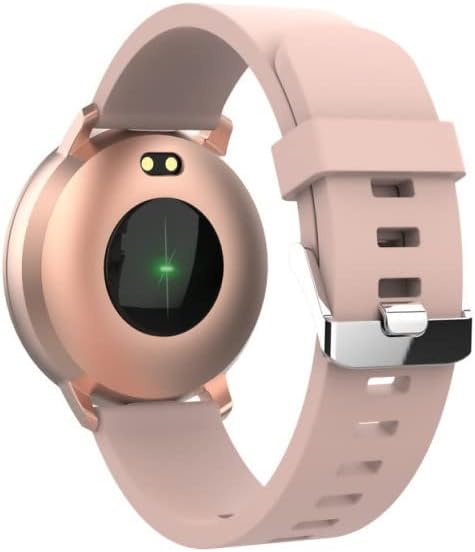
Слика 3.1: Задња страна view of the SB-315, highlighting the heart rate sensor.
- Праћење активности: Tracks steps taken, distance covered, and calories burned throughout the day.
- Праћење сна: Automatically monitors your sleep patterns, including deep sleep, light sleep, and awake times. Access detailed sleep analysis in the companion app.
- Спортски режими: Select from various sports modes such as running, cycling, climbing, and walking to track specific workout data.
- Подсетник о хидратацији: Set reminders to ensure you drink enough water throughout the day.
3.3 Паметне карактеристике
- Обавештења: Receive instant notifications for incoming calls, SMS messages, and alerts from social media applications directly on your wrist.
- Даљинска контрола камере: Use your smartwatch as a remote shutter for your smartphone's camera.
- Контрола музике: Контролишите репродукцију музике на свом паметном телефону (пуштање, паузирање, прескакање нумера) директно са сата.
- Прилагођавање циферблата сата: Personalize your watch by choosing from various watch faces available through the companion app.
- Будилник: Set silent vibrating alarms to wake you up or remind you of important events.
4. Одржавање
4.1 Чишћење и нега
To ensure the longevity and proper functioning of your SB-315 smartwatch, follow these cleaning and care guidelines:
- Чишћење: Редовно бришите екран и каиш сата меком крпомamp, lint-free cloth. Avoid using harsh chemicals, abrasive cleaners, or solvents.
- Сушење: Ensure the watch is completely dry before charging or wearing, especially after exposure to water.
- Нега ремена: If the strap is removable, clean it separately. Allow it to air dry completely before reattaching.
4.2 Отпорност на воду (IP67)
The SB-315 smartwatch is rated IP67, meaning it is protected from dust and can withstand immersion in water up to 1 meter for up to 30 minutes. While it is water-resistant, it is not waterproof for prolonged submersion or high-pressure water activities.
- Do not wear the watch while showering with hot water, in saunas, or steam rooms.
- Избегавајте притискање дугмади под водом.
- If the watch gets wet, wipe it dry thoroughly before charging.
4.3 Одржавање батерије
Да бисте максимално повећали трајање батерије и перформансе:
- Charge the watch fully before first use.
- Избегавајте често потпуно пражњење батерије.
- Чувајте сат на хладном и сувом месту када га не користите дуже време.
- Користите само приложени кабл за пуњење.
КСНУМКС. Решавање проблема
If you encounter issues with your SB-315 smartwatch, refer to the following common problems and solutions:
| Проблем | Могући узрок | Решење |
|---|---|---|
| Сат се не укључује | Low battery; device frozen | Charge the watch for at least 30 minutes. If still unresponsive, try a soft reset (refer to app or manufacturer's webсајт за конкретна упутства). |
| Не може се упарити са паметним телефоном | Bluetooth off; app not running; watch not discoverable; interference | Ensure Bluetooth is on for both devices. Restart both the watch and phone. Make sure the app is open and searching. Forget previous pairings on phone. |
| Обавештења нису примљена | App permissions not granted; notification settings off; app not running in background | Check app permissions in phone settings. Verify notification settings within the companion app. Ensure the app is running in the background. |
| Нетачан број откуцаја срца/корака | Improper fit; sensor obstruction; software glitch | Ensure the watch is worn snugly on the wrist, about one finger's width above the wrist bone. Clean the sensor on the back of the watch. Restart the watch. |
| Кратко трајање батерије | Frequent use of features; high brightness; constant notifications | Reduce screen brightness. Limit continuous heart rate monitoring. Turn off unnecessary notifications. Ensure background app refresh is optimized. |
If the problem persists, please contact FOREVER customer support for further assistance.
6. Спецификације
Key technical specifications for the FOREVER SB-315 Fitband Smartwatch:
| Феатуре | Детаљ |
|---|---|
| Назив модела | СБ-315 |
| Бранд | ФОРЕВЕР |
| Боја | Пинк |
| Технологија повезивања | Блуетоотх 5.0 |
| Величина екрана | 0.96" (or 1.3", depending on specific model variant) - 240 x 240 pixels |
| Капацитет батерије | 155 мАх Литијум-полимер |
| Максимално време приправности | До 10 дана |
| Оцена водоотпорности | ИП67 |
| Компатибилни уређаји | Smartphones (iOS ≥ 10.0, Android ≥ 5.0) |
| Посебне карактеристике | Heart Rate Monitor, Sleep Monitor, Notification, Alarm Clock, Activity Tracker, Remote Camera/Music Control |
| Нето тежина | 57г |
7. Гаранција и подршка
For warranty information, please refer to the warranty card included in your product packaging or contact your point of purchase. Warranty terms and conditions may vary by region and retailer.
For technical support, troubleshooting assistance beyond this manual, or inquiries about spare parts, please visit the official FOREVER webсајту или контактирајте њихову службу за кориснике. Контакт подаци су обично доступни на веб-сајту произвођача webсајт или паковање производа.
Manufacturer: TelForceOne
Ask a question about this manual
Ask about setup, troubleshooting, compatibility, parts, safety, or missing instructions. Manuals+ will review the question and use this page’s manual context to help answer it.