
Увод
This manual provides detailed instructions for the safe and effective use of your VANPO 1/2" Digital Torque Wrench. This advanced digital torque wrench offers precise torque management with a clear digital display. It is designed for various applications, including automotive, motorcycle, and bicycle maintenance. Please read this manual thoroughly before operation and keep it for future reference.
Садржај пакета
Након отварања пакета, уверите се да су присутни сви следећи елементи:
- 1 x VANPO 1/2" Digital Torque Wrench
- 2 к ААА батерије
- 1 к одвијач
- 1 x Упутство за употребу (овај документ)

Image: The VANPO Digital Torque Wrench, screwdriver, and instruction manual neatly arranged in its protective case.
Сетуп
1. Инсталација батерије
- Locate the battery compartment on the handle of the torque wrench.
- Use the provided screwdriver to open the battery cover.
- Уметните две ААА батерије, водећи рачуна о исправном поларитету (+/-).
- Вратите поклопац батерије и причврстите га завртњем.
2. Укључивање/искључивање
- To power on: Press the 'C' (ON/OFF) button.
- To power off: Press and hold the 'C' (ON/OFF) button. The device will automatically shut off after approximately five minutes of inactivity to conserve battery life.
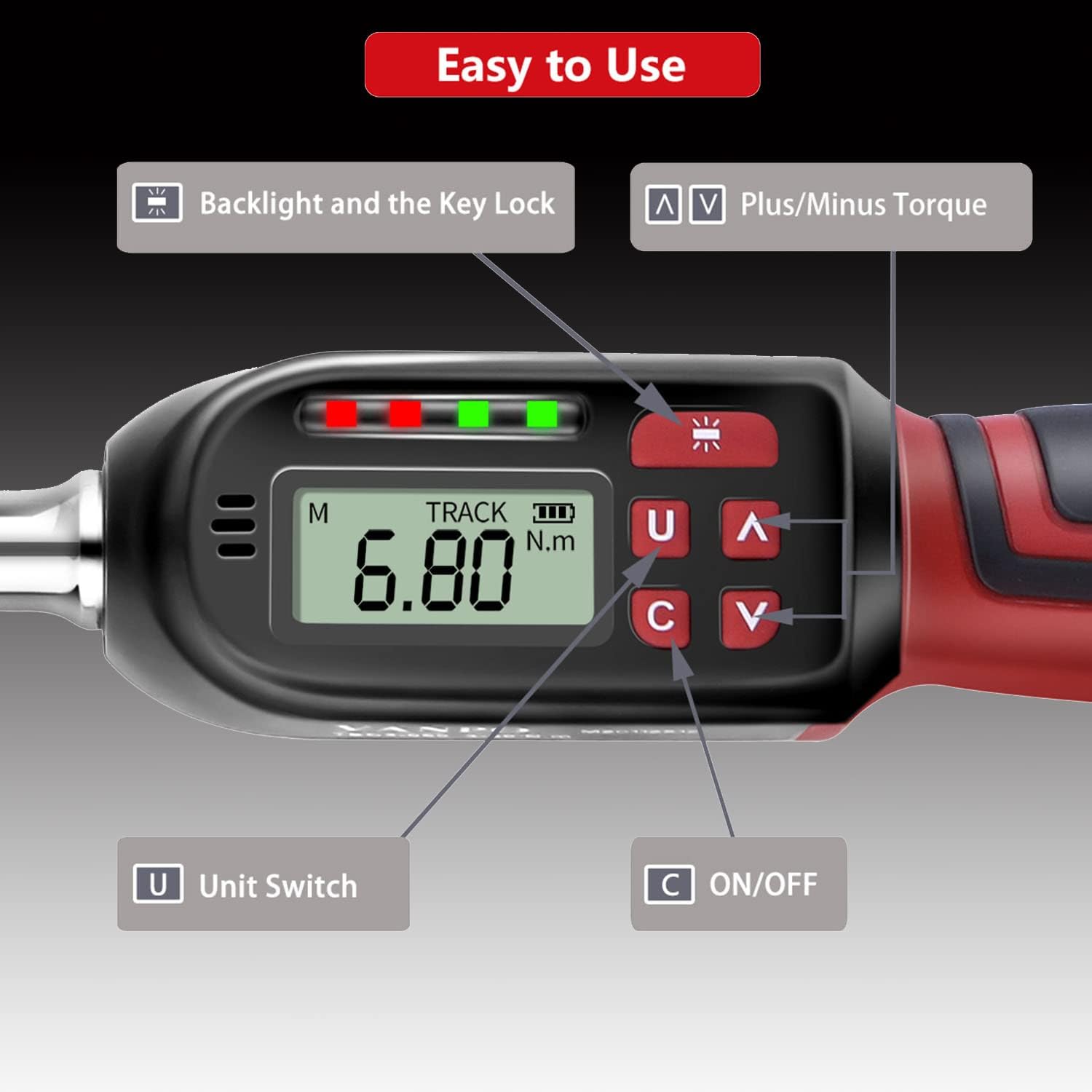
Слика: Детаљна view of the digital display showing "TRACK" mode and "6.80 N.m", with labeled buttons for Backlight/Key Lock, Plus/Minus Torque, Unit Switch, and ON/OFF.
Упутство за употребу
1. Промена мерних јединица
Press the 'U' (Unit Switch) button to cycle through available measurement units: N-m (Newton-meters), kgf-cm (kilogram-force centimeters), lbf-ft (pound-force feet), and lbf-in (pound-force inches).
2. Selecting Measurement Mode (TRACK / PEAK)
The torque wrench offers two measurement modes:
- TRACK Mode: Displays the real-time torque value as force is applied.
- ПЕАК режим: Records and displays the maximum torque value achieved during an operation.
To switch between modes, press the 'M' button (Mode button, usually located near the display).

Image: The display showing "TRACK" mode with a real-time torque value (6.80 N.m) and "PEAK" mode displaying a maximum recorded torque value (30.00 N.m).
3. Setting Target Torque Value
Use the '∧' (Plus) and '∨' (Minus) buttons to adjust the desired target torque value. The display will show the set value.
4. Примена обртног момента
- Attach the appropriate socket or bit to the 1/2" square drive.
- Place the tool onto the fastener.
- Apply steady force. The LCD will show the current torque.
- Промена смера: If the product does not perform the tightening operation in the desired direction, hold the square drive interface of the ratchet head with one hand and rotate the ratchet disk with the other hand to change the direction (left or right).

Image: The ratchet head of the torque wrench, illustrating the direction of rotation for clockwise (±2% accuracy) and counter-clockwise (±3% accuracy) operations.

Image: A user applying the VANPO Digital Torque Wrench to tighten a fastener on a bicycle wheel, demonstrating practical use.
5. Torque Alert System
The wrench provides visual and audible alerts as you approach and reach the preset torque value:
- When the applied torque reaches 85%-95% of the preset value, a green LED will illuminate, and the buzzer will sound intermittently.
- When the applied torque reaches 100% of the preset value, a red LED will illuminate, and the buzzer will emit a continuous tone. This indicates the target torque has been reached.

Image: The digital torque wrench display indicating a torque value of 60.00 N.m, with a visual representation of the "BEEP" sound alert when the preset torque is achieved.
6. Backlight and Key Lock
The advanced LCD display features a backlight for use in dark environments.
- To activate/deactivate the backlight: Press the backlight button (often indicated by a sun icon).
- To lock the product: Press and hold the backlight button.
- To unlock the product: Press and hold the backlight button again.
Одржавање и мере предострожности
- Over-Torque Protection: Do not apply force exceeding 110% of the maximum torque value (135 Nm), as this may damage the torque wrench.
- Пажљиво рукујте: Avoid violently shaking or dropping the torque wrench. Do not store it in locations subject to strong vibrations.
- Наменска употреба: This digital torque wrench is designed for precise torque application. Do not use it as a threading tool or for any purpose other than its intended function.
- Складиштење батерије: If the product will not be used for an extended period, remove the batteries to prevent leakage and damage.
- Аутоматско искључивање: The product will automatically power off after approximately five minutes of non-use to conserve battery life.
- калибрација: This product cannot be reset to zero by the user. For professional calibration, please contact customer support.
Решавање проблема
| Проблем | Могући узрок | Решење |
|---|---|---|
| Кључ се не укључује. | Мртве или неправилно инсталиране батерије. | Проверите поларитет батерија. Замените их новим ААА батеријама. |
| Екран је слаб или трепери. | Ниска снага батерије. | Замените батерије. |
| Wrench not tightening in desired direction. | Ratchet direction is set incorrectly. | Hold the square drive and rotate the ratchet disk to change direction. |
| Нетачна очитавања обртног момента. | Tool may require calibration or has been damaged. | Ensure proper usage. If issues persist, contact customer support for calibration or service. |
| Wrench is locked and buttons are unresponsive. | Key lock feature is active. | Press and hold the backlight button to unlock the device. |
Спецификације
| Феатуре | Детаљ |
|---|---|
| Назив производа | VANPO Digital Torque Wrench |
| Број модела | ВП016 |
| Дриве Сизе | 1/2 инча |
| Распон обртног момента | 6.8 - 135 Nm (10-135 N.m for this variant) |
| Accuracy (Clockwise) | ±2% |
| Accuracy (Counter-clockwise) | ±3% |
| Меасуремент Унитс | N-m, kgf-cm, lbf-ft, lbf-in |
| Дисплаи | ЛЦД са позадинским осветљењем |
| Извор напајања | 2 к ААА батерије (укључене) |
| Материјал | Хром-ванадијум челик |
| Димензије (Д к Ш к В) | 35 к 12 к 5 цм |
| Тежина | 1.15 кг |
Гаранција и подршка
Specific warranty information is not provided in this manual. For details regarding warranty coverage, technical support, or service, please refer to the product packaging or contact VANPO customer service directly through their official webсајт или продавницу где је производ купљен.
Electronic manuals in five languages are available. Please refer to the product's official support channels for access.