
Један за све URC 3661
One For All URC 3661 Universal Remote Control
Упутство за употребу
Производ је завршенview
The One For All URC 3661 is a universal remote control designed to consolidate multiple remote controls into a single, easy-to-use device. It is compatible with a wide range of electronic devices, including televisions, set-top boxes, audio systems, DVD players, and Blu-ray players. This remote features backlit keys for improved visibility in low-light conditions and includes a learning function to copy commands from original remotes.

Слика 1: Под углом view of the URC 3661 Universal Remote Control.
Сетуп
1. Инсталација батерије
The URC 3661 remote control requires two (2) AA batteries for operation. Follow these steps to install them:
- Пронађите одељак за батерије на полеђини даљинског управљача.
- Померите поклопац батерије надоле и подигните га.
- Уметните две АА батерије, водећи рачуна да позитивни (+) и негативни (-) терминали буду поравнати са ознакама унутар одељка.
- Вратите поклопац батерије тако што ћете га вратити на место док не кликне чврсто.
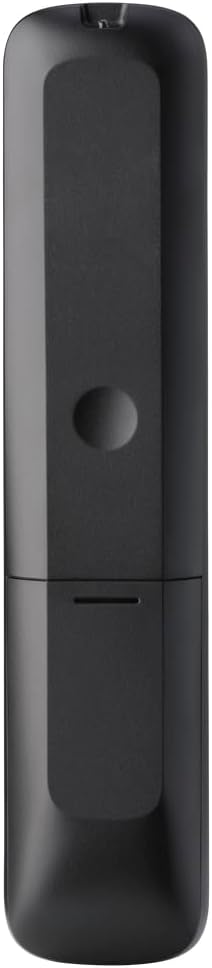
Слика 2: Позади view of the remote, highlighting the battery compartment.
2. Програмирање даљинског управљача
The URC 3661 can be programmed using direct code entry, auto code search, or the learning function. It is recommended to try direct code entry first.
Директан унос кода:
- Укључите уређај који желите да контролишете (нпр. ТВ, ДВД плејер).
- Притисните и држите СЕТУП button until the LED light under the device key (e.g., TV, DVD) blinks twice and stays lit.
- Press the device key you want to program (e.g., TV). The LED will remain lit.
- Enter the 4-digit or 5-digit setup code for your brand and device. Refer to the code list provided with your remote or visit the One For All website for the most up-to-date codes.
- After entering the code, the LED will blink twice and turn off if the code is valid. If it blinks once and stays lit, the code is invalid; re-enter the code.
- Тестирајте даљински управљач притиском на ПОВЕР button. If the device turns off, try other functions like volume or channel. If it works, programming is complete. If not, try the next code for your brand or use the Auto Code Search.
Аутоматска претрага кодова:
- Укључите уређај којим желите да управљате.
- Притисните и држите СЕТУП button until the LED blinks twice and stays lit.
- Press the device key you want to program.
- Point the remote at the device and press the ПОВЕР button repeatedly (approximately every 3 seconds) until the device turns off.
- Once the device turns off, immediately press the СЕТУП button to save the code. The LED will blink twice and turn off.
- Test the remote. If it doesn't work correctly, repeat the process.
Функција учења:
The learning function allows the URC 3661 to copy functions directly from your original remote control, which is useful for commands not available via direct code entry or auto search.
- Place the URC 3661 and your original remote on a flat surface, facing each other, about 1-2 inches apart.
- Притисните и држите СЕТУП button until the LED blinks twice and stays lit.
- Press the button on the URC 3661 that you want to teach a function to (e.g., a specific input button). The LED will blink rapidly.
- Press and hold the corresponding button on your original remote control until the LED on the URC 3661 blinks twice, indicating successful learning.
- Repeat for all desired buttons.
- To exit learning mode, press the СЕТУП button. The LED will blink twice and turn off.
Управљање даљинским управљачем
The URC 3661 is designed for intuitive operation. Familiarize yourself with the button layout and their primary functions.

Слика 3: Предња страна view of the URC 3661 with button layout.
Кључне функције:
- Device Keys (TV, STB, AUDIO, BLURAY, DVD, STREAM): Select the device you wish to control. The LED under the selected device key will illuminate.
- СНАГА: Укључује или искључује изабрани уређај.
- ВОЛ +/-: Подешава јачину звука.
- ЦХ +/-: Мења канале.
- Navigation Pad (UP, DOWN, LEFT, RIGHT, OK): Користи се за навигацију и избор у менију.
- МЕНИ: Отвара главни мени уређаја.
- ВОДИЧ: Displays the electronic program guide (if supported by the device).
- ИНФО: Приказује информације о тренутном програму или уносу.
- КУЋА: Returns to the device's home screen.
- ЕКСИТ: Exits menus or applications.
- Playback Controls (PLAY, PAUSE, STOP, REWIND, FAST FORWARD, SKIP): Контролишите репродукцију медија.
- Тастери са бројевима (0-9): За директан унос канала или нумерички унос.
- App Shortcut Keys (Netflix, Prime Video, YouTube): Директан приступ популарним стриминг сервисима.
- Позадинско осветљење: The keys are backlit for easy use in dark environments. The backlight activates automatically when a button is pressed.
Одржавање
Чишћење даљинског управљача:
To maintain the remote's appearance and functionality, clean it regularly:
- Користите меку, суву крпу да обришете површину даљинског управљача.
- За тврдокорну прљавштину, благо дampОперите крпу водом или благим, неабразивним средством за чишћење. Избегавајте прекомерну влагу.
- Do not use harsh chemicals, solvents, or abrasive cleaning agents, as these can damage the remote's finish or internal components.
Замена батерије:
Replace batteries when the remote's performance degrades or the LED indicator blinks unusually. Refer to the "Battery Installation" section under Setup for detailed instructions.
Решавање проблема
If you encounter issues with your URC 3661 remote control, try the following troubleshooting steps:
| Проблем | Могући узрок | Решење |
|---|---|---|
| Remote does not operate the device. | Incorrect device selected. Батерије су празне или су неправилно уметнуте. Incorrect code programmed. | Ensure the correct device key (TV, DVD, etc.) is pressed. Проверите оријентацију батерије и замените је ако је потребно. Re-program the remote using a different code or the Auto Code Search/Learning function. |
| Неки тастери не раде. | Incomplete programming. Device does not support the function. | Use the Learning function to copy specific commands from your original remote. Verify if the original remote has that function. |
| LED blinks once and stays lit during code entry. | Invalid code entered. | Ensure you are entering the correct 4 or 5-digit code. Try another code from the list or use Auto Code Search. |
| Remote LED does not light up. | Истрошене батерије. | Replace the batteries with new AA batteries. |
For further assistance, visit the official One For All support website or consult the comprehensive online manual.
Спецификације
| Феатуре | Детаљ |
|---|---|
| Број модела | УРЦ 3661 |
| Бранд | Један за све |
| Димензије производа | 0.39 к 0.39 к 0.39 инча |
| Тежина артикла | 6.7 унци |
| Батерије су потребне | 2 АА батерија |
| Максимални број подржаних уређаја | До 6 уређаја |
| Компатибилни уређаји | Television, Set-top Box, Audio, Blu-ray, DVD, Streaming devices |
| Посебна карактеристика | Universal, Learning Function, Backlit Keys |

Figure 4: Product packaging indicating compatibility with up to 6 devices.
Гаранција и подршка
Warranty information for the One For All URC 3661 Universal Remote Control is typically provided with your purchase documentation. Please refer to the warranty card or leaflet included in the product packaging for details regarding coverage, terms, and conditions.
For technical support, frequently asked questions, or to find the latest programming codes, please visit the official One For All website. Contact information for customer service may also be found on the manufacturer's webсајту или у документацији вашег производа.
Један за све званичник Webсајт: ввв.онефоралл.цом
Ask a question about this manual
Ask about setup, troubleshooting, compatibility, parts, safety, or missing instructions. Manuals+ will review the question and use this page’s manual context to help answer it.