
1. Увод
The iPower 600W Digital Dimmable Electronic Ballast is designed for use with High-Pressure Sodium (HPS) and Metal Halide (MH) grow lights in horticulture and hydroponics applications. This electronic ballast provides stable and efficient power delivery, featuring dimmable options and advanced safety protections to ensure optimal plant growth and system longevity.
Key features include a wide operating voltage range, multiple dimming settings, high-frequency output for increased lumen efficiency, and comprehensive safety mechanisms.

Image 1.1: iPower Dimmable Digital Ballast for HPS & MH Grow Light. This image illustrates the ballast's primary function for horticultural lighting.

Image 1.2: Two iPower 600W Digital Dimmable Electronic Ballasts. This image shows the product as it appears, including the ballast unit and its attached power cord.
2. Безбедносна упутства
Please read and understand all safety instructions before operating the iPower Digital Dimmable Electronic Ballast. Failure to follow these instructions may result in electric shock, fire, or other serious injury.
- електрична безбедност: Ensure the power source matches the ballast's voltage requirements (100V~265V with 120V working voltage). Always connect the ballast to a grounded outlet.
- Инсталација: Install the ballast in a dry, well-ventilated area. Avoid exposure to water, high humidity, or extreme temperatures. Do not block ventilation openings.
- Lamp Компатибилност: Use only compatible HPS or MH lampса исправном водомtagе. Погледајте лamp manufacturer's specifications.
- Руковање: Не додирујте лamp or ballast immediately after operation, as they may be hot. Allow sufficient cooling time.
- Одржавање: Disconnect power before performing any maintenance or cleaning. Do not attempt to open or repair the ballast yourself. Refer all servicing to qualified personnel.
- Заштитне карактеристике: The ballast includes advanced protection against short circuits, power surges, ignition failure, overheating, and end-of-bulb-life. These features are designed for user safety and product longevity.
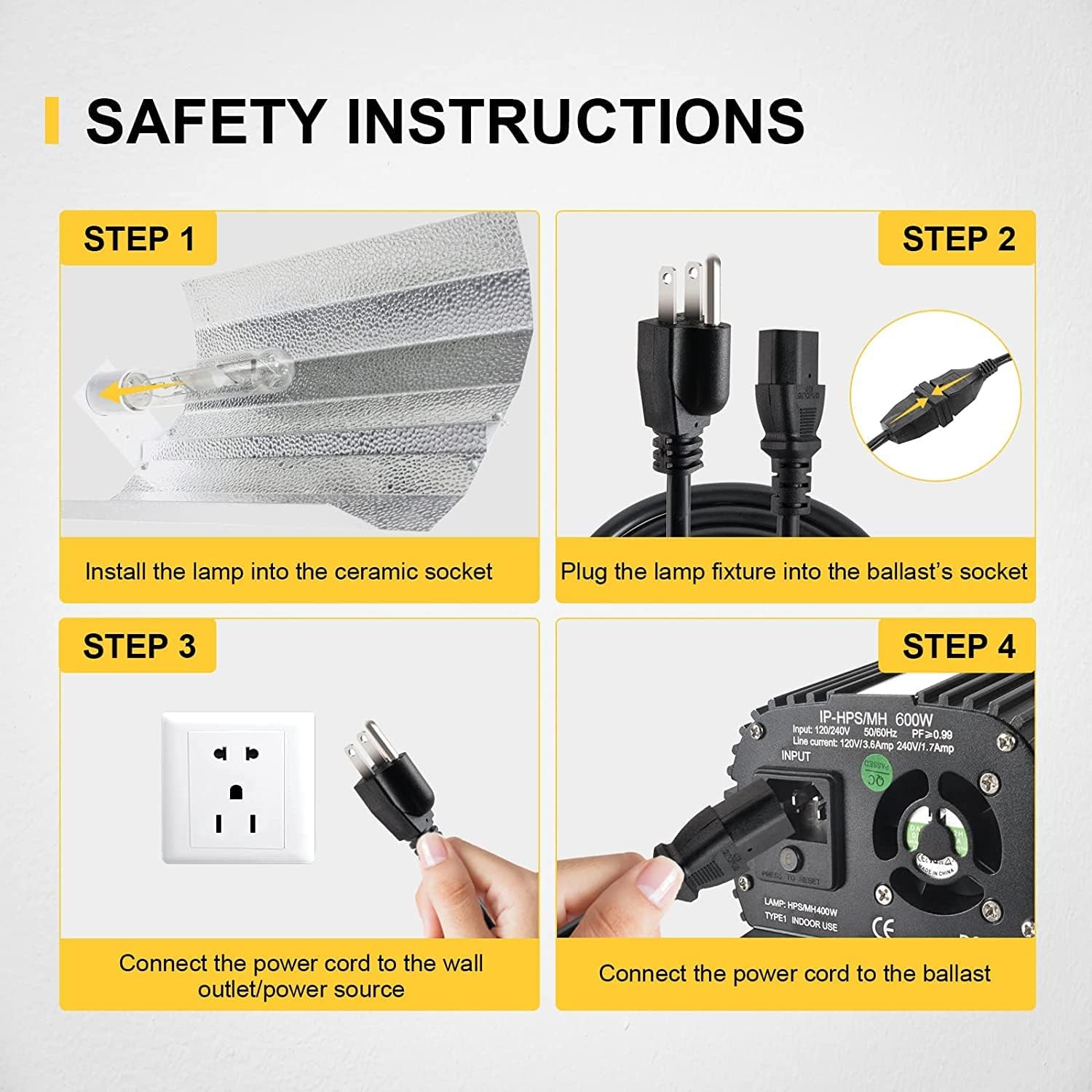
Image 2.1: Safety Instructions for Installation. This image visually guides users through the four essential steps for safely connecting the grow light system.
3. Подешавање
Follow these steps to set up your iPower Digital Dimmable Electronic Ballast and grow light system:
- Инсталирајте Лamp: Carefully install the HPS or MH lamp into the ceramic socket of your reflector fixture. Ensure the lamp је безбедно постављен.
- Повежите Лamp Fixture to Ballast: Plug the cord from the lamp fixture into the output socket of the ballast. Ensure a firm connection.
- Connect Power Cord to Ballast: Insert the heavy-duty power cord (included) into the input socket of the ballast. The ballast features an input for 120V/240V operation.
- Connect Power Cord to Wall Outlet: Plug the other end of the heavy-duty power cord into a suitable grounded wall outlet or power source.
Once all connections are made, the system is ready for operation. Ensure the dimming knob is set to the desired output level before powering on.

Image 3.1: Heavy-Duty Power Cord. This image displays the included 8-foot power cord, essential for connecting the ballast to a power source.
4. Упутство за употребу
The iPower Digital Dimmable Electronic Ballast offers flexible control over light output to suit various growth stagес и потребе биљака.
4.1 Dimmable Options
The ballast features a dimming knob that allows you to adjust the light intensity. Available dimming options are:
- 50% Output: Reduces light output to 50% of the rated wattage.
- 75% Output: Reduces light output to 75% of the rated wattage.
- 100% Output: Provides full rated wattagе излаз.
- Super Lumens (110%): Boosts light output to 110% of the rated wattage for maximum intensity during critical growth phases.

Image 4.1: Dimmable Options. This image highlights the dimming knob and its settings (50%, 75%, 100%, Super Lumens) for adjusting light intensity.

Image 4.2: Product Details with Dimming Control. This image provides a closer look at the dimming knob and the air-cooled aluminum finned casing, indicating the ballast's adjustable output and heat management. The serial number visible is B:151712578.
4.2 Ватtagе Опције
The ballast is compatible with various wattagелamps and can operate at different output levels:
- 250В
- 400В
- 600В
Ensure the selected wattage on the ballast matches the lamp being used for optimal performance and safety.
5. Одржавање
Proper maintenance ensures the longevity and efficient operation of your iPower Digital Dimmable Electronic Ballast.
- Чишћење: Regularly clean the exterior of the ballast with a dry, soft cloth. Ensure the ballast is unplugged before cleaning. Do not use liquid cleaners.
- вентилација: Keep the ventilation openings clear of dust and debris to ensure proper airflow. The ballast features a built-in cooling fan and finned design for effective heat dissipation.
- инспекција: Periodically inspect the power cord and connections for any signs of damage or wear. Replace damaged components immediately.
- Spare Fuse: The ballast includes a spare fuse. If the ballast fails to power on, check and replace the fuse if necessary. Always use a fuse of the correct rating.

Image 5.1: Product Introduction with Spare Fuse and Internal Fan. This image details the input section of the ballast, highlighting the location of the spare fuse and the 40mm DC internal fan for cooling.

Image 5.2: Ventilation Opening for Heat Dissipation. This image points out the ventilation opening on the ballast, crucial for maintaining optimal operating temperature. The serial number visible is B:151712578.
КСНУМКС. Решавање проблема
If you encounter issues with your iPower Digital Dimmable Electronic Ballast, refer to the following common troubleshooting steps:
- Нема напајања:
- Check if the power cord is securely plugged into both the ballast and the wall outlet.
- Проверите да ли зидна утичница функционише тако што ћете укључити други уређај.
- Inspect the ballast's fuse and replace it if blown (refer to Image 5.1 for fuse location).
- Lamp Not Igniting:
- Уверите се да је лamp is correctly seated in the fixture socket.
- Потврдите лamp is compatible with the ballast (HPS or MH) and its wattagе подешавање.
- Проверите да ли је лamp has reached its end-of-life. Try a new, compatible lamp.
- Verify that the dimming knob is not set to 'OFF' or an incorrect setting.
- Трепереће светло:
- Уверите се да су све везе чврсте и безбедне.
- Потврдите лamp is not nearing its end-of-life.
- Проверите стабилну волtage output from your power source.
- прегревање:
- Ensure the ballast is in a well-ventilated area and its cooling fins are not obstructed.
- Clean any dust or debris from the ventilation openings and cooling fan.
If these steps do not resolve the issue, please contact iPower customer support for further assistance.
7. Спецификације
Below are the technical specifications for the iPower 600W Digital Dimmable Electronic Ballast:
| Феатуре | Спецификација |
|---|---|
| Број модела | 600W Digital Dimmable Electronic |
| Ватtage | 600 Ваттс |
| Оператинг Волtagе Распон | 100В~265В |
| Воркинг Волtage | 120В |
| Опције затамњивања | 50%, 75%, 100%, Super Lumens (110%) |
| Lamp Компатибилност | HPS (High Pressure Sodium) and MH (Metal Halide) |
| Фреквенција | 50/60Hz, Operation frequency: 80kHz |
| Дужина кабла за напајање | 8 FT heavy-duty |
| Димензије производа | 14.57 к 6.5 к 6.3 инча |
| Тежина артикла | 11.28 фунти |
| Сигурносне карактеристике | Short circuit, power surge, ignition failure, overheat, end-of-bulb-life protection |
| Хлађење | Built-in cooling fan, graduating fin design |

Image 7.1: Suitable Size and Dimensions. This image provides a visual representation of the ballast's dimensions, including length (12.44 inches), width (2.87 inches), and height (4.33 inches).
8. Гаранција и подршка
The iPower 600W Digital Dimmable Electronic Ballast comes with a manufacturer's warranty. Please refer to the product packaging or the official iPower website for specific warranty terms and conditions. For technical support, troubleshooting assistance, or warranty claims, please contact iPower customer service.
Контакт информације:
Visit the official iPower webсајт за најновије контакт информације за подршку.