
AOLION WGXB004005
Упутство за употребу адаптера за стерео слушалице AOLION
Model: WGXB004005
Увод
The AOLION Stereo Headset Adapter is designed to enhance your gaming experience on Xbox One controllers. This adapter allows you to connect most wired stereo gaming headsets with a 3.5mm audio jack (CTIA plug standard) directly to your Xbox controller, providing convenient control over game sound and voice chat.
Садржај пакета
- 1 × AOLION Stereo Headset Adapter
- 1 × Упутство за употребу
Производ је завршенview
The adapter features intuitive controls for managing your audio experience during gameplay.

Слика 1: Предња страна view of the headset adapter showing control buttons.
- Game Balance Button: Adjusts the balance towards game audio.
- Chat Balance Button: Adjusts the balance towards voice chat audio.
- Дугме за искључивање микрофона: Укључује/искључује микрофон.
- Дугме за појачавање звука: Increases overall volume.
- Дугме за смањивање јачине звука: Decreases overall volume.
- 3.5 мм аудио прикључак: For connecting your stereo gaming headset.
- УСБ конектор: For connecting to the Xbox controller.
Компатибилност
This headset adapter is compatible with a wide range of Xbox One controllers and stereo gaming headsets:
- Xbox Controllers: Xbox One, Xbox One S, Xbox One X, Xbox Elite Wireless Controller Series 1, Xbox Elite Wireless Controller Series 2, Xbox Series S, and Xbox Series X Controllers.
- Слушалице: Most wired stereo gaming headsets featuring a 3.5mm audio jack (using the CTIA plug standard).

Figure 2: The adapter is compatible with multiple Xbox controller models.

Figure 3: The adapter supports standard 3.5mm CTIA headsets.
Сетуп
Setting up your AOLION Stereo Headset Adapter is a simple plug-and-play process.
- Connect the Adapter to the Controller: Align the USB connector of the headset adapter with the expansion port at the bottom of your Xbox controller. Gently push until it clicks securely into place.
- Повежите слушалице: Plug your wired stereo gaming headset's 3.5mm audio jack into the corresponding port on the bottom of the headset adapter.
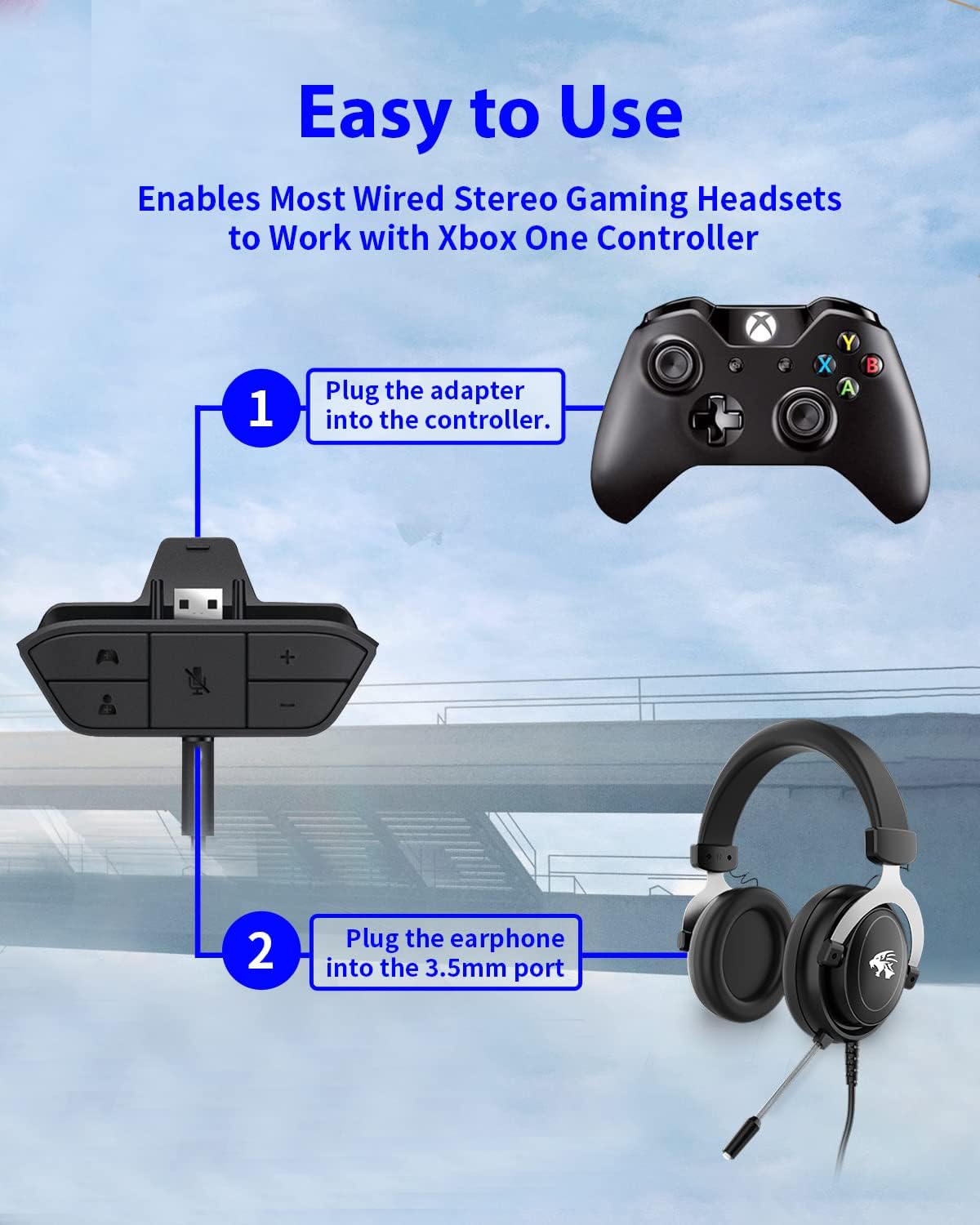
Figure 4: Step-by-step connection guide for the headset adapter.
Video 1: Demonstration of connecting the headset adapter to an Xbox controller.
Важна напомена: For optimal performance and to resolve potential audio issues, it is recommended to update your Xbox controller's firmware after connecting the adapter. This can typically be done through your Xbox console's settings (Settings > Devices & connections > Accessories > Select your controller > ... > Controller settings > Update firmware).
Упутство за употребу
Once connected, use the buttons on the adapter to control your audio:
- Појачавање/утишавање (+/-): Press the '+' button to increase the overall volume of both game and chat audio. Press the '-' button to decrease it.
- Microphone Mute (Microphone Icon): Press this button to mute or unmute your microphone. An indicator light (if present) or on-screen notification may confirm the mute status.
- Game/Chat Balance (Controller Icon / Person Icon):
- Притисните тастер Икона контролера button to increase game audio volume and decrease chat audio volume.
- Притисните тастер Икона особе button to increase chat audio volume and decrease game audio volume.
Слика 5: Детаљно view of the adapter's control buttons.
Одржавање
To ensure the longevity and optimal performance of your headset adapter, follow these simple maintenance guidelines:
- Адаптер одржавајте чистим и без прашине и остатака. За чишћење користите меку, суву крпу.
- Избегавајте излагање адаптера екстремним температурама, влажности или директној сунчевој светлости.
- Не покушавајте сами да растављате или поправљате адаптер, јер ће то поништити гаранцију.
- Чувајте адаптер на безбедном месту када га не користите како бисте спречили физичка оштећења.
Решавање проблема
If you encounter issues with your AOLION Stereo Headset Adapter, please refer to the following common solutions:
| Проблем | Могући узрок / решење |
|---|---|
| No audio or poor audio quality (buzzing, peaking) |
|
| Микрофон не ради |
|
| Game/Chat balance not working |
|
Ако проблем и даље постоји након што сте испробали ове кораке, обратите се корисничкој подршци.
Спецификације
| Феатуре | Детаљ |
|---|---|
| Број модела | WGXB004005 |
| Бранд | АОЛИОН |
| Димензије производа (Д к Ш к В) | 3.15 к 1.57 к 0.79 инча (8 к 4 к 2 цм) |
| Боја | Црно |
| Тип конектора | Auxiliary (3.5mm CTIA standard) |
| Компатибилни уређаји | Xbox One, One S, One X, Elite 1, Elite 2, Series S, Series X Controllers; 3.5mm CTIA Stereo Headsets |
Гаранција и подршка
AOLION stands behind the quality of its products. This Stereo Headset Adapter comes with:
- 60-дневна гаранција поврата новца: If you are not entirely satisfied with your purchase within 60 days, you may be eligible for a full refund.
- КСНУМКС-месец Гаранција: We provide a 24-month warranty against manufacturing defects from the date of purchase.
For any questions, concerns, or warranty claims, please contact us through Amazon. We are committed to responding to your inquiries within 12 hours to ensure your complete satisfaction.