
Увод
This manual provides detailed instructions for the setup, operation, maintenance, and troubleshooting of your Timex Ironman Triathlon T200 42mm Watch. Please read this guide thoroughly to ensure proper use and to maximize the functionality of your timepiece.

Слика 1: Предња страна view of the Timex Ironman Triathlon T200 watch.
Компоненте сата
Familiarize yourself with the buttons and display elements of your watch:
- Дугме МОДЕ: Прелази кроз различите режиме сата (Време, Хронограф, Тајмер, Аларм).
- SET/RECALL Button: Used to set values in setting modes and recall lap/split times.
- ИНДИГЛО дугме: Активира Индигло ноћно светло.
- START/LAP Button: Starts and stops the chronograph, records lap times.
- Дугме СТОП/РЕСЕТУЈЕ: Stops the chronograph or timer, resets values.
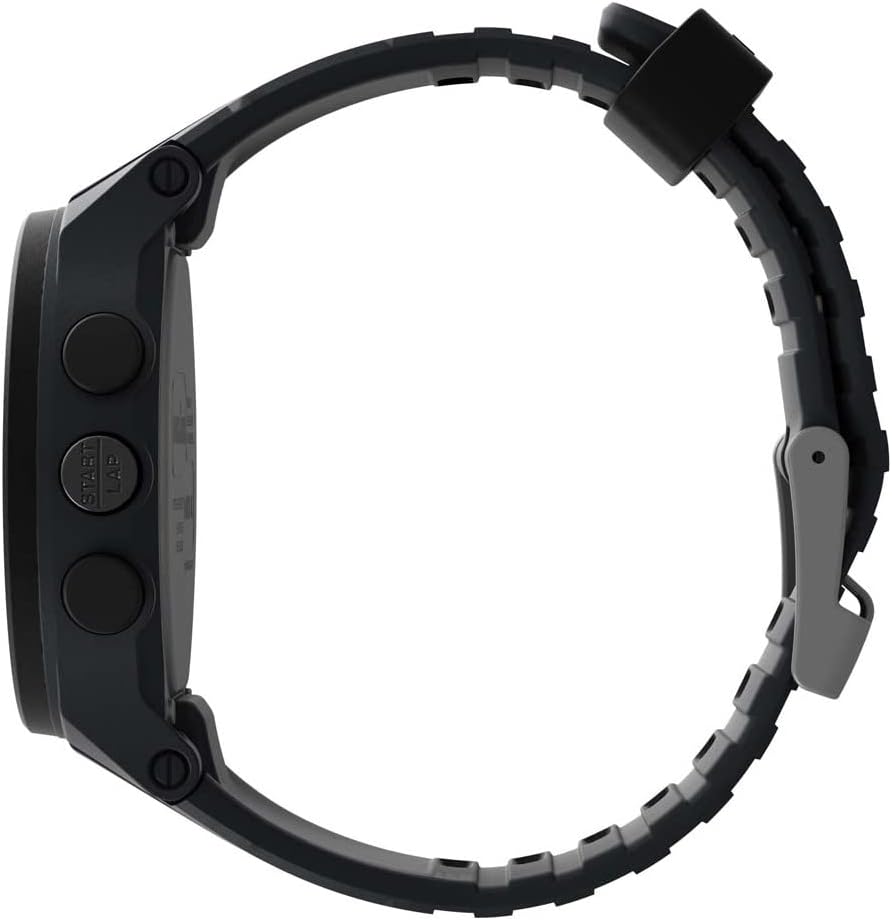
Слика 2: Страна view illustrating button placement.
Сетуп
1. Почетно подешавање времена и датума
- In Timekeeping mode, press and hold the ПОСТАВИ/ПОЗИВ дугме док дисплеј не затрепери.
- Притисните тастер СТАРТ/КРУГ or СТОП/РЕСЕТ button to adjust the flashing segment (e.g., hour, minute, year, month, day).
- Притисните тастер МОДЕ button to advance to the next segment.
- Када су сва подешавања завршена, притисните дугме ПОСТАВИ/ПОЗИВ button to exit setting mode.
2. Подешавање каиша
The watch features an adjustable silicone strap designed for comfort and secure fit. Adjust the buckle to fit your wrist circumference, ensuring it is snug but not overly tight.
Упутство за употребу
1. Режим мерења времена
This is the default display mode, showing the current time, day, and date. Press the ИНДИГЛО button to activate the backlight for visibility in low-light conditions.
2. Хронограф (штоперица)
The chronograph measures elapsed time up to 100 hours with a 200-lap memory.
- From Timekeeping mode, press the МОДЕ button until 'CHRONO' or stopwatch icon appears.
- Притисните СТАРТ/КРУГ за почетак мерења времена.
- Притисните СТАРТ/КРУГ again to record a lap time while the chronograph continues running.
- Притисните СТОП/РЕСЕТ да паузирате хронограф. Притисните СТАРТ/КРУГ да настави или СТОП/РЕСЕТ поново да се врати на нулу.
- To recall lap times, press ПОСТАВИ/ПОЗИВ док је хронограф заустављен.
3. Interval Training Timer
The watch supports interval training with customizable warm-up, interval, and cool-down segments.
- From Timekeeping mode, press the МОДЕ button until 'INTERVAL' or interval icon appears.
- Притисните и држите ПОСТАВИ/ПОЗИВ to enter setting mode for intervals.
- Adjust warm-up, interval duration, number of repeats, and cool-down times using СТАРТ/КРУГ or СТОП/РЕСЕТ, and advance with МОДЕ.
- Притисните ПОСТАВИ/ПОЗИВ да сачувате подешавања.
- Притисните СТАРТ/КРУГ to begin the interval training sequence.
4. Тајмер за одбројавање
A 24-hour countdown timer is available for various activities.
- From Timekeeping mode, press the МОДЕ button until 'TIMER' or timer icon appears.
- Притисните и држите ПОСТАВИ/ПОЗИВ to set the desired countdown duration.
- Притисните СТАРТ/КРУГ за почетак одбројавања.
- The watch will emit an alert when the countdown reaches zero.
5. Аларми
Set up to 3 daily, weekday, or weekend alarms.
- From Timekeeping mode, press the МОДЕ button until 'ALARM' or alarm icon appears.
- Притисните МОДЕ to cycle through Alarm 1, Alarm 2, Alarm 3.
- Притисните и држите ПОСТАВИ/ПОЗИВ to set the alarm time and type (daily, weekday, weekend).
- Притисните СТАРТ/КРУГ да бисте укључили/искључили аларм.
6. Dual Time Zones
The watch allows for tracking two different time zones.
- From Timekeeping mode, press the МОДЕ button until 'T2' or dual time icon appears.
- Притисните и држите ПОСТАВИ/ПОЗИВ to adjust the second time zone.
Одржавање
1. Чишћење
Clean your watch with a soft, damp cloth. Avoid harsh chemicals or abrasive materials that could damage the case or strap. For water-resistant models, rinse with fresh water after exposure to salt water or chlorine.
2. Отпорност на воду
This watch is water resistant to 100 meters (330 feet), making it suitable for swimming and snorkeling. It is not recommended for diving. Do not press any buttons while the watch is submerged to prevent water intrusion.
3. Замена батерије
The watch uses one Lithium Metal battery (CR2025). Battery replacement should be performed by a qualified watch technician to ensure water resistance is maintained. Attempting to replace the battery yourself may void the warranty and compromise the watch's water resistance.

Figure 3: Case back detailing water resistance and battery type.
Решавање проблема
- Екран је празан или замагљен: The battery may be low or depleted. Replace the battery as described in the Maintenance section.
- Дугмад не реагују: Ensure the watch is not in a locked mode (if applicable, refer to specific model features). If the issue persists, a soft reset may be required by pressing all four side buttons simultaneously for a few seconds.
- Indiglo light not working: This could indicate a low battery or a malfunction. If battery replacement does not resolve the issue, contact customer support.
- Нетачно време/датум: Re-enter the time and date settings as described in the Setup section. Ensure the correct time zone is selected.
Спецификације
| Број модела | TW5M48900SO |
| Пречник кућишта | 42мм |
| Материјал кућишта | Смола |
| Материјал сочива | Акрил |
| Материјал траке | Силицоне |
| Отпорност на воду | 100 метара (330 стопа) |
| Хронограф | 100-hour with 200-lap memory |
| Тајмер | 24-hour countdown |
| Аларми | 3 daily, weekday, or weekend alarms |
| Позадинско осветљење | Indiglo light-up watch dial |
| Тип батерије | 1 литијум-метална батерија (CR2025) |
Гаранција и подршка
Your Timex watch is covered by a limited warranty. For specific warranty details, service, or support, please refer to the warranty information included with your purchase or visit the official Timex webсајт. Сачувајте доказ о куповини за потребе гаранције.
За додатну помоћ, можете посетити Timex продавница на Амазону or the official Timex customer support portal.