
Увод
Thank you for choosing the Optex 990047 Indoor/Outdoor Wireless Digital Thermometer. This device provides accurate temperature readings for both your indoor environment and an outdoor location via a wireless sensor. Please read this manual carefully before use to ensure proper operation and to maximize the lifespan of your thermometer.
Садржај пакета
- 1 x Optex 990047 Main Display Unit
- 1 x Бежични спољни сензор
- 1 к Упутство за употребу
- (Batteries not included, typically requires AAA or AA batteries for both units)
Производ је завршенview
Familiarize yourself with the components of your Optex thermometer.
Main Display Unit (Front)

слика: Фронт view of the Optex 990047 main display unit. The digital screen shows indoor and outdoor temperatures, along with high/low records and trend indicators. Below the screen are three buttons: 'CH', '°C/°F', and 'CLEAR'.
- Дигитални екран: Shows indoor temperature (top) and outdoor temperature (bottom), along with HI/LO records and temperature trend arrows.
- ЦХ тастер: Selects the wireless channel (if multiple sensors are used) or initiates sensor search.
- Дугме °Ц/°Ф: Пребацује се између Целзијусових и Фаренхајтових температурних јединица.
- Дугме ЦЛЕАР: Clears the recorded HI/LO temperatures.
Main Display Unit (Back)

слика: Назад view of the Optex 990047 main display unit. It features a battery compartment cover and an integrated kickstand for tabletop placement, as well as a hanging hole.
- Одељак за батерије: Houses the batteries for the main unit.
- Ногара: Allows the unit to stand upright on a flat surface.
- Wall Mount Hole: For hanging the unit on a wall.
Бежични отворни сензор
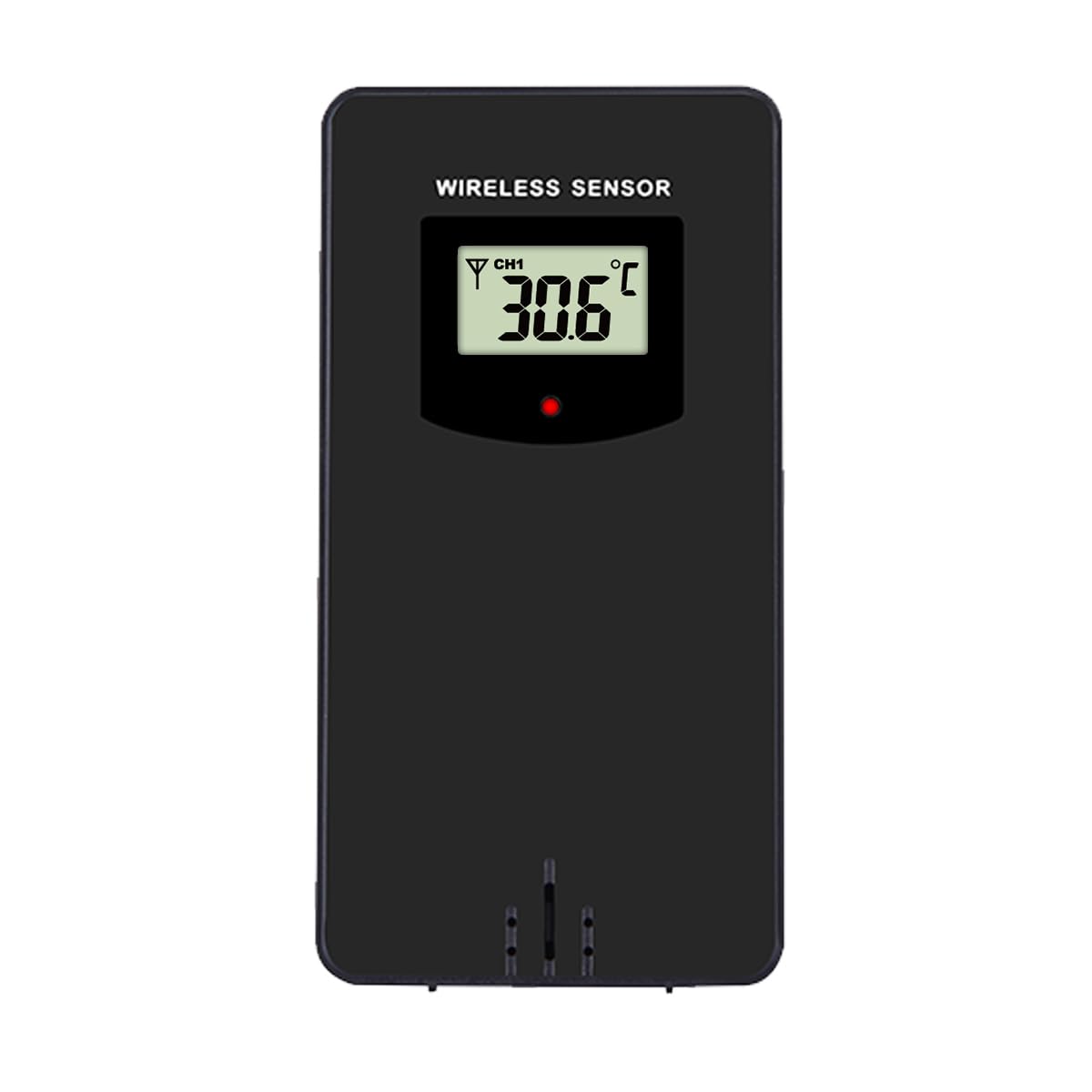
слика: Фронт view of the Optex wireless outdoor temperature sensor. It has a small digital display showing the current temperature and channel, along with a red indicator light and a battery compartment on the back.
- Сензор температуре: Measures the outdoor temperature.
- Индикатор преноса: A small LED light that flashes when data is transmitted.
- Одељак за батерије: Houses the batteries for the outdoor sensor.
- Прекидач канала: (Typically inside the battery compartment) Allows selection of a specific channel (1, 2, or 3) if using multiple sensors.
Сетуп
- Install Batteries in the Outdoor Sensor:
- Отворите одељак за батерије на задњој страни бежичног сензора.
- Уметните 2 x AAA батерије (нису укључене) према ознакама поларитета (+/-).
- Затворите одељак за батерије.
- Note: If there is a channel switch inside the compartment, ensure it is set to Channel 1 for initial setup.
- Install Batteries in the Main Display Unit:
- Отворите одељак за батерије на задњој страни главне јединице дисплеја.
- Уметните 2 x AAA батерије (нису укључене) према ознакама поларитета (+/-).
- Затворите одељак за батерије.
- The display will light up and begin searching for the outdoor sensor.
- Упаривање сензора:
- Place the outdoor sensor and the main display unit close to each other during the initial setup.
- The main unit should automatically detect and connect to the outdoor sensor within a few minutes. The outdoor temperature will appear on the display.
- If the outdoor temperature does not appear, press and hold the "CH" button on the main unit for 3 seconds to initiate a manual search for the sensor.
- Постављање спољног сензора:
- Choose a shaded location for the outdoor sensor, away from direct sunlight and rain, to ensure accurate readings.
- Avoid placing it near heat sources (e.g., vents, appliances) or metal objects that could interfere with the wireless signal.
- The maximum wireless range is approximately 30 meters (100 feet) in open air. Walls and obstacles will reduce this range.
Операција
Reading Temperatures
The main display unit shows the indoor temperature at the top and the outdoor temperature (from the wireless sensor) at the bottom. Both displays show the current temperature, along with the recorded high (HI) and low (LO) temperatures for the day, and a trend indicator.
Пребацивање јединица температуре (°C/°F)
Притисните тастер ° Ц/° Ф button once to switch between Celsius and Fahrenheit temperature units.
Clearing HI/LO Records
The thermometer automatically records the highest and lowest temperatures since the last reset. To clear these records and start new ones, press the ЦЛЕАР button once. The HI/LO values will reset to the current temperature.
Channel Selection (for multiple sensors)
If you are using multiple outdoor sensors (sold separately), you can switch between their readings by pressing the CH button. Each press will cycle through the available channels (e.g., CH1, CH2, CH3). Ensure each sensor is set to a unique channel via its internal switch.
Одржавање
- Чишћење: Обришите јединице меком крпомamp тканина. Немојте користити абразивна средства за чишћење или раствараче.
- Замена батерије: Replace batteries in both the main unit and the outdoor sensor when the low battery indicator appears on the display. Always replace all batteries at the same time with new ones of the same type.
- Складиштење: If storing the thermometer for an extended period, remove all batteries to prevent leakage. Store in a cool, dry place.
Решавање проблема
| Проблем | Решење |
|---|---|
| No outdoor temperature reading / "---" displayed. |
|
| Нетачна очитавања температуре. |
|
| Екран је туман или празан. |
|
Спецификације
- Модел: Optex 990047
- Тип приказа: Дигитални ЛЦД
- Опсег унутрашње температуре: -10°Ц до 50°Ц (14°Ф до 122°Ф) (Estimated, based on typical indoor thermometers)
- Опсег спољне температуре: -40°Ц до 60°Ц (-40°Ф до 140°Ф) (Estimated, based on typical outdoor sensors)
- Прецизност температуре: +/- 1°Ц (+/- 2°Ф) (Процењено)
- Домет бежичне мреже: До 30 метара (100 стопа) на отвореном (Процењено)
- Извор напајања (главна јединица): 2 x AAA 1.5V батерије (нису укључене)
- Извор напајања (спољни сензор): 2 x AAA 1.5V батерије (нису укључене)
- Материјал: Пластика
- Боја: Црно
Безбедносне информације
- Do not expose the main unit or sensor to extreme temperatures, direct sunlight, or excessive moisture.
- Do not immerse the units in water. The outdoor sensor is weather-resistant but not waterproof.
- Do not attempt to disassemble or repair the units. This will void the warranty.
- Старе батерије одлажите одговорно у складу са локалним прописима.
- Држите батерије ван домашаја деце.
Гаранција и подршка
Optex products are designed for reliability and performance. For warranty information or technical support, please refer to the contact details provided with your purchase or visit the official Optex website. Please have your model number (990047) ready when contacting support.