
1. Увод
Thank you for choosing the DELLA Umbra Series 9000 BTU WiFi Mini Split AC with Heat Pump. This manual provides essential information for the safe and efficient operation, installation, and maintenance of your unit. Please read this manual thoroughly before installation and use, and retain it for future reference.
Важне информације о безбедности
This appliance is designed for professional installation only. Attempting DIY installation without proper qualifications may result in injury, property damage, or voiding the warranty. Always consult a qualified HVAC technician for installation and complex maintenance tasks.
- Уверите се да напајање одговара спецификацијама уређаја.
- Не блокирајте улазе или излазе ваздуха.
- Држите децу и кућне љубимце даље од спољашње јединице.
- Turn off power before any maintenance or cleaning.
- Use only specified refrigerants (R32).
2. Производ је готовview
The DELLA Umbra Series Mini Split AC is an energy-efficient system designed for cooling and heating spaces up to 450 sq.ft. It features WiFi connectivity, Alexa compatibility, and a heat pump for year-round comfort.
Кључне карактеристике:
- Енергетски ефикасан: 19 SEER2 оцена са DC Inverter технологијом за уштеду енергије до 30%.
- Паметне функције: 4D airflow (up-down, left-right), I Feel mode, 24-hour timer, sleep mode, eco energy-saving mode, multiple fan speeds, turbo function.
- Паметни сензор: Remote control senses room temperature for optimal comfort and energy savings.
- Тих рад: Ради са ултра тихим звуком од 42 dBa.
- Широка покривеност: Cools and heats up to 450 sq.ft, operating in temperatures as low as 19°F.
- Р32 Расхладно средство: Uses environmentally friendly R32 refrigerant.
Дијаграм компоненти:

Figure 2.1: Main components included with the DELLA Umbra Series Mini Split AC.
Производ View:

Figure 2.2: DELLA Umbra Series 9000 BTU WiFi Mini Split AC.
3. Подешавање и инсталација
Professional installation is mandatory for this system. This is not a DIY mini split AC. Line-set vacuuming is required during installation. Any alteration of line-set length requires adjusting freon levels. Please consult a qualified HVAC professional for proper installation to ensure safety and optimal performance.
Инсталација је завршенаview видео:
Video 3.1: General guidance on installing your DELLA Mini Split AC unit. This video is for informational purposes only; professional installation is required.
Key Installation Steps (Summary):
- Означавање локација: Use the provided template to mark the locations for the line set wall hole and the mini split bracket.
- Носач: Securely attach the mini split bracket to the wall using the provided screws. Ensure the bracket is properly leveled.
- Routing Lines: Провуците цевовод, одводно црево и електричне каблове кроз отвор у зиду.
- Монтажа унутрашње јединице: Securely mount the indoor mini split unit onto the bracket.
- Линије за лепљење траке: Залепите одводно црево и цеви заједно за уредну и организовану инсталацију.
- Securing Electrical Wires: Користите везице за причвршћивање електричних жица око залепљених цеви и одводног црева.
- Positioning Outdoor Condenser: Place the outdoor condenser unit in its designated location.
- Сет спојних линија: Connect the unit line set to the condenser line set and tighten down firmly. Use a digital torque wrench if available to ensure proper tightening according to specifications.
- Електричне везе: Connect the electrical wires (red, black, green ground) to their corresponding terminals on the condenser unit. Each wire is designated with a specific letter and number.
- Усисавање система: Connect a vacuum pump to the system via a gauge. Open the valves on the gauge and activate the vacuum. Monitor the micron reading closely and close the valves once it reaches 350 microns. Turn off the vacuum pump.
- Обнављање снаге: Restore power to the outdoor unit.
- Initiating Cooling: Turn on the mini split unit and set it to the lowest cold setting. Allow a few minutes for the outdoor condenser fan to initiate.
- Opening Valves: Gradually open the high side (top) valve using a service wrench. Monitor the gauge as readings will decrease into the negative range. After the high side valve is open, promptly open the low side (bottom) valve. Monitor the gauge closely as the readings will increase, which is expected.
Your DELLA mini split unit installation is complete once these steps are followed and the unit is operating correctly.
Инсталлатион Преview видео:
Видео 3.2: Кратак уводview of the DELLA Mini Split AC installation process, highlighting key steps.
4. Упутство за употребу
Your DELLA Umbra Series Mini Split AC can be controlled via the included remote control, the Della+ mobile app, or voice commands through Alexa.
даљински управљач:

Figure 4.1: DELLA Mini Split AC Remote Control.
Use the remote control to adjust temperature, select operating modes, set fan speed, and activate special functions like Sleep Mode or Turbo. Refer to the remote control's specific instructions for detailed button functions.
Della+ Mobile App:
The Della+ app allows you to control your unit remotely, set schedules, and utilize smart features like Geo-Location.
Video 4.2: Learn how to set up and customize Geo-Location using the Della+ App for smart AC controls.
Видео 4.3: Кратак уводview demonstrating the features and interface of the Della+ App.

Слика 4.2: Делла+ интерфејс апликације.
- Преузми: Тражи "Della+" in your mobile app store.
- Упаривање: Follow the in-app instructions to pair your device with the AC unit.
- Режими: Select from Cool, Heat, Dry (dehumidify), Fan Only, or ECO mode.
- Брзина вентилатора: Adjust fan speed from Quiet, Low, Mid, High, to Turbo.
- Проток ваздуха: Control vertical and horizontal oscillation for optimal air distribution.
- Заказивање и тајмер: Set weekly schedules or countdown timers for automatic operation.
- Географска локација: Configure automatic AC control based on your location.
Гласовна контрола (Алекса):
The unit seamlessly integrates with Amazon Alexa for convenient voice control. Ensure your Della+ app is linked to your Alexa account.

Figure 4.3: Voice Control Compatibility with Alexa.
5. Одржавање
Regular maintenance ensures optimal performance and longevity of your DELLA Mini Split AC unit. Always disconnect power before performing any maintenance.
Чишћење филтера:
The indoor unit features washable air filters. Clean them every two weeks or more frequently depending on usage and air quality.
- Отворите предњу плочу унутрашње јединице.
- Уклоните филтере за ваздух.
- Оперите филтере млаком водом и благим детерџентом.
- Добро исперите и оставите их да се потпуно осуше на ваздуху пре него што их поново ставите.
- Затворите предњу плочу.
Чишћење унутрашње јединице:
Wipe the indoor unit's surface with a soft, damp cloth. Do not use harsh chemicals or abrasive cleaners. The unit also features PureClean tech to prevent dust buildup and defrost the indoor unit, contributing to cleaner air.
Слика 5.1: Унутрашњи view of the indoor unit highlighting PureClean technology.
Чишћење спољашње јединице:
Periodically clean the outdoor unit's coils and fins to remove dirt, leaves, and debris. Use a soft brush or vacuum cleaner. Ensure the area around the outdoor unit is clear of obstructions for proper airflow.

Figure 5.2: Outdoor unit with gold-plated fins for corrosion prevention.
КСНУМКС. Решавање проблема
Пре него што контактирате корисничку подршку, молимо вас да поновоview следећи уобичајени проблеми и решења:
| Проблем | Могући узрок | Решење |
|---|---|---|
| Јединица се не покреће. | Нема струје, осигурач је искључен, батерије даљинског управљача су празне. | Check power supply, reset circuit breaker, replace remote batteries. |
| Недовољно хлађење/грејање. | Прљави ваздушни филтери, блокирана спољашња јединица, неправилно подешавање режима, низак ниво расхладног средства. | Clean air filters, clear obstructions from outdoor unit, select correct mode, contact professional for refrigerant check. |
| Необичан звук из јединице. | Лабави делови, зачепљење вентилатора, нормални радни звуци (нпр. проток расхладног средства). | Check for loose parts or obstructions. If noise persists or is unusual, contact support. |
| Цурење воде из унутрашње јединице. | Blocked drain hose, improper installation angle. | Проверите и очистите одводно црево. Ако проблем и даље постоји, можда ће бити потребна стручна поновна инсталација. |
| Даљински управљач не ради. | Batteries dead, remote out of range, signal obstruction. | Replace batteries, ensure clear line of sight to indoor unit, operate within range. |
For issues not listed here or if solutions do not resolve the problem, please contact DELLA customer support.
7. Спецификације
| Феатуре | Детаљ |
|---|---|
| Број модела | 9K1VR-19S-JPB-I+O |
| Величина | 9,000 BTU - 115V -- 19 SEER2 |
| Капацитет хлађења | 9000 БТУ/х |
| Хеатинг Цапацити | 10000 БТУ/х |
| Повер Суппли | 115V~/60Hz/1PH |
| Максимална улазна снага | 1200 В |
| Запремина протока ваздуха | 560 м³/х |
| Макс. Фусе Сизе | 20А |
| Ниво звука | 42 децибела |
| Димензије производа | 31.18 к 7.91 к 11.5 инча |
| Тежина артикла | 58.6 фунти |
| Посебне карактеристике | Alexa and WiFi Enabled, DeHumidifier, Fast Cooling and Heating, Remote Control |
| Тип расхладног средства | Р32 |

Слика 7.1: Димензије производа.
8. Гаранција и подршка
DELLA is committed to providing high-quality products and excellent customer service.
Ограничена доживотна гаранција:
Your DELLA Umbra Series Mini Split AC comes with a limited lifetime warranty, offering peace of mind against manufacturing defects. This warranty is designed to cover the product for its expected lifespan under normal use and service. Please refer to the warranty card included with your product for full terms and conditions.

Figure 8.1: DELLA Lifetime Coverage.
Корисничка подршка:
Our dedicated customer support team is available to assist you with any questions or concerns regarding your DELLA product.
- Телефонска подршка: Доступно од понедељка до петка, од 6:00 до 16:00 часова по пацифичком стандардном времену.
- Ћаскање уживо: 24/7 support for immediate assistance.
Молимо вас да имате при руци број модела (9K1VR-19S-JPB-I+O) и информације о куповини када контактирате подршку.
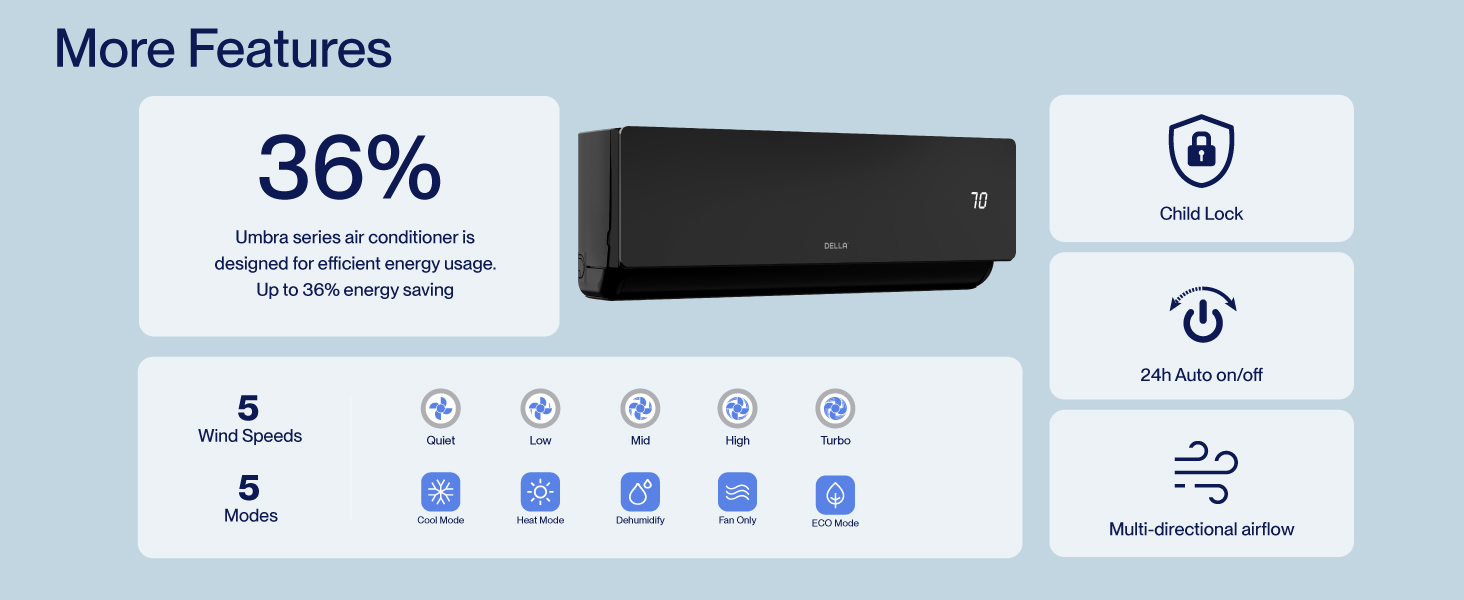
Figure 8.2: DELLA Customer Support Options.