
Fnatic BOLT
Fnatic BOLT Wireless Gaming Mouse User Manual
Увод
This manual provides detailed instructions for the setup, operation, maintenance, and troubleshooting of your Fnatic BOLT Wireless Gaming Mouse. Please read this manual thoroughly before using the product to ensure optimal performance and longevity.
Производ је завршенview
The Fnatic BOLT is a lightweight wireless gaming mouse designed for high performance. It features a durable construction and versatile connectivity options.
Компоненте
- Left and Right Click Buttons
- Точак за померање
- DPI Cycle Button (typically located on the bottom or top)
- Бочна дугмад (напред/назад)
- УСБ-Ц прикључак за пуњење
- Wireless Receiver (dongle)

Слика 1: Врх view of the Fnatic BOLT Wireless Gaming Mouse, showing the main click buttons and scroll wheel.

Слика 2: Под углом view of the Fnatic BOLT Wireless Gaming Mouse, highlighting the two programmable side buttons.

Слика 3: Предња страна view of the Fnatic BOLT Wireless Gaming Mouse, displaying the USB-C charging port.
Сетуп
1. Почетно пуњење
Before first use, it is recommended to fully charge the Fnatic BOLT mouse.
- Connect the provided USB-C cable to the charging port on the front of the mouse.
- Connect the other end of the USB-C cable to a powered USB port on your computer or a USB wall adapter.
- The mouse's indicator light will show charging status (refer to product documentation for specific light patterns). A full charge typically takes a few hours.
2. Повезивање са рачунаром
The Fnatic BOLT supports two wireless connection modes: 2.4 GHz wireless (via USB dongle) and Bluetooth.
2.1. Бежична веза од 2.4 GHz
- Locate the USB wireless receiver (dongle) that came with your mouse.
- Укључите УСБ пријемник у слободан УСБ порт на рачунару.
- Укључите миш помоћу прекидача за напајање који се налази на дну миша.
- The mouse should automatically connect to the receiver. The indicator light will confirm a successful connection.
2.2. Блуетоотх веза
- Уверите се да је Bluetooth на вашем рачунару омогућен.
- Turn on the mouse and switch it to Bluetooth mode (refer to the mouse's bottom switch or button for mode selection).
- На рачунару идите на подешавања Bluetooth-а и потражите нове уређаје.
- Select "Fnatic BOLT" from the list of available devices to pair.
- The mouse's indicator light will confirm successful pairing.
Упутство за употребу
ДПИ Адјустмент
The Fnatic BOLT mouse allows you to adjust its Dots Per Inch (DPI) sensitivity. This mouse features 4 preset DPI levels.
- Locate the DPI cycle button, typically on the bottom of the mouse.
- Press the DPI button to cycle through the available sensitivity settings.
- An indicator light (often on the scroll wheel or top of the mouse) may change color or flash to indicate the current DPI level.
Функције дугмета
- Леви клик: Примарна акција, селекција.
- Десни клик: Context menu, secondary action.
- Клик на точкић за скроловање: Middle click, often used for opening links in new tabs or specific in-game functions.
- Померање горе/доле: Navigating documents or web странице.
- Бочна дугмад: Default to Forward/Back in web browsers. These can often be customized via software (if available).
Управљање напајањем
- To conserve battery life, turn off the mouse using the power switch when not in use for extended periods.
- The mouse may enter a sleep mode after a period of inactivity. Move the mouse or click a button to wake it up.
- Monitor the battery indicator (if available) to know when to recharge.
Одржавање
Чишћење
- Редовно чистите површину миша меком, сувом крпом која не оставља влакна.
- За тврдокорну прљавштину, благо дampОбришите крпу водом или благим раствором за чишћење. Избегавајте јаке хемикалије.
- Clean the optical sensor on the bottom of the mouse with a cotton swab to ensure accurate tracking.
- Не дозволите да течности уђу у унутрашње компоненте миша.
Баттери Царе
- Избегавајте често потпуно пражњење батерије.
- Чувајте миш на хладном и сувом месту када га не користите дуже време.
- Не излажите миш екстремним температурама.
Решавање проблема
Миш не реагује
- Проверите батерију: Ensure the mouse is charged. Connect it to the USB-C cable and allow it to charge for a period.
- Прекидач: Verify the mouse's power switch is in the "ON" position.
- Wireless Connection (2.4 GHz):
- Уверите се да је USB пријемник безбедно прикључен у исправан USB порт. Покушајте са другим USB портом.
- Ensure the mouse is within range of the receiver.
- Avoid sources of interference (e.g., other wireless devices, large metal objects).
- Блуетоотх веза:
- Уверите се да је Bluetooth на вашем рачунару омогућен.
- Check if the mouse is in Bluetooth pairing mode or already paired. Re-pair if necessary.
- Remove and re-add the device in your computer's Bluetooth settings.
- Поново покрени: Поново покрените рачунар.
Нетачно праћење
- Очистите сензор: Очистите оптички сензор на дну миша.
- Површина: Ensure you are using the mouse on a suitable surface. Highly reflective or uneven surfaces can affect tracking. A mouse pad is recommended.
- ДПИ подешавање: Adjust the DPI setting to a level that suits your preference and task.
Кратко трајање батерије
- Пуњење: Уверите се да је миш потпуно напуњен.
- Искључивање: Remember to turn off the mouse when not in use.
- Употреба: High-intensity usage or certain settings might consume more power.
Спецификације
| Феатуре | Детаљ |
|---|---|
| Бранд | Фнатиц |
| Назив модела | FnaticGear BOLT |
| Број модела ставке | БОЛТ |
| Боја | бела |
| Технологија повезивања | Bluetooth, Wi-Fi (2.4 GHz Wireless) |
| Технологија детекције покрета | Оптицал |
| Број дугмади | 6 |
| Оријентација руке | Тачно |
| Посебне карактеристике | Лагана |
| Врста извора напајања | Wireless (Rechargeable Battery) |
| Батерије укључене | Yes (1 Lithium Metal battery) |
| Садржај енергије литијумске батерије | 470 Милиamp Сати (мАх) |
| Димензије производа | КСНУМКС к КСНУМКС к КСНУМКС цм; КСНУМКС г |
| Компатибилни уређаји | Лаптоп, лични рачунар |
| Оперативни системи | Linux, Windows 7, Windows XP (and newer) |
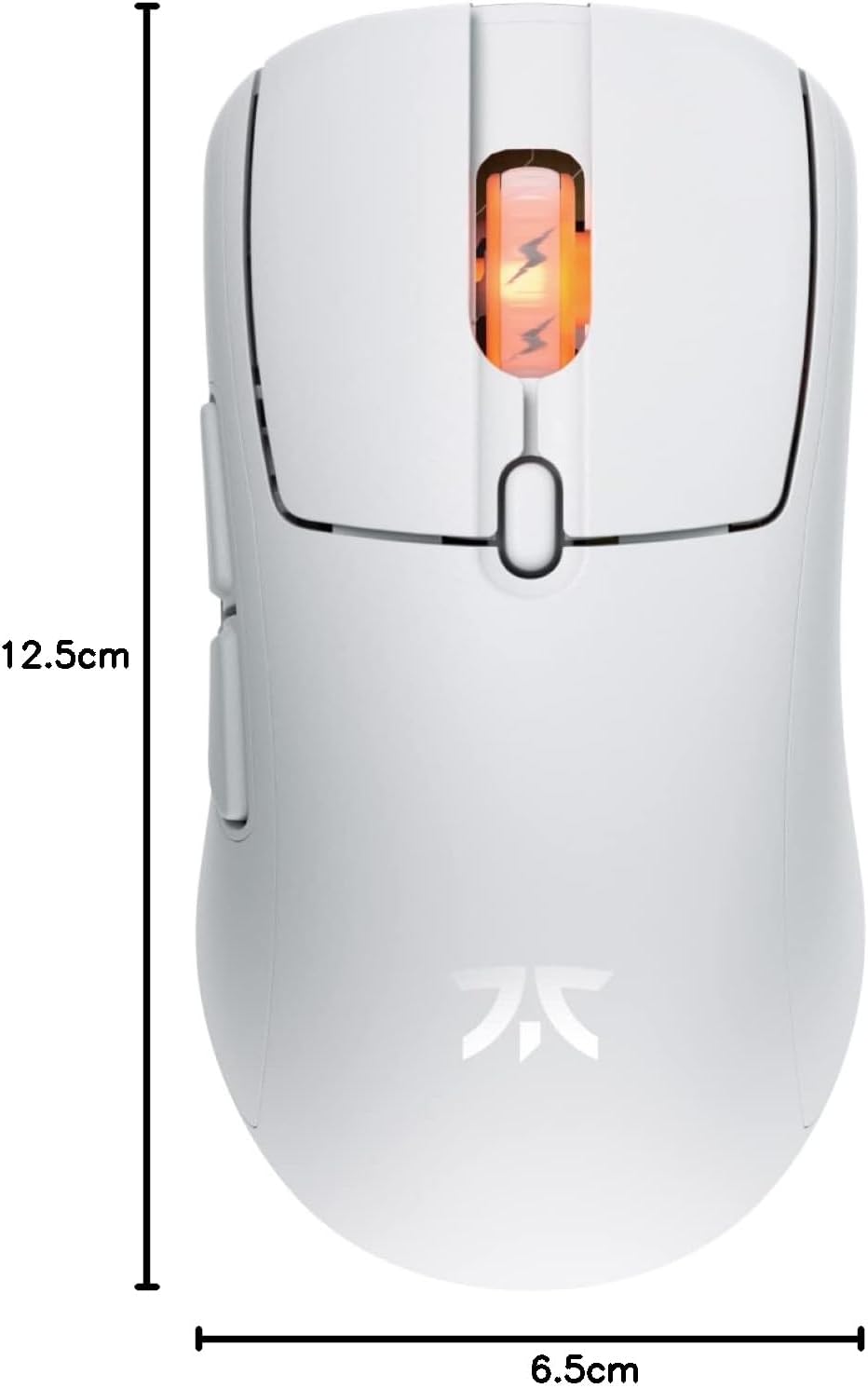
Figure 4: Diagram showing the dimensions of the Fnatic BOLT Wireless Gaming Mouse.
Гаранција и подршка
For information regarding warranty coverage and technical support, please refer to the official Fnatic webсајт или гарантни лист који је испоручен уз ваш производ.
You can typically find support resources, FAQs, and contact information on the manufacturer's official support pages.
Ask a question about this manual
Ask about setup, troubleshooting, compatibility, parts, safety, or missing instructions. Manuals+ will review the question and use this page’s manual context to help answer it.