
T-Dagger T-TGK315
T-Dagger Bora T-TGK315 Mechanical Gaming Keyboard User Manual
Model: T-TGK315 | Brand: T-Dagger
1. Увод
This manual provides detailed instructions for the T-Dagger Bora T-TGK315 Mechanical Gaming Keyboard. Please read this manual carefully before using the product to ensure proper operation and to maximize its features. This keyboard is designed for gaming, offering a compact Tenkeyless (TKL) layout and vibrant RGB backlighting.
2. Садржај пакета
Молимо вас да проверите пакет за следеће ставке:
- T-Dagger Bora T-TGK315 Mechanical Gaming Keyboard
- Micro USB to USB-A Cable (1.6 meters, detachable)
- Кеицап Пуллер
- Свитцх Пуллер
- 5 x Replaceable Switches (T-Dagger Blue or Red, depending on model)
- Кориснички приручник (овај документ)
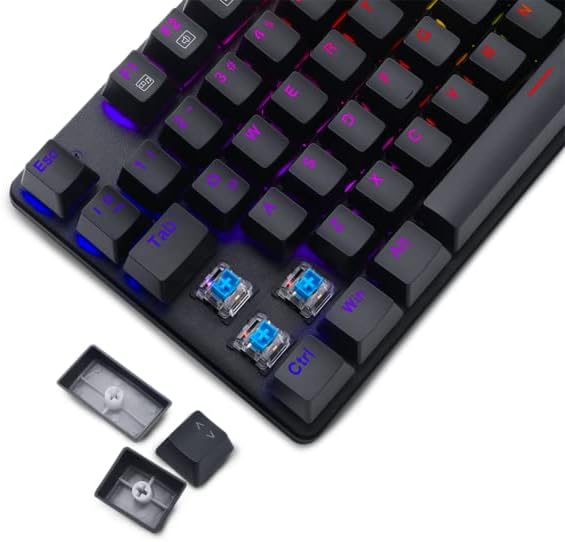
Image: T-Dagger Bora T-TGK315 keyboard showing the detachable USB cable and included accessories like the keycap and switch pullers.
3. Производ је готовview
The T-Dagger Bora T-TGK315 is a Tenkeyless (TKL) mechanical keyboard, meaning it lacks a dedicated numeric keypad, saving valuable desk space. It features durable T-Dagger mechanical switches (50 million click lifespan) and vibrant RGB backlighting.

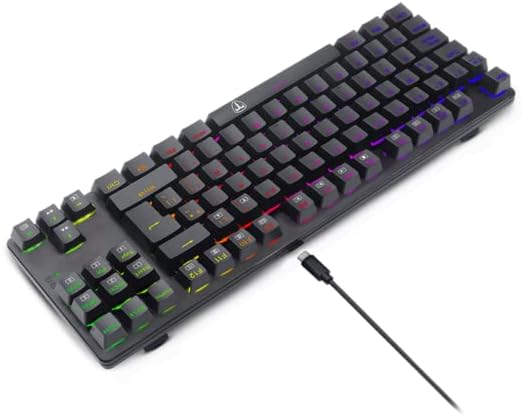
Слика: Одозго надоле view of the T-Dagger Bora T-TGK315 keyboard, showcasing its compact layout and illuminated RGB keys.

Слика: Под углом view of the T-Dagger Bora T-TGK315 keyboard, highlighting its design and RGB lighting effects.
Кључне карактеристике:
- Дизајн без кључа (TKL): Compact form factor for more mouse space.
- T-Dagger Mechanical Switches: High durability (50 million clicks) with options for Blue (tactile and clicky) or Red (linear and smooth).
- RGB позадинско осветљење: Прилагодљиви светлосни ефекти.
- Full Key Rollover & Anti-Ghosting: Ensures every keypress is registered accurately.
- Мултимедијални тастери: Accessible via FN key combinations.
- Закључавање Виндовс тастера: Prevents accidental presses during gaming.
- Double-Shot Injection Keycaps: Legends won't fade or wear off.
- Reinforced ABS Plastic Construction: Durable build.
- Detachable USB Cable: For easy transport and replacement.
4. Водич за подешавање
- Распакујте тастатуру: Пажљиво извадите тастатуру и сву додатну опрему из паковања.
- Повежите кабл: Insert the Micro USB end of the provided cable into the port on the back of the keyboard.
- Повежите се са рачунаром: Укључите УСБ-А крај кабла у слободан УСБ порт на рачунару.
- Инсталација драјвера: The keyboard is plug-and-play. Your operating system will automatically detect and install the necessary drivers. No additional software is required for basic functionality.
- Пласман: Place the keyboard on a stable, flat surface. Adjust the kickstands on the back if you prefer an angled typing position.
5. Упутство за употребу
5.1. Контрола RGB позадинског осветљења
The T-Dagger Bora T-TGK315 features various RGB lighting modes and brightness levels. Use the following key combinations:
- ФН + ИНС: Промените различите светлосне ефекте.
- ФН + ХОМЕ: Change lighting color (for static modes).
- ФН + ПГУП: Повећајте осветљеност.
- ФН + ПГДН: Смањите осветљеност.
- ФН + ДЕЛ: Подесите брзину осветљења (за динамичке режиме).

Image: The T-Dagger Bora T-TGK315 keyboard illuminated with colorful RGB lighting, integrated into a gaming environment.
5.2. Multimedia and Function Keys
Access multimedia and system functions by holding the FN key and pressing the corresponding F-key:
| Комбинација тастера | Функција |
|---|---|
| ФН + Ф1 | Мој рачунар |
| ФН + Ф2 | Pretraga |
| ФН + Ф3 | Калкулатор |
| ФН + Ф4 | Медиа Плаиер |
| ФН + Ф5 | Превиоус Трацк |
| ФН + Ф6 | Нект Трацк |
| ФН + Ф7 | Пусти/Паузирај |
| ФН + Ф8 | Стани |
| ФН + Ф9 | Муте |
| ФН + Ф10 | Утишавање звука |
| ФН + Ф11 | Волуме Уп |
| ФН + Ф12 | тастатура лоцк |
5.3. Закључавање тастера Windows
To prevent accidental presses of the Windows key during gaming, you can lock it:
- ФН + ВИН: Toggles the Windows key lock on/off.
5.4. Replacing Switches and Keycaps
The T-Dagger Bora T-TGK315 supports hot-swappable switches, allowing you to change them without soldering. Use the included tools:
- Уклоните капицу тастатуре: Use the keycap puller to gently pull the keycap straight up.
- Уклоните прекидач: Use the switch puller to grasp the clips on the top and bottom of the switch. Gently rock and pull the switch straight up.
- Уметни нови прекидач: Поравнајте пинове новог прекидача са отворима на штампаној плочи. Чврсто притисните док прекидач не кликне на своје место. Уверите се да пинови нису савијени.
- Замена тастера: Press the keycap onto the new switch stem until it is secure.
Слика: Крупни план view of the T-Dagger Bora T-TGK315 keyboard demonstrating the hot-swappable mechanical switches and keycap removal process.
6. Одржавање и њега
- Чишћење: Use a soft, dry cloth to wipe the keyboard surface. For deeper cleaning, you can remove keycaps and use compressed air to clear debris from under the switches.
- Избегавајте течности: Do not spill liquids on the keyboard. If a spill occurs, immediately disconnect it from your computer and allow it to dry completely before reconnecting.
- Складиштење: Чувајте тастатуру на хладном и сувом месту, даље од директне сунчеве светлости и екстремних температура.
- Нега каблова: Избегавајте прекомерно савијање или увијање USB кабла како бисте спречили оштећења.
КСНУМКС. Решавање проблема
- Тастатура не реагује:
- - Уверите се да је USB кабл безбедно повезан и са тастатуром и са рачунаром.
- Try plugging the keyboard into a different USB port.
- Поново покрените рачунар.
- Test the keyboard on another computer to rule out system-specific issues. - RGB lighting not working or stuck:
- - Ensure the keyboard is properly connected.
- Try cycling through lighting modes using FN + INS.
- Increase brightness using FN + PGUP.
- Disconnect and reconnect the keyboard. - Certain keys not working:
- - If you have recently replaced a switch, ensure it is fully seated and its pins are not bent.
- Try replacing the non-functional switch with one of the spare switches provided.
- Clean around the affected key with compressed air to remove any debris. - Windows key is disabled:
- - Press FN + WIN to toggle the Windows key lock on or off.
8. Спецификације
| Феатуре | Детаљ |
|---|---|
| Модел | T-TGK315 (Bora) |
| Тип тастатуре | Механички |
| Тип прекидача | T-Dagger Blue (50g actuation force) or Red |
| Пребаците животни век | 50 милиона кликова |
| Кеи Ролловер | Full Key Rollover with 100% Anti-Ghosting |
| Позадинско осветљење | РГБ |
| Лаиоут | Десет кључева (TKL) |
| Повезивање | USB (Detachable Micro USB to USB-A cable) |
| Цабле Ленгтх | 1.6 метара |
| Материјал | Reinforced ABS Plastic |
| Димензије (Д к Ш к В) | 355 к 124 к 28 мм (приближно 13.976 к 4.88 к 1.1 инча) |
| Тежина | 570 г (приближно 1.26 фунте) |
| Кеицапс | Double-shot injection, laser engraved |
| софтвер | Није потребно |
| Укључене компоненте | Manual, Keycap Puller, Switch Puller, 5x Spare Switches, USB Cable |
9. Гаранција и подршка
For warranty information and technical support, please refer to the warranty card included with your product or visit the official T-Dagger webсајт. Сачувајте рачун као доказ о куповини.
Official T-Dagger Webсајт: ввв.т-даггер.цом
Ask a question about this manual
Ask about setup, troubleshooting, compatibility, parts, safety, or missing instructions. Manuals+ will review the question and use this page’s manual context to help answer it.