
Увод
The T-Dagger Arena T-TGK321 is a compact 60% mechanical gaming keyboard designed for performance and versatility. Featuring T-Dagger Brown mechanical switches, this keyboard offers a tactile and quiet typing experience with a durability of 50 million clicks. Its 61-key layout provides maximum desk space while retaining full functionality through FN key combinations. This manual will guide you through the setup, operation, maintenance, and troubleshooting of your T-Dagger Arena keyboard.
Садржај пакета
Молимо вас да означите поље за следеће ставке:
- T-Dagger Arena T-TGK321 Mechanical Gaming Keyboard
- USB-C to USB-A Cable (1.5 meters, detachable)
- Кеицап Пуллер
- Свитцх Пуллер
- Кориснички приручник (овај документ)
Сетуп
- Распакујте тастатуру: Пажљиво извадите тастатуру и сву додатну опрему из паковања.
- Повежите кабл: Insert the USB-C end of the provided cable into the port on the keyboard. Connect the USB-A end of the cable to an available USB port on your computer.
- Препознавање система: Your computer should automatically detect and install the necessary drivers for the keyboard. This process may take a few moments. The keyboard is compatible with Windows 10 and later operating systems.
- Тест функционалност: Once recognized, the keyboard's rainbow backlighting should illuminate. Test a few keys to ensure proper operation.
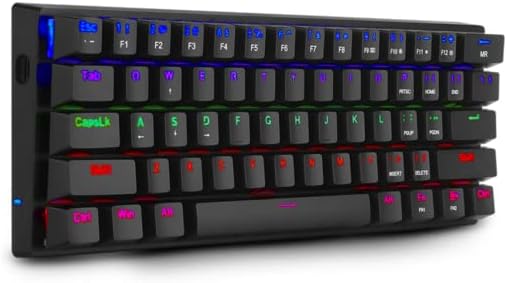
Image: The T-Dagger Arena T-TGK321 keyboard connected and illuminated with rainbow backlighting.
Упутство за употребу
The T-Dagger Arena T-TGK321 features a 60% layout, meaning some functions are accessed via the Function (FN) key. The keyboard supports full N-key rollover, ensuring every keypress is registered accurately during intense gaming sessions.
Комбинације тастера FN
To access secondary functions, press and hold the FN key, then press the desired key. The keyboard features a double FN key for enhanced accessibility.
- FN + Number Keys (1-0): Access F1-F10 functions.
- FN + - (minus) / = (equals): Access F11 / F12 functions.
- FN + P / [ / ] / ; / ' / , / . / /: Access various special characters or functions depending on the specific keycap legends.
- FN + тастери са стрелицама: Typically used for navigation (Home, End, Page Up, Page Down) or media controls. Refer to keycap legends for exact functions.
- ФН + Виндовс тастер: Закључава или откључава Windows тастер како би се спречило случајно притискање током играња.
Контрола позадинског осветљења
The keyboard features vibrant rainbow backlighting. Specific key combinations, often involving the FN key and other designated keys (e.g., P, [), are used to cycle through lighting modes, adjust brightness, or change speed. Consult the keycap legends for specific lighting control functions.
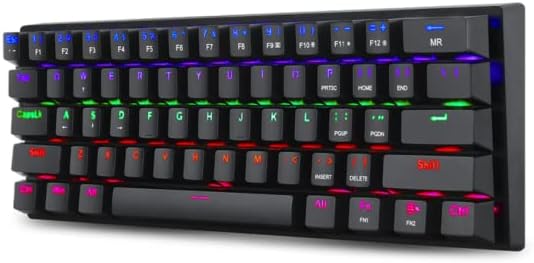
Image: A different perspective of the T-Dagger Arena T-TGK321 keyboard, highlighting the keycap legends for secondary FN functions.

Слика: Детаљна view of the T-Dagger Brown mechanical switches and the durable double-shot injection keycaps.
Одржавање
Правилно одржавање осигурава дуготрајност и оптималне перформансе ваше тастатуре.
- Чишћење: Regularly clean the keyboard with a soft, dry cloth. For deeper cleaning, use the provided keycap puller to remove keycaps and clean dust and debris from the switch area using compressed air or a small brush.
- Отпорност на просипање: The keyboard features a spill-resistant design. While it can withstand minor splashes, it is not waterproof. In case of a spill, immediately disconnect the keyboard from your computer, wipe off any liquid, and allow it to dry completely before reconnecting.
- Нега каблова: Handle the detachable USB-C cable with care. Avoid bending or twisting it excessively to prevent damage.
Решавање проблема
If you encounter issues with your T-Dagger Arena T-TGK321 keyboard, try the following troubleshooting steps:
- Тастатура не реагује:
- Уверите се да је USB кабл безбедно повезан и са тастатуром и са рачунаром.
- Покушајте да повежете тастатуру са другим УСБ портом на рачунару.
- Тестирајте тастатуру на другом рачунару да бисте искључили проблем специфичан за систем.
- Поново покрените рачунар.
- Позадинско осветљење не ради:
- Check if the backlighting has been turned off using an FN key combination.
- Уверите се да је тастатура правилно повезана и да прима напајање.
- Кључеви се не региструју:
- Remove the keycap using the keycap puller and inspect the switch for any obstructions.
- Gently re-seat the keycap.
Спецификације
| Тип | Механичка тастатура за игре |
| Прекидачи | T-Dagger Brown (Tactile, Silent) |
| Сила активирања | 45 грама |
| Трајност | 50 милиона кликова |
| Распоред тастера | 60% компактност, 61 дирка |
| Кеицапс | Double-shot Injection, Laser-Engraved |
| Позадинско осветљење | Раинбов РГБ |
| Кабл | Detachable USB-C to USB-A, PVC, 1.5 meters |
| Н-Кеи Ролловер | Пун |
| Изградња | Reinforced ABS Plastic |
| Spill-Resistant | Да |
| Распоред тастатуре | енглески |
| Тежина | 390 грама |
| Димензије (Д к Ш к В) | 293 к 104 к 35 мм |
| Компатибилност оперативног система | Виндовс 10 |

Image: The T-Dagger Arena T-TGK321 keyboard positioned on a gaming desk alongside a gaming mouse.
Гаранција и подршка
For warranty information or technical support, please refer to the official T-Dagger webсајт или контактирајте локалног продавца. Сачувајте рачун као доказ о куповини за евентуалне рекламације по гаранцији.