
Увод
This manual provides detailed instructions for the setup, operation, and maintenance of your TOMLOV DM201 HDMI Digital Microscope. Please read this manual thoroughly before using the device to ensure proper function and longevity.
Производ је завршенview
The TOMLOV DM201 is a versatile digital microscope featuring a 7-inch HD screen, 16MP camera, and dual HDMI/USB output. It is designed for various applications including coin inspection, soldering, and general observation.
Кључне карактеристике:
- 7-inch HD IPS Screen: Provides clear and vivid images with a wide viewугао уласка.
- 16MP HD камера: Captures high-resolution photos and videos.
- 2-1200X Magnification: Adjustable magnification for observing fine details.
- Двоструки систем осветљења: Equipped with 6 LED lights around the lens and 2 adjustable side lights for optimal lighting.
- HDMI/USB Output: Connects to external monitors (HDMI) or computers (Windows/Mac via USB) for larger viewинг.
- Продужна цев: Included for increased working distance, ideal for viewing entire coins.
- Паметни даљински управљач: Allows for hands-free operation, photo/video capture, and settings adjustment.
- Подесиво постоље и монитор: Ergonomic design for flexible positioning and comfortable viewинг.
- 32GB Micro-SD Card: Included for saving captured images and videos.
Садржај пакета:

слика: Contents of the TOMLOV DM201 package, including the microscope unit, bracket, base plate, extension tube, remote control, user manual, HDMI cable, USB cable, lens cleaning cloth, 5V charger, and light barrier.
Молимо вас да проверите да ли се у вашем пакету налазе све доле наведене ставке:
- DM201 Microscope Unit
- Подесиви носач
- Основна плоча
- Ектенсион Тубе
- Ремоте Цонтрол
- Упутство за употребу
- ХДМИ кабл
- УСБ кабл
- Крпа за чишћење сочива
- КСНУМКСВ пуњач
- Лигхт Барриер
- 32GB Micro-SD Card (pre-installed or separate)
Упутства за подешавање
1. Скупштина:
Follow these steps to assemble your TOMLOV DM201 Digital Microscope:
- Attach the adjustable bracket to the base plate using the provided screws.
- Slide the microscope unit onto the vertical rod of the bracket. Secure it at the desired height using the locking knob.
- Connect the two flexible side LED lights to the designated ports on the base plate. Position them to illuminate your observation area.
- If observing larger objects like entire coins, insert the extension tube between the microscope lens and the main unit to increase the working distance.

слика: Fully assembled TOMLOV DM201 Digital Microscope with the 7-inch screen, main lens, flexible side lights, and remote control. An extension tube and 32GB Micro-SD card are also shown separately.
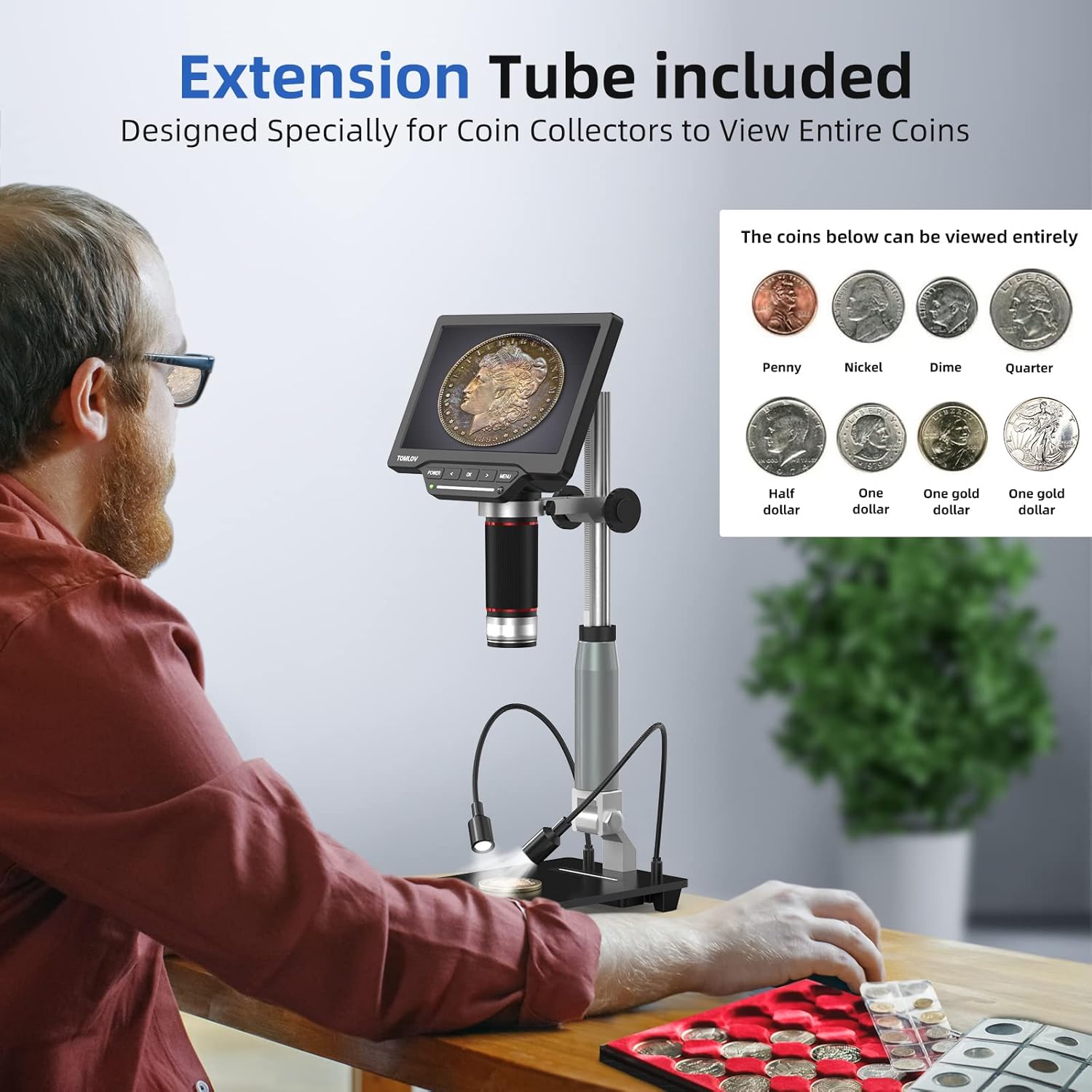
слика: A user observing a coin using the TOMLOV DM201 microscope with the extension tube installed, demonstrating its capability to view entire coins.
2. Укључивање:
Connect the 5V charger to the microscope's power input and plug it into a power outlet. Press and hold the ПОВЕР button on the microscope unit to turn it on. The screen will illuminate.
3. External Display Connection (Optional):
The DM201 supports output to external displays via HDMI or USB.
- ХДМИ излаз: Connect the provided HDMI cable from the microscope's HDMI port to an HDMI-enabled TV or monitor. The microscope display will automatically switch to the external screen.
- USB Output (PC/Mac): Connect the provided USB cable from the microscope's USB port to your computer.
- Виндовс 10: Open the default "Windows Camera" application.
- мацОС: Open the "Photo Booth" application.

слика: The TOMLOV DM201 microscope connected to a large external monitor via HDMI, showcasing its dual output capability for a larger viewинг искуство.
Упутство за употребу
1. Основни рад:
- Укључивање/искључивање: Притисните и држите ПОВЕР дугме.
- Подешавање фокуса: Rotate the large focusing knob on the microscope unit to achieve a clear image.
- Magnification (Zoom): The DM201 offers 2X to 1200X magnification. Adjust the distance between the lens and the object, and fine-tune with the focusing knob.
- Навигација у менију: Користите МЕНУ дугме за приступ подешавањима. Користите ЛЕВО и ДЕСНО arrow buttons to navigate, and OK да бисте потврдили изборе.

слика: A user demonstrating the 2X-1200X zoom capability of the TOMLOV DM201 microscope, observing a peacock feather on the screen.
2. Lighting Adjustment:
The microscope features a dual illumination system:
- Top LED Lights: 6 LEDs surround the main lens. Their brightness can be adjusted via the microscope's controls or remote.
- Side Flexible Lights: 2 adjustable gooseneck lights provide additional illumination. These can be positioned to reduce shadows and highlight specific features of the object.

слика: Diagram illustrating the dual illumination system of the TOMLOV DM201, showing both the top LED lights and the two flexible side lights, highlighting their versatility.
3. Снимање фотографија и видео записа:
The DM201 can capture images up to 16MP and record videos at 1080p 30fps or 720p 60fps. All captures are saved to the included 32GB Micro-SD card.
- Снимите фотографију: У живо view режиму, притисните OK button on the microscope or the camera button on the remote control.
- Сними видео: У живо view режиму, притисните МЕНУ button to switch to video mode (indicated by a video icon). Then, press OK or the video button on the remote to start/stop recording.
- Репродукција: Access the gallery/playback mode via the МЕНУ дугме за поновноview заробљени медији.

слика: A collage of images and video frames captured by the TOMLOV DM201, demonstrating its capability to record various subjects like coins, insects, electronic components, and plants.
4. Коришћење даљинског управљача:
The remote control provides convenient access to functions without touching the microscope, minimizing vibrations during capture.
- Снага: Turn the microscope on/off.
- Фото/Видео: Switch between photo and video modes, and trigger capture.
- Навигација: Control menu navigation and settings adjustments.
- Осветљеност: Adjust the intensity of the LED lights.
Одржавање
- Чишћење сочива: Use the provided lens cleaning cloth or a soft, lint-free cloth specifically designed for optics. Do not use abrasive materials or harsh chemicals.
- Чишћење екрана: Wipe the screen gently with a microfiber cloth. Avoid excessive pressure.
- Генерално чишћење: Use a soft, dry cloth to wipe the microscope body and stand.
- Складиштење: Store the microscope in a clean, dry, and dust-free environment when not in use. Avoid extreme temperatures and direct sunlight.
- Одржавање батерије: The microscope contains a Lithium Polymer battery. For optimal battery life, avoid fully discharging the battery frequently and store it with a partial charge if not used for extended periods.
Решавање проблема
| Проблем | Могући узрок | Решење |
|---|---|---|
| Microscope does not power on. | Проблем са слабом батеријом или адаптером за напајање. | Ensure the microscope is fully charged or connected to a working power outlet. Check the power adapter and cable. |
| Слика је мутна. | Incorrect focus or working distance. | Rotate the focusing knob to adjust focus. Adjust the height of the microscope unit on the stand. Ensure the object is within the working distance. |
| No image on external monitor/PC. | Incorrect cable connection or software issue. | Verify HDMI/USB cable connections. For PC/Mac, ensure the correct application ("Windows Camera" or "Photo Booth") is open and selected the microscope as the input device. |
| Не могу да сачувам фотографије/видео записе. | SD card full, not inserted, or corrupted. | Check if the 32GB Micro-SD card is properly inserted. Ensure there is sufficient space. Format the SD card (this will erase all data) or replace it if corrupted. |
| Даљински управљач не ради. | Battery depleted or line of sight blocked. | Replace the remote control battery. Ensure there is a clear line of sight between the remote and the microscope's IR receiver. |
Спецификације
| Назив модела | ДМ201 |
| Бранд | ТОМЛОВ |
| Величина екрана | 7-инчни ХД ИПС |
| Резолуција камере | 16 мегапиксела |
| Опсег увећања | 2Кс до 1200Кс |
| Излазни портови | ХДМИ, УСБ |
| Компатибилни уређаји | HDMI Projector & Monitor, Laptop, Personal Computer, Television |
| Складиштење | Микро-СД картица од 32 ГБ (укључена) |
| Извор светлости | LED (6 top, 2 flexible side) |
| Извор напајања | Напаја се батеријама (1 литијум-полимерска батерија укључена) |
| Материјал | Метал |
| Боја | Сребро |
| Димензије артикла | 28.1 к 26.9 к 9.8 цм |
| Тежина артикла | 1.64 кг |
Гаранција и подршка
TOMLOV products are designed for reliability and performance. For warranty information and technical support, please refer to the official TOMLOV webсајт или директно контактирајте њихову корисничку службу. Сачувајте рачун као доказ о куповини за потребе гаранције.
За даљу помоћ, посетите: ввв.томлов.цом