
1. Увод
This manual provides detailed instructions for the operation and maintenance of your Jectse Bluetooth Speaker Alarm Clock. Please read this manual thoroughly before using the product to ensure proper function and longevity.
The Jectse Bluetooth Speaker Alarm Clock is a multi-functional device featuring a digital clock, dual alarm capabilities, an LED mirror display, FM radio, and Bluetooth connectivity for audio playback. It also supports music playback via a memory card.
2. Производ је готовview
2.1. Кључне карактеристике
- Блуетоотх 5.0 повезивање: Бежично стримовање звука са компатибилних уређаја.
- Двоструки будилник: Подесите два независна аларма за различита времена буђења.
- LED Mirror Display: Clear digital time display that also functions as a mirror.
- ФМ радио: Digitally tuned FM radio (87.5MHz-108MHz) for news, music, and weather.
- Репродукција меморијске картице: Supports music playback from a memory card (up to 32GB, not included).
- Уграђена пуњива батерија: 1600mAh lithium battery for portable use.
- Компактан дизајн: Product dimensions are approximately 116 x 51 x 33mm (4.6 x 2 x 1.3 inches).
2.2. Садржај пакета
- 1 x Jectse Alarm Clock Speaker
- 1 к Мицро УСБ кабл за пуњење
- 1 x Упутство за употребу (овај документ)
2.3. Дијаграм производа
Refer to the image below for an overview компоненти и контрола уређаја.
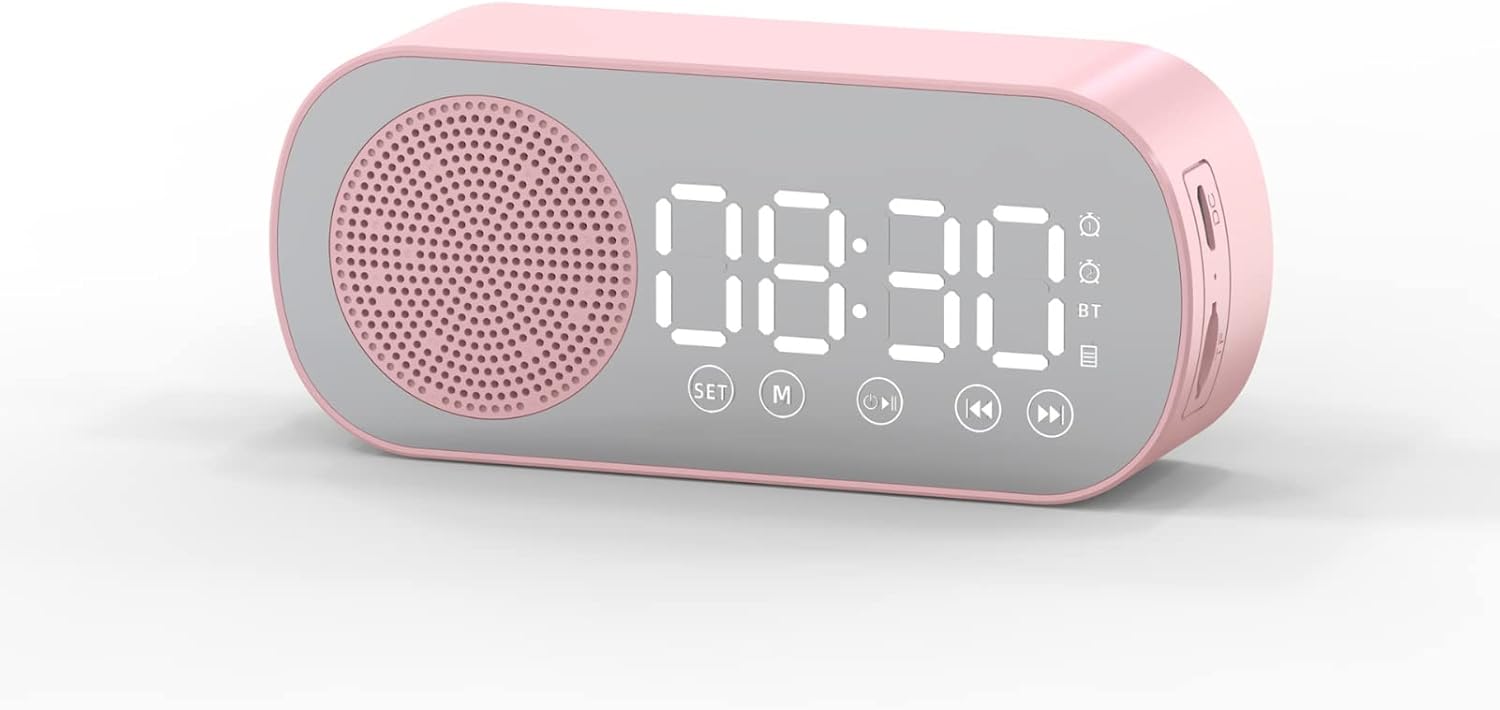
Слика 1: Фронт view of the Jectse Bluetooth Speaker Alarm Clock, showing the speaker grille, LED display, and control buttons (SET, M, Play/Pause, Previous, Next).

Слика 2: Сиде view of the alarm clock with dimensions: 116mm (4.6in) length, 51mm (2in) height, and 33mm (1.3in) depth.
3. Подешавање
3.1. Почетно пуњење
Before first use, fully charge the device. Connect the provided Micro USB charging cable to the charging port on the side of the alarm clock and the other end to a standard USB power adapter (not included).

Слика 3: The alarm clock and its Micro USB charging cable.
The battery indicator on the LED display will show charging status. A full charge typically takes a few hours.
4. Упутство за употребу
4.1. Укључивање/искључивање
Притисните и држите Power/Mode (M) дугме за укључивање или искључивање уређаја.
4.2. Подешавање времена
- У режиму сата притисните и држите СЕТ дугме док цифре сати не почну да трепћу.
- Користите Previous (◀◀) и Next (▶▶) дугмад за подешавање сата.
- Притисните тастер СЕТ button again to switch to minute adjustment. Use the Previous (◀◀) и Next (▶▶) дугмад за подешавање минута.
- Притисните тастер СЕТ button a third time to confirm and exit time setting mode.
4.3. Setting Alarms (Dual Alarm Function)
The device supports two independent alarms. Follow these steps for each alarm:

Слика 4: The alarm clock illustrating the dual alarm feature with two distinct alarm settings.
- In clock mode, short press the СЕТ button once to enter Alarm 1 setting mode. The alarm icon and hour digits will flash.
- Користите Previous (◀◀) и Next (▶▶) дугмад за подешавање сата.
- Притисните СЕТ again to adjust minutes. Use Previous (◀◀) и Next (▶▶) прилагодити.
- Притисните СЕТ a third time to select the alarm sound (e.g., buzzer, FM radio). Use Previous (◀◀) и Next (▶▶) да бисте се кретали кроз опције.
- Притисните СЕТ a fourth time to confirm Alarm 1 settings.
- To set Alarm 2, repeat steps 1-5, but short press the СЕТ button twice to enter Alarm 2 setting mode.
- To enable/disable an alarm, short press the СЕТ button until the desired alarm icon flashes, then press the Play/Pause (▶▌▌) дугме да бисте га укључили или искључили.
Note: The alarm volume is independent of the main speaker volume and may be fixed or adjustable within the alarm settings. If the alarm sound is too loud, check if there's an option to adjust it during the alarm setup process.
4.4. Блуетоотх режим
- Притисните тастер Power/Mode (M) button repeatedly until "BT" appears on the display, indicating Bluetooth mode.
- On your mobile device, enable Bluetooth and search for "Jectse Speaker" or a similar device name.
- Select the device to pair. A confirmation sound will indicate successful pairing.
- You can now play audio from your device through the speaker. Use the Play/Pause (▶▌▌), Previous (◀◀), и Next (▶▶) дугмад за контролу репродукције.
4.5. Режим ФМ радија

Слика 5: The alarm clock functioning as an FM radio on a bedside table.
- Притисните тастер Power/Mode (M) button repeatedly until "FM" appears on the display.
- Притисните тастер Play/Pause (▶▌▌) дугме за аутоматско скенирање и чување доступних ФМ станица.
- Користите Previous (◀◀) и Next (▶▶) дугмад за пребацивање између сачуваних станица.
- For better reception, ensure the device is not obstructed and try repositioning it.
4.6. Репродукција меморијске картице
Insert a memory card (Micro SD card, up to 32GB, not included) into the designated slot on the device. The device will automatically switch to memory card mode and begin playing audio fileс. Користити Play/Pause (▶▌▌), Previous (◀◀), и Next (▶▶) дугмад за контролу репродукције.
4.7. Подешавање јачине звука
In any audio playback mode (Bluetooth, FM, Memory Card), press and hold the Previous (◀◀) button to decrease volume or the Next (▶▶) дугме за повећање јачине звука.
4.8. LED Mirror Display

Слика 6: The alarm clock's LED display also functions as a mirror.
The front panel of the device features an LED display that shows the time and other information. When not actively displaying information, the surface can be used as a mirror.

Слика 7: The LED display showing multiple functions and indicators, including time, battery level, and Bluetooth status.
5. Одржавање
- Чишћење: Користите меку, суву крпу за чишћење уређаја. Не користите абразивна средства за чишћење или раствараче.
- Складиштење: Уређај чувајте на хладном и сувом месту, даље од директне сунчеве светлости и екстремних температура.
- Одржавање батерије: Да бисте продужили век трајања батерије, избегавајте често потпуно пражњење батерије. Редовно пуните уређај, чак и ако га не користите дуже време.
- Изложеност води: Овај уређај није водоотпоран. Избегавајте излагање води или високој влажности.
КСНУМКС. Решавање проблема
| Проблем | Могући узрок | Решење |
|---|---|---|
| Уређај се не укључује. | Ниска батерија. | Напуните уређај помоћу приложеног УСБ кабла. |
| Није могуће упаривање преко Bluetooth-а. | Bluetooth not enabled on device or phone; device not in pairing mode. | Ensure the alarm clock is in Bluetooth mode ("BT" displayed) and your phone's Bluetooth is on and searching. Move devices closer. |
| Пријем ФМ радија је лош. | Слаб сигнал; сметње. | Reposition the device. Avoid placing near other electronic devices that may cause interference. |
| Alarm is too loud/quiet. | Alarm volume not adjusted during setup. | Re-enter alarm setting mode and check if there is an option to adjust alarm volume. Some models may have a fixed alarm volume. |
| Дисплеј је тежак за читање. | Lighting conditions; display brightness setting. | Adjust ambient lighting. Check if there is a display brightness setting (refer to specific model instructions if available, not detailed in general description). |
7. Спецификације
| Феатуре | Детаљ |
|---|---|
| Модел | Jectsesb81t679n01182 |
| Материјал | АБС (акрилонитрил бутадиен стирен) |
| Величина производа | Приближно 116 x 51 x 33 мм (4.6 x 2 x 1.3 инча) |
| Тип батерије | Lithium Battery (Built-in) |
| Капацитет батерије | 1600мАх |
| Блуетоотх верзија | 5.0 |
| Режими репродукције | Bluetooth, Memory Card (Max 32G, not included) |
| Режими сата | Digital Clock, Dual Alarm Clock, FM Radio |
| ФМ радио фреквенција | КСНУМКСМХз-КСНУМКСМХз |
| Технологија повезивања | Блуетоотх, УСБ |
| Тежина артикла | 5.3 унци |
8. Гаранција и подршка
За информације о гаранцији и корисничкој подршци, погледајте документацију коју сте добили приликом куповине или контактирајте продавца. Сачувајте рачун као доказ о куповини.