
1. Увод
Хвала вам на куповиниasing the Aogamb D3000 Kids Alarm Clock. This device combines a digital alarm clock, Bluetooth speaker, wake-up light, and sleep sound machine to create a versatile and engaging experience for children's bedrooms. Please read this manual carefully to ensure proper use and maintenance of your device.
Садржај пакета:
- Aogamb D3000 Alarm Clock
- УСБ кабл за пуњење
- Упутство за употребу

Image: The Aogamb D3000 Alarm Clock, USB charging cable, and user manual are shown as included items.
2. Безбедносне информације
- Не излажите уређај екстремним температурама, директној сунчевој светлости или високој влажности.
- Држите уређај даље од воде или других течности.
- Не покушавајте сами да раставите или поправите уређај. Обратите се корисничкој подршци за помоћ.
- Користите само приложени УСБ кабл за пуњење или сертификовани еквивалент.
- Уверите се да је уређај постављен на стабилну површину како бисте спречили пад.
3. Подешавање
Почетно пуњење
Before first use, fully charge the alarm clock using the provided USB cable. Connect the USB cable to the charging port on the back of the device and to a suitable USB power adapter (not included). The charging indicator light will be red during charging and turn blue when fully charged.
Слика: Крупни план view of the USB charging interface located on the back of the alarm clock.
Protective Film Removal
Before operating the device, gently remove the transparent protective film from the black display lens.
Image: A hand is shown peeling off a transparent protective film from the black display area of the alarm clock.
4. Упутство за употребу
Цонтролс Оверview
Familiarize yourself with the buttons located on the top of the alarm clock:
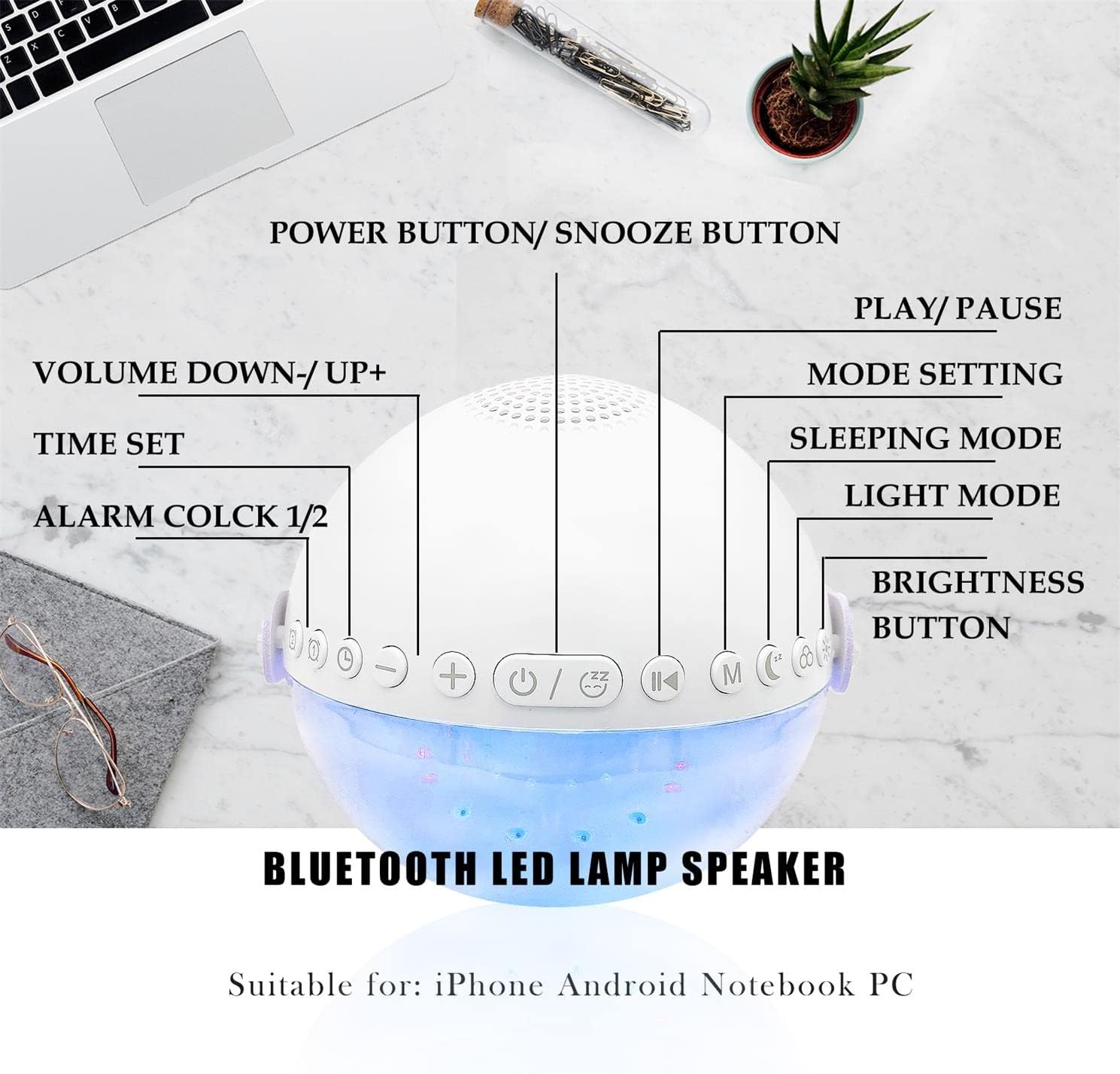
Слика: Изнад главе view of the alarm clock with labels pointing to each button: Power/Snooze, Volume Down/Up, Time Set, Alarm 1/2, Play/Pause, Mode Setting, Sleeping Mode, Light Mode, and Brightness Button.
- Power Button / Snooze Button: Press to power on/off. Short press during an alarm to activate snooze.
- Volume Down (-) / Volume Up (+): Кратко притисните за подешавање јачине звука.
- Временски склоп: Притисните да бисте ушли у режим подешавања времена.
- Alarm 1 / Alarm 2: Press to set or activate/deactivate Alarm 1 or Alarm 2.
- Пусти/паузирај: Controls media playback in Bluetooth or Sound Machine mode.
- Mode Setting (M): Press to cycle through modes (Bluetooth, Sound Machine).
- Режим спавања: Activates sleep mode features.
- Светлосни режим: Cycles through light colors and effects.
- Дугме осветљености: Adjusts display and light brightness.
Подешавање времена
- Притисните тастер Тиме Сет button. The hour display will flash.
- Користите Јачина звука (+) or Смањивање јачине звука (-) дугмад за подешавање сата.
- Притисните Тиме Сет again to confirm the hour and move to minute setting.
- Користите Јачина звука (+) or Смањивање јачине звука (-) дугмад за подешавање минута.
- Притисните Тиме Сет још једном да бисте потврдили и изашли из подешавања времена.
- The clock supports a 24-hour format.
Alarm Setting (Dual Alarms)
The device features two independent alarms. You can customize ringtones, alarm volume, and light color/brightness for each.
- Притисните тастер Аларм 1 or Аларм 2 button to select an alarm. The alarm icon will flash.
- Follow the time setting steps to set the desired alarm time.
- After setting the time, you can customize the alarm sound, volume, and wake-up light settings using the respective buttons (e.g., Лигхт Моде, Волуме +/-).
- Притисните тастер Аларм 1 or Аларм 2 button again to activate/deactivate the alarm. The alarm icon will appear/disappear on the display.
Image: Two panels illustrate customized alarm times: one for waking up at 7:30 AM and another for going to sleep at 10:00 PM, both for Monday to Friday.
Функција одлагања
Када се огласи аларм, притисните дугме Power Button / Snooze Button to activate the snooze function. The alarm will pause for 5 minutes and then sound again. This can be repeated up to three times, after which the alarm will turn off automatically.
Image: The alarm clock is displayed with a clear indication of its snooze function.
Режим Блуетоотх звучника
The alarm clock features advanced Bluetooth 5.0 technology for wireless audio streaming.
- Притисните тастер Mode Setting (M) button repeatedly until the Bluetooth icon appears on the display.
- On your smartphone or Bluetooth-enabled device, search for "Aogamb D3000" in the Bluetooth settings and pair.
- Once connected, you can play music or audio from your device through the alarm clock speaker.
- Користите Пусти / Пауза дугме за контролу репродукције.
- Користите Јачина звука (+) or Смањивање јачине звука (-) дугмад за подешавање јачине звука.

Image: A child and adult are shown with the alarm clock, which is wirelessly connected to a smartphone via Bluetooth, playing music.
Машина за спавање звука
The alarm clock offers 8 soothing natural sounds to aid sleep or relaxation.
- Притисните тастер Mode Setting (M) button repeatedly until the Sound Machine icon appears on the display.
- Кратко притисните на Јачина звука (+) or Смањивање јачине звука (-) buttons to cycle through the 8 available sounds: Rain, Ocean Waves, Birds, Water Stream, White Noise, Cicada, Bonfire, Tick-Tock.
- Дуго притисните Јачина звука (+) or Смањивање јачине звука (-) buttons to adjust the volume of the sleep sounds.
- Притисните тастер Пусти / Пауза button to start or stop the sound.

Image: A child and adult are shown sleeping, with the alarm clock nearby. Icons for 8 natural sounds (Rain, Water Stream, Cicadas, Birds, Ocean Waves, White Noise, Bonfire, Tick-Tock) are displayed, indicating the sleep sound feature.
Wake-up Light / Night Light
The alarm clock features a touch-activated backlight and adjustable colored lights.
- Touch-Activated Backlight: Gently tap the device to activate the backlight for checking the time in the dark.
- Светлосни режим: Притисните тастер Лигхт Моде button to cycle through various light colors (Warm White, Green, Red, Blue, Orange, Yellow) and lighting effects (e.g., breathing lights, flashing light).
- Подесите осветљеност: Притисните тастер Дугме за осветљење to adjust the intensity of the light (3 levels: Low, Middle, High).

Image: The alarm clock is shown displaying various colorful night light options, including 9 different colors, 3 breathing light effects, and 1 flashing light, with adjustable brightness levels (Low, Middle, High).

Image: The alarm clock is shown with various light colors and brightness settings, illustrating its wake-up light functionality.
Sleep Trainer Function (Sun & Moon Icons)
The alarm clock features sun and moon icons on the LED display to help children understand day and night cycles, promoting better sleep habits. The sun icon indicates daytime, and the moon icon indicates nighttime.
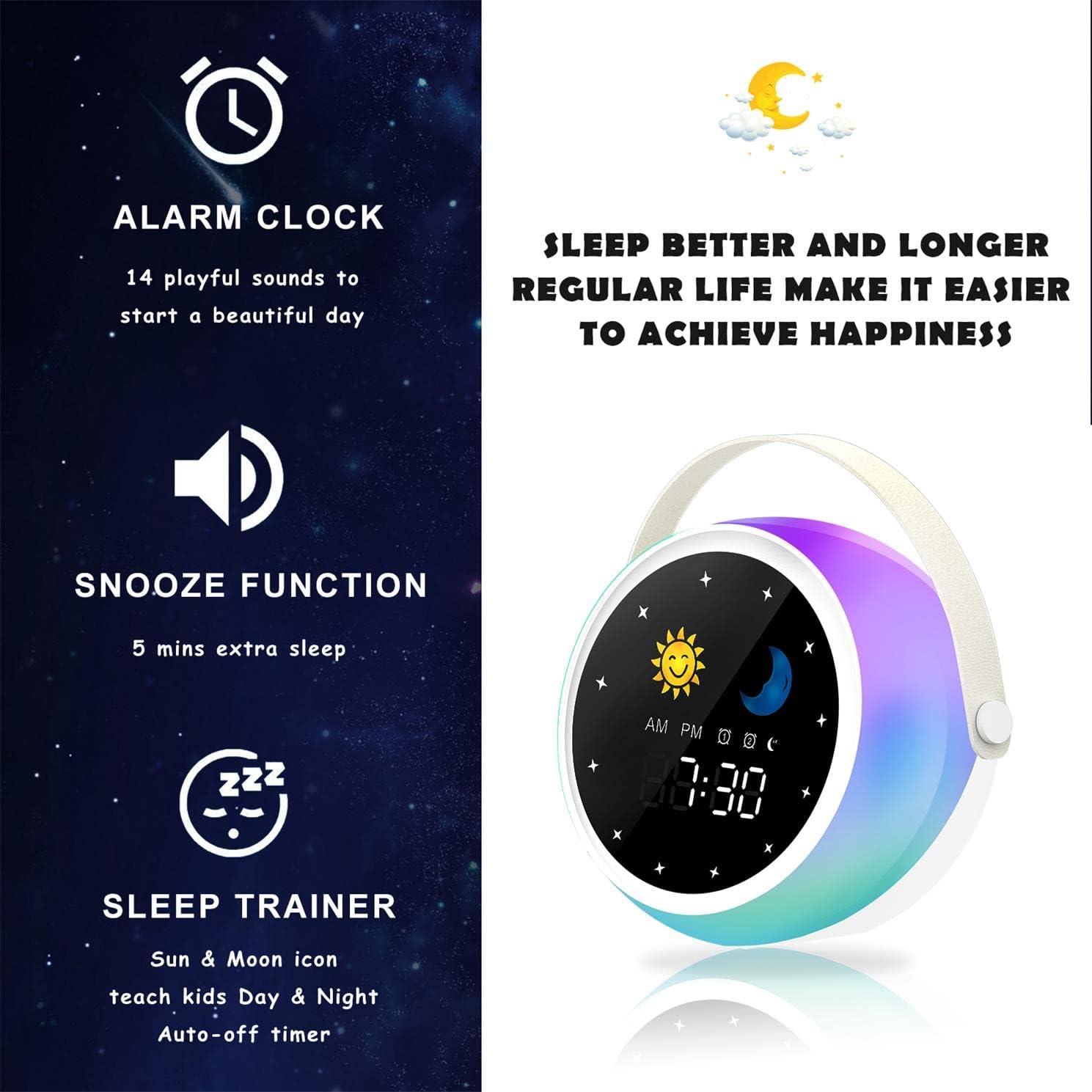
Image: A visual representation of the alarm clock's key features: alarm, snooze, and sleep trainer, with the sun and moon icons visible on the display to teach day and night.

Image: Two panels show the alarm clock display: one for sleep time (10:30 PM with moon icon) and one for wake-up time (7:00 AM with sun icon), illustrating the sleep trainer function.
5. Одржавање
- Очистите уређај меком, сувом крпом. Не користите абразивна средства за чишћење или раствараче.
- Уверите се да је порт за пуњење без прашине и остатака.
- Чувајте уређај на хладном и сувом месту када се не користи дуже време.
КСНУМКС. Решавање проблема
Уређај се не укључује:
- Ensure the device is fully charged. Connect it to a power source using the USB cable.
- Press and hold the Power Button for a few seconds.
Проблеми са Блуетоотх упаривањем:
- Make sure the alarm clock is in Bluetooth mode (Bluetooth icon visible).
- Ensure your smartphone or device's Bluetooth is enabled and within range.
- Try restarting both the alarm clock and your Bluetooth device.
- Заборавите уређај са Блутут листе телефона и покушајте поново да га упарите.
Аларм се не оглашава:
- Verify that the alarm is activated (alarm icon visible on display).
- Check the alarm volume settings.
- Ensure the alarm time is set correctly.
7. Спецификације
| Бранд | Аогамб |
| Број модела | Д3000 |
| Боја | Бела |
| Димензије (Д к Ш к В) | 12 к 12.1 к 10.5 цм |
| Тежина | 430 г |
| Материјал | Цристал |
| Дисплаи Типе | Дигитал |
| Извор напајања | Електрични кабл |
| Посебне карактеристике | Alarm, Charging Port, Snooze, Bluetooth Speaker, Wake-up Light, Sleep Sound Machine |
| Батерије укључене | бр |
8. Гаранција и подршка
This product comes with a standard manufacturer's warranty. For detailed warranty information, please refer to the product packaging or contact Aogamb customer support. If you encounter any issues or have questions not covered in this manual, please reach out to our support team for assistance.
Контакт за корисничку подршку: Please refer to the contact information provided on the product packaging or the official Aogamb webсајту.