
Увод
This manual provides essential information for the safe and efficient operation of your DuraPro 55-Inch Outdoor 4K UHD LED TV. Please read these instructions thoroughly before installation and use, and retain them for future reference.
The DuraPro 55-Inch Outdoor 4K UHD LED TV is designed for outdoor entertainment in partially shaded areas. It features a 4K display with HDR, 500-nit brightness, and a rugged, weatherproof IP54-rated exterior with tempered glass for protection against environmental elements.
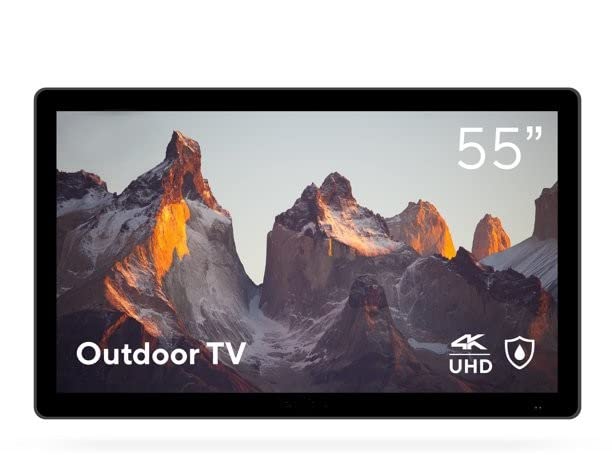
Image: DuraPro 55-Inch Outdoor 4K UHD LED TV.

Image: DuraPro TV mounted on an outdoor wall, showcasinг тхе WebOS smart platform.

Image: DuraPro TV displaying 4K UHD and HDR capabilities.

Image: DuraPro TV demonstrating IP54 weatherproof rating with water resistance.
Кључне карактеристике
- Optimized for Outdoors: Designed for use in outdoor spaces like covered patios and gazebos.
- 4K UHD HDR Screen: Delivers crisp 4K resolution with High Dynamic Range and 500-nit brightness for enhanced clarity.
- Заштита од свих временских услова: IP54-rated exterior and tempered glass screen provide protection against rain, dust, and UV rays.
- Интегрисане компоненте: Includes built-in speakers, an IP55 waterproof remote, and a compatible TV wall mount.
- Повезивање прилагођено кориснику: Equipped with 3 HDMI 2.0 inputs (HDCP 2.2 compatible) and 1 USB input for various media sources.
Шта је у кутији
Проверите да ли су све компоненте присутне пре него што наставите са инсталацијом.
- DuraPro 55-Inch Outdoor 4K UHD LED TV
- Повер Цабле
- IP55 Waterproof Remote Control
- Compatible Wall Mount Bracket

Image: Included wall mount bracket for DuraPro outdoor TV.
Безбедносне информације
Увек се придржавајте основних мера безбедности када користите овај производ како бисте смањили ризик од пожара, струјног удара и повреда особа.
- Do not expose the TV to direct sunlight for extended periods. This TV is designed for partially shaded outdoor areas.
- Обезбедите одговарајућу вентилацију око телевизора. Не блокирајте вентилационе отворе.
- Use only the power cable supplied with the TV. Connect to a grounded outdoor-rated power outlet.
- Не покушавајте сами да сервисирате овај производ. Све сервисирање препустите квалификованом сервисном особљу.
- Keep the remote control dry. While it is IP55 waterproof, prolonged submersion or exposure to harsh chemicals should be avoided.
- Securely mount the TV using the provided wall mount and follow all installation instructions carefully to prevent injury or damage.
Сетуп
1. Монтажа зидног носача
The DuraPro 55-Inch Outdoor TV includes a compatible wall mount. Follow the instructions provided with the wall mount for secure installation. Ensure the mounting surface is structurally sound and capable of supporting the TV's weight (approximately 72 pounds).

Слика: Позади view of DuraPro TV showing VESA mounting points and rugged exterior.
2. Повезивање уређаја
Locate the input ports on the back or side of the TV. Connect your external devices (e.g., streaming box, game console) using HDMI cables. The TV supports HDMI 2.0 and HDCP 2.2 for 4K sources. A USB port is also available for media playback.
- ДВИ: Повежите до три HDMI уређаја.
- УСБ: Insert a USB drive for viewing photos or playing videos.
3. Прикључак за напајање
Connect the supplied power cable to the TV's power input and then to a suitable outdoor-rated, grounded electrical outlet.
4. Почетно укључивање и подешавање мреже
Press the power button on the remote control or on the TV. Follow the on-screen prompts to complete the initial setup, including language selection, time zone, and network connection for smart TV features (WebОС).

Image: DuraPro Outdoor TV with WebOS interface on a patio.
Упутство за употребу
Коришћење даљинског управљача
The included IP55 waterproof remote control allows full functionality of your TV. Familiarize yourself with the button layout for power, volume, channel, input selection, and smart TV navigation.

Image: DuraPro IP55 waterproof remote control with water droplets.
Основне функције телевизора
- Укључивање/искључивање: Притисните тастер Повер дугме.
- Контрола јачине звука: Користите Појачавање/утишавање јачине звука дугмад.
- Избор улаза: Притисните тастер Инпут button to cycle through connected sources (HDMI 1, HDMI 2, HDMI 3, USB).
Карактеристике паметног телевизора (WebОС)
Your DuraPro TV is powered by WebOS, providing access to various streaming applications and smart features. Connect the TV to your home Wi-Fi network during initial setup to enable these functions.
- Кућна контролна табла: Access your favorite apps, inputs, and settings from the home screen.
- Апп Сторе: Download and install additional streaming applications.
- Подешавања мреже: Manage your Wi-Fi connection and other network preferences.

Image: DuraPro TV displaying the WebOS smart TV interface.
Одржавање
Regular maintenance helps ensure the longevity and optimal performance of your outdoor TV.
- Чишћење екрана: Нежно обришите екран меком крпом која не оставља влакна. За тврдокорне мрље, дampОчистите крпу водом или благим, неабразивним средством за чишћење екрана. Не прскајте течност директно на екран.
- Чишћење екстеријера: Wipe the TV's exterior casinг са меким, дamp крпу. Избегавајте јаке хемикалије или абразивна средства за чишћење.
- Заштита од временских прилика: While the TV is IP54-rated, it is designed for partially shaded areas. For prolonged periods of extreme weather (heavy rain, snow, direct intense sunlight), consider using a protective cover (not included) to extend the product's life.
- Управљање кабловима: Ensure all cables are securely connected and routed to prevent water ingress or damage.
Решавање проблема
Ако наиђете на проблеме са телевизором, погледајте следеће уобичајене проблеме и решења пре него што контактирате корисничку подршку.
| Проблем | Могуће решење |
|---|---|
| Нема струје / ТВ се не укључује. |
|
| Нема слике, али је звук присутан. |
|
| Нема звука. |
|
| Даљински управљач не ради. |
|
| Повезивање на Ви-Фи није могуће. |
|
Спецификације
| Феатуре | Детаљ |
|---|---|
| Бранд | DuraPro |
| Број модела | ДП-55 |
| Величина екрана | 55 инча |
| Дисплаи Тецхнологи | ЛЕД |
| Резолуција | 4К УХД |
| Рефресх Рате | 120 Хз |
| Посебна карактеристика | Flat, HDR, Weatherproof (IP54), Tempered Glass |
| Технологија повезивања | 3x HDMI 2.0 (HDCP 2.2), 1x USB |
| Спеакер Типе | Уграђени |
| Аспецт Ратио | 16:9 |
| Димензије производа (Д x Ш x В) | 7 к 45.5 к 28.5 инча |
| Тежина артикла | 72 фунти |
| Боја | Црно |
| Укључене компоненте | Power Cable, Remote, Wall Mount |
Гаранција и подршка
For warranty information and technical support, please refer to the warranty card included with your product or visit the official DuraPro website. You may also contact DuraPro customer service directly for assistance with product registration, troubleshooting, or service requests.
Please note: Specific warranty terms and conditions may vary by region and purchase date. Keep your proof of purchase for warranty claims.