
1. Увод
This manual provides essential instructions for the proper use and maintenance of your LOTUS Smartwatch Model 50003/A. Please read this guide thoroughly before using your smartwatch to ensure optimal performance and longevity.
The LOTUS Smartwatch 50003/A features an intuitive interface and elegant design, offering a variety of smart functions. It is equipped with Bluetooth connectivity, allowing seamless synchronization with your mobile devices. This synchronization enables features such as call and message notifications, music control, and other practical functions for daily life.
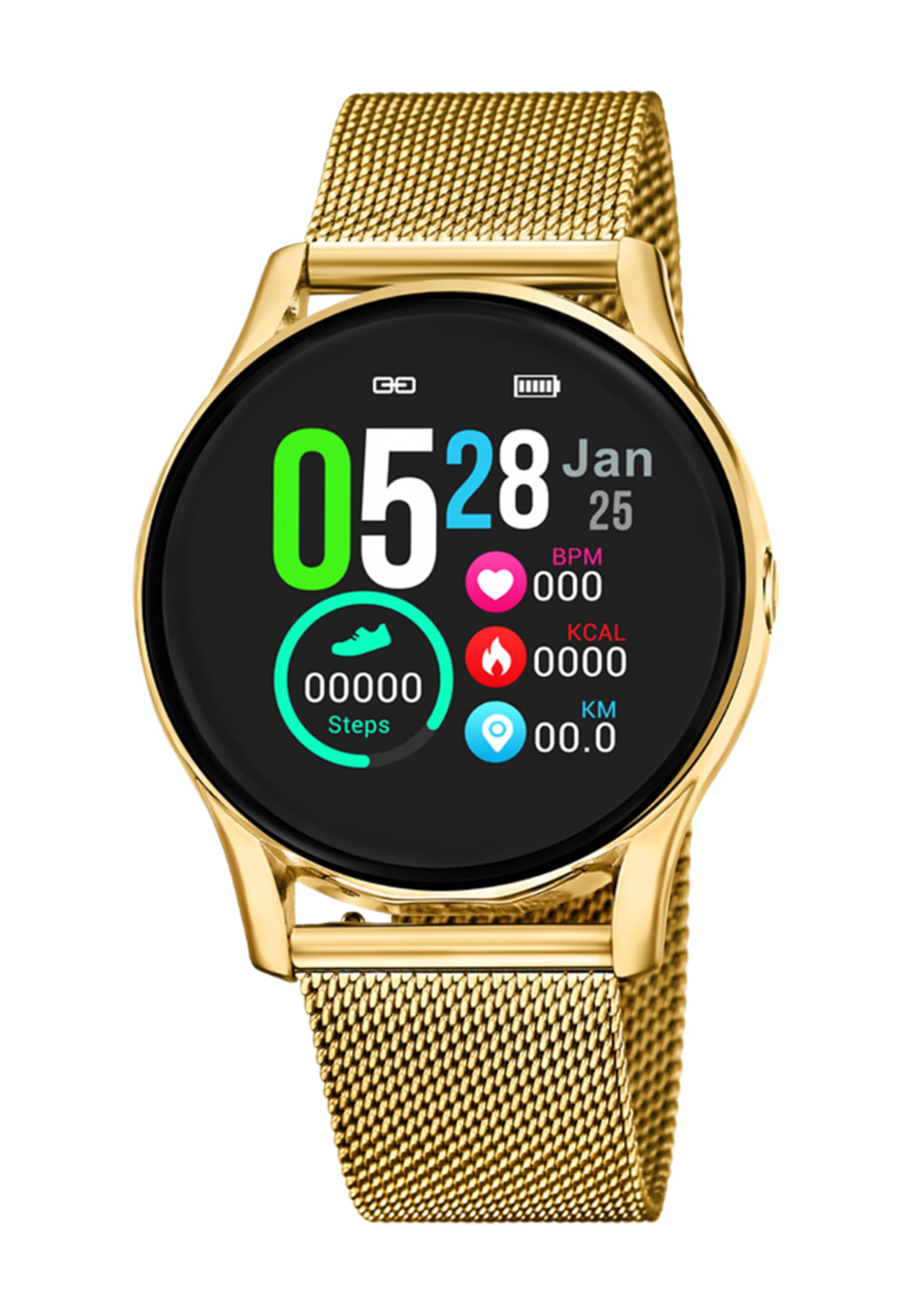
Слика 1.1: Предња страна view of the LOTUS Smartwatch 50003/A.
2. Садржај пакета
Please check the package contents upon unboxing. The standard package for the LOTUS Smartwatch 50003/A should include:
- LOTUS Smartwatch 50003/A
- Кабл за пуњење
- Кориснички приручник (овај документ)
3. Водич за подешавање
3.1. Пуњење паметног сата
Before initial use, fully charge your smartwatch.
- Повежите кабл за пуњење са портом за пуњење на задњој страни паметног сата.
- Укључите други крај кабла за пуњење у УСБ адаптер за напајање (није укључен) или УСБ порт рачунара.
- Екран сата ће приказивати статус пуњења. Сачекајте отприлике 2-3 сата да се сат потпуно напуни.
3.2. Инсталирање пратеће апликације
To unlock all features and synchronize your smartwatch with your smartphone, you need to install the official LOTUS Connected app.
- Scan the QR code provided in the watch packaging or search for "LOTUS Connected" in your smartphone's app store (Google Play Store for Android, Apple App Store for iOS).
- Преузмите и инсталирајте апликацију.
- Пратите упутства на екрану да бисте креирали налог или се пријавили.

Image 3.2: Synchronizing the smartwatch with the companion app on a smartphone.
3.3. Упаривање са вашим паметним телефоном
Ensure Bluetooth is enabled on your smartphone and the smartwatch is charged.
- Open the LOTUS Connected app on your smartphone.
- Follow the app's instructions to add a new device.
- The app will search for available smartwatches. Select "LOTUS 50003/A" from the list.
- Confirm the pairing request on both your smartphone and smartwatch if prompted.
- Једном упарен, сат ће синхронизовати време и податке са вашим телефоном.
4. Упутство за употребу
4.1. Основна навигација
- екран осетљив на додир: Превуците прстом лево/десно, горе/доле да бисте се кретали кроз меније и функције. Додирните да бисте изабрали.
- Бочна дугмад: The smartwatch may have one or more physical buttons. Typically, one button serves as a power on/off, back, or home button. Refer to the on-screen prompts for specific button functions.

Слика 4.1: Примерample of a smartwatch display showing activity data.
4.2. Кључне карактеристике
- Обавештења: Receive alerts for incoming calls, messages, and app notifications directly on your wrist. Manage notification settings via the LOTUS Connected app.
- Контрола музике: Control music playback on your connected smartphone (play, pause, skip tracks, adjust volume).
- Праћење активности: Monitor steps, distance, calories burned, and sleep patterns. View detailed statistics in the companion app.
- Отпорност на воду: The smartwatch is water resistant. Avoid prolonged submersion or use in hot water/steam. Refer to specifications for exact water resistance rating.
5. Одржавање
5.1. Чишћење паметног сата
- Обришите екран и кућиште сата меком крпом која не оставља влакна.
- За тврдокорну прљавштину, благо дampНатопите крпу водом. Избегавајте јаке хемикалије или абразивне материјале.
- Уверите се да су контакти за пуњење чисти и суви пре пуњења.
5.2. Брига о батерији
- Charge the smartwatch regularly. Avoid letting the battery completely drain for extended periods.
- Do not expose the smartwatch to extreme temperatures, as this can affect battery life and performance.
- If the watch will not be used for a long time, charge it to about 50% before storing.
КСНУМКС. Решавање проблема
6.1. Уобичајени проблеми и решења
- Сат се не укључује: Уверите се да је сат потпуно напуњен. Прикључите га на пуњач и сачекајте неколико минута пре него што покушате да га укључите.
- Не може се упарити са паметним телефоном:
- Уверите се да је Блуетоотх омогућен на вашем паметном телефону.
- Make sure the smartwatch is within range of your phone.
- Поново покрените и паметни телефон и паметни сат.
- Покушајте да раскинете упаривање и поново упарите уређај путем апликације.
- Обавештења која нису примљена:
- Check notification settings in the LOTUS Connected app.
- Ensure the app has necessary permissions on your smartphone.
- Verify that the smartwatch is properly connected via Bluetooth.
- Kratko trajanje baterije:
- Смањите осветљеност екрана.
- Disable unnecessary notifications or features.
- Уверите се да је сат потпуно напуњен пре употребе.
6.2. Фацтори Ресет
If issues persist, a factory reset may resolve them. This will erase all data on the smartwatch and restore it to its original settings.
- Navigate to the "Settings" menu on your smartwatch.
- Look for an option like "System," "Reset," or "Factory Reset."
- Потврдите ресетовање када се то од вас затражи.
- After resetting, you will need to re-pair the smartwatch with your phone and set it up again.
7. Спецификације
| Феатуре | Детаљ |
|---|---|
| Бранд | ЛОТУС |
| Број модела | 50003/А |
| Боја | Црно |
| Компатибилност оперативног система | Андроид, иОС |
| Величина екрана | 39.65 милиметара |
| Посебне карактеристике | Отпоран на воду |
| Компатибилни уређаји | Смартпхоне |
| Састав батерије | Литхиум Метал |
| Доступност резервних делова | 5 године |
8. Гаранција и подршка
Your LOTUS Smartwatch 50003/A comes with a manufacturer's warranty. Please refer to the warranty card included in your product packaging for specific terms and conditions.
Резервни делови за овај модел доступни су до 5 година од датума куповине.
For technical support, service, or warranty claims, please contact LOTUS customer service through their official webсајт или контакт информације наведене у вашој гарантној документацији.