
T-DAGGER 3rd Generation
T-DAGGER Mechanical Gaming Keyboard User Manual
Model: 3rd Generation
1. Увод
Thank you for choosing the T-DAGGER Mechanical Gaming Keyboard. This manual provides detailed instructions for setting up, operating, and maintaining your new keyboard to ensure optimal performance and longevity. This full-size 104-key keyboard is designed for gaming and office use, featuring durable blue mechanical switches and vibrant rainbow backlighting.

Figure 1.1: T-DAGGER Mechanical Gaming Keyboard Overview
2. Шта је у кутији
- 1 x T-DAGGER Mechanical Gaming Keyboard
3. Подешавање
The T-DAGGER Mechanical Gaming Keyboard is a plug-and-play device, compatible with various operating systems.
3.1. Повезивање тастатуре
- Пронађите слободан УСБ порт на рачунару.
- Укључите УСБ конектор тастатуре у УСБ порт.
- Оперативни систем ће аутоматски детектовати и инсталирати потребне драјвере. Обично није потребна инсталација додатног софтвера.
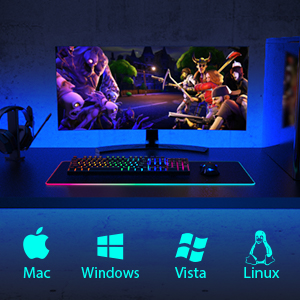
Figure 3.1: Compatible with Mac, Windows, Vista, and Linux operating systems.
4. Упутство за употребу
4.1. Кључне карактеристике
- Full 104-Key Anti-Ghosting: Ensures all key presses are registered accurately, even during rapid, simultaneous inputs, preventing missed commands.
- Classic Blue Switches: Provide a distinct tactile bump and an audible "click" sound, offering clear feedback for each keystroke. These switches are known for their responsiveness and durability, with a lifespan of 50 million keystrokes.

Figure 4.1: Diagram illustrating the Classic Blue Switch mechanism, highlighting its 4.0±0.2mm actuation distance and 60±15g actuation force.
4.2. Контрола позадинског осветљења
The keyboard features extensive backlighting options to enhance your gaming and typing experience.
- Динамички режими осветљења: Cycle through 9 dynamic lighting effects by pressing ФН + ИНС.
- Gaming Backlight Modes: Select from 8 pre-set gaming backlight modes by pressing FN + 1~8. These modes illuminate specific key clusters relevant to different game genres (e.g., WASD for FPS games).
- Подешавање осветљености: Подесите нивое осветљености позадинског осветљења.
- Подешавање брзине: Контролишите брзину динамичких светлосних ефеката.
- Искључите позадинско осветљење: The backlight can be turned off completely.

Figure 4.2: Visual representation of various backlight modes, including specific key illumination for MOBA and FPS games.
4.3. Мултимедијални тастери
Access common multimedia functions directly using the FN key in combination with the F-keys (F1-F12).
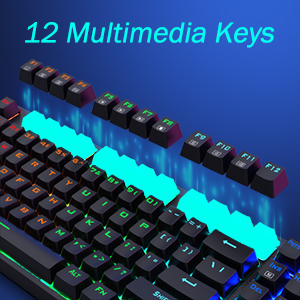
Figure 4.3: Illustration highlighting the 12 multimedia keys (F1-F12) on the keyboard.
5. Ергономија
The keyboard is designed with user comfort in mind to reduce wrist discomfort and fatigue during extended use.
- Ergonomically Curved Surface: The keycap layout is stepped to conform to the natural curve of your fingers.
- Подесиви угао: Features a natural 7-degree angle and foldable rear stands, allowing you to adjust the keyboard tilt for a more comfortable typing position.
- Ноге против клизања: Ensures stability on your desk during intense gaming sessions.

Figure 5.1: Depiction of the keyboard's ergonomic design, showing the stepped keycap layout, foldable rear stand, and anti-slip feet.
6. Одржавање
Правилна нега ће продужити век трајања ваше тастатуре.
- Чишћење: Use a soft, dry cloth to wipe down the keyboard. For deeper cleaning, use compressed air to remove dust and debris from between the keys. Avoid using harsh chemicals or abrasive materials.
- Дизајн отпоран на проливање: The keyboard features a splash-proof design with a metal panel, making it more resistant to accidental spills. In case of a spill, immediately disconnect the keyboard from your computer, wipe off any liquid, and allow it to dry completely before reconnecting.

Figure 6.1: Visual representation of the keyboard's spill-resistant capabilities.
КСНУМКС. Решавање проблема
If you encounter issues with your T-DAGGER Mechanical Gaming Keyboard, refer to the following common solutions:
- Тастатура не реагује:
- Уверите се да је УСБ кабл безбедно прикључен и на тастатуру и на рачунар.
- Покушајте да прикључите тастатуру на други УСБ порт на рачунару.
- Поново покрените рачунар.
- Test the keyboard on another computer to determine if the issue is with the keyboard or the computer's USB port.
- Позадинско осветљење не ради или је неисправно:
- Ensure the backlight is not turned off (refer to Section 4.2).
- Cycle through backlight modes and brightness settings using FN key combinations.
- Check for any software conflicts if you are using third-party lighting control software.
- Тастери се не региструју или се куцају двапут:
- Очистите око погођених тастера да бисте уклонили све остатке који би могли да ометају прекидач.
- Ensure the keyboard is connected directly to the computer and not through a USB hub, which might cause power issues.
8. Спецификације
| Феатуре | Детаљ |
|---|---|
| Бранд | Т-ДАГГЕР |
| Број модела | 3рд Генератион |
| Технологија повезивања | УСБ Виред |
| Опис тастатуре | Гаминг |
| Број кључева | 104 |
| Тип прекидача | Плави механички прекидачи |
| Животни век тастера | 50 милиона |
| Позадинско осветљење | Раинбов РГБ |
| Посебне карактеристике | Ergonomic, Backlit, Wrist Rest, Splash-Proof |
| Димензије производа | 17.24 к 4.96 к 1.02 инча |
| Тежина артикла | 2.07 фунти |
| Компатибилни уређаји | PC |

Figure 8.1: Keyboard dimensions, showing its full 104-key layout.
9. Гаранција и подршка
For warranty information and technical support, please refer to the documentation included with your purchase or visit the official T-DAGGER webсајт. Сачувајте доказ о куповини за потребе гаранције.
Ask a question about this manual
Ask about setup, troubleshooting, compatibility, parts, safety, or missing instructions. Manuals+ will review the question and use this page’s manual context to help answer it.