
Xetron XT-LMG-10X-EU
Упутство за употребу дигиталног манометъра Xetron HVAC
Model: XT-LMG-10X-EU
1. Увод
The Xetron LMG-10X Digital Manifold Gauge is an advanced tool designed for HVAC and refrigeration systems. It provides precise measurements for pressure, temperature, vacuum, and automatically calculates superheat and subcooling. This manual will guide you through the setup, operation, and maintenance of your device.

Figure 1: Xetron LMG-10X Digital Manifold Gauge with included accessories.
2. Безбедносне информације
Always read and understand all safety warnings and instructions before using the device. Failure to follow these instructions may result in electric shock, fire, or serious injury.
- Уверите се да су све везе безбедне пре рада.
- Не излажите уређај екстремним температурама или директној сунчевој светлости током дужег периода.
- Use only specified accessories and probes.
- Држите уређај даље од воде и других течности.
- Сервисирање препустите само квалификованом особљу.
3. Садржај пакета
Проверите да ли се у вашем пакету налазе све ставке наведене у наставку:
- 1 x Xetron Digital Manifold Gauge (LMG-10X)
- 2 к Цлamp Температуре Пробес
- 1 к торбица за ношење
- 1 x Упутство за употребу (овај документ)

Figure 2: What's in the box - Xetron Digital Manifold and Clamp Temperature Probes.
4. Подешавање
4.1. Прво укључивање
- Insert batteries into the compartment on the back of the unit (if not pre-installed).
- Притисните и држите дугме за напајање (⏻) да бисте укључили уређај.
- The LCD screen will illuminate and display the initial measurement interface.
4.2. Connecting Probes and Hoses
Повежите цлamp temperature probes to the designated ports on the manifold. Ensure a secure connection. Refrigerant hoses (not included) can be connected to the 1/4" SAE threaded connectors at the bottom of the unit.
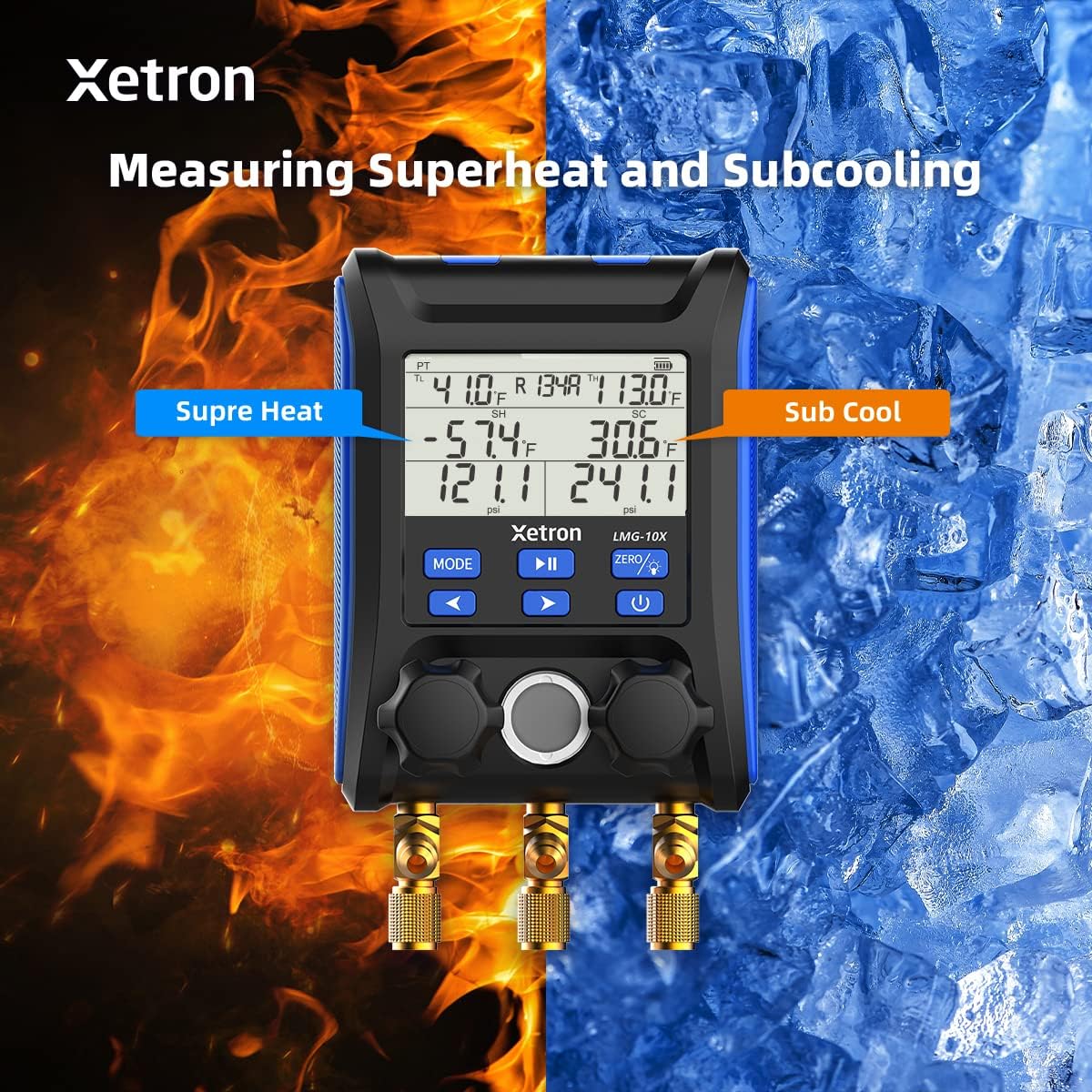
Figure 3: Connecting the Xetron LMG-10X to an HVAC system.
5. Упутство за употребу
5.1. Pressure and Temperature Measurement Mode
This mode displays real-time pressure and temperature readings, along with calculated saturation temperatures (VSAT, LSAT).

Figure 4: Interface for Pressure and Temperature Measurement Mode.
5.2. Superheat and Subcooling Measurement
The device automatically calculates superheat (SH) and subcooling (SC) values based on the selected refrigerant and measured parameters.

Figure 5: Display showing Superheat and Subcooling measurements.
5.3. Pressure Hold Test Mode
To enter Pressure Hold Test mode, briefly press the МОДЕ дугме праћено ПЛАИ/ПАУСЕ button from VAC mode. This mode allows you to monitor pressure changes over time.

Figure 6: Interface for Pressure Hold Test Mode.
5.4. Unit Settings and Auto Shutdown
The device allows for conversion of various measurement units and configuration of automatic shutdown settings.

Figure 7: Temperature Unit Setting.
Figure 8: Pressure Unit Setting.
Figure 9: Auto Shutdown OFF.
Figure 10: Auto Shutdown ON.
6. Built-in Refrigerant Database
The Xetron LMG-10X comes with a comprehensive database of 88 types of refrigerants, allowing for accurate calculations and measurements across various systems.

Figure 11: Partial list of supported refrigerants.
7. Одржавање
7.1. Чишћење
Обришите уређај меком, дamp крпа. Не користите абразивна средства за чишћење или раствараче. Уверите се да је уређај сув пре складиштења.
7.2. Складиштење
Store the device in its carrying case in a cool, dry place when not in use. Remove batteries if storing for extended periods to prevent leakage.
КСНУМКС. Решавање проблема
| Проблем | Могући узрок | Решење |
|---|---|---|
| Уређај се не укључује. | Low or dead batteries; incorrectly inserted batteries. | Замените батерије; водите рачуна о исправном поларитету. |
| Нетачна очитавања. | Probes not properly connected; incorrect refrigerant selected. | Check probe connections; verify selected refrigerant matches system. |
| Екран је слаб или трепери. | Ниска снага батерије. | Замените батерије. |
9. Спецификације
- Модел: XT-LMG-10X-EU
- Димензије (Д к Ш к В): КСНУМКС к КСНУМКС к КСНУМКС цм (КСНУМКС к КСНУМКС к КСНУМКС инча)
- Тежина артикла: 1.2 кг (2.65 лбс)
- Материјал: акрилонитрил бутадиен стирен (АБС)
- Refrigerant Database: 88 врсте
- Функције: Pressure & Temperature Measurement, Vacuum Measurement, Pressure Hold Test, Automatic Shutdown, Temperature Compensation
10. Гаранција и подршка
Xetron offers a one-year warranty for the LMG-10X Digital Manifold Gauge. For any questions or support needs, please contact Xetron customer service. We are committed to providing lifetime customer service.
For further assistance, please visit the official Xetron webсајт или контактирајте њихове канале за подршку.