
Увод
The ARCTIC P9 PWM PST is a 92mm PC case fan designed for efficient cooling, particularly in applications requiring high static pressure. This fan features a wide RPM range, PWM control for precise speed adjustment, and a 0dB mode for silent operation at low loads. Its high-quality bearing ensures an extended lifespan and quiet performance.

Image: The ARCTIC P9 PWM PST 92mm PC fan, showcasing its black frame and fan blades.
Подешавање и инсталација
This section provides instructions for installing your ARCTIC P9 PWM PST fan into your computer case or onto a heatsink/radiator.
Повезивање вентилатора
The ARCTIC P9 PWM PST fan utilizes a 4-pin connector for power and PWM control. It also features a 4-pin socket for daisy-chaining additional fans, thanks to its PWM Sharing Technology (PST).
- Identify a suitable mounting location: Determine where the fan will be installed (e.g., case fan mount, CPU heatsink, radiator). Ensure proper airflow direction for optimal cooling.
- Secure the fan: Use the provided screws to firmly attach the fan to the desired mounting point. Avoid overtightening.
- Connect to motherboard: Plug the fan's 4-pin connector into an available 4-pin fan header on your motherboard. If daisy-chaining, connect the first fan to the motherboard, then connect subsequent PST-compatible fans to the 4-pin socket on the previous fan.

Image: The 4-pin PWM PST connector and socket, illustrating the daisy-chaining capability for multiple fans.
Упутство за употребу
The ARCTIC P9 PWM PST fan offers flexible operation modes controlled via its 4-pin PWM connection.
PWM Control and RPM Range
- The fan speed can be precisely controlled via a Pulse Width Modulation (PWM) signal from your motherboard or fan controller.
- The fan operates within a wide RPM range of 200 to 3000 RPM, allowing for a balance between cooling performance and noise levels.
- 0dB Mode: When the PWM signal is below 5%, the fan will stop spinning completely, providing a 0dB noise level for silent operation during low system loads. Above 5% PWM, the fan will spin up and adjust its speed infinitely within its specified range.
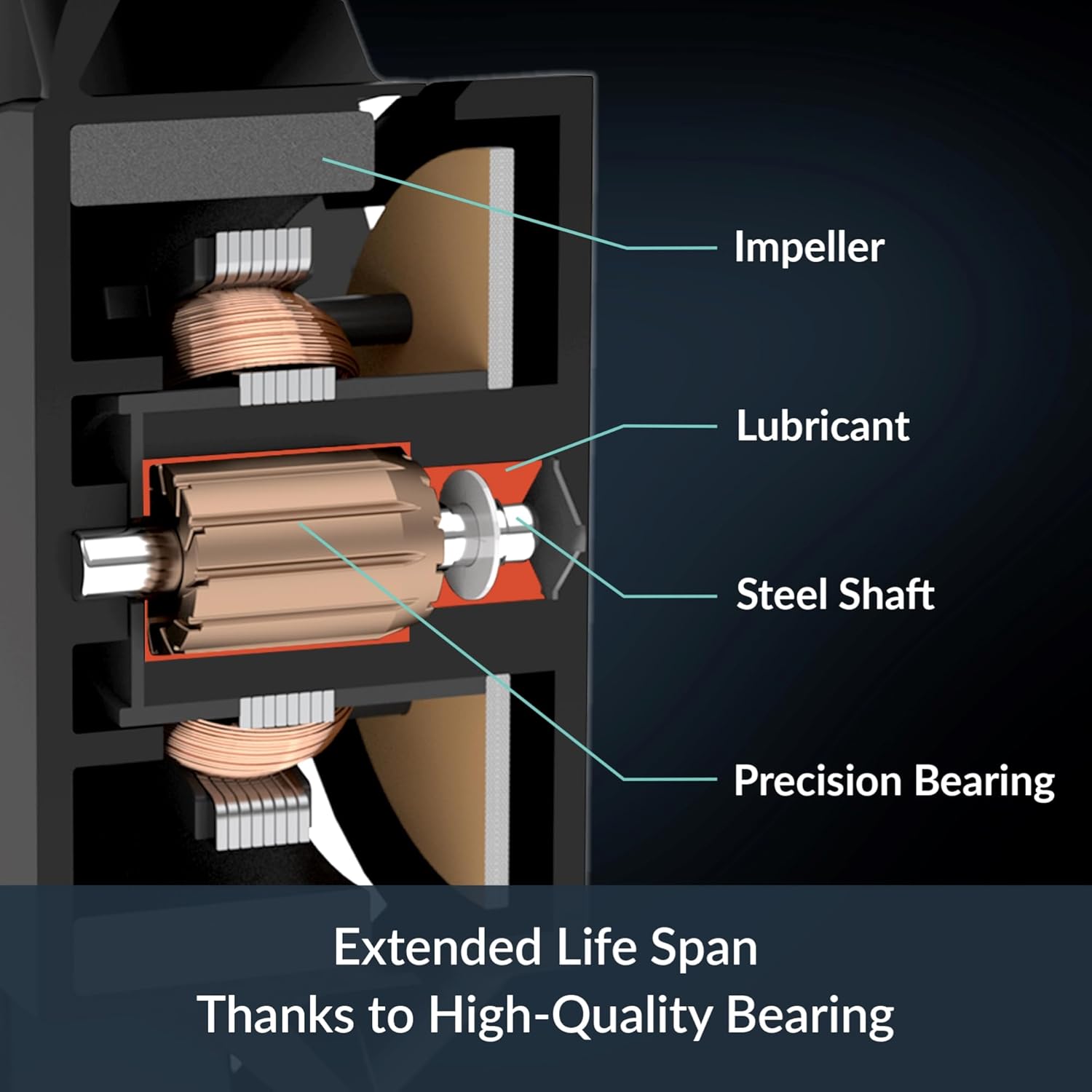
Image: Illustration of the 0dB mode, indicating the fan stops below 5% PWM signal for silent operation.
Оптимизовано за статички притисак
The fan's design is optimized for high static pressure, making it particularly effective for use on heatsinks and radiators where air resistance is higher. This ensures efficient heat dissipation even through dense fins.

Image: Diagram showing airflow through a fan optimized for static pressure, suitable for radiators and heatsinks.
Одржавање
Regular maintenance helps ensure the longevity and optimal performance of your ARCTIC P9 PWM PST fan.
- Чишћење прашине: Periodically inspect the fan blades and housing for dust accumulation. Use compressed air or a soft brush to gently remove dust. Ensure the fan is powered off before cleaning.
- Трајност лежаја: The fan features a high-quality bearing with a combination of alloy and lubricant designed to reduce friction and prevent excessive heat build-up, contributing to an extended lifespan. No user maintenance is required for the bearing itself.

Image: Cross-section diagram of the fan's internal components, highlighting the impeller, lubricant, steel shaft, and precision bearing, which contribute to its extended lifespan.
Решавање проблема
If you encounter issues with your ARCTIC P9 PWM PST fan, refer to the following common troubleshooting steps:
| Проблем | Могући узрок | Решење |
|---|---|---|
| Вентилатор се не окреће |
|
|
| Вентилатор је прегласан |
|
|
| Лоше перформансе хлађења |
|
|
Спецификације
Detailed technical specifications for the ARCTIC P9 PWM PST fan.
| Феатуре | Валуе |
|---|---|
| Модел | П9 ПВМ ПСТ |
| Величина вентилатора | 92 мм |
| Брзина вентилатора | 200 - 3000 обртаја у минути (PWM контролисано) |
| Проток ваздуха | 38.83 CFM | 65.97 m³/h |
| Статички притисак | 3.12 ммХ₂О |
| Конектор за напајање | 4-pin fan connector + 4-pin socket (PST) |
| Волtage | 12 Волтс |
| Ватtage | 1.44 вати |
| Цуррент | 0.12 А |
| Беаринг Типе | High Quality Fluid Dynamic Bearing |
| Димензије (Д к Ш к В) | 3.6" x 3.6" x 1" (92 mm x 92 mm x 25 mm) |
| Тежина | 106 грама |
| Материјал | Пластика |

Image: Visual representation of key technical data including fan speed, static pressure, airflow, current, and voltage.
Информације о гаранцији
ARCTIC products are manufactured to high quality standards. For specific warranty terms and conditions applicable to your ARCTIC P9 PWM PST fan, please refer to the official ARCTIC webсајт или гарантни лист који је приложен уз ваш производ. Типично, ARCTIC нуди ограничену гаранцију против недостатака у материјалу и изради.
Подршка и контакт
For further assistance, technical support, or inquiries regarding your ARCTIC P9 PWM PST fan, please visit the official ARCTIC webсајт:
You may also find helpful resources, FAQs, and driver downloads on their support pages.