
1. Увод
This manual provides essential information for the safe and efficient use of your OPPO F21 Pro (5G) smartphone. Please read this manual thoroughly before using your device to ensure optimal performance and longevity.
The OPPO F21 Pro (5G) is a high-performance smartphone featuring a 2.2 GHz Octa-core processor, 8GB of RAM, and 128GB of internal storage, expandable via microSDXC. It operates on Android 12 and is powered by a non-removable 4500 mAh Li-Po battery. Key features include a 6.43-inch AMOLED display, a 64 MP AI Triple Camera system, and 5G connectivity.
2. Подешавање уређаја
2.1 Садржај пакета
- OPPO F21 Pro (5G) Smartphone
- УСБ кабл
- Кратки водич (може да варира у зависности од региона)
- Safety Information (may vary by region)
2.2 Inserting SIM Cards and MicroSD Card
Your OPPO F21 Pro (5G) supports Dual-SIM functionality and a microSDXC card for expanded storage. The device uses Nano-SIM cards.
- Пронађите лежиште за СИМ картицу са стране телефона.
- Уметните алатку за избацивање СИМ картице (ако је доступна) у мали отвор поред лежишта и лагано гурајте док лежиште не искочи.
- Поставите своје Nano-SIM картице и/или microSDXC картице у предвиђене слотове на лежишту. Уверите се да су златни контакти окренути надоле.
- Пажљиво гурните лежиште назад у телефон док се не поравна са бочном страном.
Важна напомена о компатибилности мреже за купце из САД:
Овај паметни телефон није компатибилан са CDMA мрежама, укључујући VERIZON, SPRINT и US CELLULAR. Пре куповине проверите компатибилност са 3G или 4G/LTE мрежама са вашим мрежним оператером.
2.3 Укључивање/искључивање
- За укључивање: Press and hold the Power button (located on the right side) until the OPPO logo appears.
- За искључивање: Притисните и држите дугме за напајање, а затим изаберите „Искључи“ из опција на екрану.
- Рестартовати: Притисните и држите дугме за напајање, а затим изаберите „Рестарт“ из опција.
2.4 Почетно подешавање
Upon first power-on, follow the on-screen instructions to complete the initial setup process. This includes selecting your language, connecting to Wi-Fi, setting up your Google account, and configuring security features like Face Recognition.
3. Управљање вашим уређајем
3.1 Основна навигација
Your OPPO F21 Pro (5G) runs on Android 12, offering an intuitive user interface. Use gestures or navigation buttons (configurable in settings) to move between apps, return to the home screen, and access recent applications.
3.2 Карактеристике екрана

The front of the OPPO F21 Pro (5G) features a vibrant AMOLED display with a punch-hole cutout for the front camera.

Детаљно view of the punch-hole front camera, integrated seamlessly into the display.
The device features a 6.43-inch AMOLED display with a resolution of 1080 x 2400 pixels, protected by Schott Xensation glass. This display provides vivid colors and deep blacks for an enhanced viewинг искуство.
3.3 Употреба камере
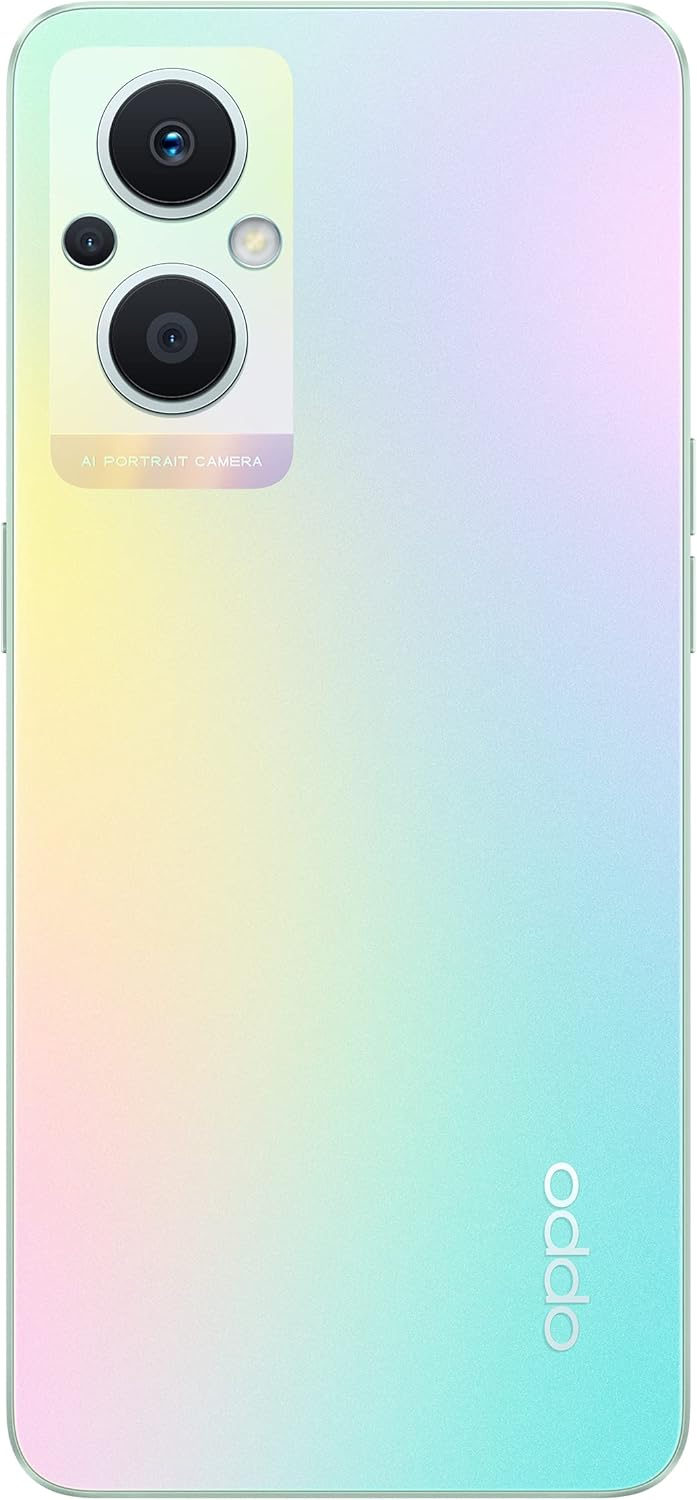
The back of the OPPO F21 Pro (5G) showcases its triple camera system and sleek design.

Детаљно view of the AI Portrait Camera module on the rear, highlighting the lenses and flash.
The OPPO F21 Pro (5G) is equipped with a versatile camera system:
- Задња камера: 64 MP (широкоугаони, f/1.7, PDAF), 2 MP (макро, f/2.4), 2 MP (дубина, f/2.4).
- Предња камера: 16 MP (широкоугаони, f/2.4).
Access the Camera app from your home screen or app drawer. Select various shooting modes such as Photo, Video, Portrait, Macro, and more. Tap the screen to focus and press the shutter button to capture images or start/stop video recording.
3.4 Повезивање
- 5G мрежа: Supports N1/ N8/ N28/ N41/ N77/ N78 SA/NSA bands.
- Ви-Фи: Повежите се на бежичне мреже за приступ интернету.
- Блуетоотх: Упарите са бежичном додатном опремом попут слушалица и звучника.
- УСБ типа Ц: За пуњење и пренос података.
3.5 Сигурносне карактеристике
The device includes Face Recognition for convenient and secure unlocking. You can set this up in the Security settings menu.
4. Одржавање
4.1 Одржавање батерије
Your OPPO F21 Pro (5G) is equipped with a 4500 mAh Lithium-Polymer battery. To maximize battery life:
- Избегавајте екстремне температуре.
- Use the original charger and USB cable provided.
- Избегавајте често потпуно пражњење батерије.
- Optimize battery settings in the device's settings menu.
4.2 Чишћење уређаја
The device is rated as Water Resistant. To clean your phone:
- Искључите уређај пре чишћења.
- Користите меку крпу која не оставља длачице.
- Избегавајте употребу јаких хемикалија, абразивних средстава за чишћење или компримованог ваздуха.
- Не потапајте уређај у воду.
4.3 Ажурирања софтвера
Regularly check for and install software updates to ensure your device has the latest features, security patches, and performance improvements. You can check for updates in the device's Settings menu under 'About phone' or 'Software update'.
КСНУМКС. Решавање проблема
If you encounter issues with your OPPO F21 Pro (5G), try the following basic troubleshooting steps:
- Уређај не реагује: Притисните и држите дугме за напајање око 10-15 секунди да бисте поново покренули рачунар.
- Проблеми са мрежом: Ensure your SIM card is correctly inserted. Check your network settings and ensure mobile data or Wi-Fi is enabled. Restart your device.
- Рушење апликације: Затворите и поново отворите апликацију. Обришите кеш меморију и податке апликације у Подешавањима > Апликације. Ако проблем и даље постоји, деинсталирајте и поново инсталирајте апликацију.
- Батерија се брзо празни: Review battery usage in Settings to identify power-hungry apps. Reduce screen brightness, disable unnecessary features (GPS, Bluetooth, Wi-Fi) when not in use.
- Меморија је пуна: Обришите непотребно files, photos, and videos. Move media to a microSD card if installed. Clear app caches.
For more complex issues, refer to the official OPPO support webсајту или контактирајте корисничку подршку.
6. Спецификације

Ан оверview of the OPPO F21 Pro (5G) showcasing its main features including the 64MP AI Triple Camera, AMOLED screen, and Qualcomm Snapdragon 5G SoC.

The OPPO F21 Pro (5G) in Rainbow Spectrum, displaying both its front and rear aesthetics.
| Феатуре | Спецификација |
|---|---|
| Бранд | ОППО |
| Назив модела | OPPO F21 Pro (5G) |
| Оперативни систем | Андроид 12.0 |
| Процесор | Qualcomm SM6375 Snapdragon 695 5G (6 nm), осам језгара (2x2.2 GHz Kryo 660 Gold и 6x1.7 GHz Kryo 660 Silver) |
| РАМ | 8 ГБ |
| Интерна меморија | 128 ГБ |
| Екпандабле Стораге | мицроСДКСЦ |
| Величина екрана | 6.43 инча (16.33 центиметара) |
| Дисплаи Типе | АМОЛЕД |
| Резолуција | 1080 к 2400 пиксела |
| Задња камера | 64 MP (широкоугаони), 2 MP (макро), 2 MP (дубински) |
| Предња камера | 16 MP (широкоугаони) |
| Капацитет батерије | 4500 mAh (Lithium-Polymer, non-removable) |
| Целлулар Тецхнологи | 5G (Дуал СИМ) |
| Бежична технологија | Ви-Фи, Блуетоотх |
| Тип конектора | УСБ тип Ц |
| Биометријска безбедност | Препознавање лица |
| Ниво отпорности на воду | Отпоран на воду |
| Димензије | 6.3 к 2.87 к 0.31 инча |
| Тежина артикла | 173 грама |
7. Информације о гаранцији
Your OPPO F21 Pro (5G) smartphone comes with a Двогодишња гаранција произвођачаОва гаранција покрива недостатке у материјалу и изради при нормалној употреби. Молимо вас да сачувате доказ о куповини за потребе подношења захтева за гаранцију.
The warranty does not cover damage caused by misuse, accidents, unauthorized modifications, or normal wear and tear. For full terms and conditions, please refer to the warranty card included in your product packaging or visit the official OPPO webсајту.
8. Подршка
For further assistance, technical support, or to find service centers, please visit the official OPPO support webсајт:
You may also find helpful FAQs and community forums on the support webсајту.