
1. Добродошли
Thank you for choosing the ASHATA FG-100 DDS Function Generator. This device is designed for generating various waveforms with high precision and stability, making it suitable for a wide range of electronic testing and calibration applications. Please read this manual thoroughly before operation to ensure proper use and to maximize the lifespan of your device.
2. Карактеристике производа
- Generates main output waveforms including sine, square, triangle, and sawtooth.
- Features a filter (toggle on/off) for sine and pulse outputs.
- High precision and stable frequency, ideal for oscilloscope scan time calibration.
- Square wave output suitable for oscilloscope attenuators and probe pulse adjustment.
- Compact size, multi-functional, simple operation, and portable design.
3. Садржај пакета
- 1 x ASHATA FG-100 DDS Function Generator
- 1 к УСБ кабл
- 1 к Упутство за употребу
4. Мере предострожности
- Always use the specified power supply (DC 3.5-10V, DC 5V adapter or 3.7V recommended).
- Не излажите уређај влази или екстремним температурама.
- Избегавајте испуштање или излагање уређаја јаким ударима.
- Не покушавајте да растављате или модификујете уређај, јер ће то поништити гаранцију и може проузроковати оштећења.
- Чувати ван домашаја деце.
5. Водич за подешавање
5.1 Повезивање напајања
Connect the provided USB cable to the DC 5V input port on the side of the function generator and to a suitable USB power source (e.g., a computer USB port, a USB wall adapter).

Figure 1: ASHATA FG-100 DDS Function Generator connected via USB cable.
5.2 Почетно укључивање
Once power is connected, the device will automatically power on, and the LCD display will illuminate, showing the current waveform function and frequency.
6. Упутство за употребу
6.1 Интерфаце Оверview
The front panel of the FG-100 features an LCD display, several buttons for control, and an amplitude adjustment knob. The output is provided via a BNC connector.
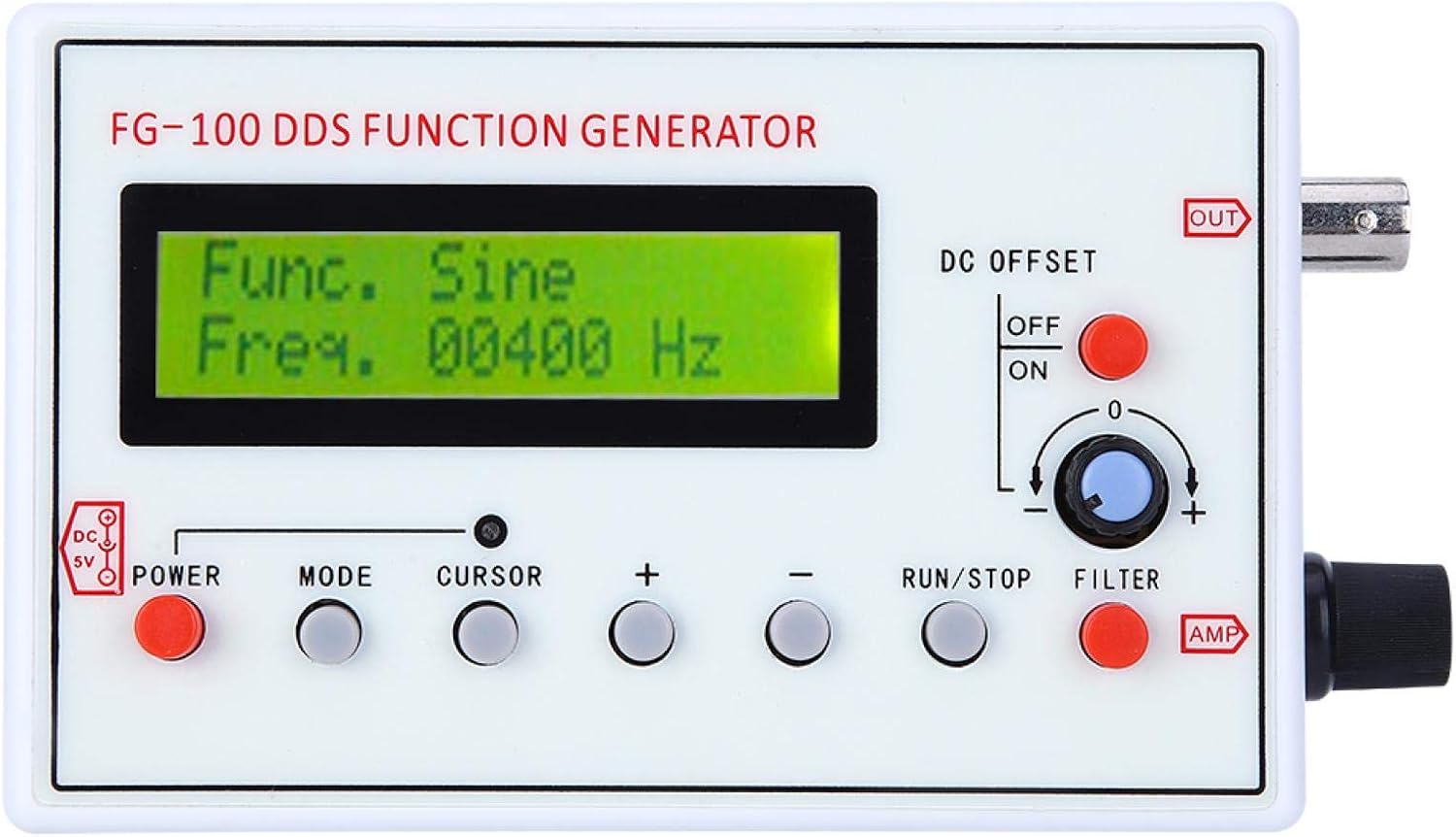
Figure 2: Front panel controls and display of the FG-100.
6.2 Selecting Waveforms
Притисните тастер МОДЕ button to cycle through the available waveform types: Sine, Square, Triangle, Forward Sawtooth, Reverse Sawtooth, Pulse, and ECG. The selected waveform will be displayed on the LCD.
6.3 Adjusting Frequency
Користите ЦУРСОР button to select the digit you wish to adjust. Then, use the + и - buttons to increase or decrease the frequency value. The frequency range for sine waves is 1Hz to 500kHz (amplitude flat up to 200kHz), and for other waveforms, it is 1Hz to 20kHz for optimal phase noise and distortion.
6.4 Подешавање Amplitude and DC Offset
- Ampсветлост (AMP): Ротирајте AMP knob on the right side of the device to adjust the output waveform amplitude. The maximum output amplitude is ±10V (peak-to-peak).
- ДЦ Оффсет: Користите DC OFFSET switch (ON/OFF) and the associated knob to apply or adjust a DC bias to the waveform. The maximum DC offset is ±10V.
6.5 Using the Filter
Притисните тастер ФИЛТЕР button to toggle the internal filter on or off. This filter is designed for sine and pulse waveforms.
6.6 Outputting Waveforms
Притисните тастер РУН / СТОП button to start or stop the waveform output. When running, the waveform will be generated at the ОУТ БНЦ конектор.
6.7 Оперативна демонстрација
Video 1: Demonstration of waveform selection, frequency adjustment, and output control on a similar DDS Function Generator (FG-200).
7. Техничке спецификације
| Спецификација | Валуе |
|---|---|
| Врста ставке | Фунцтион генератор |
| Материјал | АБС |
| Frequency Range (Sine) | 1Hz~500kHz (Magnitude flat up to 200kHz) |
| Фреквентни опсег (други таласни облици) | 1Hz~20kHz (with good phase noise and small distortion) |
| Резолуција | 1Хз |
| Излазни таласни облици | Sine, Square, Triangle, Forward Sawtooth, Reverse Sawtooth, Pulse, ECG |
| Sine Distortion | 1% (frequency = 1kHz) |
| Излаз Ampлитуде | Maximum ±10V (P-P) |
| Излазна импеданса | 50 ома |
| ДЦ Оффсет | Maximum ±10V (can be turned off) |
| Интерни филтер | For sine or pulse, can be turned on/off |
| Повер Суппли | DC 3.5-10V (DC 5V adapter or 3.7V recommended) |
| Тежина артикла | 240 г |
| Произвођач | АСХАТА |
| Број модела | RRCc16w9sb5kxiua361 |
| Земља порекла | Кина |
8. Нега и одржавање
- Чишћење: Користите меку, суву крпу за чишћење спољашњости уређаја. Не користите абразивна средства за чишћење или раствараче.
- Складиштење: Store the function generator in a cool, dry place away from direct sunlight and extreme temperatures.
- Руковање: Handle the device with care to avoid damage to the display or connectors.
9. Водич за решавање проблема
| Проблем | Могући узрок | Решење |
|---|---|---|
| Уређај се не укључује. | No power, faulty USB cable, or power source issue. | Ensure USB cable is securely connected. Try a different USB port or power adapter. Verify power source is active. |
| No waveform output. | Output stopped, incorrect settings, or faulty connection. | Press the RUN/STOP button to start output. Check frequency and amplitude settings. Ensure output cable is correctly connected to the BNC port. |
| Settings are not saved after power off. | This model does not feature memory retention for settings. | Settings must be re-entered after each power cycle. |
| Inaccurate frequency output. | Calibration needed or external interference. | Use an external frequency counter or oscilloscope to verify and adjust settings if necessary. Ensure proper grounding. |
10. Гаранција и корисничка подршка
ASHATA products are designed for reliability and performance. For warranty information, technical support, or service inquiries, please refer to the contact information provided with your purchase or visit the official ASHATA webсајт. Сачувајте рачун као доказ о куповини за потребе гаранције.