
Shargeek STM2E-1
Shargeek STORM2 Slim Portable Charger User Manual
Модел: СТМ2Е-1
Увод
This manual provides comprehensive instructions for the safe and efficient use of your Shargeek STORM2 Slim Portable Charger. Please read this manual thoroughly before operating the device and retain it for future reference.
The Shargeek STORM2 Slim is a high-capacity portable power bank featuring a unique transparent design and an IPS display screen. It offers 130W max output with 100W USB-C and 30W USB-A ports, suitable for charging various devices including laptops, tablets, and smartphones.

Image: The Shargeek STORM2 Slim portable charger, showcasing its transparent design that reveals internal components and the included yellow USB-C to USB-C cables.
Карактеристике производа
- Транспарентни дизајн: The see-through casing reveals the internal battery and circuit layout, highlighting the device's engineering.
- IPS Display Screen: A clear screen provides real-time information on battery life, output distribution, temperature, operation hours, and active ports.
- Велики капацитет: 20000mAh battery capacity, capable of multiple charges for various devices.
- Брзо пуњење: Features a 100W USB-C PD port and a 30W USB-A port, supporting 130W max output for rapid charging.
- Универзална компатибилност: Charges laptops, phones, tablets, and other devices with USB-C or USB ports.

Слика: Детаљна view of the Shargeek STORM2 Slim's IPS LCD screen, showing various data points such as input/output wattagе, волtage, current, battery level, and temperatures.
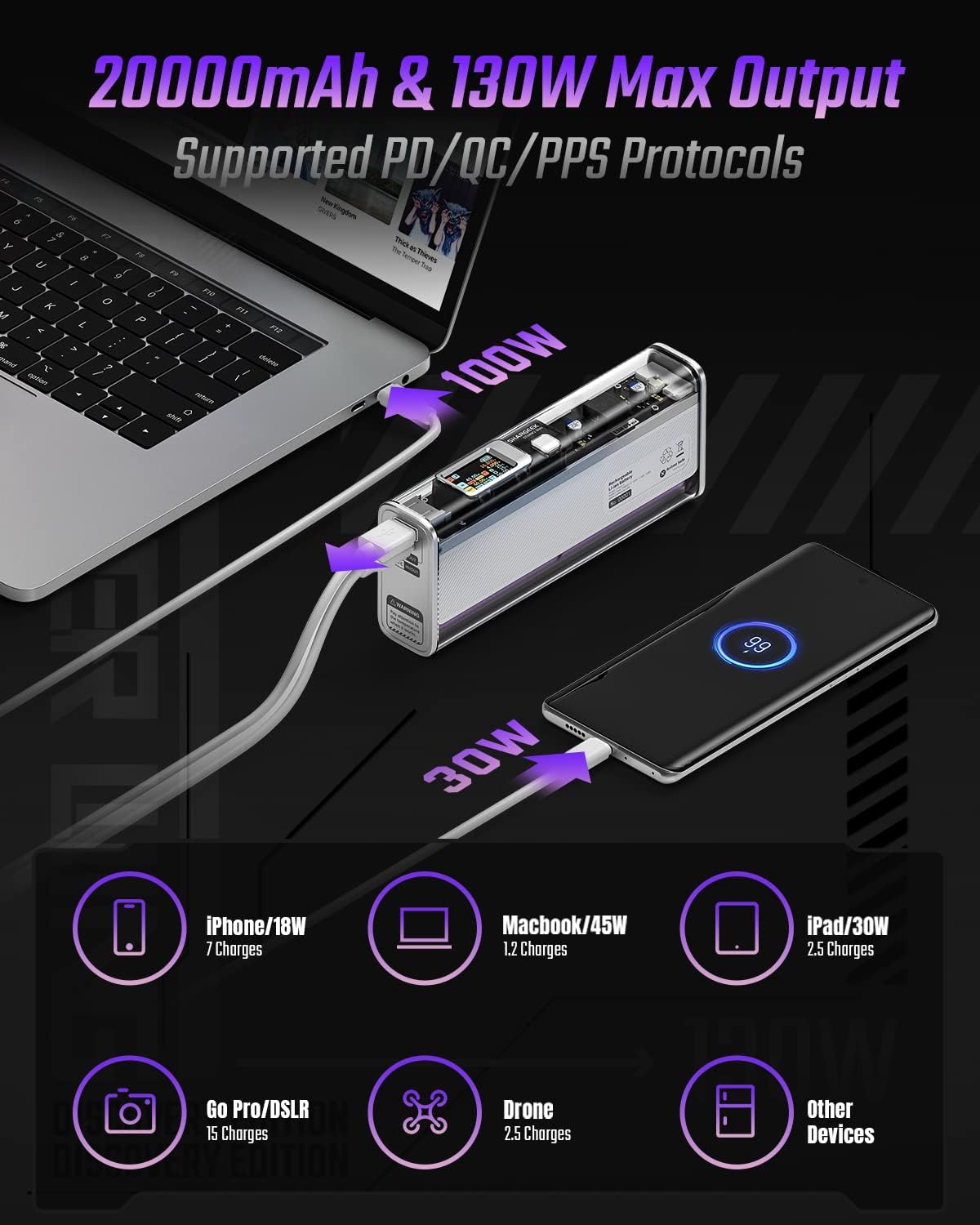
Image: The Shargeek STORM2 Slim connected via USB-C to a laptop for 100W charging and via USB-A to a smartphone for 30W charging, demonstrating its dual-port capability.
Подешавање и прва употреба
Садржај пакета:
- Shargeek STORM2 Slim Portable Charger
- УСБ-Ц на УСБ-Ц кабл
- Кориснички приручник (овај документ)
Прво пуњење:
- Before first use, fully charge your STORM2 Slim.
- Connect the provided USB-C to USB-C cable to the USB-C port on the STORM2 Slim.
- Connect the other end of the cable to a compatible USB-C power adapter (not included) with a minimum of 100W output for fastest charging.
- The IPS screen will display charging status and battery percentage. The device is fully charged when the screen indicates 100%.
- A full recharge typically takes approximately 90 minutes with a 100W power adapter.
Упутство за употребу
Уређаји за пуњење:
- Identify the appropriate charging cable for your device (USB-C to USB-C or USB-A to device-specific cable).
- Connect one end of the cable to your device and the other end to the corresponding port (USB-C or USB-A) on the STORM2 Slim.
- The IPS screen will automatically activate and display the charging output (watts, volts, amps) for the connected device(s).
- The STORM2 Slim can charge two devices simultaneously using both the USB-C and USB-A ports.
Understanding the IPS Screen:
The IPS screen provides detailed real-time information. Use the physical button on the side of the power bank to navigate through different display modes or access settings.
- Input/Output Dashboard: Shows power input (IN) when charging the power bank and power output (OUT) when charging devices, including wattagе, волtage, and current for each port.
- Ниво батерије: Приказује преостали проценат батеријеtage and a visual icon.
- Волtagе & струја: Detailed readings for the internal battery cells.
- температура: Shows the internal circuit board and battery temperatures.
- Трајање: A resettable timer indicating the duration of current operation.
To access menus: Long-press the button. To navigate: Short-press. Да бисте изабрали: Long-press.
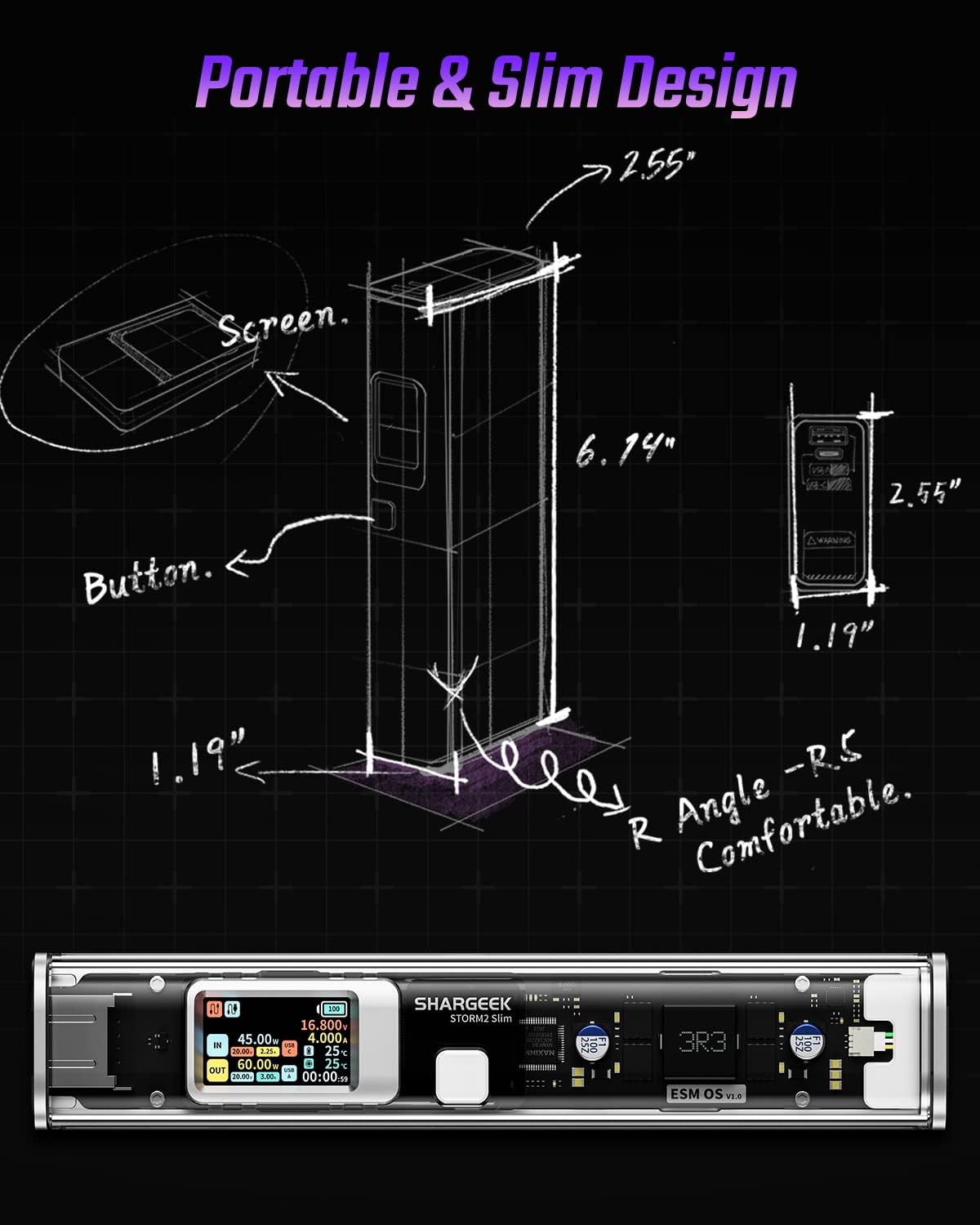
Image: A technical drawing illustrating the dimensions of the Shargeek STORM2 Slim and pointing out the screen and button locations.
Одржавање
- Чишћење: Користите меку, суву крпу за чишћење спољашњости преносне батерије. Избегавајте употребу јаких хемикалија или абразивних материјала.
- Складиштење: Чувајте уређај на хладном и сувом месту, даље од директне сунчеве светлости, екстремних температура и високе влажности.
- Одржавање батерије: To prolong battery life, avoid fully discharging the power bank frequently. Recharge it when the battery level is low. If storing for extended periods, charge it to approximately 50-70% every 3-6 months.
- Избегавајте капи: While designed with an aluminum alloy frame for durability, avoid dropping the device as it may damage internal components or the transparent casing.
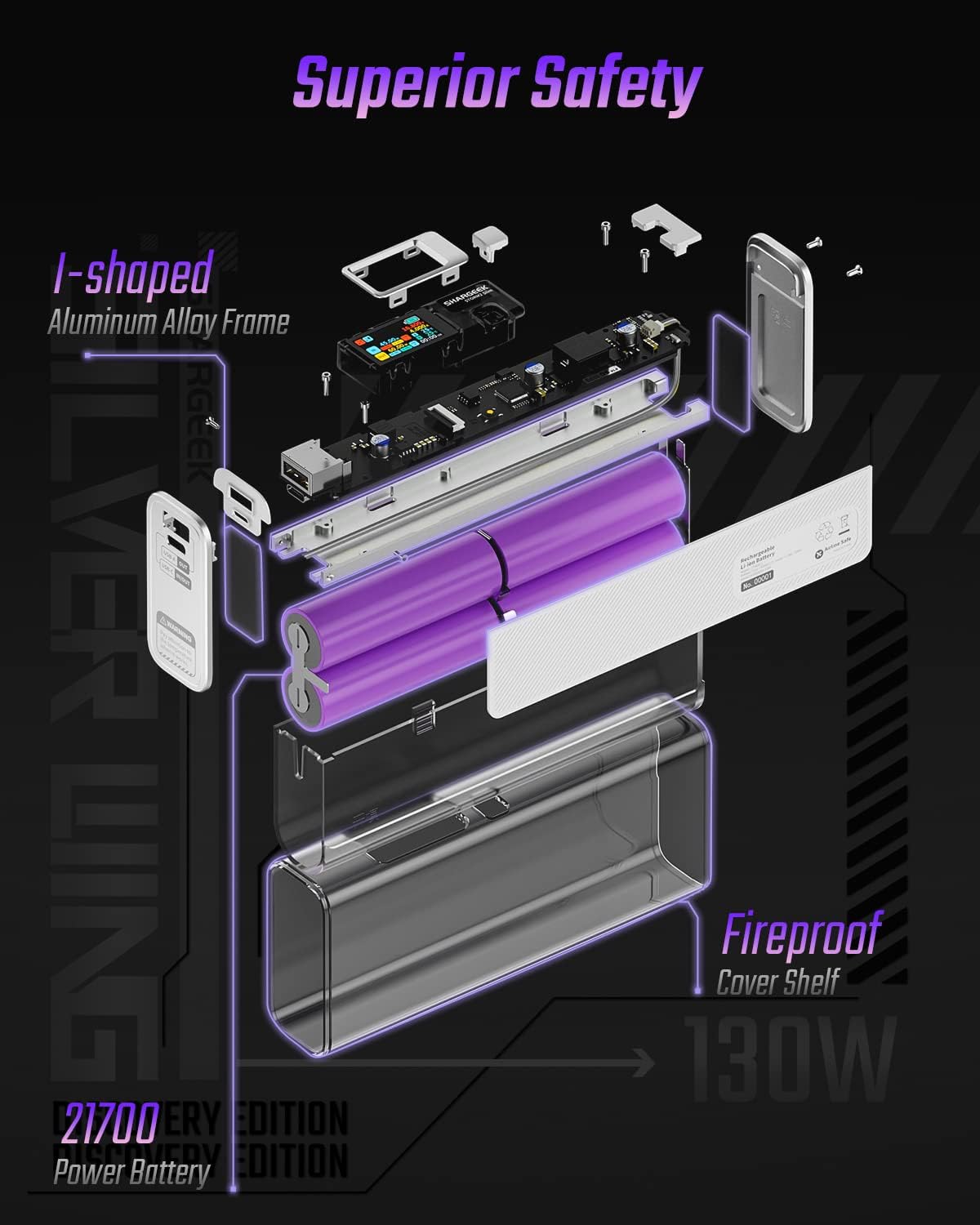
Image: An exploded diagram of the Shargeek STORM2 Slim, illustrating its internal structure including the I-shaped aluminum alloy frame, fireproof cover shelf, and 21700 power batteries, highlighting its robust construction.
Решавање проблема
| Проблем | Могући узрок | Решење |
|---|---|---|
| Уређај се не пуни са преносног пуњача. | Low power bank battery; incompatible cable; device not properly connected; device requires more power than available. | Recharge the STORM2 Slim. Ensure cable is fully inserted and compatible. Check device power requirements against power bank output. Try a different cable or port. |
| Повер банк се не пуни. | Charging cable or adapter faulty; power bank port damaged. | Try a different USB-C cable and power adapter. Ensure the adapter meets the recommended power output (e.g., 100W). If problem persists, contact support. |
| IPS screen is blank or unresponsive. | Power bank is off; temporary software glitch. | Press the button to activate the screen. If unresponsive, try connecting a device to charge or connecting the power bank to a charger to see if it activates. If problem persists, contact support. |
| Споро пуњење. | Cable not supporting fast charging; device not supporting fast charging; multiple devices connected. | Ensure you are using a high-quality USB-C PD cable. Verify your device supports fast charging. Charging multiple devices simultaneously may reduce individual charging speeds. |
Спецификације
- Број модела: СТМ2Е-1
- Капацитет батерије: 20000мАх
- Макс. излаз: 130В
- УСБ-Ц излаз: Напајање до 100W (PD)
- УСБ-А излаз: До 30В
- Улаз: USB-C (up to 100W PD)
- Приказ: ИПС екран
- Димензије: 3 x 6.5 x 15.59 цм (приближно 1.18 x 2.56 x 6.14 инча)
- Тежина: Приближно 689 г (1.52 фунте)
- Тип батерије: Литхиум Ион
Гаранција и подршка
Информације о гаранцији:
Shargeek products are covered by a limited warranty against defects in materials and workmanship. Please refer to the warranty card included with your purchase or visit the official Shargeek webсајт за детаљне услове гаранције.
Корисничка подршка:
For technical assistance, troubleshooting, or warranty claims, please contact Shargeek customer support through their official webсајт или контакт информације наведене на паковању вашег производа.
Official Shargeek Store Link: Shargeek Official Store
Безбедносне информације
- Не излажите уређај води, влази или екстремним температурама.
- Не растављајте, не модификујте и не покушавајте сами да поправите уређај. То ће поништити гаранцију и може проузроковати оштећење или повреду.
- Чувати ван домашаја деце.
- Користите само сертификоване и компатибилне каблове и адаптере за пуњење.
- Избегавајте испуштање или излагање уређаја јаким ударима.
- Одложите уређај одговорно у складу са локалним прописима за електронски отпад.
Ask a question about this manual
Ask about setup, troubleshooting, compatibility, parts, safety, or missing instructions. Manuals+ will review the question and use this page’s manual context to help answer it.