
MeLE Quieter3Q
MeLE Quieter3Q Mini PC User Manual
Model: Quieter3Q
1. Увод
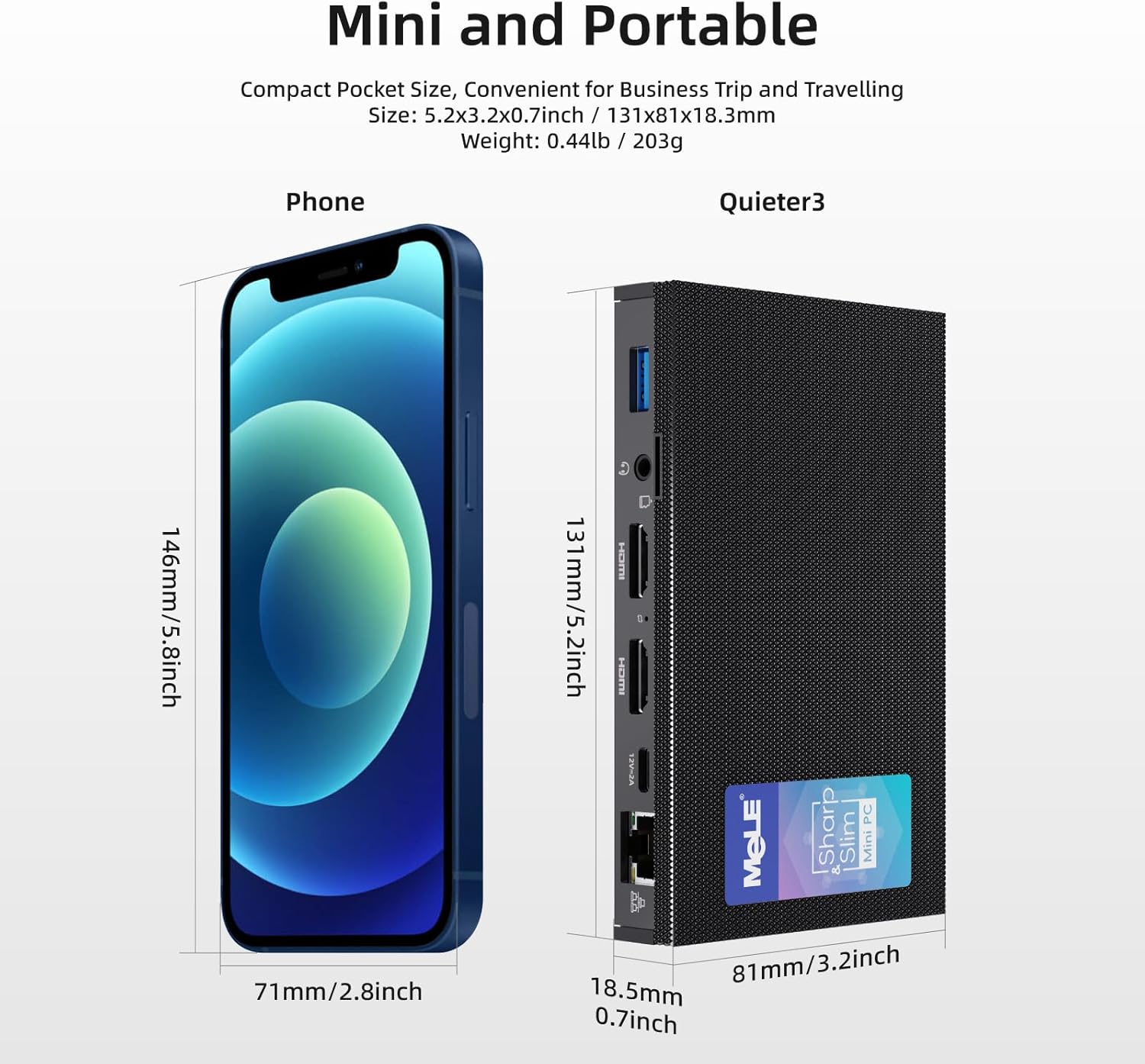
The MeLE Quieter3Q Mini PC is a compact and powerful computing device designed for various applications, including office work, education, home theater, and industrial IoT. This fanless mini PC features an Intel Celeron N5105 processor, 8GB DDR4 RAM, and a 128GB NVMe M.2 2280 SSD, running on Windows 11 Pro. Its small form factor allows for easy portability and flexible installation.
Кључне карактеристике укључују:
- процесор: Intel Celeron N5105 (up to 2.90 GHz) for efficient performance.
- Меморија и складиштење: 8GB RAM and 128GB ROM, expandable up to 5TB via M.2 SSD (SATA/NVMe 2280).
- Приказ: Supports 4K UHD @60 Hz output via HDMI 2.0 for high-definition visuals.
- Повезивање: Equipped with Wi-Fi 6.0 (802.11ax), Bluetooth 5.2, Gigabit Ethernet, and multiple USB 3.0 ports.
- Дизајн: Fanless design for silent operation, Kensington lock slot for security, and support for Wake on LAN, PXE, Auto Power On, and RTC Wake.
2. Садржај пакета
Молимо вас да означите поље за следеће ставке:
- 1x MeLE Quieter3Q Mini PC
- 1к упутство за употребу
- 1к 12В 2А адаптер за напајање
- 1x VESA Mount Bracket
3. Производ је готовview (Ports and Components)
Familiarize yourself with the ports and components of your MeLE Quieter3Q Mini PC:
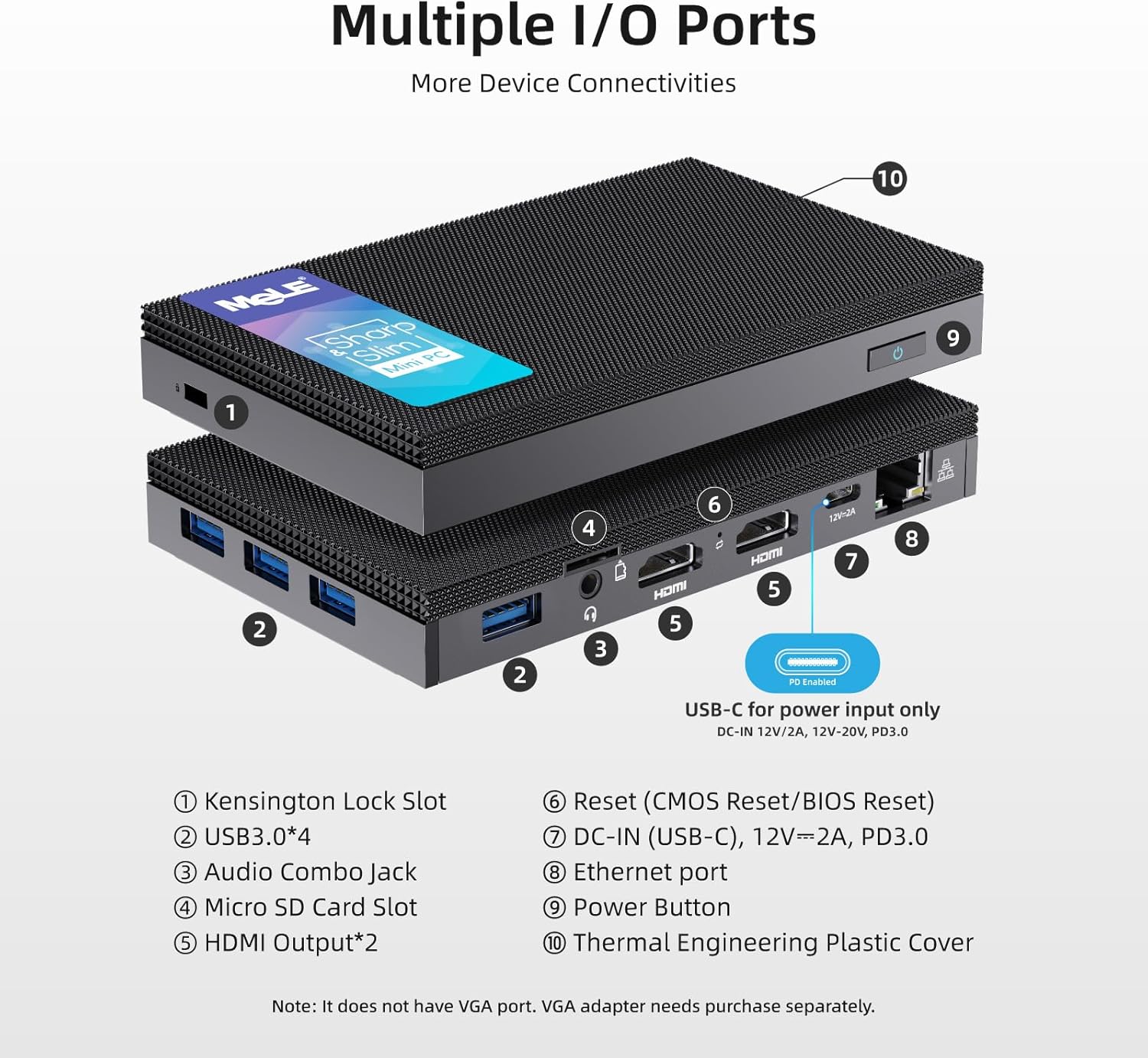
- Utor za Kensington Lock: За осигурање уређаја.
- УСБ 3.0 портови (к4): For connecting peripherals such as keyboards, mice, and external storage.
- Комбиновани аудио прикључак: За слушалице или микрофоне.
- Утор за микро СД картицу: For additional storage expansion.
- HDMI Output (x2): Supports dual 4K display output.
- Reset Button (CMOS Reset/BIOS Reset): For system reset or BIOS access.
- DC-IN (USB-C), 12V=2A, PD3.0: Улазни порт за напајање.
- Етхернет порт: За жичану мрежну везу (гигабитни етернет).
- Дугме за напајање: Да бисте укључили/искључили уређај.
- Thermal Engineering Plastic Cover: The fanless design ensures silent operation.
4. Водич за подешавање
4.1 Почетно повезивање
- Повежи се са екраном: Use an HDMI cable to connect the Mini PC to your monitor or TV. The device supports dual 4K displays.
- Повежите периферне уређаје: Plug in your USB keyboard and mouse into the available USB 3.0 ports.
- Прикључите напајање: Connect the 12V 2A power adapter to the DC-IN (USB-C) port on the Mini PC and then to a power outlet.
- Мрежна веза (опционо): For a wired connection, plug an Ethernet cable into the Ethernet port. For wireless, ensure your Wi-Fi network is available.
4.2 VESA Mount Installation
The MeLE Quieter3Q Mini PC can be mounted on the back of a VESA-compatible monitor for a clutter-free setup. The included VESA mount supports 70mm, 75mm, 80mm, 85mm, and 100mm mounting hole distances.
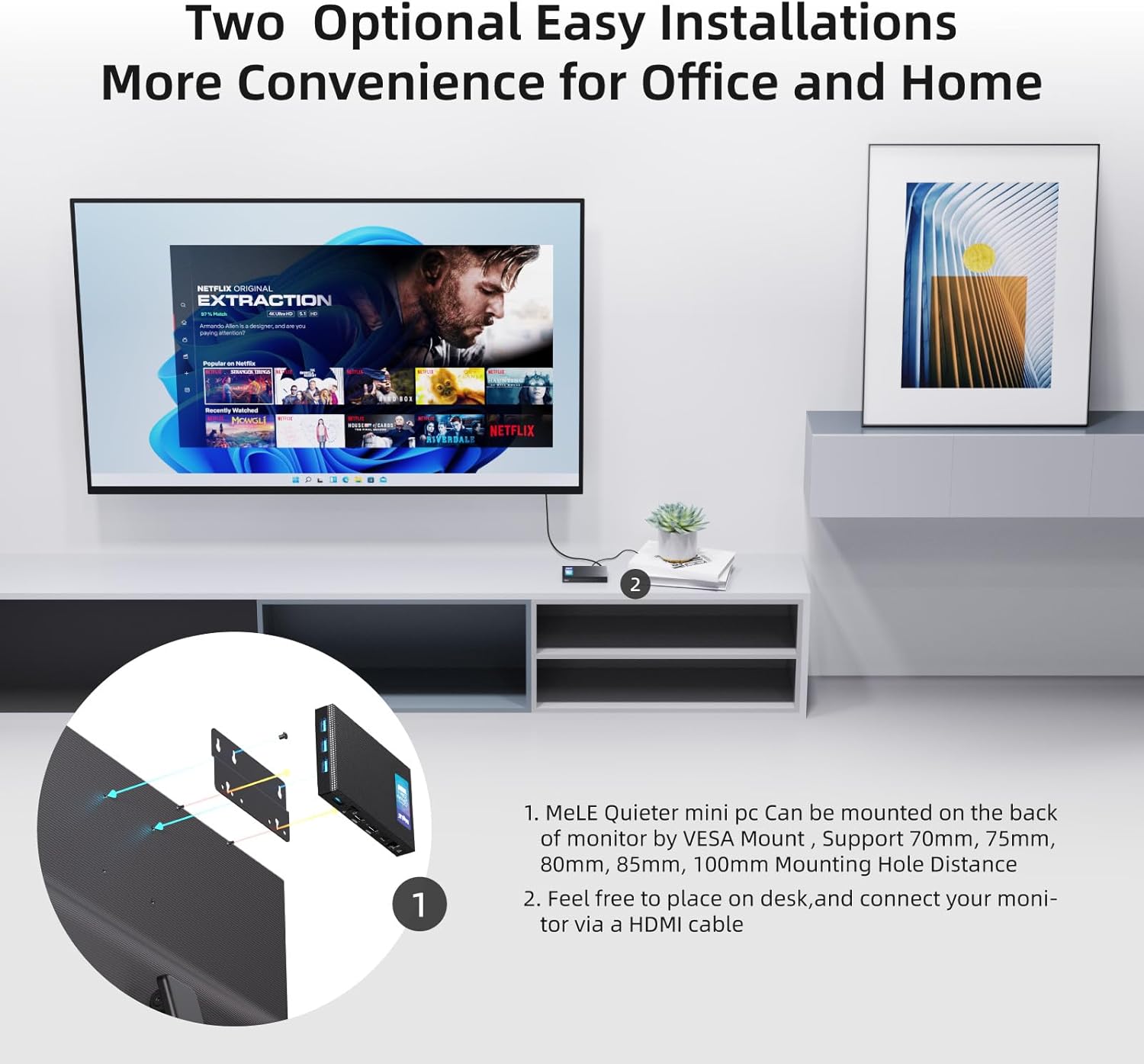
- Attach the VESA mount bracket to the back of your monitor using the appropriate screws.
- Slide the Mini PC onto the VESA mount bracket until it clicks securely into place.
5. Упутство за употребу
5.1 Укључивање/искључивање
- За укључивање: Press the Power Button (9 in Figure 2). The device will boot into Windows 11 Pro.
- За искључивање: Use the standard Windows shutdown procedure. Alternatively, press and hold the Power Button for a few seconds for a forced shutdown (not recommended for regular use).
5.2 Мрежа и повезивање
The Mini PC supports both wired and wireless network connections, along with Bluetooth for peripheral devices.

- Wi-Fi 6.0 (802.11ax): Connect to your wireless network through the Windows settings. Supports 2.4GHz and 5GHz bands.
- Блуетоотх КСНУМКС: Pair Bluetooth-enabled devices like headphones, speakers, or game controllers via Windows Bluetooth settings.
- Гигабит Етхернет: For a stable and high-speed wired internet connection, plug an Ethernet cable into the RJ45 port.
5.3 Проширење складишног простора
The Mini PC comes with 128GB of internal storage and can be expanded significantly.
- М.2 ССД слот: The device includes an M.2 2280 slot for SATA or NVMe SSDs, allowing storage expansion up to 5TB (SSD not included).
- Утор за микро СД картицу: Supports Micro SD cards up to 2TB for additional portable storage.

5.4 BIOS Settings and Advanced Features
- Приступ БИОС-у: To enter BIOS settings, press the power button and repeatedly press F7 or Избриши during startup. Select "Enter Setup" and press Ентер.
- Wake on LAN (WoL): Allows the PC to be woken up remotely over a network.
- ПКСЕ покретање: Enables booting from a network server.
- Аутоматско укључивање: Configures the PC to automatically power on after a power outage.
- RTC Wake: Schedules the PC to wake up at a specific time.
- These features can be configured within the BIOS settings.
6. Одржавање
The MeLE Quieter3Q Mini PC features a fanless design, which reduces dust accumulation and eliminates fan noise, contributing to its longevity and stable operation. To ensure optimal performance and extend the lifespan of your device, follow these general maintenance guidelines:
- Одржавати уредним одржавати чистим: Regularly wipe the exterior of the Mini PC with a soft, dry cloth to remove dust. Avoid using liquid cleaners directly on the device.
- вентилација: Ensure the device is placed in a well-ventilated area. Although fanless, proper airflow helps dissipate heat. Do not block the ventilation holes.
- температура: Operate the Mini PC within recommended temperature ranges. Avoid extreme heat or cold.
- Ажурирања софтвера: Keep your operating system (Windows 11 Pro) and drivers updated to ensure security and optimal performance.
- Резервна копија података: Редовно правите резервне копије важних података на екстерни диск или складиште у облаку како бисте спречили губитак података.
КСНУМКС. Решавање проблема
7.1 Уобичајена питања и решења
- Storage Capacity Displayed Incorrectly:
Проблем: The 128GB eMMC storage may display as approximately 114GB on the computer.
Разлог: This is due to the difference in how computer operating systems (1KB = 1024 bytes) and storage manufacturers (1KB = 1000 bytes) calculate storage capacity. The actual usable capacity is normal.
- 4K Performance Lagging:
Проблем: 4K video playback or display performance may experience lag.
Разлог: 4K display performance is influenced by various factors, including network speed, HDMI cable quality, monitor settings, graphics card, video decoding method, and video format/resolution. While the Mini PC features integrated graphics, demanding 4K content might require a more powerful processor and dedicated graphics card for smooth hardware decoding.
решење: If 4K video lags, consider reducing the display resolution to 1080p for smoother video playback. Ensure you are using high-quality HDMI cables.
- Нема излаза на екран:
Проблем: The monitor shows no signal after powering on the Mini PC.
решење:
- Check if the HDMI cable is securely connected to both the Mini PC and the monitor.
- Ensure the monitor is set to the correct input source (HDMI 1, HDMI 2, etc.).
- Try a different HDMI cable or monitor if available.
- Уверите се да је адаптер за напајање правилно повезан и да је дугме за напајање притиснуто.
- Уређај се не укључује:
Проблем: The Mini PC does not respond when the power button is pressed.
решење:
- Verify the power adapter is firmly connected to both the device and a working power outlet.
- Тестирајте утичницу са другим уређајем.
- If possible, try a different compatible 12V 2A power adapter.
8. Спецификације
| Феатуре | Детаљ |
|---|---|
| Бранд | МеЛЕ |
| Број модела | Quieter 3Q 81E |
| Оперативни систем | Windows 11 Pro, Linux, Windows 10 |
| ЦПУ модел | Интел Целерон Н5105 |
| Брзина процесора | 2 GHz (Max 2.9 GHz) |
| Број процесора | 4 |
| Грапхицс Цопроцессор | Интел УХД графика |
| Величина инсталиране РАМ меморије | 8 ГБ ЛПДДР4 |
| Брзина меморије | 2933 МХз |
| Капацитет складиштења | 128 ГБ (еММЦ) |
| Hard Drive Technology | Embedded Multi Media Card (eMMC) |
| Проширење складиштења | 1x M.2 2280 SSD slot (SATA/NVMe up to 5TB), Micro SD slot (up to 2TB) |
| Бежична технологија | Wi-Fi 6 (802.11ax), Bluetooth 5.2 |
| Етхернет | Гигабитни Етхернет (РЈ45) |
| УСБ портови | 4к УСБ 3.0 |
| Видео Оутпут | 2x HDMI (4K@60Hz max resolution: 4096x2160 Pixels) |
| Аудио излаз | Аудио комбиновани прикључак |
| Потрошња енергије | 24 Ватт |
| Димензије | 6.4 к 15.5 к 10.9 цм |
| Метод хлађења | Fanless (Air) |
| Посебне карактеристике | USB-C function, Unlocked BIOS, Wake On LAN, PXE Boot, RTC Wake, Auto Power On |
9. Гаранција и подршка
9.1 Информације о гаранцији
MeLE provides the following warranty and support for your Quieter3Q Mini PC:
- Бесплатна замена: 3 months free replacement.
- Гарантни период: Гаранција 12 месеци од датума куповине.
- Доживотна услуга: MeLE offers lifetime service for its products.
9.2 Корисничка подршка
For technical assistance, service inquiries, or further support, please contact MeLE customer service:
- Емаил: Service@mele.cn
- Време одговора: Customer service typically responds within 24 hours.
- Онлине ресурси: Посетите mele.cn for support, drivers, downloads, and community forums.
9.3 Безбедносне информације
MeLE has a global partnership agreement with Microsoft, ensuring that Windows 10/11 Pro and Home OS are officially licensed. The manufacturing of MeLE products complies with international standards such as FCC, UL, UKCA, CE, GS, CCC, PSE, Giteki, and RCM.
Ask a question about this manual
Ask about setup, troubleshooting, compatibility, parts, safety, or missing instructions. Manuals+ will review the question and use this page’s manual context to help answer it.