
1. Увод
Thank you for choosing the Pantum BP5100DN Monochrome Laser Printer. This manual provides essential information for the safe and efficient use of your printer. Please read it thoroughly before operating the device and keep it for future reference.
The Pantum BP5100DN is designed for high-speed, high-quality monochrome printing, featuring automatic two-sided printing and versatile connectivity options including USB and Ethernet.
2. Безбедносне информације
- Увек постављајте штампач на стабилну, равну површину.
- Обезбедите одговарајућу вентилацију око штампача како бисте спречили прегревање.
- Не излажите штампач води или прекомерној влажности.
- Use only the specified power supply and connect to a grounded outlet.
- Држите руке и широку одећу даље од покретних делова током рада.
- Avoid touching the fuser unit, as it can be very hot.
- Do not attempt to service the printer yourself. Refer to qualified service personnel.
3. Шта је у кутији
Проверите да ли су све ставке наведене у наставку укључене у ваш пакет:
- Pantum BP5100DN Monochrome Laser Printer
- Кабл за напајање
- УСБ интерфејс кабл
- Водич за брзо подешавање
- Starter cartridge (3000 pages)
- Starter drum (30000 pages)

Figure 3.1: Package Contents. This image displays the Pantum BP5100DN printer along with its accessories: power cord, USB interface cable, quick setup guide, starter toner cartridge, and starter drum unit.
4. Производ је готовview
4.1. Printer Components
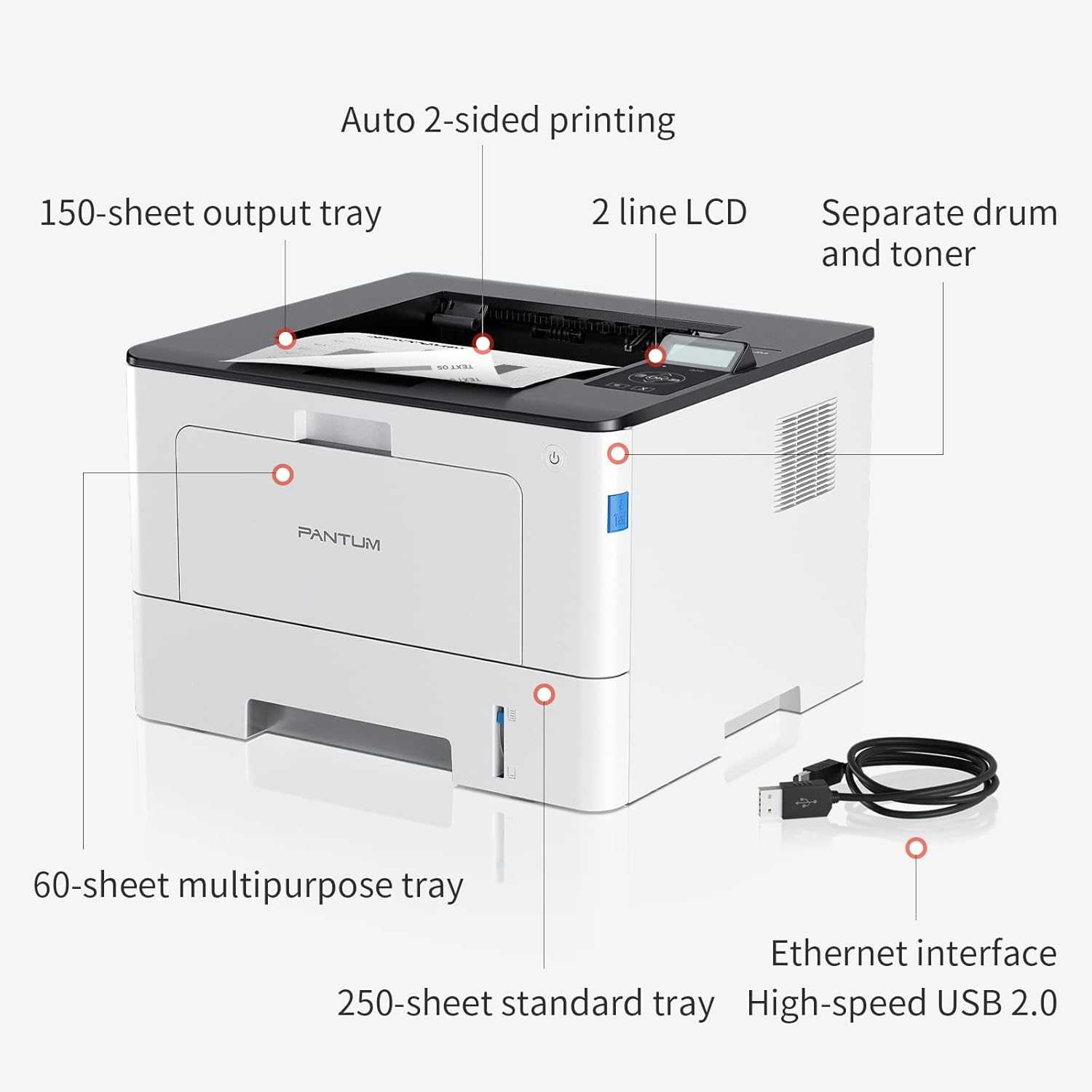
Figure 4.1: Printer Components. Key features include a 150-sheet output tray, a 2-line LCD display, separate drum and toner units, a 60-sheet multipurpose tray, a 250-sheet standard tray, an Ethernet interface, and a High-speed USB 2.0 port.
4.2. Димензије

Figure 4.2: Printer Dimensions. The printer measures approximately 14.33 inches (W) x 10.12 inches (H) x 13.54 inches (D).
4.3. Контролна табла

Figure 4.3: Control Panel. The control panel includes a 2-line LCD display for status messages and menu navigation, along with buttons for OK, arrow controls, and cancel functions.
5. Подешавање
5.1. Распакивање и постављање
- Пажљиво извадите штампач из амбалаже.
- Уклоните све заштитне траке и материјал за паковање са штампача.
- Place the printer on a firm, level surface with adequate space for ventilation.
5.2. Toner and Drum Installation
- Отворите предњи поклопац штампача.
- Unpack the drum unit and toner cartridge.
- Insert the toner cartridge into the drum unit until it clicks into place.
- Insert the combined drum and toner unit into the printer.
- Затворите предњи поклопац.
5.3. Папер Лоадинг
- Pull out the standard paper tray or open the multipurpose tray.
- Подесите вођице за папир према величини вашег папира.
- Load paper into the tray, ensuring it is flat and not exceeding the maximum capacity (250 sheets for standard tray, 60 sheets for multipurpose tray).
- Затворите лежиште за папир.
5.4. Power and Connectivity
- Прикључите кабл за напајање на штампач, а затим на уземљену електричну утичницу.
- For USB connection: Connect the provided USB 2.0 cable from the printer to your computer.
- For Ethernet connection: Connect an Ethernet cable from the printer to your network router or switch.
- Притисните дугме за напајање да бисте укључили штампач.
6. Упутство за употребу
6.1. Инсталација драјвера
For optimal performance, install the printer drivers from the official Pantum website or the provided installation media. The printer supports easy one-step installation for quick setup.
6.2. Штампање документа
- Отворите документ који желите да одштампате на рачунару или мобилном уређају.
- Изаберите опцију штампања из ваше апликације.
- Choose the Pantum BP5100DN from the list of available printers.
- Прилагодите подешавања штампања по потреби (нпр. број копија, величину папира, двострано штампање).
- Кликните на „Штампај“.
The printer offers fast printing speeds of up to 40 pages per minute (A4) / 42 pages per minute (Letter) in black and white. It also supports automatic two-sided printing to save paper.
6.3. Мобилно штампање
The Pantum BP5100DN supports direct printing of office documents from mobile devices. Ensure your mobile device and printer are connected to the same network or via USB OTG (if supported by your device and printer).
7. Одржавање
7.1. Replacing Toner Cartridge and Drum Unit
When the toner is low or the drum unit reaches its end of life, the printer's display will show a message. Refer to the instructions provided with the replacement consumables for proper installation. The starter toner cartridge yields approximately 3000 pages, and the starter drum unit yields approximately 30000 pages.
7.2. Чишћење штампача
- Turn off the printer and unplug the power cord before cleaning.
- Обришите спољашњост штампача меком крпом која не оставља влакна.
- Use a dry cloth to clean the paper path and rollers if paper jams occur frequently.
- Немојте користити абразивна средства за чишћење или раствараче.
КСНУМКС. Решавање проблема
If you encounter issues with your printer, refer to the following common solutions:
- Штампач не реагује: Проверите прикључке за напајање, USB/Ethernet кабловске везе и уверите се да је штампач укључен. Поново покрените штампач и рачунар.
- Заглављивање папира: Open all covers and carefully remove any jammed paper. Ensure paper is loaded correctly and not creased or damaged.
- Лош квалитет штампе: Check toner levels. If print quality is faded, especially with cut and paste text, ensure you are using the correct print settings and consider replacing the toner cartridge or drum unit if they are near end-of-life.
- Проблеми са повезивањем: For Ethernet, verify network cable connection and IP address settings. For USB, try a different USB port or cable.
- Поруке о грешци: Consult the printer's display for specific error codes and refer to the quick setup guide or online support for detailed solutions.
For persistent issues, please contact customer service for support.
9. Спецификације
| Феатуре | Спецификација |
|---|---|
| Назив модела | BP5100DN |
| Технологија штампе | Ласер |
| Излаз штампача | Моноцхроме |
| Максимална брзина штампања (монохроматско) | 40 ppm (A4) / 42 ppm (Letter) |
| Максимална резолуција штампања | 1200 к 1200 дпи |
| Двострано штампање | Да (аутоматски) |
| Технологија повезивања | Етхернет, УСБ 2.0 |
| Максимални капацитет улазног листа | 250 sheets (Standard Tray), 60 sheets (Multipurpose Tray) |
| Принт Медиа | Папир (обичан) |
| Величина листа | A4, Letter, etc. |
| Компатибилни уређаји | Smartphones, PCs |
| Ватtage | 650 Ваттс |
| Тежина артикла | 9.07 kg (approx. 9 kg 70 g) |
| Произвођач | Пантум |
10. Гаранција и подршка
The Pantum BP5100DN Monochrome Laser Printer comes with a 1-year warranty from the date of purchase. For warranty claims, technical support, or any inquiries, please refer to the contact information provided in your quick setup guide or visit the official Pantum webсајту.
For a better experience, please kindly refer to the user manual or contact customer service for support.