
1. Увод
This manual provides detailed instructions for the installation, operation, and maintenance of your REDTIGER T27 Mirror Dash Cam. The T27 features a front 4K camera and a rear 2.5K camera, an 11-inch UHD touch screen, WDR+HDR Super Night Vision, GPS tracking, reverse assistance, and parking monitoring capabilities. Please read this manual thoroughly before use to ensure proper functionality and safety.

Figure 1.1: REDTIGER T27 Mirror Dash Cam and included accessories.
2. Подешавање
2.1 Шта је у кутији
- 1 × T27 Mirror Dash Cam
- 1 × 32GB SD Card
- 1 × Backup Camera
- 1 × 21FT Backup Camera Cable
- 1 × Car Charger
- 1 × GPS Bracket
- 4 × Straps for mounting
- 1 × Крпа за чишћење
- 1 × Car wire trim tool

Figure 2.1: All components included with the REDTIGER T27 Mirror Dash Cam.
2.2 Инсталација
Follow these steps to install your REDTIGER T27 Mirror Dash Cam:
- Mount the Mirror Dash Cam: Secure the T27 Mirror Dash Cam over your existing rearview mirror using the provided straps. Ensure the front camera lens is unobstructed and can be adjusted for optimal view.
- Adjust the Front Camera: The front camera is adjustable. Slide it left or right to ensure it captures the desired view without obstruction from your vehicle's sun visor or other components.

Figure 2.2: The adjustable front camera allows for optimal positioning to avoid obstructions and expand the field of view.
- Инсталирајте задњу камеру: The rear camera can be mounted either inside or outside your vehicle. Choose a location that provides a clear view of the rear. Use the included bracket and screws for secure mounting. Route the rear camera cable to the main dash cam unit, tucking it neatly along the vehicle's trim using the provided trim tool.

Figure 2.3: The updated rear camera can be mounted inside or outside the vehicle, offering flexibility for installation.
- Повежите каблове:
- Connect the rear camera cable to the AV-IN port on the main unit.
- Connect the GPS module to the dedicated GPS port.
- Plug the car charger into the Type-C port on the dash cam and into your vehicle's 12V power outlet.
- Уметните СД картицу: Уметните приложену SD картицу од 32 GB у отвор за меморијску картицу. Уверите се да је правилно уметнута.

Слика 2.4: Завршеноview of the REDTIGER T27 ports including GPS, Memory card slot, AV-IN, and Type-C.
3. Упутство за употребу
3.1 Укључивање/искључивање
- Камера у аутомобилу ће се аутоматски укључити и почети снимање када се укључи паљење вашег возила.
- Аутоматски ће се искључити када се паљење искључи.
- To manually power on/off, press and hold the power button located on the side of the unit.
3.2 Touch Screen Controls
The 11-inch UHD touch screen allows for intuitive control:
- Превуците лево/десно: Промените камеру view displayed (front, rear, split-screen).
- Превлачење нагоре/доле (лева страна екрана): Подесите вертикалу viewугао камере.
- Превуците прстом горе/доле (десна страна екрана): Подесите осветљеност екрана.
- Tap Icons: Access various functions and settings directly on the screen.
Video 3.1: Official REDTIGER video demonstrating the touch screen interface and various features of the T27 Mirror Dash Cam.
3.3 Режими снимања
- Лооп Рецординг: The dash cam continuously records video in segments. When the memory card is full, the oldest unlocked fileс се преписују.
- Г-сензор (снимање у хитним случајевима): The built-in G-sensor detects sudden impacts or collisions. In such events, the current video segment is automatically locked and saved to prevent it from being overwritten by loop recording.
- Паркинг монитор: When the vehicle is parked and the ignition is off, the dash cam can monitor for impacts. With a hardwire kit (sold separately), it can provide up to 48 hours of parking monitoring, recording at a low frame rate (3-5 frames per second) to conserve storage.

Figure 3.1: Visual representation of the Emergency Recording, Loop Recording, and Parking Monitor functions.

Figure 3.2: The G-sensor automatically detects collisions and locks video files. A hardwire kit is required for continuous parking monitoring.

Figure 3.3: Time-lapse recording for 24/48 hour parking monitoring, requiring a hardwire kit.
3.4 Режими приказа
The 11-inch screen supports various display configurations:
- Предња камера View: Displays only the front camera feed.
- Задња камера View: Displays only the rear camera feed.
- Сплит-Сцреен View: Displays both front and rear camera feeds simultaneously.
- Приказ преко целог екрана: Максимизира view of either the front or rear camera.
- Panorama Display: Offers a wide-angle view, particularly useful for the rear camera.

Figure 3.4: Full screen display mode, often used with parking assistance guidelines.

Figure 3.5: Panorama display mode, providing a wider field of view.
3.5 GPS праћење
The integrated GPS module records real-time driving direction and speed. You can review this data along with your video recordings using the customized REDTIGER Player software on your computer (compatible with Windows and Mac systems).
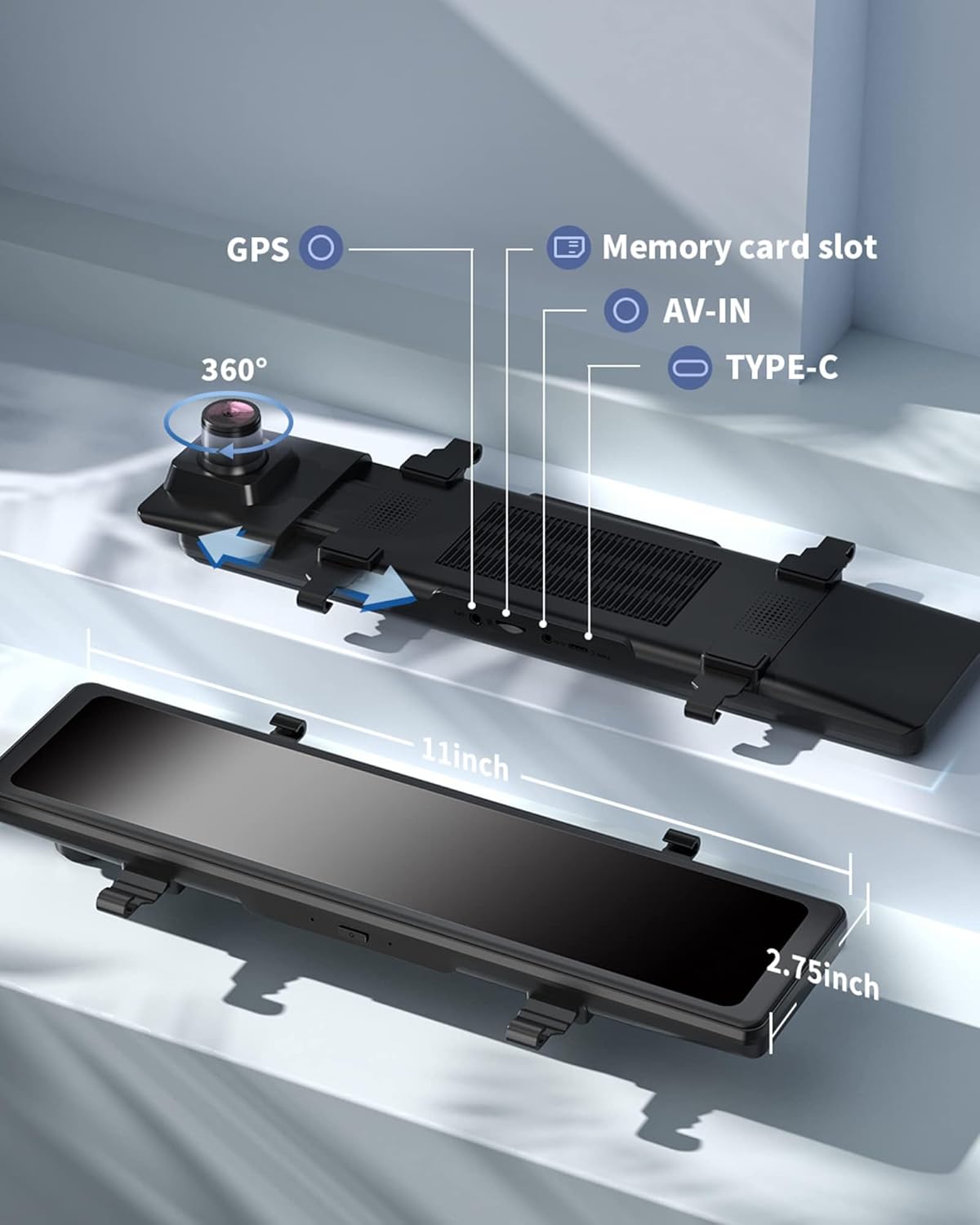
Figure 3.6: GPS tracking records real-time direction and speed, viewable with the REDTIGER Player.
3.6 WDR+HDR Super Night Vision
The WDR (Wide Dynamic Range) and HDR (High Dynamic Range) technology, combined with a high-sensitivity sensor and six-layer glass lens, enhances night vision. This allows the camera to capture clear and vivid video in both strong and low-light conditions, reducing glare from headlights and improving overall visibility at night.

Figure 3.7: The dash cam's WDR+HDR technology provides enhanced night vision for clear recordings in various lighting conditions.
3.7 Reverse Assistance
When shifting into reverse, the dash cam automatically displays the rear camera feed with adjustable parking guidelines, assisting you in safe parking maneuvers.
4. Одржавање
4.1 Управљање меморијским картицама
- Regularly format the SD card (at least once a month) through the dash cam's settings to ensure optimal performance and prevent data corruption.
- Use a high-quality Class 10 or U3 speed micro SD card (up to 128GB supported, 32GB included).
4.2 Чишћење
- Use the provided cleaning cloth to gently wipe the screen and camera lenses.
- Избегавајте употребу абразивних средстава за чишћење или растварача који могу оштетити уређај.
КСНУМКС. Решавање проблема
If you encounter any issues with your REDTIGER T27 Mirror Dash Cam, please refer to the following common solutions:
- Камера у аутомобилу се не укључује: Ensure the car charger is securely connected to both the dash cam and the vehicle's 12V outlet. Check if the vehicle's ignition is on.
- Recording Issues (e.g., video not saving, gaps in recording): Format the SD card through the dash cam's settings. Ensure you are using a compatible high-speed SD card. If the issue persists, try a different SD card.
- Задња камера се не приказује: Check all connections of the rear camera cable to both the rear camera and the main dash cam unit. Ensure the cable is not damaged.
- Screen Glare/Reflections: Adjust the screen brightness using the touch controls. Ensure the dash cam is positioned to minimize direct sunlight or strong light sources reflecting on the screen.
- ГПС не прати: Ensure the GPS module is securely connected and has a clear view неба.
За додатну помоћ, обратите се корисничкој подршци.
6. Спецификације
| Феатуре | Спецификација |
|---|---|
| Бранд | Црвени тигар |
| Назив модела | Т27 |
| Резолуција снимања видео записа | Front 4K, Rear 2.5K (2560 x 1440) |
| Величина екрана | 11 инча |
| Дисплаи Типе | UHD Touch Screen LCD |
| Предње поље View | 170 степени |
| Задње поље View | 150 степени |
| Посебне карактеристике | Front and Rear Dual Recording, Streaming Media Rearview, G-sensor, Emergency Recording, Parking Assistance, Loop Recording, WDR+HDR Technology, Built-in HI-SILICON Chip, Parking Monitor & Time Lapse Recording, Accident Recording, GPS Tracking, Full Touch Screen, Super Night Vision |
| Технологија повезивања | УСБ |
| Тип флеш меморије | SD (up to 128GB supported) |
| Величина укључене меморијске картице | 32 ГБ |
| Фраме Рате | 30 ФПС |
| Тип монтаже | Страп Моунт |
| Опсег радне температуре | Typically -4°F to 158°F (-20°C to 70°C) |
7. Гаранција и подршка
7.1 Информације о гаранцији
The REDTIGER T27 Mirror Dash Cam is backed by a ГАРАНЦИЈА 1 ГОДИНА from the date of purchase. This warranty covers manufacturing defects and ensures product satisfaction.
7.2 Корисничка подршка
If you have any questions regarding installation, usage, or require technical support, please do not hesitate to contact our professional customer service team. We offer 7*24 hours of technical support.
- Емаил: суппорт@редтигерцам.цом