
Увод
This manual provides detailed instructions for the installation, operation, and maintenance of your Podofo 9-inch Autoradio Carplay Android Auto system, model 1G+16G+Carplay+HiFi. This unit is specifically designed for Peugeot 308 and 408 models manufactured between 2007 and 2013. Please read this manual thoroughly before installation and use to ensure proper function and safety.
Безбедносне информације
- Увек се уверите да је возило искључено и да је батерија искључена пре него што извршите било какву инсталацију или ожичење.
- Improper installation can lead to vehicle damage or electrical malfunction. If you are unsure about the installation process, seek professional assistance.
- Не користите уређај на начин који вас одвлачи од вожње. Увек дајте приоритет безбедности у саобраћају.
- Избегавајте излагање уређаја екстремним температурама, директној сунчевој светлости током дужег периода или прекомерној влази.
- Користите само назначене каблове за напајање и додатну опрему како бисте спречили оштећења или пожар.
Садржај пакета
Проверите да ли су све ставке наведене у наставку укључене у ваш пакет:
- 1 x Autoradio (including frame)
- 1 к задња камера
- 1 x CANbus dekoder
- 1 к кабл за напајање
- 1 x Оригинални УСБ кабл
- 1 к ГПС антена
- 1 x Радио антена
- 1 x кабл за улаз задње камере
- 1 к спољни микрофон
- 1 x RCA сет каблова
- 2 к УСБ каблови
- 1 x Комплет алата за инсталацију
- 1 x Упутство за употребу (енглеска верзија)
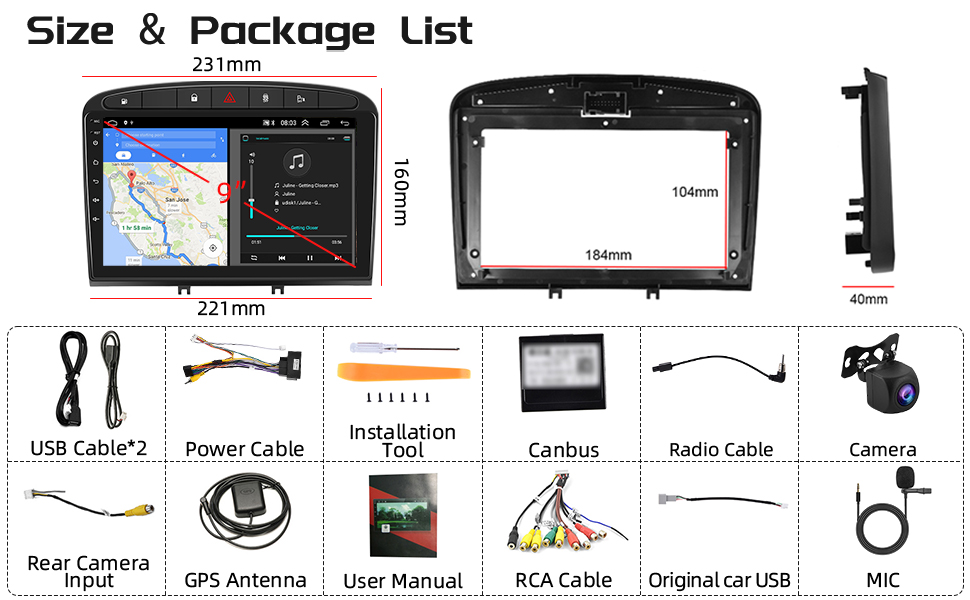
This image displays the main autoradio unit with its frame, along with all the cables, antennas, rear camera, installation tools, and user manual included in the package.
Подешавање и инсталација
1. Провера пре инсталације
- Ensure your vehicle is a Peugeot 308 or 408 model from 2007-2013.
- Confirm the dimensions of the unit (231mm top width x 221mm bottom width x 160mm height) fit your car's dashboard opening.
- Искључите акумулатор возила пре почетка инсталације.
This image illustrates the precise dimensions of the autoradio unit and its accompanying frame, crucial for verifying compatibility with your vehicle's dashboard.
2. Ожичење
Connect the provided cables according to the wiring diagram. The Canbus decoder ensures compatibility with your vehicle's existing systems, including steering wheel controls.
- Кабл за напајање: Connect to the vehicle's power harness.
- CANbus декодер: Integrate the Canbus decoder as per the vehicle-specific instructions to enable communication with the car's electronics.
- УСБ каблови: Connect the two USB cables for external device connectivity.
- ГПС антена: Монтирајте GPS антену на место са јасним view неба, обично на контролној табли или испод ветробранског стакла.
- Радио антена: Connect the radio antenna for FM/RDS reception.
- Задња камера: Connect the rear camera input cable and install the camera at the rear of the vehicle. Ensure proper power supply to the camera.
- Спољни микрофон: Повежите екстерни микрофон за бољи квалитет позива.
- RCA каблови: Use the RCA cable set for additional audio/video inputs or outputs if needed.
3. Монтажа јединице
Carefully insert the autoradio unit into the dashboard opening. Secure it using the provided mounting brackets and screws. Ensure all cables are properly routed and not pinched.

This image shows a comparison of the car's dashboard before and after the installation of the Podofo Autoradio, highlighting the integrated fit.
Упутство за употребу
1. Почетно укључивање и подешавање система
After installation, reconnect the vehicle battery. The unit will power on automatically or by pressing the power button. Follow the on-screen prompts for initial setup, including language selection and time zone.
2. Бежични Carplay и Android Auto
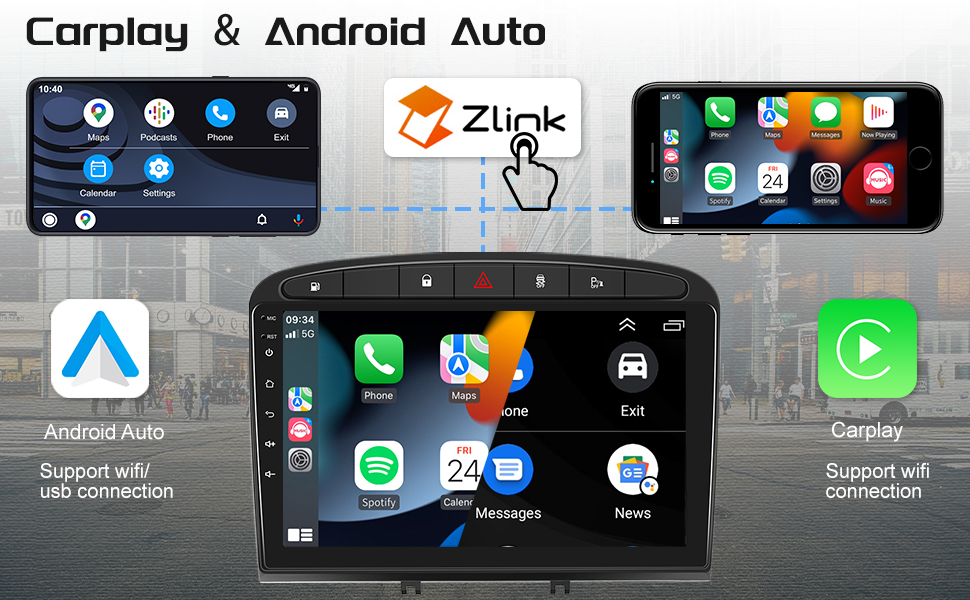
The unit supports both wireless and wired Apple Carplay and Android Auto via the "Zlink" application. This allows you to mirror your smartphone's applications directly onto the autoradio screen.
- веза: Open the "Zlink" app on the autoradio. For wireless connection, enable Bluetooth and Wi-Fi on your smartphone and pair it with the autoradio. For wired connection, connect your phone via USB.
- Функционалност: Access navigation apps (Google Maps, Waze), music streaming (Spotify), messaging (WhatsApp), and other compatible applications directly from the autoradio display.

This image illustrates the seamless integration of wireless Carplay and Android Auto, displaying smartphone applications like Spotify, Phone, and Maps on the autoradio screen.
3. Блуетоотх повезивање
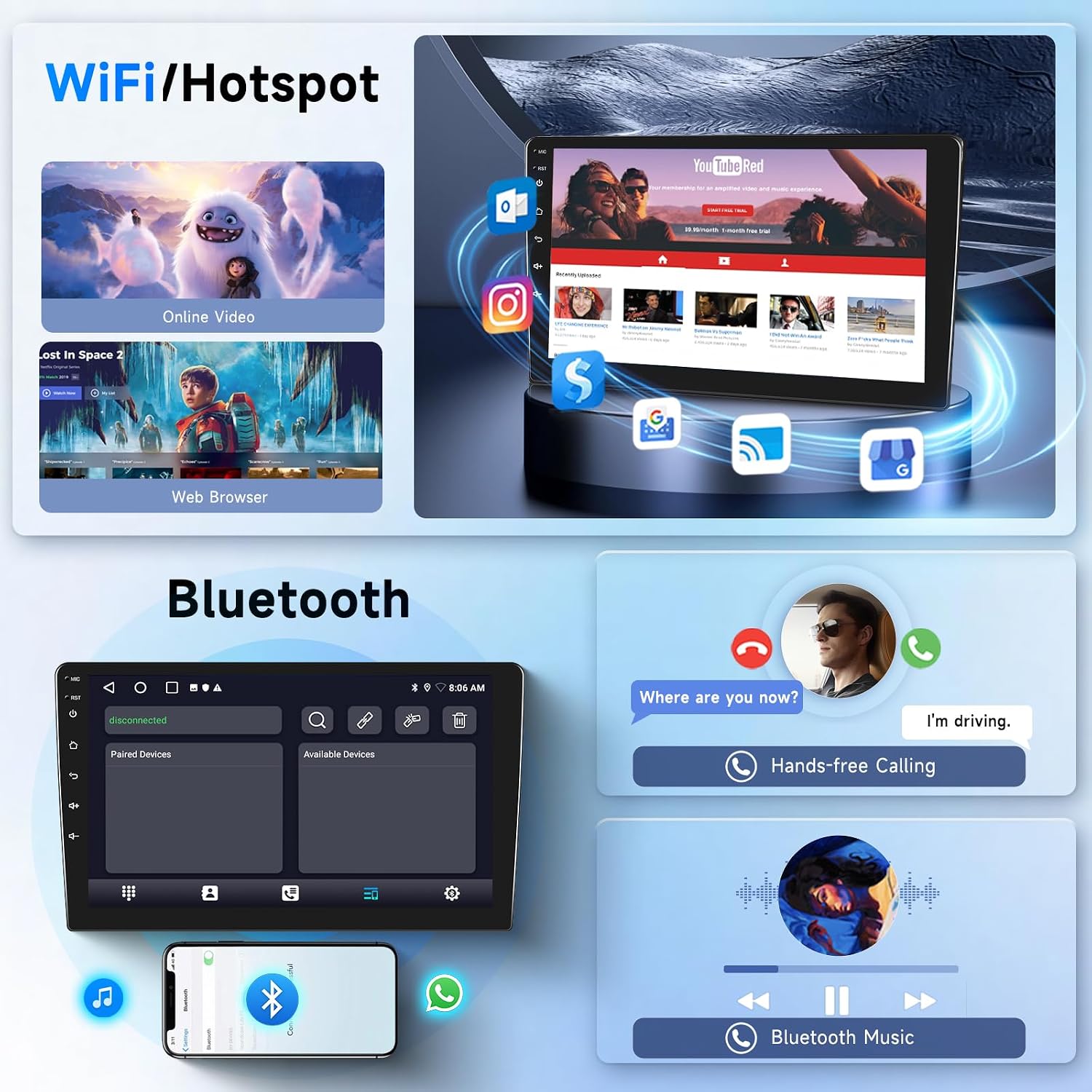
The integrated Bluetooth module enables hands-free calling and audio streaming.
- Упаривање: Go to the Bluetooth settings on the autoradio and your smartphone. Тражи and select the autoradio's Bluetooth name to pair.
- Хандс-фрее позиви: Make and receive calls directly through the autoradio. Use the external microphone for clear voice transmission.
- Блуетоотх музика: Stream audio from your smartphone to the autoradio's speakers.

This image displays the Bluetooth interface for managing calls and playing music, alongside the Wi-Fi/Hotspot feature for internet access and online content.
4. Wi-Fi and Internet Access
Connect the autoradio to a Wi-Fi network or a mobile hotspot to access online features and download applications.
- веза: Navigate to Wi-Fi settings and select your desired network. Enter the password if required.
- Пријаве: Download various apps from the pre-installed app store or browser.
5. GPS навигација
The unit is equipped with a GPS module for navigation. It comes with the "HereWego" map application pre-installed, supporting both online and offline maps.
- Онлајн мапе: Requires Wi-Fi or mobile data connection.
- Офлајн мапе: Преузмите податке мапа за свој регион да бисте користили навигацију без интернет везе.

This image shows the GPS navigation system, offering both online and offline map capabilities, along with the FM/RDS radio interface showing frequency tuning.
6. FM/RDS радио
Enjoy your favorite radio programs with the built-in FM/RDS tuner. The unit supports a frequency range of 87.5-107.5 MHz and allows saving up to 6 channels.
- подешавање: Use the touch screen to scan for stations or manually tune to a specific frequency.
- РДС: Radio Data System provides additional information like station name and song title where available.
7. Управљање воланом (SWC)
The Canbus decoder enables integration with your vehicle's existing steering wheel controls. This allows you to manage audio, calls, and other functions without taking your hands off the wheel.
- Конфигурација: Access the SWC settings in the system menu to map your steering wheel buttons to specific functions on the autoradio.
This image demonstrates the steering wheel control setup screen, allowing users to configure buttons, and the split-screen feature for multitasking like navigation and media playback.
8. Hi-Fi аудио
The unit features HiFi audio processing for enhanced sound quality. Adjust equalizer settings to customize your listening experience.

This image shows the Digital Sound Processor (DSP) audio setup screen, providing controls for equalization, balance, and various sound presets to optimize the in-car audio experience.
9. Приказ задње камере
When the vehicle is shifted into reverse gear, the display automatically switches to the rear camera view, providing a clear image with 1280x720 pixels, waterproofing, and night vision capabilities.
10. Функционалност подељеног екрана
Utilize the split-screen feature to run two applications simultaneously, such as navigation and music playback, or a web browser and navigation.

This image displays several key user interfaces of the autoradio, including the main home screens, Bluetooth call and music interfaces, FM radio, video playback, split-screen mode, and the rear camera display.
Одржавање
- Чишћење: Користите меку, суву крпу за чишћење екрана и уређаја. Избегавајте абразивна средства за чишћење или раствараче.
- Ажурирања софтвера: Периодично проверавајте да ли постоје ажурирања софтвера како бисте осигурали оптималне перформансе и приступ новим функцијама. Ажурирања се обично могу преузети путем Wi-Fi мреже.
- Кабловске везе: Ensure all cables remain securely connected. Loose connections can lead to intermittent issues.
Решавање проблема
| Проблем | Могући узрок | Решење |
|---|---|---|
| Јединица се не укључује. | Лабав прикључак за напајање, прегорели осигурач, искључен акумулатор возила. | Проверите везе кабла за напајање. Проверите осигураче возила. Уверите се да је батерија повезана. |
| Контроле на волану не раде. | Canbus decoder not properly connected or configured. | Verify Canbus connection. Access SWC settings in the unit to configure buttons. |
| Нема звука. | Volume too low, mute activated, speaker wires disconnected. | Increase volume. Check if mute is active. Inspect speaker wiring. |
| GPS сигнал је слаб или нетачан. | GPS antenna improperly placed, obstruction. | Relocate GPS antenna to a position with a clear view неба. |
| Carplay/Android Auto се не повезује. | Incorrect Zlink app usage, Bluetooth/Wi-Fi issues, incompatible phone OS. | Ensure Zlink app is open. Check phone's Bluetooth/Wi-Fi. Try wired connection. Update phone OS if necessary. |
| Задња камера не приказује слику. | Camera power issue, incorrect cable connection, camera malfunction. | Verify camera power and RCA cable connection. Check camera settings in the unit. |
Спецификације
| Феатуре | Детаљ |
|---|---|
| Број модела | 1G+16G+Carplay+HiFi |
| Компатибилна возила | Peugeot 308/408 (2007-2013) |
| Величина екрана | 9 инча |
| Оперативни систем | Android (1G RAM, 32G ROM, Quad-core) |
| Технологија повезивања | Bluetooth, Carplay, Android Auto, USB, Wi-Fi |
| Контролни метод | Тоуцхсцреен |
| Посебне карактеристике | ABS, Aluminum, Glass construction |
| Компатибилни уређаји | Смартпхоне |
| Укупни ХДМИ портови | 1 |
| Режим аудио излаза | Стерео |
| Конфигурација канала сурроунд звука | 2.0 или 2.1 |
| Видео Енцодинг | H.264, H.265/HEVC, MPEG-4 |
| Излазна снага | 180 Watts (Peak), 45 Watts (RMS per channel) |
| Број канала | 4 |
| Internet Applications | Android Auto, CarPlay |
| Формат дигиталних медија | WAV, WMA |
| Тежина артикла | 16 грама |
| Боја | Црно |
| Задња камера | HD (1280x720 pixels), Waterproof, Night Vision |
Гаранција и подршка
For warranty information and technical support, please refer to the contact details provided with your purchase or visit the official Podofo webсајт. Сачувајте доказ о куповини за потребе гаранције.
Напомена: Software updates are generally provided by the manufacturer. Information regarding guaranteed software updates is not available at the time of this manual's publication.
резервни делови: Information regarding the availability of spare parts is not available.