
Увод
Thank you for choosing the BOBLOV W3 WiFi Body Camera. This manual provides detailed instructions for the proper setup, operation, and maintenance of your device. Please read this manual thoroughly before using the camera to ensure optimal performance and to prevent damage.
Садржај пакета
Проверите да ли су све ставке наведене у наставку укључене у ваш пакет:
- 1x BOBLOV W3 Body Camera
- 1x 64GB Micro SD Card (pre-installed in camera)
- 1к УСБ-Ц кабл за пуњење
- 1x Screw Driver
- 1x Упутство за употребу (овај документ)
- 1x Back Magnets Clip
- 1x Brooch
Производ је завршенview
Упознајте се са компонентама и контролама камере:

слика: BOBLOV W3 Body Camera with labels indicating the Power/Video Button, Audio/WiFi Button, Microphone, Reset button, Brooch attachment point, Back Magnetic Clip, and USB-C Charging Interface. The image also shows the dimensions of the camera.
- Power/Video Button: Used to power on/off the device and start/stop video recording.
- Audio/WiFi Button: Used to start/stop audio recording and activate/deactivate WiFi function.
- Миц: Microphone for audio capture.
- Ресетовати: Мало дугме за ресетовање уређаја (потребан је ПИН).
- Brooch: Attachment point for the included brooch clip.
- Back Magnetic Clip: Removable clip for magnetic attachment.
- Интерфејс за пуњење: USB-C порт за пуњење и пренос података.
Сетуп
1. Пуњење камере
Before initial use, fully charge the camera. The built-in 1450mAh battery takes approximately 3 hours to fully charge.
- Connect the provided USB-C charging cable to the camera's charging interface.
- Повежите други крај кабла са УСБ адаптером за напајање (није укључен) или УСБ портом рачунара.
- Индикаторска лампица пуњења ће светлети током пуњења и искључити се када се потпуно напуни.
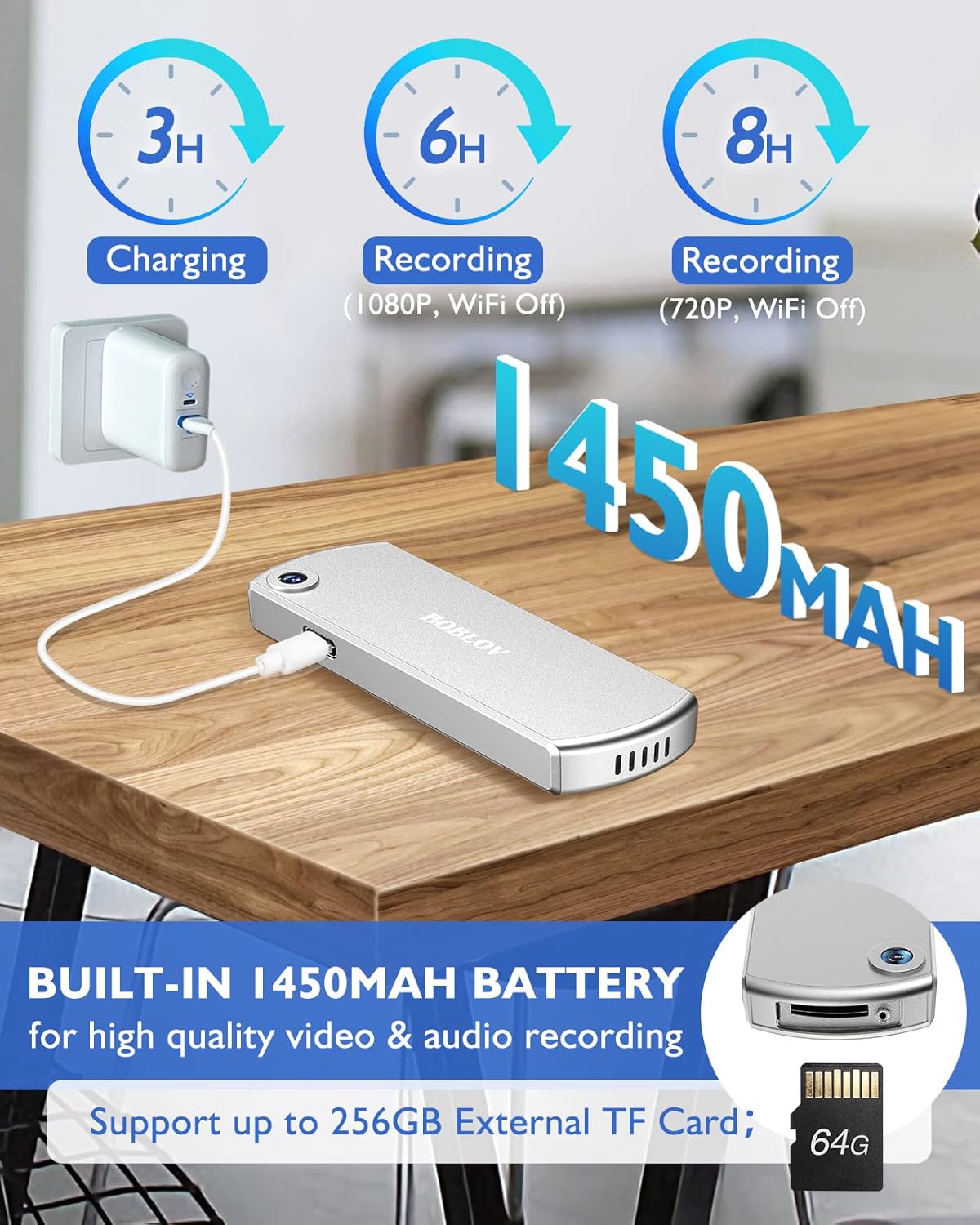
слика: The BOBLOV W3 Body Camera being charged via a USB-C cable, highlighting the 1450mAh battery and charging times: 3 hours for full charge, 6 hours recording (1080P, WiFi Off), and 8 hours recording (720P, WiFi Off).
2. Inserting/Expanding Memory Card
The W3 Body Camera uses an external Micro SD card. A 64GB card is included and pre-installed.
- Пронађите слот за меморијску картицу на фотоапарату.
- Use the included screwdriver to carefully unscrew the cover of the card slot.
- Insert or replace the Micro SD card (up to 256GB) into the slot with the contacts facing down.
- Securely fasten the card slot cover with the screwdriver.
3. Attaching the Camera
The camera offers two attachment options: a back magnetic clip and a brooch.
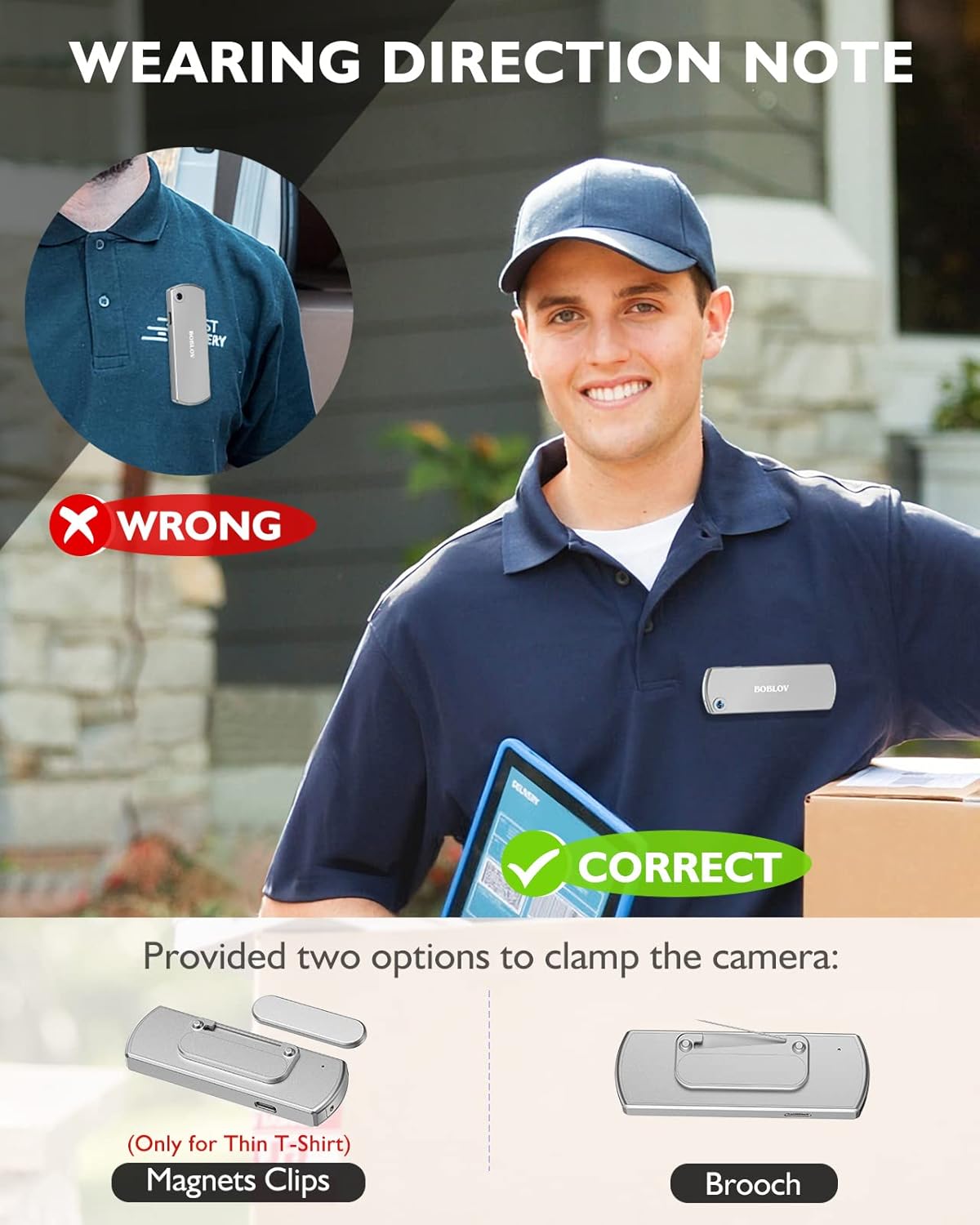
слика: Illustration demonstrating correct and incorrect ways to wear the BOBLOV W3 Body Camera. It shows that magnetic clips are suitable for thin T-shirts, while a brooch provides a more secure attachment for other clothing types.
- Магнетни клип: Attach the magnetic clip to the back of the camera. This is suitable for thin fabrics like T-shirts. Ensure the camera is securely held.
- Brooch: For more secure attachment or thicker clothing, use the provided brooch. Attach it to the camera's designated brooch point and then pin it to your clothing.
Упутство за употребу
1. Укључивање/искључивање
- Укључено: Притисните и држите Power/Video Button for a few seconds until the indicator light illuminates.
- Искључивање: Притисните и држите Power/Video Button again for a few seconds until the indicator light turns off.
2. Видео снимање
- While the camera is powered on, press the Power/Video Button once to start video recording. The indicator light will flash to indicate recording is in progress.
- Притисните тастер Power/Video Button again to stop video recording. The indicator light will return to a steady state.
- The camera supports 1080P and 720P video recording. With WiFi off, it can record for approximately 6 hours at 1080P or 8 hours at 720P on a full charge.
- Videos are saved in 5-minute fragments by default. The camera supports loop recording, overwriting older fileс када је меморијска картица пуна.
3. Аудио снимање
- While the camera is powered on, press the Audio/WiFi Button once to start audio recording.
- Притисните тастер Audio/WiFi Button поново да бисте зауставили аудио снимање.
4. WiFi Function and App Connectivity
The BOBLOV W3 features WiFi connectivity, allowing you to manage files and change settings via a smartphone app.
- Activate WiFi: Притисните и држите Audio/WiFi Button for a few seconds to turn on the WiFi function. The WiFi indicator light will flash.
- Преузми апликацију:
- For Android devices, download the DHiHZ апп.
- For iOS devices, download the Mini-XRcam апп.
- Повежи се са камером: On your smartphone, go to WiFi settings and connect to the camera's WiFi network (usually named "BOBLOV_W3_XXXX"). The default password is typically "12345678".
- Користите апликацију: Open the downloaded app to view ливе фооtagе, репродукција снимака, преузимање files, and adjust camera settings.
- Deactivate WiFi: Притисните и држите Audio/WiFi Button поново да искључите ВиФи.

слика: The BOBLOV W3 Body Camera wirelessly connected to a smartphone, illustrating the WiFi function for managing files, changing settings, and accessing features like video, audio, preview, playback, and download through the dedicated Android (DHiHZ) and iOS (Mini-XRcam) applications.
5. Повезивање са рачунаром
You can connect the camera to a computer to manage recorded fileс и промените подешавања.
- Ensure the camera is powered ON before connecting to the PC.
- Connect the camera to your computer using the provided USB-C cable.
- Камера ће се појавити као преносиви диск на вашем рачунару.
- You can then access, copy, delete, or upload recorded files. Some settings may also be configurable via a configuration file on the camera's storage.

слика: The BOBLOV W3 Body Camera connected to a laptop via a USB-C cable, demonstrating how to manage recorded files and change settings. Icons for Playback, Delete, Upload, and Settings are shown, with a note to ensure the camera is powered ON for connection.
Одржавање
- Чишћење: Use a soft, dry cloth to clean the camera body. Do not use liquid cleaners or solvents.
- Складиштење: Чувајте камеру на хладном и сувом месту, даље од директне сунчеве светлости и екстремних температура.
- Одржавање батерије: To prolong battery life, avoid fully discharging the battery frequently. Charge the camera regularly, even if not in use for extended periods.
- меморијска картица: Periodically back up important recordings from the Micro SD card to a computer. Format the Micro SD card regularly (e.g., once a month) to maintain optimal performance and prevent data corruption.
- Отпорност на воду: The camera has an IP65 waterproof rating, meaning it is protected against dust and low-pressure water jets. It is not designed for submersion.
Решавање проблема
| Проблем | Могући узрок / решење |
|---|---|
| Камера се не укључује. | Battery may be depleted. Charge the camera for at least 3 hours. If the issue persists, try resetting the camera using a pin in the reset hole. |
| Camera gets hot when WiFi is on. | This is normal behavior for the camera when the WiFi function is active due to increased power consumption. |
| Cannot connect to WiFi via smartphone app. | Ensure WiFi is enabled on the camera. Check if you have downloaded the correct app (DHiHZ for Android, Mini-XRcam for iOS). Verify the WiFi password (default is "12345678"). Try restarting both the camera and your phone. |
| Camera stops recording unexpectedly. | The memory card may be full. The camera supports loop recording, but if the card is corrupted or too slow, it might cause issues. Try formatting the card or using a different high-speed Micro SD card. Battery may be low. |
| Није могуће приступити fileс на рачунару. | Ensure the camera is powered ON before connecting to the PC. Try a different USB-C cable or USB port. |
Спецификације
| Феатуре | Детаљ |
|---|---|
| Бранд | БОБЛОВ |
| Назив модела | W3 |
| Број модела | Б-В3 |
| Технологија повезивања | Ви-Фи |
| Посебне карактеристике | Лагана |
| Компатибилни уређаји | Android/iOS Phone |
| Извор напајања | Баттери Поверед |
| Резолуција снимања видео записа | 1080п |
| Боја | Сребро |
| Тип монтаже | Сурфаце Моунт |
| Форм Фацтор | Цомпацт |
| Материјал кућишта | Метал |
| Тип упозорења | Мотион Онли |
| Извор светлости | Инфрацрвени |
| Водоотпорна оцена | ИП65 |
| Контролни метод | Апп |
| Ватtage | 3.7 ват-сати |
| Нигхт Висион | Нигхт Цолор |
| Димензије артикла | 9 к 3 к 1.5 центиметара |
| Капацитет батерије | 1450mAh (уграђена) |
| Recording Time (1080P, WiFi Off) | Прибл. 6 сата |
| Recording Time (720P, WiFi Off) | Прибл. 8 сата |
| Време пуњења | Прибл. 3 сата |
| Екстерна меморија | Micro SD Card, up to 256GB (64GB included) |
| Нето тежина | 60 г / 2 оз |
Гаранција и подршка
BOBLOV provides a two-year warranty for high-value products, including the W3 Body Camera. For any technical assistance, troubleshooting, or warranty claims, please contact BOBLOV customer service.
Please refer to the official BOBLOV website or your purchase documentation for the most up-to-date contact information and warranty details.