
1. Увод
Хвала вам на куповиниasing the Blaupunkt PB10DB Bluetooth Karaoke Speaker. This manual provides essential information for the safe and efficient operation of your device. Please read it thoroughly before use and keep it for future reference. The PB10DB is a portable party speaker designed for high-quality audio playback and karaoke, featuring Bluetooth connectivity, USB, and AUX inputs.
2. Безбедносне информације
Да бисте осигурали безбедан рад и спречили оштећења, молимо вас да се придржавате следећих мера предострожности:
- Не излажите уређај екстремним температурама, директној сунчевој светлости или високој влажности.
- Keep the speaker away from water and other liquids. The product is indicated as waterproof, but avoid submerging it.
- Do not attempt to disassemble or modify the speaker. Repairs should only be performed by qualified personnel.
- Користите само наведену додатну опрему за пуњење.
- Ensure proper ventilation around the speaker during use.
- Избегавајте слушање музике на претерано јаким гласноћама током дужег временског периода како бисте спречили оштећење слуха.
3. Садржај пакета
Молимо вас да проверите да ли су све ставке присутне у пакету:
- Blaupunkt PB10DB Bluetooth Karaoke Speaker
- Адаптер за напајање/кабл за пуњење
- Кориснички приручник (овај документ)
- Microphone (if included in your specific package)
4. Производ је готовview
Familiarize yourself with the various parts of your Blaupunkt PB10DB speaker.
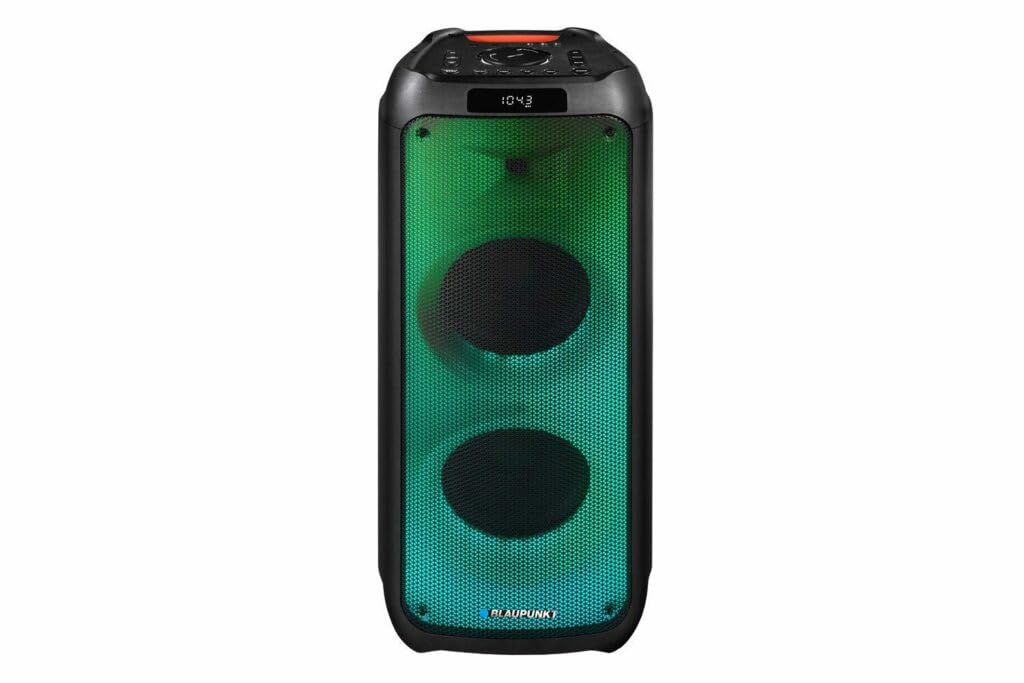
Слика 1: Фронт view of the Blaupunkt PB10DB speaker, showcasing the dual speaker grilles and dynamic LED lighting. The top panel features a display and control buttons.

Слика 2: Англед view of the Blaupunkt PB10DB speaker, highlighting its portable design and the side profile.
Controls and Ports (Typical Layout)
- Дугме за напајање: Укључује/искључује звучник.
- Дугме за режим: Switches between Bluetooth, USB, AUX, and FM radio modes.
- Контрола јачине звука: Подешава главну јачину звука.
- Дугме за репродукцију/паузу: Контролише репродукцију медија.
- Дугмад за претходну/следећу нумеру: Navigates through tracks.
- Улаз за микрофон (MIC IN): For connecting a wired microphone for karaoke.
- УСБ порт: For playing music from a USB drive or charging external devices.
- AUX улаз (3.5 мм): For connecting external audio devices via an audio cable.
- Порт за пуњење: For connecting the power adapter to charge the speaker.
5. Подешавање
5.1 Пуњење звучника
- Connect the provided power adapter to the charging port on the speaker.
- Укључите адаптер у одговарајућу утичницу.
- The charging indicator light will illuminate (color may vary) to show that the speaker is charging.
- Once fully charged, the indicator light may change color or turn off. Disconnect the charger.
A full charge typically takes several hours and provides approximately 8 hours of playback time.
5.2 Укључивање/искључивање
- За укључивање: Press and hold the Power button for a few seconds until the display lights up and you hear an audible prompt.
- За искључивање: Press and hold the Power button again for a few seconds until the display turns off and you hear an audible prompt.
6. Упутство за употребу
6.1 Блуетоотх упаривање
- Ensure the speaker is powered on and in Bluetooth mode. If not, press the Mode button until "Bluetooth" or a similar indicator appears on the display. The speaker will enter pairing mode, indicated by a flashing Bluetooth icon or LED.
- На свом мобилном уређају (паметном телефону, таблету итд.) омогућите Блутут и потражите доступне уређаје.
- Select "Blaupunkt PB10DB" from the list of found devices.
- Once paired, the speaker will emit an audible confirmation, and the Bluetooth indicator will stop flashing.
- Сада можете да репродукујете звук са свог уређаја преко звучника.
Звучник ће аутоматски покушати да се поново повеже са последњим упареним уређајем када се укључи.
6.2 Функција караоке
- Connect a wired microphone (not always included) to the MIC IN port on the speaker.
- Ensure the microphone is switched on (if it has a power switch).
- Play your desired karaoke track via Bluetooth, USB, or AUX.
- Adjust the microphone volume and echo effects (if available on the speaker) using the dedicated controls.
6.3 Репродукција са УСБ-а
- Уметните УСБ флеш диск који садржи МП3 аудио fileс у УСБ порт.
- Press the Mode button to switch to USB mode. The speaker will automatically begin playing music from the USB drive.
- Користите дугмад Репродукција/Пауза и Претходна/Следећа нумера за контролу репродукције.
6.4 АУКС улаз
- Повежите један крај аудио кабла од 3.5 мм (није укључен) са AUX IN портом на звучнику.
- Повежите други крај кабла са прикључком за слушалице или аудио излазом вашег екстерног аудио уређаја.
- Press the Mode button to switch to AUX mode.
- Control playback and volume from your external audio device.
7. Одржавање
7.1 Чишћење
- Увек искључите звучник и искључите га из извора напајања пре чишћења.
- Користите меку, суву крпу да обришете спољашњост звучника.
- Do not use abrasive cleaners, waxes, or solvents, as these may damage the finish.
7.2 Складиштење
- Чувајте звучник на хладном и сувом месту, даље од директне сунчеве светлости и екстремних температура.
- If storing for an extended period, charge the battery periodically (e.g., every 3 months) to maintain battery health.
КСНУМКС. Решавање проблема
| Проблем | Могући узрок | Решење |
|---|---|---|
| Звучник се не укључује. | Батерија је празна. | Charge the speaker using the provided power adapter. |
| Нема звука из звучника. | Јачина звука је прениска или искључена. Неисправан режим уноса. | Increase volume. Press the Mode button to select the correct input (Bluetooth, USB, AUX). |
| Блуетоотх упаривање није успело. | Звучник није у режиму упаривања. Уређај је предалеко. Сметње. | Уверите се да је звучник у режиму упаривања путем Bluetooth-а. Приближите уређај звучнику. Искључите друге Bluetooth уређаје. |
| Микрофон не ради. | Microphone not connected properly or switched off. Microphone volume too low. | Check microphone connection. Ensure microphone is powered on. Adjust microphone volume. |
| Репродукција са УСБ-а не ради. | USB drive not formatted correctly or unsupported file врсте. | Ensure USB drive is formatted to FAT32 and contains MP3 files. Try a different USB drive. |
9. Спецификације
| Назив модела: | ПБ10ДБ |
| Бренд: | БЛАУПУНКТ |
| Технологија повезивања: | Помоћни, Блутут, УСБ |
| Максимална излазна снага звучника: | 1000 Ваттс |
| Режим аудио излаза: | Стерео |
| Тип монтаже: | Табле Моунт |
| Материјал: | Метал и пластика |
| Тип звучника: | Твеетер |
| Посебна карактеристика: | Музика |
| Препоручена употреба: | For music player |
| Боја: | Плава |
| водоотпоран: | Истина |
| Метод контроле: | Додирните |
| Пречник високотонца: | 4 центиметара |
| Просечан век трајања батерије: | 8 сата |
| Компатибилни уређаји: | Лаптоп, паметни телефон |
| Извор напајања: | Баттери Поверед |
| Тежина артикла: | 105 грама |
| Димензије производа (Д к Ш к В): | 24 к 69 к 2.5 цм |
10. Гаранција и подршка
Blaupunkt products are designed and manufactured to the highest quality standards. For detailed warranty information, please refer to the warranty card included with your product or visit the official Blaupunkt webсајту.
For technical support, troubleshooting assistance, or service inquiries, please contact Blaupunkt customer support through their official channels.
- Службено Webсајт: ввв.блаупункт.цом
- Служба за кориснике: Refer to your regional Blaupunkt webсајт за контакт детаље.