
Увод
This manual provides essential information for the proper installation, operation, and maintenance of your TELE System TS6105 DVB-T2 HEVC Digital Terrestrial Decoder. Please read these instructions carefully before using the device to ensure optimal performance and safety.
The TS6105 decoder is designed to receive DVB-T2 HEVC 10-bit digital terrestrial television broadcasts, offering Full HD resolution up to 1080p@60Hz. It includes features such as automatic channel scanning (AUTOSCAN), an Electronic Program Guide (EPG), and multimedia playback capabilities via USB.
Садржај пакета
Уверите се да су све ставке присутне у пакету:
- TELE System TS6105 DVB-T2 HEVC Digital Terrestrial Decoder
- Ремоте Цонтрол
- Повер Адаптер
- Кориснички приручник (овај документ)

This image shows the compact design of the TS6105 decoder, highlighting the TELE System logo, model number TS6105 DVB-T2 HEVC, Dolby Audio, and HDMI branding on the front, with ventilation on the side.
Сетуп
1. Connecting the Decoder
Before connecting, ensure your television and the decoder are turned off.

This image displays the rear panel of the TS6105 decoder, featuring the ANT IN, ANT OUT, COAXIAL, HD OUT (HDMI), SCART, and DC IN ports for power and signal connections.
- Антенска веза: Connect your terrestrial antenna cable to the АНТ ИН port on the rear of the decoder. If you wish to loop the signal to another device, connect a coaxial cable from the АНТ ОУТ port to the next device.
- TV Connection (HDMI): For the best picture quality, connect an HDMI cable from the ХД ОУТ port on the decoder to an available HDMI input on your television. Select the corresponding HDMI input on your TV.
- TV Connection (SCART): If your TV does not have an HDMI input, connect a SCART cable from the СЦАРТ port on the decoder to the SCART input on your television.
- Прикључак за напајање: Прикључите адаптер за напајање у ДЦ ИН port on the decoder, then plug the adapter into a wall outlet.
2. First-Time Installation and Channel Scan
After connecting the decoder and turning on your TV, switch on the decoder. The first time you use it, an installation wizard will guide you through the initial setup.
- Избор језика: Choose your preferred language using the remote control's navigation buttons and press OK.
- Избор земље: Select your country. This helps the decoder apply the correct regional settings for channel scanning.
- АУТОМАТСКО СКЕНИРАЊЕ: The decoder will automatically initiate the AUTOSCAN function. This process searches for all available digital terrestrial channels and organizes them logically using the LCN (Logical Channel Number) system. This may take several minutes.
- Завршетак: Once the scan is complete, the decoder will save the channels and display the first available channel.
Operating the Decoder
Даљински управљач је завршенview
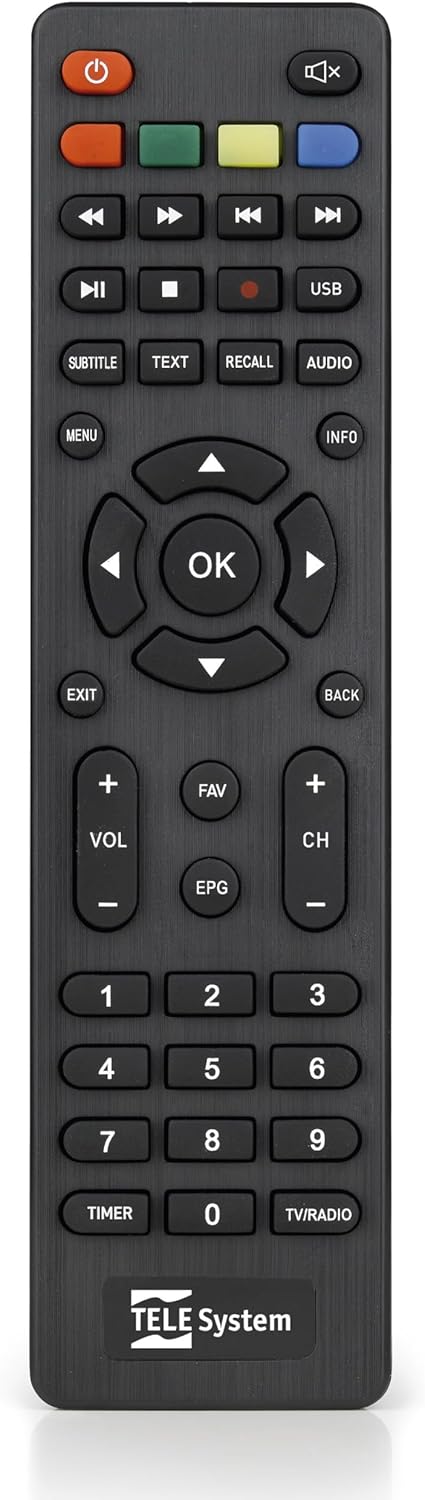
This image presents the remote control for the TS6105 decoder, featuring power, mute, channel, volume, navigation, EPG, media playback, and numeric buttons for comprehensive control.
- Дугме за укључивање (U): Turns the decoder on or off (standby).
- ЦХ +/-: Мења канале горе или доле.
- ВОЛ +/-: Подешава ниво јачине звука.
- ОК: Потврђује изборе у менијима или приказује информације о каналу.
- МЕНИ: Accesses the main menu for settings and features.
- EXIT/BACK: Exits the current menu or returns to the previous screen.
- ЕПГ: Отвара електронски водич кроз програме.
- ТЕКСТ: Activates Teletext.
- СУБТИТЛЕ: Toggles subtitles on/off or selects subtitle language.
- УСБ: Accesses the multimedia player.
- Дугмад у боји (црвена, зелена, жута, плава): Functionality varies depending on the current menu or EPG.
Електронски програмски водич (ЕПГ)
Притисните тастер ЕПГ дугме на даљинском управљачу за view the Electronic Program Guide. The EPG provides information about current and upcoming programs for all channels. You can navigate through channels and time slots to see program details.
Multimedia Player (USB)
The TS6105 can play multimedia fileс са УСБ уређаја за складиштење.
- Insert a USB drive into the USB port on the decoder.
- Притисните тастер УСБ button on the remote control or navigate to the multimedia section via the МЕНУ.
- Select the type of media you wish to play (Music, Photo, Video).
- Прегледајте своје fileс и притисните OK играти се.
Pause TV / Timeshift
The Pause TV / Timeshift function allows you to pause live television and resume viewing later. This feature requires a USB storage device connected to the decoder.
- Док гледате програм, притисните дугме ПАУСЕ button (usually represented by two vertical bars) on the remote control.
- Да бисте наставили репродукцију, притисните ПЛАИ button (usually represented by a right-pointing triangle).
- You can also fast-forward or rewind using the respective buttons.
Одржавање
Чишћење
To clean the decoder, ensure it is unplugged from the power outlet.
- Користите меку, суву крпу за брисање спољашњих површина.
- Do not use liquid cleaners, aerosols, or abrasive materials, as these can damage the device.
- Држите вентилационе отворе чистим од прашине и препрека.
Ажурирања софтвера
Периодично проверавајте произвођачеве website for available software updates. Updates can improve performance, add new features, or resolve issues. Follow the instructions provided with the update file пажљиво.
Решавање проблема
If you encounter problems with your decoder, refer to the following common issues and solutions:
- Нема слике/звука:
- Ensure all cables (antenna, HDMI/SCART, power) are securely connected.
- Проверите да ли је ваш телевизор подешен на исправан улазни извор (нпр. HDMI 1, AV).
- Check if the decoder is powered on and not in standby mode.
- No Channels Found:
- Perform an AUTOSCAN again from the menu.
- Check your antenna connection and ensure the antenna is properly positioned and functional.
- Verify that your region has DVB-T2 HEVC broadcasts.
- Даљински управљач не реагује:
- Замените батерије у даљинском управљачу.
- Ensure there are no obstructions between the remote control and the decoder's IR sensor.
- Picture Freezing or Pixelation:
- This often indicates a weak or unstable signal. Check your antenna connection and position.
- Try rescanning channels.
Спецификације
- Модел: ТС6105
- Бренд: ТЕЛЕ систем
- Боја: Црно
- Тип тјунера: DVB-T2 HEVC 10-bit
- Видео резолуција: Up to 1080p@60Hz (Full HD)
- Повезивање: HDMI, USB, SCART, Coaxial (ANT IN/OUT)
- Карактеристике: AUTOSCAN, LCN, EPG, Pause TV/Timeshift, Multimedia Player (USB), Teletext, Subtitle Support
- Број модела: 21005353
Гаранција и подршка
Информације о гаранцији
This product comes with a manufacturer's warranty of 2 years. Please retain your proof of purchase for warranty claims. The warranty covers defects in materials and workmanship under normal use. It does not cover damage caused by misuse, accidents, unauthorized modifications, or improper installation.
Корисничка подршка
For technical assistance, troubleshooting beyond this manual, or warranty inquiries, please contact TELE System customer support. Refer to the official TELE System website or product packaging for the most up-to-date contact information.