
1. Увод
The Guardo Fit Coach Explore is an advanced activity tracker designed to monitor various aspects of your health and fitness. This manual provides essential information for setting up, operating, and maintaining your device to ensure optimal performance and longevity.
2. Садржај пакета
Молимо вас да проверите да ли су све ставке присутне у вашем пакету:
- Guardo Fit Coach Explore Activity Tracker
- Кабл за пуњење
- Кориснички приручник (овај документ)
3. Подешавање
3.1 Пуњење уређаја
Before first use, fully charge your Guardo Fit Coach Explore. Connect the charging cable to the charging port on the back of the device and plug the other end into a USB power source (e.g., computer, USB wall adapter). The device will display a charging indicator.

Слика: Позади view of the activity tracker highlighting the charging contacts and sensors, alongside a display showing blood pressure readings.
3.2 Инсталација и упаривање апликације
- Download the official Guardo Fit Coach app from your smartphone's app store (compatible with Android operating systems).
- Уверите се да је Блуетоотх омогућен на вашем паметном телефону.
- Отворите апликацију и пратите упутства на екрану да бисте креирали налог или се пријавили.
- Изаберите „Додај уређај“ или „Упари нови уређај“ у апликацији.
- The app will search for your Guardo Fit Coach Explore. Select your device from the list to initiate pairing.
- Confirm the pairing request on both your smartphone and the activity tracker if prompted.

Image: The activity tracker worn on a wrist, showing a watch face with icons for different applications, indicating smartphone connectivity.
4. Упутство за употребу
4.1 Основна навигација
The Guardo Fit Coach Explore features a touchscreen display for interaction. Swipe left, right, up, or down to navigate through menus and features. Tap to select an option or confirm an action. The device may also have physical buttons for specific functions like power on/off or returning to the home screen.

Image: The activity tracker's display showing a customizable watch face with a unique spiral graphic.
4.2 Receiving Notifications
Once paired with your smartphone, the activity tracker can display notifications for incoming calls, messages, and app alerts. Ensure notification permissions are granted in your smartphone's settings and within the Guardo Fit Coach app.

Image: The activity tracker's screen showing an incoming call notification with the caller's number and options to answer or reject the call.
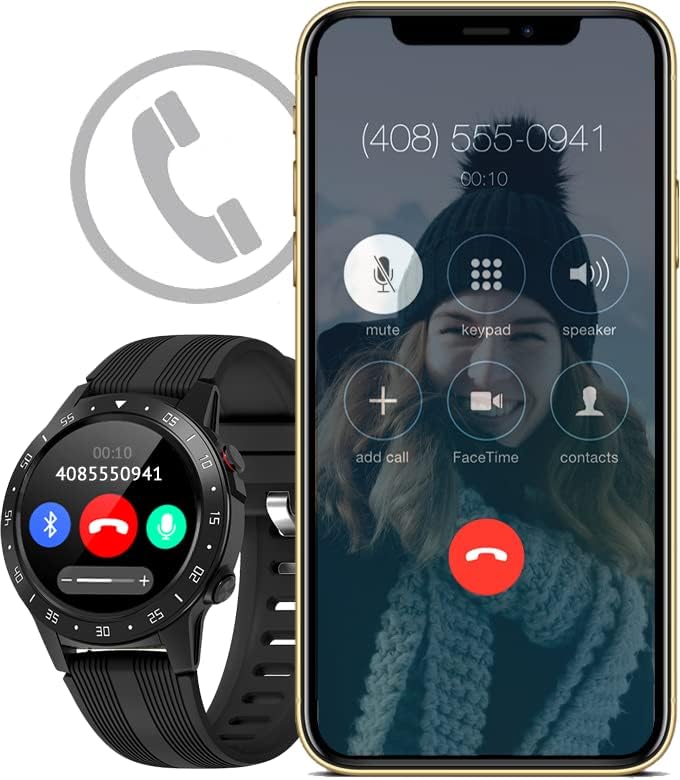
Image: The activity tracker and a smartphone side-by-side, both indicating an incoming call, demonstrating call notification synchronization.
4.3 Контрола музике
Control music playback on your paired smartphone directly from your activity tracker. This feature allows you to play, pause, skip tracks, and adjust volume without needing to access your phone.

Image: The activity tracker and a smartphone displaying synchronized music playback interfaces, allowing remote control of audio.
5. Карактеристике
The Guardo Fit Coach Explore offers a range of features to support your active lifestyle:
- Мултиспорт Трацкер: Track various activities such as indoor and outdoor sports, cycling, and climbing.
- Custom Activity Tracking: Monitor specific activities with tailored settings.
- ГПС: Built-in GPS for accurate tracking of routes and distances during outdoor activities.
- Монитор пулса: Непрекидно пратите свој пулс.
- Монитор крвног притиска: Measure your blood pressure directly from the device.
- Обавештења: Receive alerts for calls, messages, and app notifications.
- компас: Integrated digital compass for navigation.
- Акцелерометар: Measures movement and activity.
- Висиномер: Measures altitude, useful for hiking and climbing.
- барометар: Measures atmospheric pressure, aiding in weather prediction and altitude accuracy.

Image: The activity tracker's display surrounded by icons symbolizing its diverse functionalities, including communication and utility features.

Image: The activity tracker's screen showing real-time GPS data, such as distance covered, pace, and heart rate, overlaid on a map.
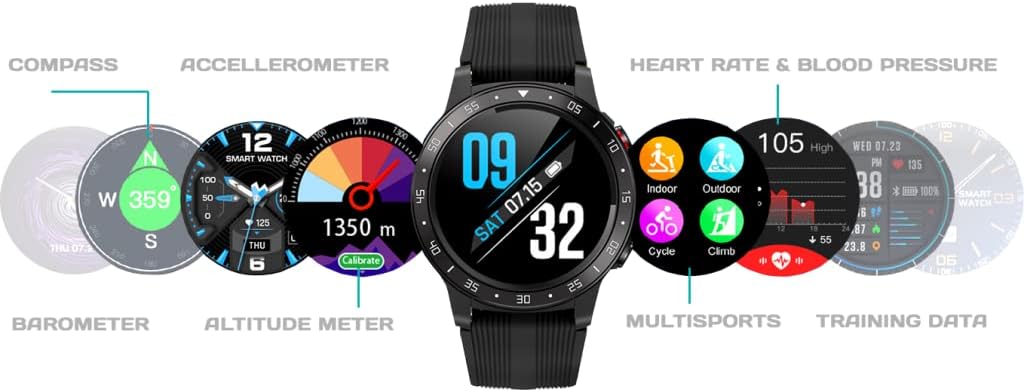
Слика: Свеобухватни view of the activity tracker's display, showcasing various data points from its integrated sensors, including environmental and health metrics.
6. Одржавање
6.1 Чишћење
Regularly clean your activity tracker to prevent skin irritation and maintain device functionality. Use a soft, damp, lint-free cloth to wipe the screen and strap. Avoid harsh chemicals or abrasive materials.
6.2 Одржавање батерије
To prolong battery life, avoid exposing the device to extreme temperatures. Charge the device regularly, but avoid leaving it fully charged or fully depleted for extended periods.
КСНУМКС. Решавање проблема
7.1 Уређај се не укључује
- Уверите се да је уређај потпуно напуњен. Повежите га са пуњачем најмање 30 минута.
- Press and hold the power button (if applicable) for 10-15 seconds to attempt a forced restart.
7.2 Проблеми са упаривањем
- Уверите се да је Bluetooth омогућен на вашем паметном телефону и да је уређај у домету.
- Restart both your smartphone and the activity tracker.
- Forget the device in your smartphone's Bluetooth settings and attempt to pair again through the Guardo Fit Coach app.
- Проверите да ли је апликација ажурирана на најновију верзију.
7.3 Нетачна очитавања
- Ensure the device is worn snugly on your wrist, about one finger's width above your wrist bone.
- Очистите сензоре на задњој страни уређаја.
- For GPS, ensure you are in an open area with a clear view неба.
8. Спецификације
| Феатуре | Спецификација |
|---|---|
| Бранд | Гуардо |
| Модел | Истражите |
| Компатибилни уређаји | Smartphone (Android OS) |
| Дисплаи Типе | ЛЦД |
| Величина екрана | 40 милиметар |
| Бежично повезивање | Блуетоотх |
| ГПС | Уграђен ГПС |
| Инпут Девице | Микрофон, екран осетљив на додир |
| Пуњиве батерије укључене | Да |
| Посебне карактеристике | Custom activity tracking, Blood pressure monitor, GPS, Notifications, Multisport Tracker |
9. Безбедносне информације
- Не покушавајте да отворите или раставите уређај.
- Држите уређај даље од екстремних температура, директне сунчеве светлости и влаге.
- This device is not a medical instrument. The data provided is for reference only and should not be used for medical diagnosis or treatment.
- Consult your doctor before starting any new exercise regimen or if you have any health concerns.
- Одложите уређај и његову батерију у складу са локалним прописима.