
Увод
This manual provides detailed instructions for the setup, operation, maintenance, and troubleshooting of your Xtrfy MZ1 Wireless Gaming Mouse. Please read this manual thoroughly before using the product to ensure optimal performance and longevity.
Садржај пакета
Проверите да ли су све ставке присутне у пакету:
- Xtrfy MZ1 Wireless Gaming Mouse
- 1.8 m Xtrfy EZcord Pro cable
- УСБ-А на УСБ-Ц кабл
- УСБ адаптер
- УСБ Донгле
- 500 mA battery (pre-installed or included separately)
- Second back shell (for adjustable shape)
Производ је завршенview
The Xtrfy MZ1 Wireless Gaming Mouse is designed for high-performance gaming, featuring a lightweight design, adjustable shape, and customizable settings without the need for software.
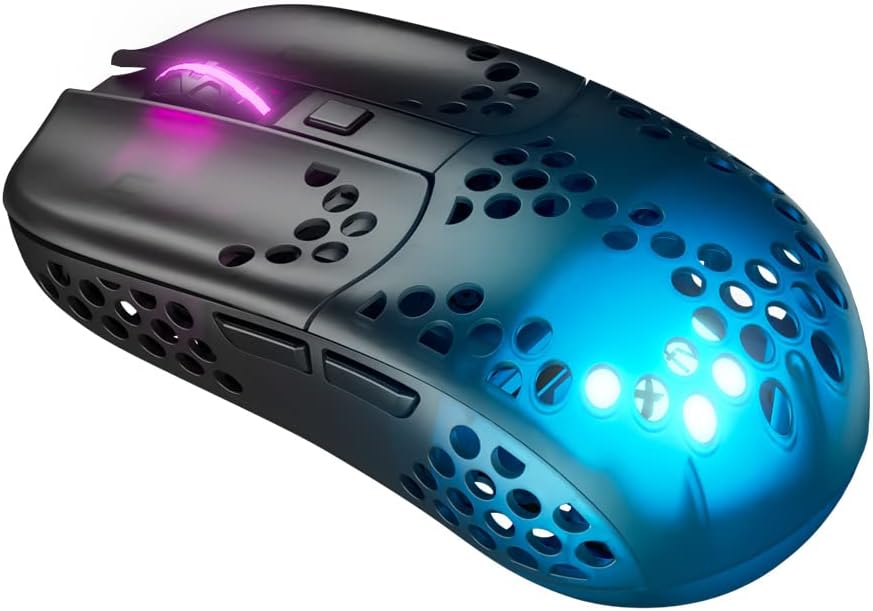
Figure 1: Xtrfy MZ1 Wireless Gaming Mouse, angled view with RGB lighting.
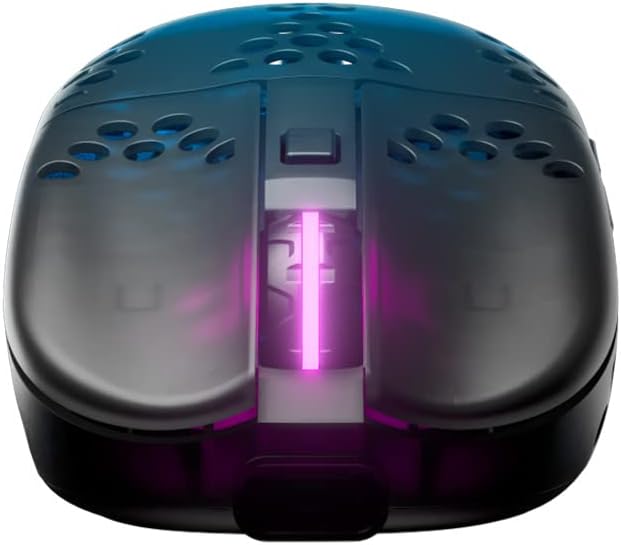
Слика 2: Врх view of the Xtrfy MZ1 Wireless Gaming Mouse, highlighting the scroll wheel and main buttons.

Figure 3: The Xtrfy MZ1 Wireless Gaming Mouse shown with its two interchangeable back shells, allowing for shape adjustment.
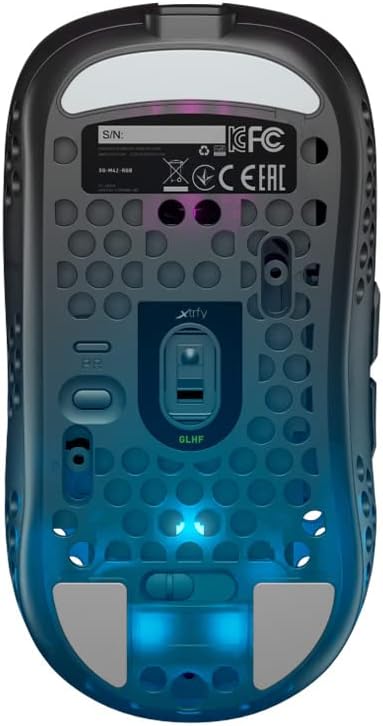
Слика 4: Дно view of the Xtrfy MZ1 Wireless Gaming Mouse, displaying the sensor, power switch, and configuration buttons.
Сетуп
1. Повезивање миша
- Connect the USB dongle to your computer using the provided USB-A to USB-C cable and adapter.
- Укључите миш помоћу прекидача за напајање који се налази на дну миша.
- The mouse should automatically connect to the dongle. If not, ensure the dongle is properly connected and the mouse is powered on.
2. Почетно пуњење
For first use, it is recommended to fully charge the mouse. Connect the Xtrfy EZcord Pro cable to the front of the mouse and to a USB power source. The mouse can be used while charging.
3. Adjusting the Back Shell
The MZ1 Wireless comes with two interchangeable back shells to customize the mouse shape to your preference. To change the back shell:
- Gently remove the currently installed back shell by lifting it from the rear.
- Align the desired back shell with the mouse body and press down until it clicks into place.
4. Adjusting Weight Balance
The battery position can be adjusted to fine-tune the mouse's weight balance. To do this:
- Уклоните задњу шкољку.
- Carefully slide the battery forward or backward within its compartment to achieve your preferred balance.
- Replace the back shell.
Упутство за употребу
The Xtrfy MZ1 Wireless Mouse allows for on-the-fly adjustments without software.
1. CPI (Counts Per Inch) Adjustment
The CPI setting controls the mouse sensitivity. Use the dedicated CPI button on the bottom of the mouse to cycle through preset CPI levels. The LED indicator will change color to show the current CPI setting.
2. Подешавање стопе гласања
The polling rate determines how often the mouse reports its position to the computer. A higher polling rate results in smoother tracking. Adjust the polling rate using the switch on the bottom of the mouse, typically labeled 'PR' or similar.
3. Lift-Off Distance (LOD) Adjustment
LOD is the height at which the mouse sensor stops tracking when lifted from the surface. Adjust this setting using the switch on the bottom of the mouse, typically labeled 'LOD'.
4. Debounce Time Adjustment
Debounce time is the delay before a second click can be registered after the first, preventing accidental double-clicks. Adjust this setting using the switch on the bottom of the mouse, typically labeled 'DT'.
5. Трајање батерије и пуњење
The mouse provides up to 75 hours of playtime on a single charge. When the battery is low, connect the EZcord Pro cable to the mouse and a USB power source to charge. The mouse can be used normally during charging.
6. Programmable Button ('PGDN')
The top button, after adjusting other settings, can be set to 'PGDN'. This allows you to bind it to any desired function within your games or applications.
Одржавање
- Чишћење: Користите меку, суву крпу за чишћење миша. Избегавајте употребу јаких хемикалија или абразивних материјала.
- Брига о сензорима: Одржавајте оптички сензор на дну миша чистим и без прашине или прљавштине како бисте осигурали прецизно праћење.
- Складиштење: Када се миш не користи дуже време, чувајте га на сувом и хладном месту.
Решавање проблема
| Проблем | Могуће решење |
|---|---|
| Миш не реагује |
|
| Интермитентна веза |
|
| Проблеми са праћењем |
|
| Buttons not responding correctly |
|
Спецификације
| Феатуре | Детаљ |
|---|---|
| Број модела | MZ1W |
| Димензије производа | 4.37 к 2.3 к 1.33 инча |
| Тежина артикла | 2.15 унце (приближно 61 грама) |
| Технологија повезивања | Бежично (2.4 GHz) |
| Откривање покрета | Optical (Pixart 3370 sensor) |
| Прекидачи | Kailh GM 8.0 (80 million clicks) |
| Микроконтролер | АРМ 32-бит |
| Батерија | 1 Lithium Ion battery (500 mA, up to 75 hours playtime) |
| Посебне карактеристике | Lightweight, Rechargeable, Adjustable Shape (interchangeable back shells), Adjustable Weight Balance, No Software Needed |
| Боја | Црно |
Гаранција и подршка
For warranty information, technical support, or further assistance, please visit the official Xtrfy webсајт или директно контактирајте њихову корисничку подршку. Сачувајте доказ о куповини за потребе гаранције.