
1. Увод
This manual provides detailed instructions for the safe and efficient operation of your KSUN DM10 Digital Two-Way Radio. Please read this manual thoroughly before using the device to ensure proper functionality and to prevent damage.
2. Производ је готовview
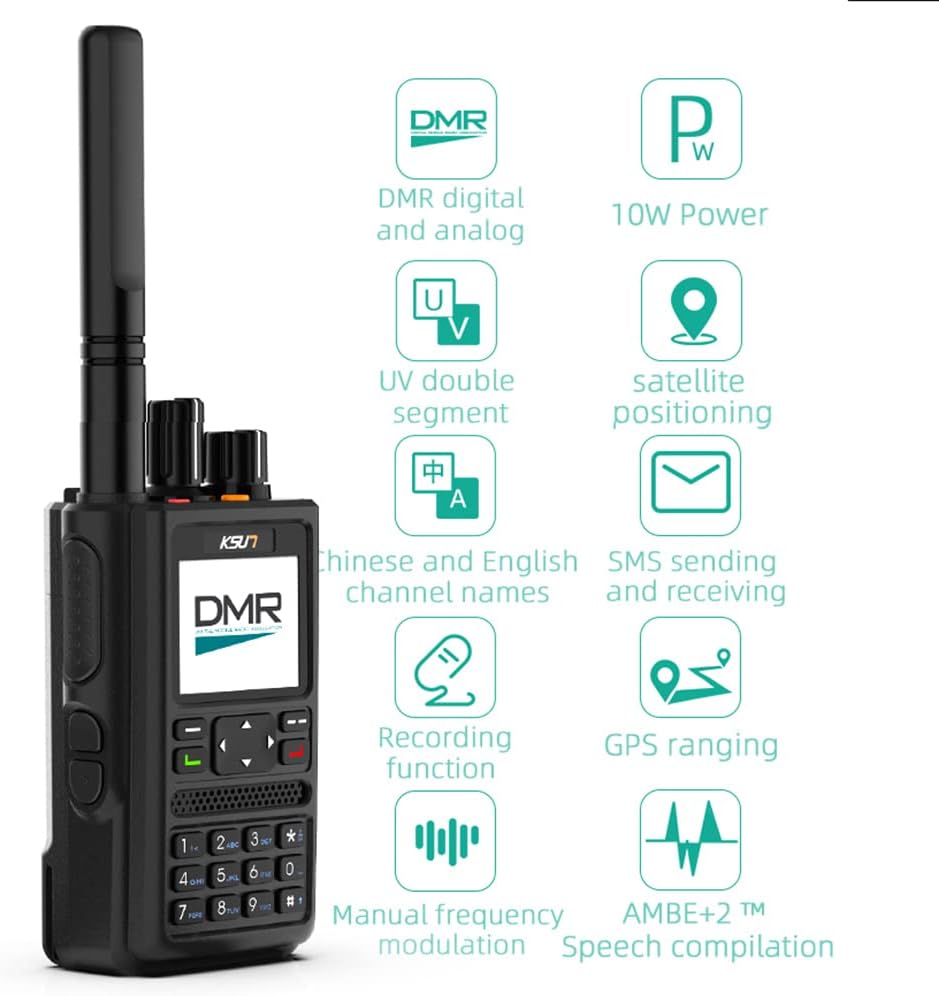
Image: The KSUN DM10 Digital Two-Way Radio, showcasing its design and primary interface.
2.1 Кључне карактеристике
- 4000мАх батерија: Provides extended operation for 3-6 days of typical use, or 2-3 days of continuous use.
- СМС функционалност: Send and receive text messages with other DMR devices.
- Satellite GPS Positioning: Offers reliable positioning without requiring a network signal, suitable for outdoor environments.
- 1.77 Inch Large Screen: Displays essential information such as frequency, location, and battery status.
- Дигитални и аналогни режими: Supports both DMR digital and traditional analog communication.
- Функција снимања: Allows for recording of communications.
- Intercom Encryption: Provides real-time encryption for secure communications.
- Manual Programmable: Features a digital keyboard for manual programming of frequencies and settings.
- UV Double Segment: Supports dual-band operation.
- Капацитет канала 1000: Allows for extensive channel storage and management.
2.2 Шта је у кутији

Image: The KSUN DM10 radio and its included accessories laid out. This includes the radio unit, battery, belt clip, charger, charging cable, manual, lanyard, and antenna.
- 1 x KSUN DM10 Radio
- 1 x Battery (4000mAh Lithium Polymer)
- 1 к копча за појас
- 1 к пуњач
- 1 к кабл за пуњење
- 1 к Упутство за употребу
- 1 к Ланиард
- КСНУМКС к антена
2.3 Компоненте производа

Image: A diagram highlighting the Channel knob, Power/Volume knob, PTT key, Custom keys, and Earphone jack on the KSUN DM10 radio.
Familiarize yourself with the radio's physical components:
- Дугме канала: Used to select communication channels.
- Дугме за напајање/јачину: Контролише укључивање/искључивање и јачину звука.
- ПТТ (притисни за разговор) тастер: Активира пренос.
- Прилагођени кључеви: Programmable buttons for various functions.
- Утичница за слушалице: За повезивање екстерне аудио додатне опреме.
- Антена: За пренос и пријем сигнала.
- 1.77-инчни ХД екран: Приказује оперативне информације.
- Дигитална тастатура: За ручни унос фреквенције и навигацију кроз мени.
2.4 Сценарији примене

Слика: прamples of environments where the KSUN DM10 radio can be effectively used, such as construction sites, hotels, and outdoor adventures.
The KSUN DM10 is designed for reliable communication across various environments, including:
- Truck transportation
- Commercial hotels
- Property communities
- Градилишта
- Public safety industry
- Enterprise factories
2.5 Видео за распакивање
Video: An unboxing demonstration of the KSUN DM10 Digital Two-Way Radio, showing all included components and a brief overview of the radio's display and features.
3. Подешавање
3.1 Инсталација батерије
- Поравнајте батерију са одељком за батерију на задњој страни радија.
- Лагано гурните батерију на место док не кликне безбедно.
- To remove, slide the battery release latch (if present) and pull the battery away.
3.2 Прикључак антене
- Заврните антену у смеру казаљке на сату у конектор на врху радија док не буде чврсто затегнута прстима. Немојте превише затезати.
3.3 Пуњење батерије
- Connect the charging cable to the charger base and plug the charger into a power outlet.
- Place the radio (with battery installed) or the battery alone into the charger slot.
- Индикаторска лампица пуњења обично светли црвено током пуњења, а зелено када је потпуно напуњена.
- A full charge can take several hours. Ensure the battery is fully charged before first use.
3.4 Initial Power On and Programming
- Turn the Power/Volume knob clockwise to power on the radio.
- The radio will display a welcome screen and then show the operating interface.
- For advanced programming and channel configuration, dedicated programming software (CPS) is required. Please contact customer service for the software if needed. The DM10 can be programmed using a standard K-head program cable (not included).
- Basic frequency and channel settings can be adjusted directly via the radio's digital keyboard and menu system.
4. Упутство за употребу
4.1 Укључивање/искључивање и контрола јачине звука
- Укључено: Rotate the Power/Volume knob clockwise until a click is heard and the screen illuminates.
- Искључивање: Rotate the Power/Volume knob counter-clockwise until a click is heard and the screen turns off.
- Подешавање јачине звука: Окрените дугме за напајање/јачину звука у смеру казаљке на сату да бисте повећали јачину звука и у смеру супротном од казаљке на сату да бисте смањили јачину звука.
4.2 Избор канала

Image: The KSUN DM10 radio screen indicating its capacity for up to 1000 editable channels, supporting both analog and digital communication types.
- Rotate the Channel knob to select a desired channel. The selected channel number or name will appear on the 1.77-inch display.
- The radio supports up to 1000 channels, configurable for both analog and digital communication.
4.3 Пренос и пријем
- To transmit, press and hold the PTT (Push-To-Talk) key. Speak clearly into the microphone.
- Отпустите тастер PTT да бисте зауставили предају и вратили се у режим пријема.
- Ensure you are on the correct channel and within range of the other party.
4.4 SMS Sending and Receiving

Image: The KSUN DM10 radio displaying options for sending and receiving SMS messages, including text editing and draft box functions, alongside its recording function.
- Navigate to the SMS menu using the radio's keypad and navigation buttons.
- Select "New Message" to compose a text message. Use the keypad to enter text.
- Choose a recipient from your contacts or enter a DMR ID.
- То view received messages, access the "Inbox" from the SMS menu.
4.5 GPS позиционирање
The KSUN DM10 features satellite GPS positioning, allowing you to determine your location even without a cellular network signal. Access the GPS function through the radio's menu to view your coordinates.
4.6 Функција снимања
The radio supports an optional recording function for both received and transmitted communications. This feature can be enabled or disabled through the radio's menu settings. Recorded audio files can typically be accessed and managed via the programming software (CPS).
4.7 Intercom Encryption

Image: A visual representation of the intercom encryption feature, showing the radio within a secure communication bubble.
For secure communications, the KSUN DM10 offers real-time encryption protection for work calls. This feature enhances privacy and can be configured within the radio's security settings, often requiring specific encryption keys or settings to be programmed.
4.8 LCD Icon Summary

Image: A table summarizing the various icons displayed on the KSUN DM10's LCD screen, along with their corresponding descriptions, such as Squelch, Battery level, GPS status, VOX, and encryption indicators.
Refer to the image above for a summary of the LCD icons and their meanings to understand the radio's status and active functions.
5. Одржавање
5.1 Чишћење
- Обришите површину радија меком крпомamp тканина. Немојте користити јаке хемикалије или абразивна средства за чишћење.
- Пре чишћења проверите да ли је радио искључен и да ли је батерија извађена.
5.2 Одржавање батерије
- Избегавајте често потпуно пражњење батерије како бисте продужили њен век трајања.
- Чувајте батерију на хладном и сувом месту када је не користите дуже време.
- Не излажите батерију екстремним температурама или директној сунчевој светлости.
5.3 Складиштење
- Чувајте радио на сувом месту без прашине.
- Remove the battery if storing the radio for a long duration.
КСНУМКС. Решавање проблема
| Проблем | Могући узрок | Решење |
|---|---|---|
| Радио се не укључује. | Батерија је празна или није правилно постављена. | Напуните батерију или је поново безбедно инсталирајте. |
| Не може се преносити или примати. | Изабран је погрешан канал, ван домета или антена није прикључена. | Verify channel, ensure within range, check antenna connection. |
| Hissing sound during reception. | Potential signal interference or squelch setting. | Adjust squelch level in settings. If problem persists, it may indicate external interference. |
| Тешкоће у програмирању канала. | Incorrect programming software (CPS) or cable. | Ensure you have the correct CPS and a standard K-head program cable. Contact customer service for software assistance. |
| ГПС не прима сигнал. | Operating indoors or in an area with poor satellite visibility. | Преместите се на отворено спољашње подручје са чистим view неба. |
7. Спецификације
| Феатуре | Детаљ |
|---|---|
| Бранд | КСУН |
| Број модела | KSUN-DM10 |
| Боја | Црно |
| Број канала | 1000 |
| Фреквенцијски опсег | 136-174 МХз / 400-470 МХз |
| Домет разговора (максимални) | 2 миља (приближно, варира у зависности од терена) |
| Волtage | 7.4 волти (ДЦ) |
| Ниво отпорности на воду | Отпоран на воду |
| Димензије производа (Д x Ш x В) | 4.3 cm x 1.3 cm x 2.1 cm |
| Тип батерије | 1 литијум-полимерска батерија (укључена) |
| Просечан век трајања батерије | 36 Hours (typical usage) |
| Цоннецтивити Протоцол | ДМР |
| Компатибилни уређаји | Standard USB charging cables and standard programming cables |
8. Гаранција и подршка
For any issues with your KSUN DM10 handheld walkie-talkie, please contact customer service. Support is available to assist with product inquiries, troubleshooting, and software requests.
While specific warranty details are not provided in this manual, it is recommended to retain your proof of purchase for any warranty claims. For programming software, please reach out to the seller or manufacturer directly.