
1. Увод
The Deity TC-1 is a compact and versatile wireless timecode box designed for professional audio and video synchronization. It integrates advanced features such as Bluetooth 5.0, a 2.4G radio ecosystem, and app control, offering precise timecode accuracy and flexible workflow integration. This manual provides detailed instructions for setting up, operating, maintaining, and troubleshooting your TC-1 unit.
2. Безбедносне информације
- Не излажите уређај води или прекомерној влажности.
- Avoid extreme temperatures. Operate and store the device within recommended environmental conditions.
- Не покушавајте да растављате или модификујете уређај. Поправке треба да обавља само овлашћено особље.
- Користите само назначени кабл за пуњење и извор напајања како бисте спречили оштећења или пожар.
- Држите уређај даље од јаких магнетних поља.
3. Садржај пакета
Verify that all items are present in your Deity TC-1 package:
- 1x Deity TC-1 Wireless Timecode Box
- 1x Locking to Unlocking TRS Audio Spring Cable
- 1x Removable Cold Shoe Holder
- 1к Типе-Ц кабл за пуњење
- 1x USB-C to USB-A Firmware Upgrade Adapter
- 2x Female Buckle Velcro

Image: Deity TC-1 Wireless Timecode Box with all included accessories, including cables, cold shoe mount, and Velcro.
4. Производ је готовview
The Deity TC-1 features a compact design with an intuitive OLED display and on-board controls for easy operation.

Слика: Фронт view of the Deity TC-1, highlighting its 1-inch OLED display showing timecode, battery status, and connection indicators.

Слика: Са стране view of the Deity TC-1, showing the control wheel for menu navigation and the power/menu button.

Слика: Доња страна view of the Deity TC-1, illustrating the attachment point for the removable cold shoe holder.
5. Подешавање
5.1 Пуњење уређаја
The TC-1 is powered by an internal Lithium Ion battery. To charge, connect the included USB-C charging cable to the USB-C port on the device and a compatible USB power source. A full charge takes approximately 2 hours and provides up to 28 hours of battery life.
5.2 Опције монтаже
The TC-1 offers flexible mounting solutions:
- Носач хладне ципеле: Attach the removable cold shoe holder to the bottom of the TC-1 and slide it onto a camera's cold shoe or hot shoe mount.
- Велцро: Use the included female buckle Velcro pieces to secure the TC-1 to various surfaces or equipment.

Image: Deity TC-1 unit shown with the removable cold shoe mount attached to its base.
5.3 Почетно укључивање
To power on the TC-1, press and hold the power button located on the side of the unit. The OLED display will illuminate, showing the current timecode and device status. To power off, press and hold the power button again until the display turns off.
6. Упутство за употребу
6.1 Timecode Synchronization
The TC-1 offers multiple methods for timecode synchronization:
- Блуетоотх КСНУМКС: Connect the TC-1 to your smartphone via Bluetooth for wireless jamming and control using the Sidus Audio mobile app. The Bluetooth range is up to 250 feet.
- 2.4G Radio: Utilize the proprietary 8-channel 2.4G radio ecosystem to wirelessly sync multiple TC-1 units together. This method also offers a maximum range of 250 feet.
- Hardwire Jam: Use the 3.5mm timecode port to hardwire jam timecode from another device or to jam other devices from the TC-1.
- Internal Generation: The TC-1 can also internally generate timecode, functioning as a master clock for your setup.

Image: A smartphone screen showing the Sidus Audio app interface, used for controlling and syncing the Deity TC-1.
6.2 Supported Timecode Formats
The Deity TC-1 supports all standard SMPTE Timecode Formats, ensuring compatibility with a wide range of professional equipment.
6.3 Timecode Accuracy
The TC-1 boasts high timecode accuracy of 0.5ppm, resulting in a minimal drift of only 1 frame every 72 hours. This ensures reliable and consistent synchronization over extended periods.
6.4 Повезивање са уређајима
Use the locking 3.5mm timecode port to connect the TC-1 to cameras, audio recorders, and other timecode-enabled devices. The included Locking to Unlocking TRS Audio Spring Cable facilitates these connections.
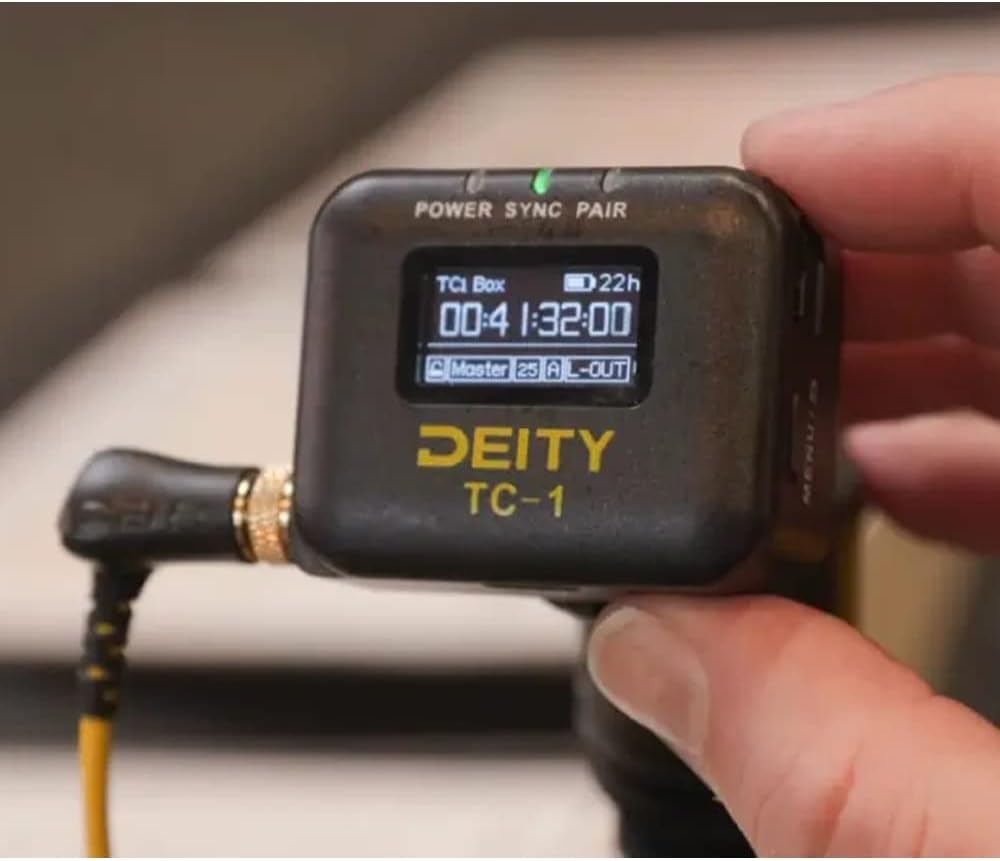
Image: The Deity TC-1 connected to a professional camera setup, demonstrating its integration into a production workflow.
7. Одржавање
- Чишћење: Користите меку, суву крпу за чишћење спољашњости уређаја. Не користите течна средства за чишћење или раствараче.
- Складиштење: Store the TC-1 in a cool, dry place away from direct sunlight and extreme temperatures when not in use.
- Одржавање батерије: За оптималан век трајања батерије, избегавајте често потпуно пражњење батерије. Ако је складиштите дуже време, пуните је до приближно 50% сваких неколико месеци.
КСНУМКС. Решавање проблема
- Уређај се не укључује: Ensure the battery is charged. Connect the USB-C cable to a power source and try again.
- Timecode not syncing: Check all cable connections. Ensure both the TC-1 and the receiving device are set to the correct timecode format and frame rate. Verify that Bluetooth or 2.4G radio connections are active and within range.
- Екран не ради: If the device powers on but the display is blank, try restarting the unit. If the issue persists, contact Deity support.
- Проблеми са повезивањем апликације: Ensure Bluetooth is enabled on your mobile device. Restart the Sidus Audio app and the TC-1.
9. Спецификације
| Феатуре | Спецификација |
|---|---|
| Број модела | ТЦ-КСНУМКС |
| Timecode Port | Locking 3.5mm |
| Блуетоотх верзија | 5.0 |
| Bluetooth Max Range | 250ФТ |
| Радио фреквенција | 2.4Г |
| Радио канали | 8 |
| Прецизност временског кода | 0.5ппм |
| Frame Drift | 1 Frame Every 72 Hours |
| Дисплаи | 1" OLED |
| Порт за пуњење | УСБ-Ц |
| Време пуњења | 2 сата (приближно) |
| Трајање батерије | До 28 сати |
| Тежина артикла | 9.2 унци (0.26 кг) |
| Димензије пакета | 5.59 к 5.04 к 1.73 инча |
10. Гаранција и подршка
For detailed warranty information and technical support, please refer to the official Deity website or contact Deity customer service directly. Keep your purchase receipt as proof of purchase for any warranty claims.
Deity Contact Information: Молимо посетите ввв.деитимиц.цом за најновије ресурсе за подршку и контакт информације.