
1. Производ је готовview
The AZZA CSAZ-280B Spectra Black is an ATX Mid Tower gaming case designed to house various computer components. It features a tempered glass side panel and a steel right panel. This manual provides instructions for the proper installation and maintenance of your computer components within this case.

Слика 1.1: Напред лево view of the AZZA CSAZ-280B Spectra Black case, showcasing the tempered glass side panel and the front panel design with integrated RGB lighting.
Кључне карактеристике:
- Left Panel: Tempered glass with rubber mounts for secure installation.
- Right Panel: Solid steel panel.
- Motherboard Compatibility: Supports ATX, Micro-ATX, and ITX motherboards.
- Drive Bays: Up to three 2.5" drive bays and up to two 3.5" drive bays.
- Maximum CPU Cooler Height: Up to 170 mm.
- Maximum Video Card Length: Up to 290 mm.
2. Подешавање и инсталација компоненти
Follow these steps for proper installation of your computer components into the AZZA CSAZ-280B case. Ensure the system is powered off and unplugged before beginning any installation.
2.1 Прикључци на предњој У/И панелу
The top panel of the case features various input/output ports and controls for convenient access.

Слика 2.1: Одозго надоле view of the case's front I/O panel, indicating the Power button, LED control button, Audio jacks (Mic and Headphone), two USB 2.0 ports, and one USB 3.0 port.
- Дугме за напајање: Press to power on or off the system.
- ЛЕД дугме: Controls the RGB lighting effects of the case.
- Аудио прикључци: Separate ports for microphone and headphones.
- УСБ 2.0 портови: Two ports for connecting USB 2.0 devices.
- УСБ 3.0 порт: One port for connecting USB 3.0 devices, offering faster data transfer speeds.
2.2 Инсталација погона
The case supports both 3.5" HDDs and 2.5" SSDs. Refer to the images below for drive bay locations.

Слика 2.2: Унутрашњи view showing the lower drive cage, capable of holding one 3.5" HDD or one 2.5" SSD, and an additional dedicated 3.5" HDD bay.

Слика 2.3: Унутрашњи view showing two dedicated 2.5" SSD mounting brackets located behind the motherboard tray.
- For 3.5" HDDs: Install drives into the designated 3.5" drive cage located at the bottom front of the case. Secure with screws.
- For 2.5" SSDs: Install drives into the dedicated 2.5" mounting brackets behind the motherboard tray or in the lower drive cage. Secure with screws.
2.3 Инсталација графичке картице
Кућиште подржава графичке картице дужине до 290 мм.

Слика 2.4: Унутрашњи view illustrating the maximum supported length for a video card, which is 290mm.
- Remove the necessary PCI-E slot covers from the rear of the case.
- Carefully insert the graphics card into the PCI-E slot on your motherboard.
- Причврстите графичку картицу за кућиште помоћу завртњева.
2.4 Fan Installation and Airflow
Proper fan placement ensures optimal cooling performance. The case supports various fan configurations:
- Фронт: Supports 3 x 120mm fans or 2 x 140mm fans.
- Врх: Подржава 2 x 120 мм вентилатора.
- позади: Supports 1 x 120mm fan.
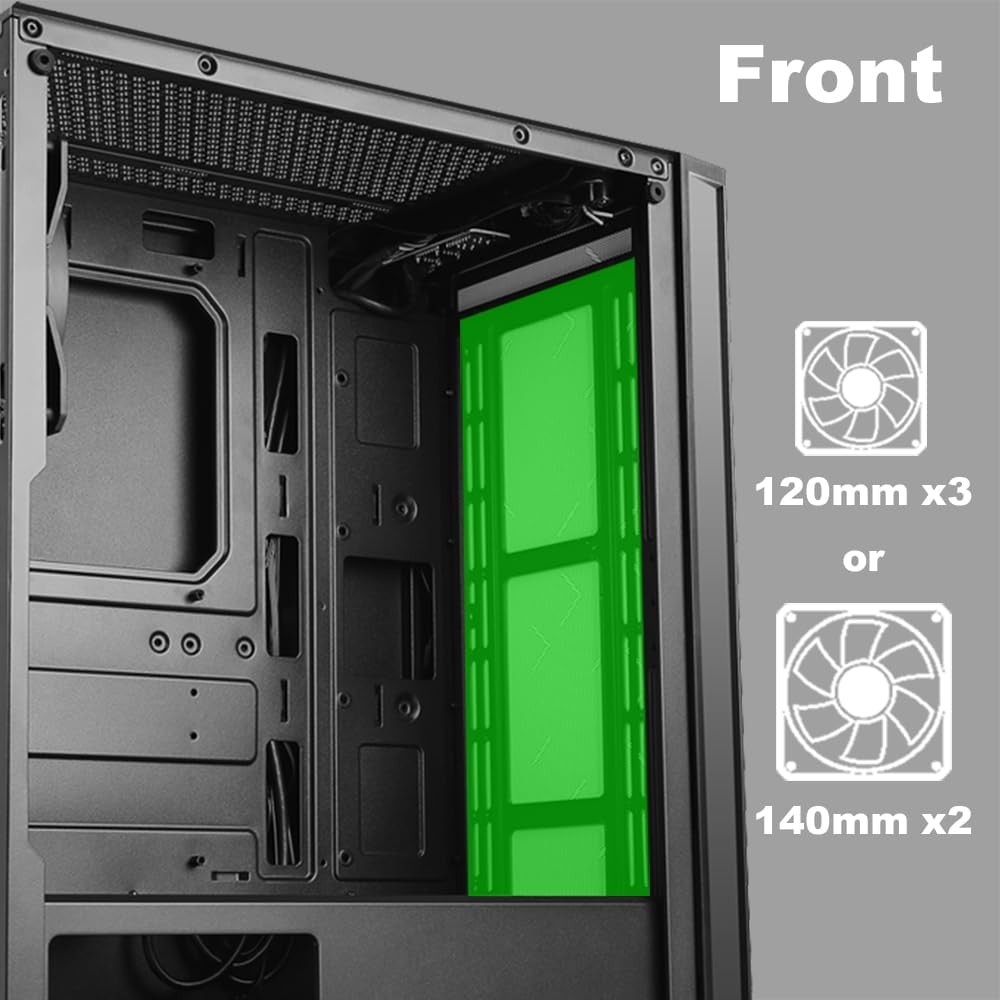
Слика 2.5: Унутрашњи view of the front panel, highlighting the mounting locations for up to three 120mm fans or two 140mm fans.

Слика 2.6: Унутрашњи view of the top panel, showing the mounting locations for up to two 120mm fans.

Слика 2.7: Унутрашњи view of the rear panel, indicating the mounting location for one 120mm fan.
- Identify the desired fan mounting locations (front, top, rear).
- Secure fans to the case using appropriate fan screws.
- Connect fan power cables to the motherboard or a fan controller.
2.5 Инсталација напајања
The power supply unit (PSU) mounts at the bottom of the case.
- Slide the PSU into the designated compartment at the bottom rear of the case.
- Secure the PSU to the case using screws from the rear.
- Route power cables through the cable management cutouts to reach your components.
3. Упутство за употребу
3.1 Укључивање/искључивање
To power on your system, press the power button located on the top I/O panel. To power off, either shut down through your operating system or press and hold the power button for several seconds.
3.2 ЛЕД контрола
Use the dedicated LED button on the top I/O panel to cycle through various lighting modes and colors for the integrated RGB elements of the case.
4. Одржавање
Редовно одржавање помаже у обезбеђивању оптималних перформанси и дугог века трајања компоненти вашег рачунара.
- Чишћење прашине: Periodically clean dust filters and internal components using compressed air. Ensure the system is powered off and unplugged before cleaning.
- Управљање кабловима: Ensure cables are neatly routed to prevent obstruction of airflow and to maintain a clean interior.
- Panel Care: Clean the tempered glass panel with a soft, lint-free cloth and a mild glass cleaner. Avoid abrasive materials.
КСНУМКС. Решавање проблема
Овај одељак се бави уобичајеним проблемима на које можете наићи.
- Систем се не укључује:
- Verify all power cables (24-pin ATX, 8-pin CPU, GPU power) are securely connected to the motherboard and components.
- Уверите се да је прекидач за напајање у положају „УКЉУЧЕНО“.
- Check that the front panel power button cable is correctly connected to the motherboard's front panel header.
- Вентилатори се не окрећу / ЛЕД диоде се не пале:
- Проверите да ли су каблови за напајање вентилатора правилно повезани са матичном плочом или контролером вентилатора.
- Ensure LED cables are correctly connected to the motherboard's RGB header or the case's LED controller.
- Press the LED button on the top I/O panel to cycle through modes or turn on the lighting.
- УСБ портови не раде:
- Check that the USB 2.0 and USB 3.0 headers from the front panel are correctly plugged into the corresponding ports on your motherboard.
- Audio Jacks Not Working:
- Ensure the HD Audio cable from the front panel is securely connected to the HD Audio header on your motherboard.
6. Спецификације
Detailed technical specifications for the AZZA CSAZ-280B Spectra Black case.
| Феатуре | Спецификација |
|---|---|
| Назив модела | CSAZ-280B SPECTRA BLACK |
| Тип случаја | Мид Товер |
| Компатибилност матичне плоче | АТКС, Мицро-АТКС, ИТКС |
| Материјал | Пластика, каљено стакло |
| Боја | Црно |
| Димензије (Д к Ш к В) | 19.69 к 17.32 к 9.84 инча |
| Тежина артикла | 11 фунти |
| Лежишта за дискове од 2.5 инча | До 3 |
| Лежишта за дискове од 3.5 инча | До 2 |
| Максимална висина ЦПУ хладњака | 170 мм |
| Максимална дужина видео картице | 290 мм |
| Предњи И / О портови | 2 x USB 2.0, 1 x USB 3.0, Audio, Mic, Power, LED Control |
| Подршка предњег вентилатора | 3 к 120 мм или 2 к 140 мм |
| Подршка врхунских навијача | 2 к 120 мм |
| Носач задњег вентилатора | 1 к 120 мм |
| Монтажа напајања | Боттом Моунт |
7. Гаранција и подршка
7.1 Политика враћања
This product is subject to a 30-day return policy for refund or replacement, as per the retailer's terms.
7.2 Техничка подршка
For technical assistance or inquiries regarding your AZZA product, please visit the official AZZA website or contact their customer support channels. You can find more information and contact details by visiting the AZZA Store on Amazon.