
ОМОТОН ВК003
OMOTON 2.4GHz Wireless AZERTY Keyboard Instruction Manual
Модел: ВК003
Марка: ОМОТОН
1. Увод
Thank you for choosing the OMOTON 2.4GHz Wireless AZERTY Keyboard. This ultra-slim, silent keyboard is designed for comfortable and efficient typing across various Windows operating systems. This manual provides detailed instructions for setting up, operating, maintaining, and troubleshooting your new keyboard to ensure optimal performance.
2. Садржај пакета
Please check the package contents carefully. If any items are missing or damaged, please contact OMOTON customer support.
- 1 x OMOTON 2.4GHz Wireless AZERTY Keyboard
- КСНУМКС к УСБ пријемник
- 1 к Упутство за употребу
3. Водич за подешавање
Follow these steps to set up your OMOTON wireless keyboard:
- Инсталирајте батерије: Open the battery compartment on the back of the keyboard. Insert two AAA batteries (not included), ensuring correct polarity. Close the compartment.
- Уметните УСБ пријемник: Locate the USB receiver, which is magnetically stored in the battery compartment. Plug the USB receiver into an available USB port on your computer.

Image: Battery compartment with USB receiver and AAA batteries.
- Укључено: Slide the ON/OFF switch located on the top right side of the keyboard to the "ON" position.
- Повежите се: Your computer should automatically detect and install the necessary drivers for the keyboard. No additional software is required.

Image: Plug & Play setup with USB receiver.
Тастатура је сада спремна за употребу.
4. Упутство за употребу
4.1 Основно куцање
Simply begin typing. The keyboard features a standard AZERTY layout for familiar use.
4.2 Fn Lock Function
The keyboard includes a convenient Fn Lock function. By default, the F1-F12 keys perform their standard function. To access the multimedia shortcuts directly without pressing the Fn key, activate the Fn Lock.
- Activate/Deactivate Fn Lock: Притисните Fn + Échap simultaneously. When activated, the multimedia functions (e.g., volume control, home page) will be directly accessible by pressing F1-F12. When deactivated, F1-F12 will perform their standard functions, and multimedia actions will require pressing Fn + Fx.

Image: Fn Lock function and multimedia keys.
4.3 Мултимедијалне пречице
The keyboard provides 12 multimedia shortcuts for quick access to common functions. These can be used directly when Fn Lock is active, or by pressing Fn in combination with the respective F-key when Fn Lock is inactive.
| Кључ | Функција |
|---|---|
| F1 | Муте |
| F2 | Утишавање звука |
| F3 | Волуме Уп |
| F4 | Превиоус Трацк |
| F5 | Пусти/Паузирај |
| F6 | Нект Трацк |
| F7 | Brightness Down (System Dependent) |
| F8 | Brightness Up (System Dependent) |
| F9 | Pretraga |
| Ф10 | Почетна страница |
| Ф11 | Копирај |
| Ф12 | Залепите |
4.4 Компатибилност
This keyboard is compatible with Windows 11, 10, 8, 7, XP, and Vista, making it suitable for a wide range of desktop and laptop computers.
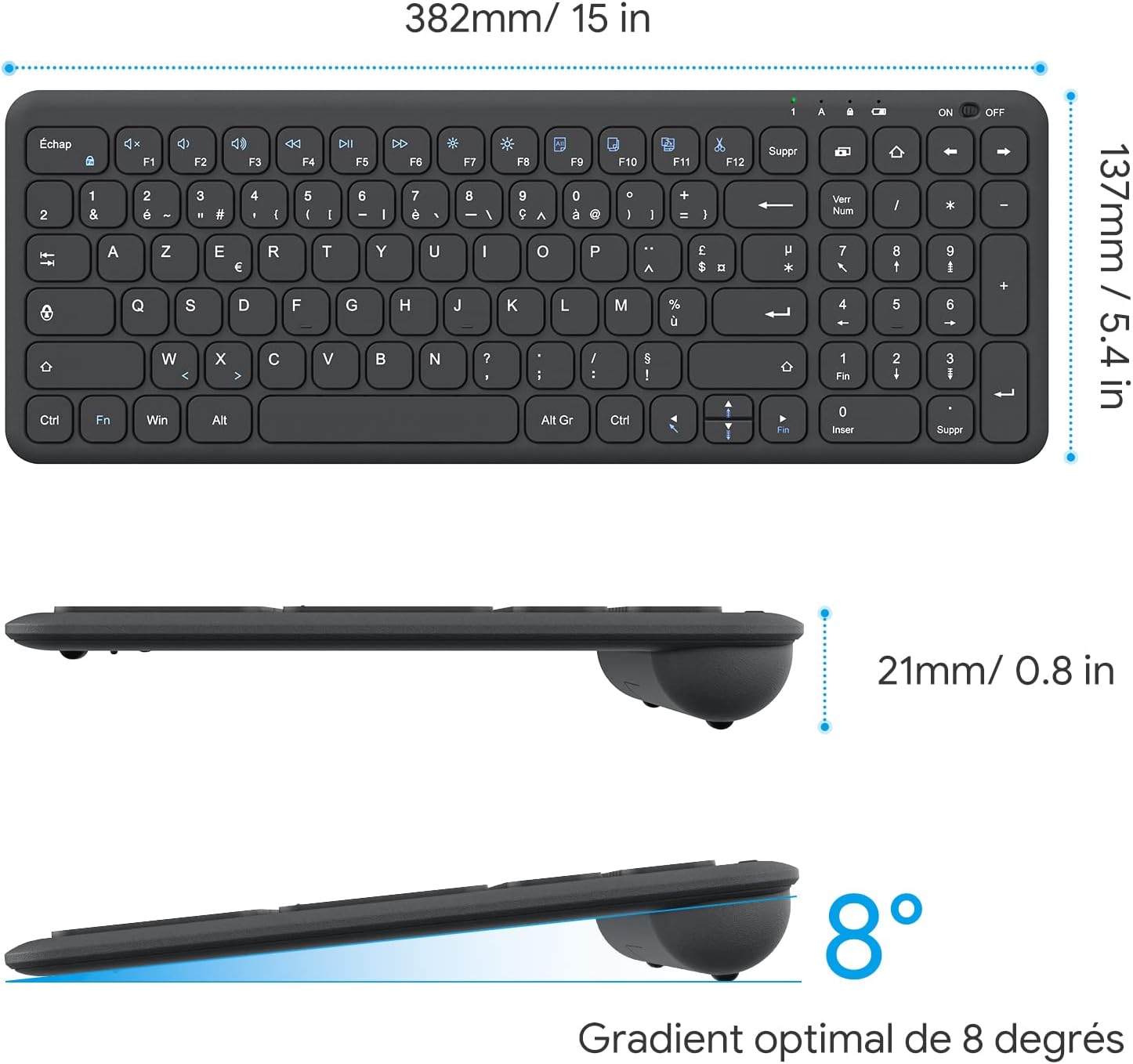
Image: Keyboard compatibility with Windows systems.
5. Одржавање
5.1 Замена батерије
When the keyboard's performance degrades or the indicator light flashes, it's time to replace the batteries. Open the battery compartment on the back and replace the two AAA batteries with new ones, observing polarity.
5.2 Чишћење
Да бисте очистили тастатуру, нежно обришите површину меком крпомamp cloth. Avoid using harsh chemicals or abrasive materials. Ensure the keyboard is turned off before cleaning.
5.3 USB Receiver Storage
For convenience and to prevent loss, the USB receiver can be magnetically stored inside the keyboard's battery compartment when not in use or during transport.
КСНУМКС. Решавање проблема
Ако имате проблема са тастатуром, погледајте следећа уобичајена решења:
- Тастатура не реагује:
- Уверите се да је тастатура УКЉУЧЕНА.
- Проверите да ли су батерије правилно постављене и да ли су довољно напуњене. Замените их ако је потребно.
- Проверите да ли је USB пријемник безбедно прикључен на исправан USB порт на рачунару. Покушајте са другим USB портом.
- Поново покрените рачунар.
- Lagging or intermittent input:
- Ensure the keyboard is within the effective operating range (up to 10 meters) of the USB receiver.
- Reduce potential interference by moving the keyboard closer to the receiver or away from other wireless devices (e.g., Wi-Fi routers, cordless phones).
- Check battery level. Low batteries can affect wireless performance.
- Одређени тастери не раде:
- Пажљиво очистите око оштећеног тастера да бисте уклонили све остатке.
- If the issue persists, contact OMOTON customer support for further assistance.
7. Спецификације
Detailed technical specifications for the OMOTON Wireless AZERTY Keyboard:
| Феатуре | Детаљ |
|---|---|
| Бранд | ОМОТОН |
| Модел | ВК003 |
| Технологија повезивања | 2.4 GHz бежични (USB пријемник) |
| Распоред тастатуре | АЗЕРТИ |
| Компатибилни уређаји | PC, Desktop, Laptop |
| Компатибилни оперативни системи | Виндоус 11/10/8/7/XP/Vista |
| Посебне карактеристике | 12 Multimedia Shortcuts, Fn Lock, Silent Keys, Ultra-Slim Design, Magnetic USB Receiver Storage |
| Боја | Црно |
| Извор напајања | 2 к ААА батерије (нису укључене) |
| Димензије (Д к Ш к В) | КСНУМКС к КСНУМКС к КСНУМКС цм (КСНУМКС к КСНУМКС к КСНУМКС инча) |
| Број кључева | 99 |
| Тип прекидача кључа | Tactile (Scissor-mechanism) |
| Optimal Gradient | 8 степени |

Image: Keyboard dimensions and ergonomic design.

Image: Scissor-mechanism key design.
8. Информације о гаранцији
OMOTON products typically come with a manufacturer's warranty. Please refer to the warranty card included with your product or visit the official OMOTON website for detailed warranty terms and conditions. Keep your purchase receipt as proof of purchase for any warranty claims.
9. Корисничка подршка
If you have any questions, require technical assistance, or experience issues not covered in this manual, please do not hesitate to contact OMOTON customer support. You can usually find contact information on the OMOTON official webсајту или преко продавца где сте купили производ.
Ask a question about this manual
Ask about setup, troubleshooting, compatibility, parts, safety, or missing instructions. Manuals+ will review the question and use this page’s manual context to help answer it.