
1. Увод
Thank you for choosing the RAZEAK RM-X18 Wired Gaming Mouse. This manual provides detailed instructions for setting up, operating, and maintaining your new gaming mouse. Please read this manual thoroughly before use to ensure optimal performance and longevity of your device.
2. Карактеристике производа
- Programmable 8 Buttons: Customize button functions, DPI settings, RGB lighting, and record macros using the dedicated software.
- Dual Usage Modes: Switch between gaming and office modes by simultaneously pressing the middle and right buttons.
- 9 RGB режима позадинског осветљења: Enhance your gaming environment with 9 distinct backlight modes and 16 million customizable colors.
- 6 подесива нивоа DPI-ја: Default DPI settings include 500, 1000, 1500, 2000, 3000, and 4000. These values and their indicator colors can be customized via software.
- Ергономски дизајн: Engineered for comfortable grip during extended use.
- Високопрецизни оптички сензор: Equipped with an Avago 3050 sensor for accurate tracking.
3. Садржај пакета
- RAZEAK RM-X18 Wired Gaming Mouse
- Упутство за употребу
4. Водич за подешавање
- Повежите миш: Plug the USB connector of the RAZEAK RM-X18 mouse into an available USB port on your computer.
- Инсталација драјвера: The mouse is plug-and-play for basic functionality. For advanced features such as button programming, DPI customization, and RGB lighting effects, please download and install the official RAZEAK software from the manufacturer's webсајту.

Image: The RAZEAK RM-X18 mouse connected to a computer, showcasing its RGB lighting and ergonomic design alongside a keyboard.
5. Упутство за употребу
5.1 Распоред и функције дугмади
The RAZEAK RM-X18 mouse features 8 buttons, all of which can be customized using the dedicated software.
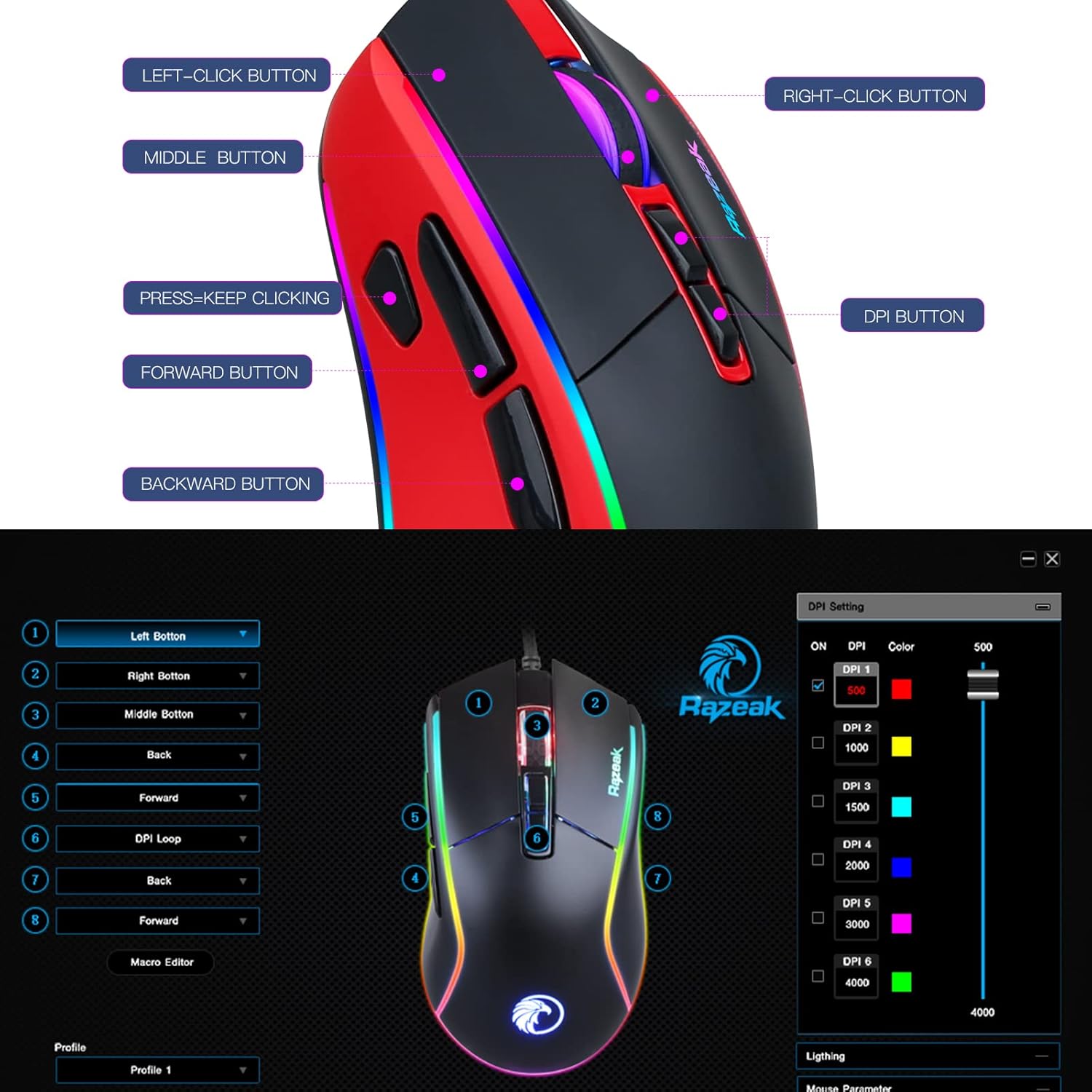
Image: A diagram illustrating the location and labels of the Left-Click, Right-Click, Middle Button, DPI Button, Press=Keep Clicking, Forward, and Backward buttons on the RAZEAK RM-X18 mouse.
- Леви клик: Стандардна функција примарног клика.
- Десни клик: Стандардна функција секундарног клика.
- Средње дугме (клик на точкић за померање): Standard middle click function.
- Дугме ДПИ: Кружи кроз подешавања DPI-ја.
- Дугме за напред: Навигација напред у web претраживачи или file истраживачи.
- Дугме за назад: Навигација уназад web претраживачи или file истраживачи.
- "Press=Keep Clicking" Button: A dedicated button for rapid, continuous clicks, often referred to as a "fire button" in gaming. This button can be programmed to perform multiple left clicks with a single press.
5.2 ДПИ подешавање
The mouse offers 6 adjustable DPI levels to suit various tasks and gaming preferences. Press the Дугме ДПИ (located behind the scroll wheel) to cycle through the preset DPI levels: 500, 1000, 1500, 2000, 3000, and 4000.
For advanced customization, including setting specific numerical values for each DPI level and assigning indicator colors, use the RAZEAK software.

Image: A close-up of the RAZEAK RM-X18 mouse highlighting the DPI button and a graphic representation of the six adjustable DPI levels.
5.3 Button Programming and Macros
All 8 buttons on the RM-X18 mouse are programmable. To customize button functions, record macros, or assign specific actions, you must use the RAZEAK software. The software allows you to create profileза различите апликације или игре.

Image: Screenshot of the RAZEAK software interface, showing options to program each of the 8 mouse buttons and manage profiles.
5.4 RGB контрола осветљења
The RM-X18 mouse features dynamic RGB lighting with 9 backlight modes and 16 million colors. You can adjust the lighting effects directly on the mouse or through the RAZEAK software.
- On-Mouse Adjustment: Притисните тастер Left-Click Button анд тхе Дугме ДПИ simultaneously to cycle through different lighting effects.
- Прилагођавање софтвера: Use the RAZEAK software for full control over lighting modes, colors, brightness, and speed.

Image: A close-up of the RAZEAK RM-X18 mouse, indicating the combination of the Left Key and DPI button to adjust lighting effects.

Image: The RAZEAK RM-X18 mouse displaying vibrant RGB lighting effects.
5.5 Switching Between Gaming and Office Modes
The mouse supports two distinct usage modes: Gaming and Office. To switch between these modes, simultaneously press the Средње дугме (scroll wheel click) and the Десни клик на дугме.
6. Software Installation and Usage
To unlock the full potential of your RAZEAK RM-X18 mouse, including advanced button programming, macro recording, and detailed RGB lighting customization, download the official software from the RAZEAK webсајт. Пратите упутства на екрану за инсталацију.
The software interface allows you to:
- Assign custom functions to all 8 buttons.
- Create and manage multiple user profiles.
- Adjust DPI levels and their corresponding indicator colors.
- Configure RGB lighting effects, colors, and speed.
- Record and edit macros for complex command sequences.
Video: An official RAZEAK video demonstrating the features and customization options of the RM-X18 Wired Gaming Mouse, including RGB lighting, DPI settings, and programmable buttons.
7. Одржавање
To ensure the longevity and optimal performance of your RAZEAK RM-X18 mouse, follow these maintenance guidelines:
- Чишћење: Користите меку, суву крпу да обришете површину миша. За тврдокорну прљавштину, благо обришитеampИсперите крпу водом. Избегавајте употребу јаких хемикалија или абразивних материјала.
- Брига о сензорима: Одржавајте оптички сензор на доњој страни миша чистим и без прашине или прљавштине како бисте осигурали прецизно праћење.
- Управљање кабловима: Избегавајте оштра савијања или прекомерно повлачење USB кабла како бисте спречили оштећења.
- Складиштење: Store the mouse in a clean, dry environment when not in use.
КСНУМКС. Решавање проблема
| Проблем | Могући узрок | Решење |
|---|---|---|
| Миш не реагује | Лабава УСБ веза, неисправан УСБ порт, проблем са драјвером. |
|
| Нетачно праћење или кашњење курсора | Dirty optical sensor, unsuitable mouse pad surface, incorrect DPI setting. |
|
| RGB осветљење не ради или је неисправно | Software settings, mode conflict. |
|
| Дугмад се не могу програмирати | Software not installed or not running, incorrect profile изабрани. |
|
9. Спецификације
| Феатуре | Детаљ |
|---|---|
| Бранд | RAZEAK |
| Назив модела | РМ-Кс18 |
| Технологија повезивања | УСБ Виред |
| Технологија детекције покрета | Optical (Avago 3050 Sensor) |
| ДПИ Левелс | 500/1000/1500/2000/3000/4000 (Adjustable) |
| Број дугмади | 8 (Програмабилно) |
| РГБ позадинско осветљење | 9 Modes, 16.8 Million Colors |
| Оријентација руке | Тачно |
| Компатибилни уређаји | Персонал Цомпутер |
| Хардверска платформа | PC |
| Тежина артикла | 137 грама |
10. Гаранција и подршка
RAZEAK offers a једногодишња гаранција произвођача for the RM-X18 Wired Gaming Mouse. For any product inquiries, technical support, or warranty claims, please contact RAZEAK customer service. We aim to respond to messages within 24 hours.
Молимо вас да сачувате доказ о куповини ради потврде гаранције.