
1. Увод
Thank you for choosing the ASHATA 95 Keys Wired Mechanical Gaming Keyboard. This compact and versatile keyboard is designed for both gaming and office use, offering a comfortable typing experience with its durable mechanical switches and plug-and-play functionality. This manual provides essential information for setting up, operating, and maintaining your new keyboard.
2. Карактеристике производа
- Распоред са 95 тастера: Compact design with a full set of essential keys, available with English and Arabic keycaps.
- Жичано повезивање: Reliable USB-A connection for stable performance.
- Механички прекидачи: Provides tactile feedback and durability for an enhanced typing and gaming experience.
- Плуг анд Плаи: No complex driver installation required; simply connect and use.
- Издржљив дизајн: Features legible, fade-resistant key printing for long-lasting use.
- Удобно куцање: Ergonomically designed for extended use in office or home environments.
- Ultra-compact Design: Approximately 60% size of a standard keyboard, saving desk space.
- Висока издржљивост: Rated for over 10 million keystrokes life.
- Танак и преносив: With a thickness of approximately 1 cm, it is easy to transport.
- Тихи дизајн: Equipped with quality silicone keys for a quiet typing environment.
- Independent Multimedia Buttons: Dedicated buttons for quick access to media controls.

Слика: Прекоview of the ASHATA Wired Keyboard highlighting its features.

Слика: Крупни план view of the comfortable 95-key layout.

Слика: Сајд професионалацfile illustrating the thin and portable design.

Image: Detail of a keycap, demonstrating the silent design feature.
3. Садржај пакета
Уверите се да су све ставке присутне у пакету:
- 1 к жичана тастатура
4. Упутства за подешавање
The ASHATA 95 Keys Wired Mechanical Gaming Keyboard is designed for simple plug-and-play operation.
- Распакујте тастатуру: Пажљиво извадите тастатуру из паковања.
- Повежите се са својим уређајем: Locate an available USB-A port on your computer (desktop, laptop, etc.). Insert the USB connector of the keyboard cable into the USB-A port.
- Аутоматско препознавање: Your operating system (e.g., Windows) will automatically detect and install the necessary drivers. This process usually takes a few seconds.
- Почните са употребом: Once recognized, the keyboard is ready for immediate use.

Image: The keyboard with its integrated USB cable, approximately 1.5m long.

Image: USB interface for plug and play functionality, with cable length of 1.5m.

Image: Keyboard connected and ready for use with a desktop computer.
5. Упутство за употребу
This keyboard functions like a standard QWERTY keyboard with additional multimedia controls.
5.1 Основно куцање
Simply press the desired keys to input characters. The keyboard supports both English and Arabic characters, depending on the specific model and your operating system's language settings.
5.2 мултимедијалних тастера
The keyboard features dedicated multimedia buttons located above the function keys (F1-F12) for quick access to media controls. These buttons allow you to:
- Adjust Volume (Volume Up, Volume Down, Mute)
- Control Media Playback (Play/Pause, Previous Track, Next Track)
- Open Default Media Player
- Open Default Web Бровсер
- Отворите Емаил Цлиент
- Функција претраге
Image: Detail of the independent multimedia buttons for quick access to functions.
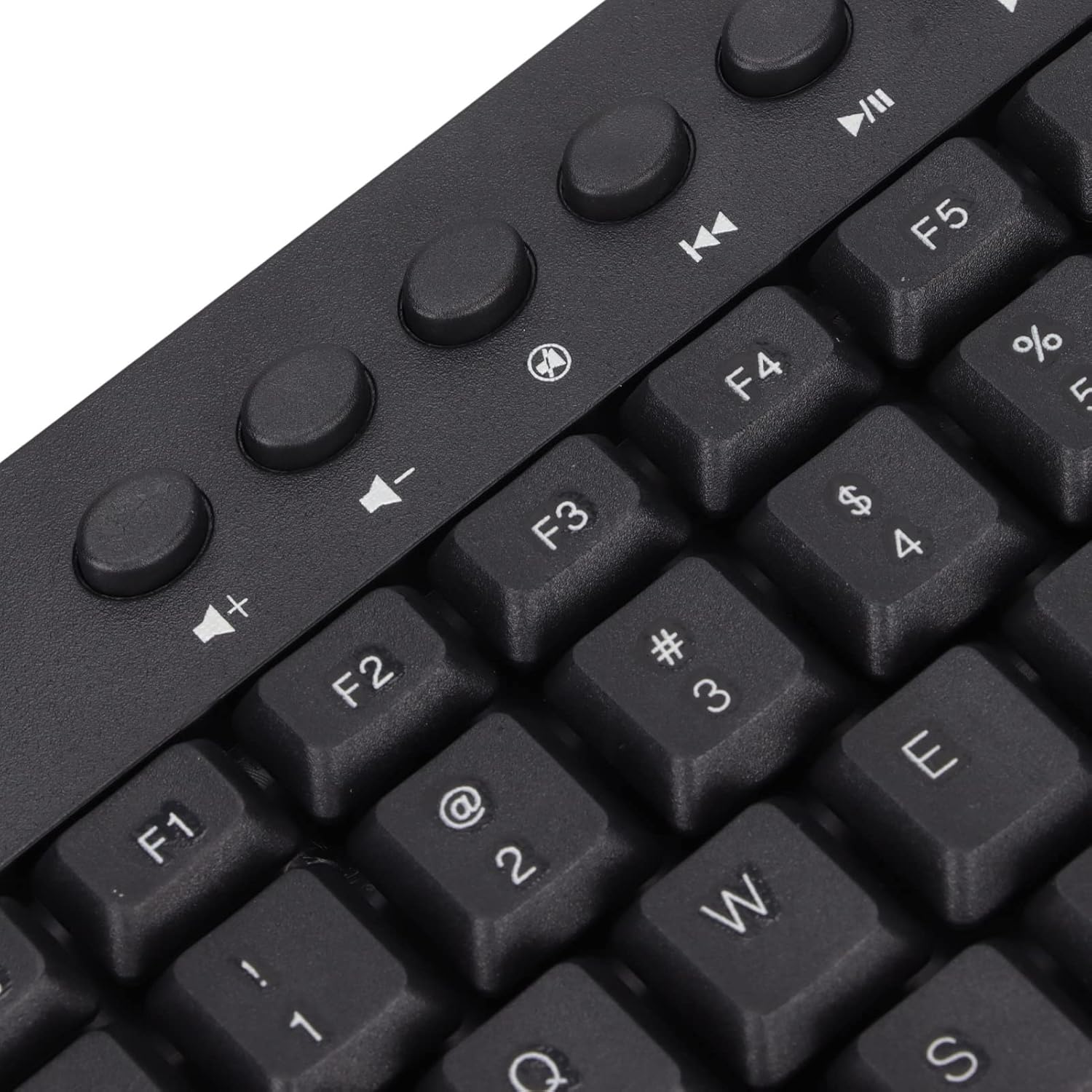
Слика: Крупни план view of the dedicated multimedia control keys.

Image: Detail of the right-side keys, including navigation and control keys.
6. Одржавање
To ensure the longevity and optimal performance of your ASHATA keyboard, follow these maintenance guidelines:
- Чишћење: Use a soft, dry cloth to wipe the surface of the keyboard. For deeper cleaning, you may use a slightly damp cloth with a mild cleaning solution, ensuring no liquid enters the key switches or internal components.
- Уклањање прашине: Користите компримовани ваздух да уклоните прашину и остатке између тастера.
- Избегавајте течности: Не просипајте течности по тастатури. У случају просипања, одмах искључите тастатуру из рачунара и оставите је да се потпуно осуши пре него што је поново повежете.
- Складиштење: Чувајте тастатуру на хладном и сувом месту, даље од директне сунчеве светлости и екстремних температура.
КСНУМКС. Решавање проблема
If you encounter issues with your keyboard, refer to the following common problems and solutions:
7.1 Тастатура не реагује
- Проверите УСБ везу: Ensure the USB cable is securely plugged into a working USB-A port on your computer. Try a different USB port.
- Поново покрените рачунар: Sometimes, a simple computer restart can resolve connectivity issues.
- Тестирајте на другом уређају: Connect the keyboard to another computer to determine if the issue is with the keyboard or your original device.
7.2 Тастери не функционишу исправно
- Чисти тастери: Check for any debris or foreign objects lodged under the non-functioning keys. Use compressed air to clear them.
- Сукоб софтвера: Уверите се да нису инсталирани конфликтни софтвери или драјвери који би могли ометати унос са тастатуре.
7.3 Multimedia Keys Not Working
- Подешавања оперативног система: Verify that your operating system's media key settings are configured correctly.
- Application Compatibility: Some applications may not fully support universal multimedia keys.
Ако ови кораци не реше проблем, обратите се корисничкој подршци за додатну помоћ.
8. Спецификације
| Феатуре | Детаљ |
|---|---|
| Бранд | АСХАТА |
| Број модела | ASHATA8x4ni917wp552-12 |
| Технологија повезивања | USB-A (жичани) |
| Број кључева | 95 |
| Тип прекидача | Механички |
| Материјал | Пластика |
| Боја | Black (Arabic layout) |
| Компатибилни уређаји | PC (Desktop, Laptop) |
| Компатибилна породица оперативних система | Виндовс |
| Цабле Ленгтх | Approx. 1.5m / 1.6yd |
| Посебна карактеристика | Независна мултимедијална дугмад |

Слика: Доња страна view of the keyboard, displaying regulatory information and adjustable feet.
9. Гаранција и подршка
За информације о гаранцији и корисничку подршку, погледајте документацију коју сте добили уз куповину или се директно обратите продавцу/произвођачу. Сачувајте доказ о куповини за евентуалне рекламације у вези са гаранцијом.