
1. Производ је готовview
The Kuephom Portable CD Player (Model PM11-Black) is a versatile audio device designed for personal and multi-user listening. It features a built-in speaker, rechargeable battery, and anti-skip protection, making it suitable for various environments including home, car, and travel. The player supports multiple audio formats and offers adjustable playback speed for learning purposes.

Image 1.1: Kuephom Portable CD Player and accessories.
Кључне карактеристике:
- Пуњива батерија: Integrated 1500mAh battery provides up to 8 hours of playback with earphones or 5 hours with the built-in speaker on a 4-hour charge.
- Уграђени звучник: Allows direct listening without external headphones or speakers.
- Заштита од прескакања: Ensures uninterrupted audio playback during movement or light shocks.
- Memory Playing: Resumes playback from the last played track when the device is turned on again.
- Широка компатибилност: Supports CD, CD-R, CD-RW, MP3, and WMA formats.
- Више опција повезивања: Includes 3.5mm AUX input/output, USB port, and headphone jack.
- Adjustable Playback Speed: Useful for language learning or musical practice.
2. Водич за подешавање
2.1 Пуњење уређаја
Before initial use, fully charge the CD player. The device features a built-in rechargeable battery, eliminating the need for disposable AA batteries.
- Locate the charging port on the side of the CD player.
- Connect the provided USB charging cable to the player and a compatible USB power source (e.g., wall charger, power bank, car charger, computer USB port).
- The charging indicator light will illuminate. A full charge typically takes approximately 4 hours.

Image 2.1: Charging options for the CD player.
2.2 Loading a CD
The CD player supports standard CD, CD-R, CD-RW, MP3, and WMA disc formats.
- Locate the 'OPEN' switch on the side of the player.
- Slide the switch to the 'OPEN' position to release the lid.
- Gently place the CD onto the central spindle with the label side facing up. Ensure the CD is securely seated.
- Чврсто затворите поклопац док не кликне на место.
Video 2.2: Demonstrates the basic functions and usage scenarios of the Kuephom Portable CD Player, including loading a CD and identifying ports.
2.3 Повезивање екстерних уређаја
- Слушалице: Plug the included earbuds or your preferred 3.5mm headphones into the headphone jack (blue port).
- АУКС веза: Use the provided 3.5mm audio cable to connect the player's AUX port (green port) to external speakers or a car's AUX input.
- УСБ репродукција: Insert a USB flash drive into the USB port to play compatible audio fileс (МП3, ВМА).

Image 2.3: Connecting the CD player to a car's audio system.
3. Упутство за употребу
3.1 Укључивање/искључивање
Locate the power switch on the side of the player. Slide it to the 'ON' position to power on the device. Slide it to 'OFF' to power off.
3.2 Основне контроле репродукције
The control panel on the top of the player features intuitive buttons:
- Play/Pause (►▮): Притисните да бисте покренули или паузирали репродукцију.
- Previous Track (◀◀): Press once to go to the beginning of the current track. Press twice to go to the previous track.
- Next Track (►►): Притисните да бисте прешли на следећу нумеру.
- Јачина звука (+): Повећава јачину звука.
- Утишавање (-): Смањује јачину звука.
3.3 Advanced Playback Functions
- Repeat (REP): Cycles through repeat modes (e.g., repeat one, repeat all, random).
- Режим (МОДЕ): Switches between different playback modes (e.g., CD, USB, AUX).
- A-B Repeat (A-B): Allows repeating a specific segment of audio.
- Program (PROG): Enables programming a custom playback order for tracks.
- Speed Adjustment (SPEED +/-): Adjusts the playback speed, useful for language learning or transcribing audio.

Image 3.1: The adjustable playback speed feature is beneficial for learning.
3.4 Anti-Skip and Memory Functions
- Заштита од прескакања: This function is automatically activated when the player is turned on, providing a buffer against minor shocks and vibrations to ensure continuous playback.
- Memory Playing: The device remembers the last played track and position, resuming from that point when powered on again.
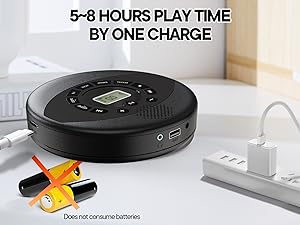
Image 3.2: Anti-shock protection for active use.
4. Одржавање
4.1 Cleaning the CD Player
- Користите меку, суву крпу за чишћење спољашњости плејера.
- For the lens, use a specialized CD lens cleaning kit. Do not touch the lens directly.
- Избегавајте употребу абразивних средстава за чишћење или растварача.
4.2 Одржавање батерије
- Да бисте продужили век трајања батерије, избегавајте често потпуно пражњење батерије.
- Чувајте уређај на хладном и сувом месту када се не користи дуже време.
- Charge the device at least once every three months if unused to prevent deep discharge.
4.3 Нега компакт дискова
- Handle CDs by their edges to avoid fingerprints and scratches.
- Очистите ЦД-ове меком крпом која не оставља влакна, бришући од средине ка споља.
- Store CDs in their cases to protect them from dust and damage.
КСНУМКС. Решавање проблема
| Проблем | Могући узрок | Решење |
|---|---|---|
| Плејер се не укључује. | Батерија је празна. Прекидач за напајање је искључен. | Напуните батерију. Уверите се да је прекидач за напајање у положају „УКЉУЧЕНО“. |
| Нема звука. | Volume is too low. Headphones/AUX cable not connected properly. CD/USB not playing. | Increase volume. Check connections. Ensure CD/USB is playing and not paused. |
| Прескакање или не репродукција CD-а. | CD is dirty or scratched. CD is not properly seated. Incorrect CD format. | Clean the CD. Re-seat the CD. Ensure the CD format (CD, CD-R, CD-RW, MP3, WMA) is supported. |
| Репродукција са УСБ-а не ради. | USB drive not properly inserted. Incompatible file формату. | Уверите се да је УСБ диск потпуно уметнут. Проверите да ли files are MP3 or WMA format. |
6. Спецификације производа
| Феатуре | Детаљ |
|---|---|
| Број модела | PM11-Black |
| Димензије производа | 5.7 к 5.7 к 1.2 инча |
| Тежина артикла | 1.01 фунти |
| Тип батерије | 1 литијум-полимерска батерија (укључена) |
| Повезивање | Помоћни, УСБ |
| Посебне карактеристике | Anti-Skip Protection, Portable, Programmable Memory, Rechargeable |
| Укључене компоненте | CD player X 1, Earbuds X 1, Audio cable X 1, Charging cable X 1, Pouch X 1 |
| Подржани формати | ЦД, ЦД-Р, ЦД-РВ, МП3, ВМА |
7. Гаранција и подршка
For warranty information and customer support, please contact Kuephom directly. Details regarding product warranty periods and service procedures are typically provided with your purchase documentation or can be found on the official Kuephom webсајту.
If you encounter any issues not covered in this manual, please reach out to Kuephom customer service for assistance.