
1. Увод
Welcome to the Radiant Miami Smartwatch user manual. This guide provides essential information for setting up, operating, maintaining, and troubleshooting your new smartwatch. The Radiant Miami Smartwatch (Model RAS21005) is designed for both men and women, offering a blend of modern design and advanced health monitoring features.
Key features include heart rate monitoring, blood pressure measurement, sleep tracking, and various activity tracking functions. It also supports notifications for calls and messages from compatible smartphones.

Image 1.1: The Radiant Miami Smartwatch worn on a wrist, showcasinг његов елегантан дизајн.
2. Подешавање
2.1 Пуњење паметног сата
Before initial use, fully charge your Radiant Miami Smartwatch. Connect the charging cable to the charging port on the back of the watch and plug the USB end into a standard USB power adapter (not included) or a computer's USB port. A full charge typically takes approximately 2 hours and provides up to 10 days of battery life, depending on usage.
2.2 Инсталација и упаривање апликације
- Преузмите пратећу апликацију: Тражи the official Radiant companion app on your smartphone's app store (compatible with iOS 8.4+ and Android 4.4+).
- Омогући Блуетоотх: Уверите се да је Блуетоотх омогућен на вашем паметном телефону.
- Отворите апликацију: Launch the Radiant app and follow the on-screen instructions to create an account or log in.
- Упарите уређај: Within the app, navigate to the 'Device' or 'Add Device' section. Select your Radiant Miami Smartwatch from the list of available devices. Confirm the pairing request on both your phone and the smartwatch if prompted.
Once paired, the smartwatch will synchronize time and data with your smartphone.
3. Управљање паметним сатом
3.1 Основна навигација
- Превуците нагоре/надоле: Листајте кроз меније и обавештења.
- Превуците лево/десно: Приступите брзим функцијама или различитим екранима са подацима.
- Додирните: Изаберите ставку или потврдите радњу.
- Бочно дугме: Притисните да бисте се вратили на почетни екран или пробудили уређај.
3.2 Мониторинг здравља
The Radiant Miami Smartwatch continuously monitors various health metrics:
- Откуцаји срца: Access the heart rate monitor from the main menu or a quick-access screen. The watch will display your current heart rate in beats per minute (BPM).
- крвни притисак: Initiate a blood pressure measurement from the dedicated function. Ensure the watch is snug on your wrist for accurate readings.
- Кисеоник у крви (SpO2): Measure your blood oxygen saturation level.
- Монитор спавања: The watch automatically tracks your sleep patterns, including awake, light, and deep sleep stagес. View детаљни подаци о спавању у пратећој апликацији.
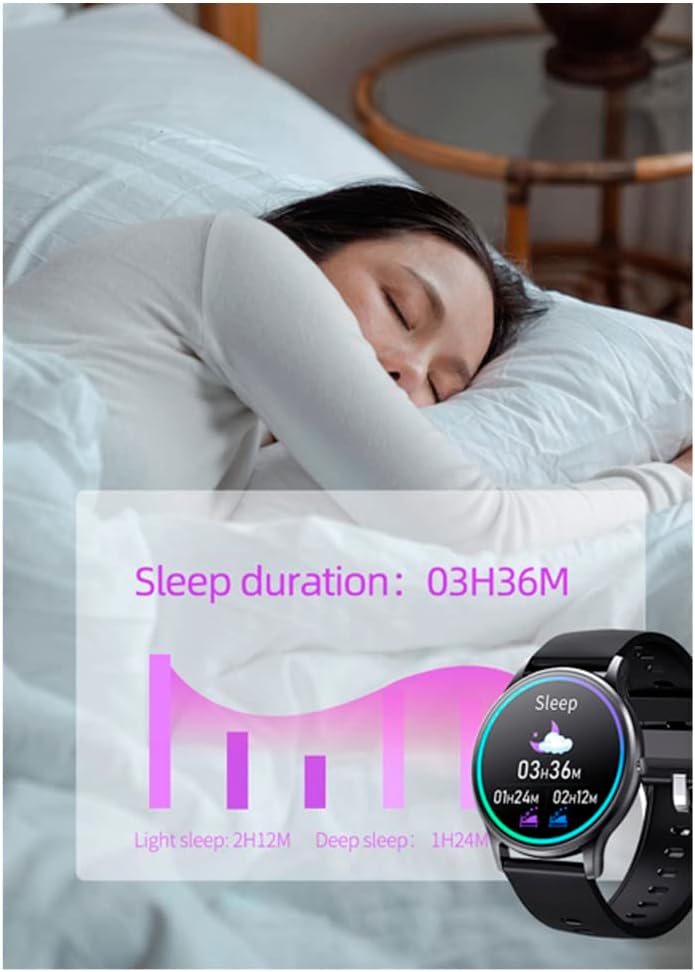
Image 3.1: The smartwatch screen showing sleep duration and different sleep stages (light, deep).
3.3 Праћење активности
Track your daily activities and workouts:
- Кораци, удаљеност, калорије: The watch automatically records your steps, estimated distance, and calories burned throughout the day.
- Мулти-спорт режими: Select specific sport modes (e.g., running, walking, cycling) to get more accurate data for your workouts.

Слика 3.2: Примерamples of activity tracking screens on the smartwatch, showing metrics for different exercises.
3.4 Обавештења и позиви
Receive notifications directly on your smartwatch:
- Обавештења о порукама: Get alerts for messages from apps like WhatsApp and Facebook. You can view the message text on your watch.
- Долазни позиви: See who is calling and reject calls directly from your smartwatch.
- Vibration Reminders: The watch provides vibration alerts for sedentary reminders, alarm clocks, low battery, and water intake reminders.

Image 3.3: The smartwatch screen showing an incoming message notification from Facebook.
НИКАДА Прилагодба
Персонализујте искуство са својим паметним сатом:
- Лица за гледање: Change the watch face through the companion app's 'Dial Center' to match your style.

Image 3.4: The companion app's 'Dial Center' displaying multiple watch face options for customization.
4. Одржавање
4.1 Чишћење
Regularly clean your smartwatch and strap to prevent skin irritation and maintain functionality. Use a soft, damp крпу за брисање екрана и каиша. Избегавајте употребу јаких хемикалија или абразивних материјала.
4.2 Одржавање батерије
Да бисте продужили век трајања батерије:
- Избегавајте екстремне температуре.
- Напуните сат пре него што се батерија потпуно испразни.
- Не остављајте сат да се пуни дуже време након што се напуни.
КСНУМКС. Решавање проблема
5.1 Smartwatch Not Turning On
Уверите се да је сат потпуно напуњен. Ако се и даље не укључује, покушајте да га повежете са пуњачем најмање 30 минута.
5.2 Није могуће упаривање са паметним телефоном
- Проверите да ли је Блутут омогућен на вашем паметном телефону.
- Уверите се да је паметни сат у домету Bluetooth-а вашег телефона.
- Поново покрените и паметни телефон и паметни сат.
- Покушајте да раскинете упаривање и поново упарите уређај путем апликације.
5.3 Нетачна очитавања здравственог стања
For accurate readings, ensure the smartwatch is worn snugly on your wrist, about one finger's width above the wrist bone. Avoid excessive movement during measurements. Note that the smartwatch is not a medical device and readings are for reference only.
5.4 Обавештења се не појављују
- Verify that notifications are enabled in the companion app settings.
- Check your smartphone's notification settings to ensure the app has permission to send notifications.
- Уверите се да је паметни сат повезан путем Блутут-а.
6. Спецификације
| Феатуре | Спецификација |
|---|---|
| Број модела | РАС21005 |
| Тип батерије | 1 Lithium metal battery (required) |
| Трајање батерије | До 10 дана (у стању приправности) |
| Време пуњења | Прибл. 2 сата |
| Компатибилност | иОС 8.4+ / Андроид 4.4+ |
| Произвођач | РАДИАНТ |
| Димензије производа | 16.3 к 14.5 к 3.5 цм |
| Тежина артикла | 100 грама |
7. Гаранција и подршка
Radiant is a recognized and respected Spanish brand in the watch industry, known for producing high-quality watches for decades. For warranty information or technical support, please refer to the documentation included with your purchase or visit the official Radiant webсајт. Сачувајте доказ о куповини за потребе гаранције.
For further assistance, please contact Radiant customer service through their official channels.