
1. Увод
Welcome to the user manual for your new Avtex W195TS Smart TV. This television is specifically designed for mobile living, offering versatile power options (12V, 24V, and 240V) and a range of smart features, including Wi-Fi, Bluetooth, and an integrated Freesat satellite decoder. This manual provides essential information for setting up, operating, maintaining, and troubleshooting your device to ensure optimal performance and enjoyment.
2. Безбедносне информације
Пажљиво прочитајте сва безбедносна упутства пре коришћења телевизора. Сачувајте ово упутство за будуће потребе.
- Напајање: Осигурајте тачан обимtage is used (12V, 24V DC or 240V AC). Do not overload power outlets.
- вентилација: Не блокирајте вентилационе отворе. Оставите довољно простора око телевизора за правилан проток ваздуха.
- Вода и влага: Не излажите телевизор киши или влази. Не стављајте предмете напуњене течношћу на телевизор.
- Чишћење: Искључите телевизор из струје пре чишћења. Користите меку, суву крпу. Не користите течна средства за чишћење или аеросолна средства за чишћење.
- Пласман: Place the TV on a stable, flat surface or mount securely to a wall/bracket. Avoid direct sunlight or heat sources.
- Сервисирање: Не покушавајте сами да сервисирате овај производ. Све сервисирање препустите квалификованом сервисном особљу.
3. Садржај пакета
Before setup, please check that all items are present in the box:
- Автек В195ТС Смарт ТВ
- Даљински управљач са батеријама
- 12В/24В ДЦ кабл за напајање
- 240V AC Power Adapter
- Table Stand (if applicable)
- Кориснички приручник (овај документ)
4. Производ је готовview
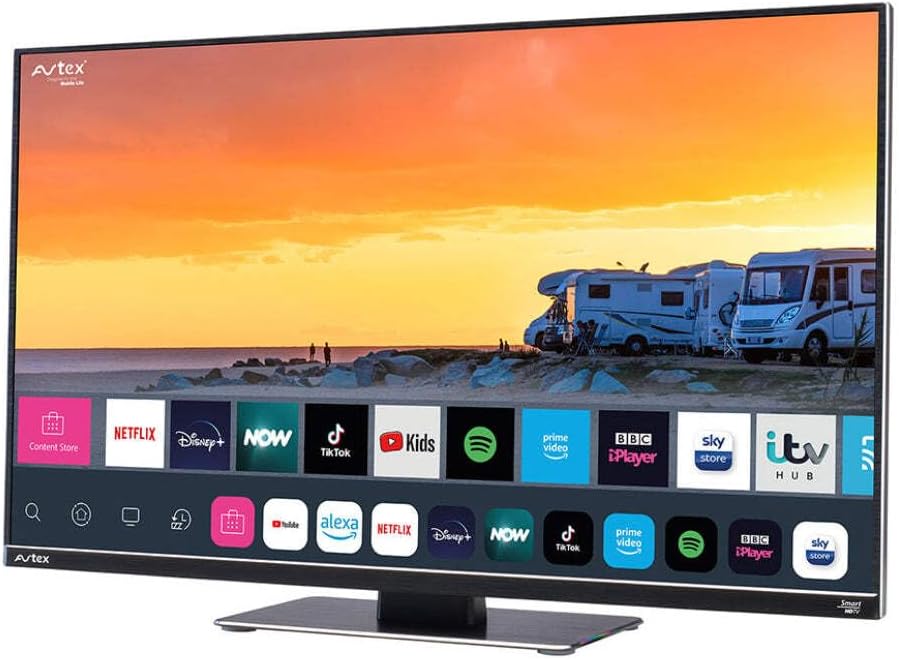
Figure 4.1: Avtex W195TS Smart TV Front View
This image shows the Avtex W195TS Smart TV from a slight angle, highlighting its slim design and the vibrant display. The screen shows a user interface with icons for popular streaming services like Netflix, Disney+, Now, TikTok, Kids, Spotify, Prime Video, BBC iPlayer, Sky Store, and ITV Hub. The background on the screen depicts a scenic view of motorhomes parked near a beach at sunset. The Avtex logo is visible on the top left and bottom left of the TV frame.
4.1. Портови и везе
- ХДМИ портови: For connecting external devices like Blu-ray players, game consoles, or set-top boxes.
- УСБ портови (2): For media playback from USB drives or connecting USB accessories.
- Антенски улаз: For connecting a terrestrial TV antenna.
- Сателитски улаз: For connecting a satellite dish for Freesat or other satellite services.
- Улаз за једносмерну струју: For 12V/24V DC power connection.
- Улаз наизменичне струје: For 240V AC power connection via adapter.
- Етхернет порт: За жичану мрежну везу.
- Аудио излаз: За повезивање екстерних аудио система или слушалица.
5. Подешавање
5.1. Инсталирање постоља (опционо)
- Пажљиво поставите телевизор лицем надоле на меку, чисту површину како бисте спречили оштећење екрана.
- Поравнајте постоље са отворима за монтажу на дну телевизора.
- Причврстите постоље помоћу приложених вијака.
5.2. Прикључак за напајање
The Avtex W195TS supports multiple power inputs:
- 12V/24V једносмерне струје: Connect the supplied 12V/24V DC power cable to the DC input on the TV and to your vehicle's 12V or 24V power outlet.
- 240В АЦ: Connect the supplied 240V AC power adapter to the AC input on the TV, then plug the adapter into a standard 240V AC wall socket.
Напомена: Do not connect both DC and AC power simultaneously.
5.3. Antenna/Satellite Connection
- Terrestrial TV: Connect your aerial cable to the 'ANTENNA IN' port.
- Satellite TV (Freesat): Connect your satellite dish cable to the 'SATELLITE IN' port.
5.4. Прво укључивање и прво подешавање
- Connect the TV to power and press the power button on the remote control or TV.
- The First-Time Setup Wizard will appear. Follow the on-screen prompts to select your language, country, and time zone.
- Perform an automatic channel scan for both terrestrial and satellite channels.
- Повежите се са својом Wi-Fi мрежом тако што ћете изабрати назив мреже и унети лозинку.
6. Оперативни
6.1. Функције даљинског управљача
Упознајте се са дугмадима даљинског управљача ради лакше навигације и контроле функција вашег телевизора.
- Дугме за напајање: Укључује/искључује ТВ.
- Дугме извора: Selects input sources (HDMI, USB, TV, Satellite).
- Волуме +/-: Подешава ниво јачине звука.
- Канал +/-: Мења ТВ канале.
- Навигациона дугмад (горе/доле/лево/десно/ОК): За навигацију и избор у менију.
- Smart Hub/Home Button: Приступа интерфејсу Smart TV-а.
- Дугмад апликације: Dedicated buttons for popular streaming apps (if available).
6.2. Карактеристике паметног телевизора
Your Avtex W195TS is equipped with smart TV capabilities:
- Апп Сторе: Download and install various applications for streaming, news, and entertainment.
- Услуге стримовања: Access pre-installed or downloaded apps like Netflix, Disney+, Prime Video, BBC iPlayer, etc. (subscription may be required).
- Web Прегледач: Претражујте интернет директно на свом телевизору.
- Пресликавање екрана: Connect your smartphone or tablet to display content on the TV screen (compatibility may vary).
6.3. Блуетоотх повезивање
Pair Bluetooth devices such as headphones or external speakers for enhanced audio experience.
- Go to the TV's settings menu.
- Select 'Bluetooth' or 'Connected Devices'.
- Enable Bluetooth and put your device into pairing mode.
- Изаберите свој уређај са листе за упаривање.
6.4. Репродукција медија преко УСБ-а
Insert a USB drive into one of the USB ports to view фотографије, репродуковање видео записа или слушање музике.
- The TV will usually prompt you to open the media player.
- Крећите се кроз своје fileпомоћу даљинског управљача.
7. Одржавање
7.1. Чишћење телевизора
- Екран: Нежно обришите екран меком крпом која не оставља влакна. За тврдокорне мрље, благо обришитеampОбришите крпу водом или средством за чишћење екрана (не прскајте директно по екрану).
- Casing: Користите меку, суву крпу да обришете телевизорasinг. Избегавајте абразивна средства за чишћење или раствараче.
7.2. Ажурирања софтвера
Periodically check for software updates to ensure your TV has the latest features and bug fixes. Updates can usually be found in the TV's settings menu under 'System' or 'Software Update'.
КСНУМКС. Решавање проблема
If you encounter issues with your Avtex W195TS, refer to the following common problems and solutions:
| Проблем | Могући узрок | Решење |
|---|---|---|
| Но Повер | Power cable not connected; no power from outlet. | Check power cable connection; test outlet with another device; ensure correct voltagе (12 В/24 В/240 В). |
| Нема слике, али је звук присутан | Incorrect input source selected; faulty cable. | Press the 'Source' button on the remote to select the correct input; check HDMI/antenna cables. |
| Нема звука, али је слика присутна | Јачина звука је искључена или прениска; проблем са спољним аудио системом. | Укључите звук или повећајте ниво; проверите везе са спољним аудио уређајима. |
| Не могу да се повежем са Wi-Fi мрежом | Нетачна лозинка; проблем са рутером; ТВ је предалеко од рутера. | Re-enter Wi-Fi password; restart router; move TV closer to router or use an extender. |
| Даљински управљач не ради | Празне батерије; препрека; проблем са упаривањем. | Замените батерије; уклоните препреке; поново упарите даљински управљач ако је у питању Блутут даљински управљач. |
9. Спецификације
| Феатуре | Спецификација |
|---|---|
| Бранд | Автек |
| Број модела | AVTEX W195TS |
| Величина екрана | 19.5 инча |
| Резолуција | 1080p (Full HD) |
| Аспецт Ратио | 16:9 |
| Технологија повезивања | Блутут, ХДМИ, Ви-Фи |
| Укупно УСБ портова | 2 |
| Волtage | 12 Volts, 24 Volts, 240 Volts |
| Тежина артикла | 2.5 килограма |
| Модел Иеар | 2018 |
10. Гаранција и подршка
Your Avtex W195TS Smart TV comes with a manufacturer's warranty. Please refer to the warranty card included in your product packaging for specific terms and conditions, including warranty period and coverage details. Keep your proof of purchase for warranty claims.
For technical support, troubleshooting assistance beyond this manual, or warranty inquiries, please contact Avtex customer service through their official website or the contact information provided with your product. When contacting support, please have your model number (AVTEX W195TS) and serial number ready.