
Увод
This manual provides detailed instructions for the proper setup, operation, and maintenance of your TOMLOV DM04 Digital Microscope. Please read this manual thoroughly before using the device to ensure optimal performance and longevity.
The TOMLOV DM04 is a versatile digital microscope featuring a 9-inch LCD screen, 16MP camera, and up to 1300X digital magnification. It is designed for various applications including coin inspection, circuit board repair, and general observation of small objects. It is compatible with Windows and Mac OS for advanced functions.
Садржај пакета
Проверите да ли су све ставке наведене у наставку укључене у ваш пакет:
- 9-inch Microscope Unit
- Основна плоча
- 10-inch Stand Pole
- Ремоте Цонтрол
- USB Cable for Microscope (Micro USB)
- USB Cable for Base (USB-C)
- Лигхт Барриер
- Упутство за употребу
- 32GB SD Card (pre-installed or included separately)

Image: All components included in the TOMLOV DM04 Digital Microscope package, including the microscope unit, stand, base, cables, remote, and manual.
Упутства за подешавање
- Саставите штанд: Attach the 10-inch stand pole to the base plate. Ensure it is securely fastened.
- Mount the Microscope: Slide the microscope unit onto the stand pole and tighten the securing screw at the desired height.
- Прикључите напајање:
- Connect the Micro USB cable to the microscope unit and a power source (e.g., USB adapter, computer USB port).
- Connect the USB-C cable to the base plate (for auxiliary lights) and a separate power source.
- Уметните СД картицу: If not pre-installed, insert the provided 32GB SD card into the slot on the back of the microscope unit.
- Position Auxiliary Lights: Adjust the flexible auxiliary lights on the base to illuminate your observation area as needed.
- Укључено: Press and hold the power button on the microscope unit to turn it on.
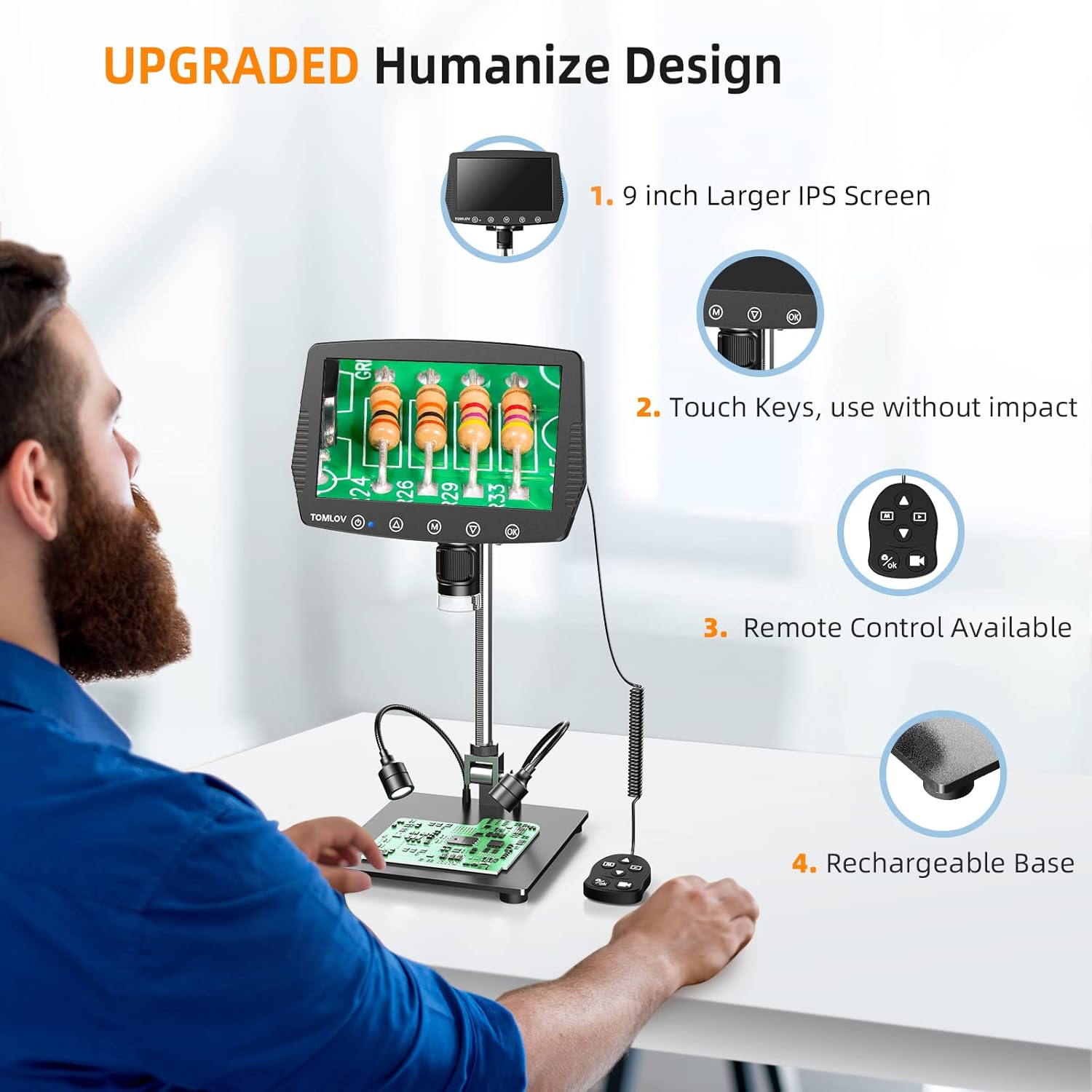
Image: A user setting up the TOMLOV DM04 microscope, demonstrating the assembly of the stand and placement of the microscope unit.
Упутство за употребу
Основна операција
- Укључивање/искључивање: Притисните и држите дугме за напајање (⑂) to turn the device on or off.
- Подешавање фокуса: Rotate the focus wheel on the microscope unit to achieve a clear image on the 9-inch LCD screen.
- Увећање: The microscope offers digital magnification up to 1300X. Adjust the height of the microscope on the stand and use the digital zoom functions (if available via menu) to change magnification.
- Осветљење:
- Уграђена ЛЕД светла: The microscope head has built-in LED lights. These can be adjusted via the menu or dedicated buttons.
- Auxiliary Base Lights: The two flexible lights on the base can be adjusted independently using their respective controllers to provide additional illumination.
- Снимите слике/видео снимке:
- Притисните тастер OK button on the microscope or remote control to take a picture.
- Притисните и држите OK дугме за покретање/заустављање снимања видеа.
- Captured images and videos are saved to the inserted SD card.
Напредне функције
- Навигација у менију: Користите M (Menu) button and arrow buttons (▲, ▼) to navigate through settings and options on the LCD screen.
- даљински управљач: The included remote control allows for stable operation, reducing image shake during capture.
- Rotatable Screen & Bracket Pole: The screen can be rotated up to 80 degrees and the bracket pole up to 180 degrees for flexible viewинг углова.
- PC Connection (Windows/Mac OS):
- Connect the microscope to your computer using the appropriate USB cable.
- Select "PC Camera" mode on the microscope's screen.
- Install the dedicated software (refer to the included software CD or manufacturer's website for download) to enable measurement and marking functions, and to view the live feed on your computer.
- Files can be transferred directly from the SD card when connected to a PC.

Image: The TOMLOV DM04 microscope connected to a laptop, showing the "PC Camera" function and measurement capabilities on the computer screen.

Слика: Крупни план view of the TOMLOV DM04 microscope's dual auxiliary lighting system, highlighting the built-in LED ring light and the two flexible base lights.
Video: A demonstration of the TOMLOV DM04 digital microscope's capabilities, showing a detailed view of a fly. This video illustrates the clarity and magnification achievable with the device.
Одржавање
- Чишћење:
- Use a soft, dry cloth to clean the exterior of the microscope and screen.
- For the lens, use a lens cleaning cloth and specialized lens cleaning solution. Avoid abrasive materials.
- Do not use liquid cleaners directly on the screen or lens.
- Складиштење: Store the microscope in a clean, dry environment away from direct sunlight and extreme temperatures.
- Одржавање батерије: For optimal battery life, charge the microscope regularly and avoid fully discharging it for extended periods.
- Ажурирања софтвера: Periodically check the TOMLOV official website for any available software or firmware updates for your DM04 model.
Решавање проблема
| Проблем | Могући узрок | Решење |
|---|---|---|
| Нема слике на екрану | Device not powered on; lens cap on; focus not adjusted. | Ensure device is powered on. Remove lens cap. Adjust focus wheel. |
| Слика је мутна | Improper focus; insufficient lighting; dirty lens. | Adjust focus wheel. Increase illumination using built-in or auxiliary lights. Clean the lens. |
| Cannot save images/videos | No SD card inserted; SD card full or corrupted; incorrect file подешавања формата. | Insert a compatible SD card. Delete unnecessary files or replace SD card. Check menu settings for file формату. |
| PC connection not working | Incorrect USB cable; "PC Camera" mode not selected; driver issues. | Ensure correct USB cable is used. Select "PC Camera" mode on microscope. Install necessary drivers/software. |
Спецификације
- Модел: ДМ04
- Величина екрана: 9-инчни ЛЦД
- Резолуција камере: 16 мегапиксела
- Видео резолуција: 1080П
- Digital Magnification: До 1300Кс
- Stand Length: 10 инча
- Опсег фокуса: Up to 8 inches (with enhanced stand)
- Осветљење: Built-in 8-LED fill lights, Rechargeable base lights (2)
- Контрола: Touch buttons, Remote control
- Складиштење: Supports Micro SD card (32GB included)
- ПЦ компатибилност: Виндовс, Мац ОС
- Извор напајања: Напаја се батеријама (5 волти)
- Материјал: 10'' Metal Stand + 9'' LCD Screen + Large Metal Base
Информације о гаранцији
TOMLOV products typically come with a standard manufacturer's warranty. Please refer to the warranty card included in your product packaging or visit the official TOMLOV webсајт за детаљне услове и одредбе гаранције, укључујући период покрића и поступке за подношење рекламација.
Корисничка подршка
For technical assistance, troubleshooting not covered in this manual, or warranty inquiries, please contact TOMLOV customer support:
- Webсајт: ввв.томлов.цом (Напомена: Ово је резервисано место URL, погледајте документацију производа за званичну подршку webсајту.)
- Емаил: Refer to your product documentation.
- Телефон: Refer to your product documentation.
When contacting support, please have your product model (DM04) and purchase information ready.