
1. Увод
Thank you for choosing the Rollei DF-S 1600 SE Film and Slide Scanner. This device is designed to digitize your precious film negatives and slides with high resolution, preserving your memories for years to come. This manual provides detailed instructions for the proper setup, operation, and maintenance of your scanner. Please read this manual thoroughly before using the device to ensure optimal performance and safety.
2. Безбедносна упутства
- Always use the provided power adapter. Using an incorrect adapter may damage the device and void the warranty.
- Не излажите скенер води или прекомерној влази.
- Избегавајте постављање скенера на директну сунчеву светлост или близу извора топлоте.
- Држите скенер даље од јаких магнетних поља.
- Не покушавајте сами да растављате или поправљате скенер. Обратите се квалификованом сервисеру.
- Clean the scanner with a soft, dry cloth. Do not use liquid cleaners or solvents.
- Обезбедите одговарајућу вентилацију око уређаја током рада.
3. Садржај пакета
Please check the contents of your package upon unpacking. If any items are missing or damaged, contact your retailer.
- Rollei DF-S 1600 SE Film and Slide Scanner
- Повер Адаптер
- УСБ кабл
- Film Holder for 135/126/110 mm Negatives
- Slide Holder for 135/126/110/8 mm Slides
- Четка за чишћење
- Кориснички приручник (овај документ)

Image: Included film and slide holders for different media types.
4. Производ је готовview
Familiarize yourself with the main components of your Rollei DF-S 1600 SE scanner.

Слика: Под углом view of the Rollei DF-S 1600 SE scanner, highlighting the display and film input.

Слика: Фронт view of the scanner, showing the power button and film output slot.
- ЛЦД екран: 3.5-inch TFT LCD color screen for previewсликање и навигација кроз меније.
- Контролна дугмад: Buttons for navigation, capture, and menu access.
- Film/Slide Input Slot: Where film holders are inserted.
- Дугме за напајање: Да бисте укључили/искључили уређај.
- Слот за СД картицу: For inserting an SD/SDHC/MMC memory card to save scanned images.
- УСБ порт: For connecting to a computer or power adapter.
- HDMI/TV Out Port: For connecting to an external display or TV.
5. Подешавање
Follow these steps to set up your scanner for first use.
- Прикључите напајање: Connect the provided power adapter to the scanner's USB port and then to a power outlet. The scanner can also be powered via a computer's USB port.
- Уметните меморијску картицу: Insert an SD/SDHC/MMC memory card (not included) into the designated slot on the scanner. Ensure it is inserted correctly until it clicks into place.
- Укључено: Press and hold the Power button until the LCD display turns on.
- Изаберите језик: If prompted, use the navigation buttons to select your preferred language and confirm.
- Prepare Film/Slide: Choose the appropriate film or slide holder for your media type. Carefully insert your negatives or slides into the holder. Ensure they are clean and free of dust.

Image: Preparing a film strip for insertion into the scanner using a film holder.
6. Упутство за употребу
6.1 Scanning Negatives (135, 126, 110 mm)
- Insert the negative film strip into the appropriate negative film holder. Ensure the film is flat and correctly aligned.
- Insert the loaded film holder into the scanner's film input slot. Push it gently until it locks into position.
- On the scanner's LCD, select "Negative Film" as the media type.
- Use the navigation buttons to preview the image. Adjust exposure and color settings if necessary (refer to Section 6.3).
- Press the "Capture" button to scan the image. The scanned image will be saved to the memory card.
- Remove the film holder and advance the film to the next frame, or replace with a new film strip.
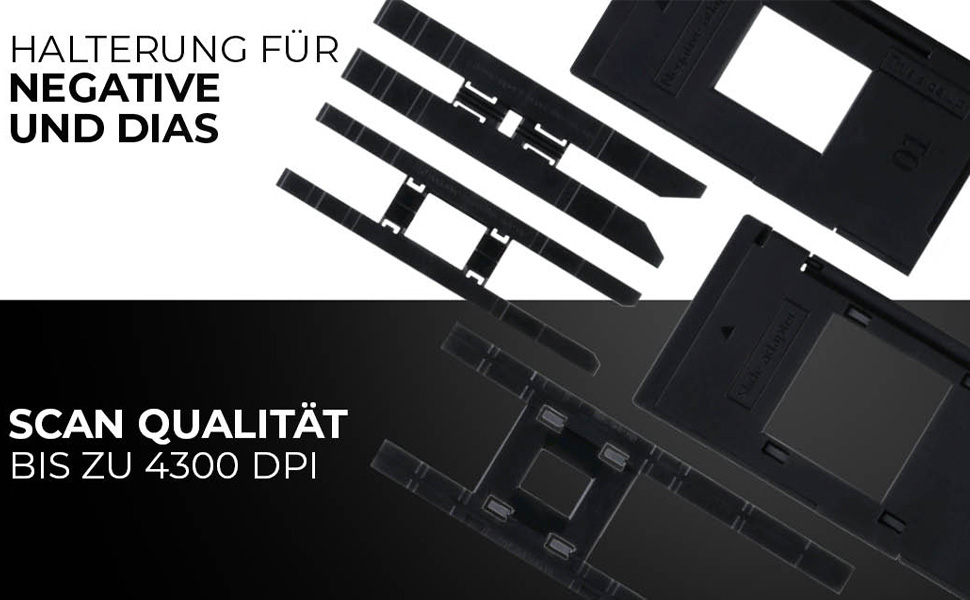
Image: Scanning a negative film strip with the Rollei DF-S 1600 SE.
6.2 Scanning Slides (135, 126, 110, 8 mm)
- Place your mounted slide into the appropriate slide holder. Ensure the slide is clean and correctly oriented.
- Insert the loaded slide holder into the scanner's film input slot.
- On the scanner's LCD, select "Slide" as the media type.
- Преview the image on the display. Adjust settings as needed (refer to Section 6.3).
- Press the "Capture" button to scan the image. The scanned image will be saved to the memory card.
- Remove the slide holder and replace with the next slide.

Image: Scanning a mounted slide with the Rollei DF-S 1600 SE.
6.3 Подешавање подешавања
The Rollei DF-S 1600 SE offers 7 manual adjustment levels for optimal image results. Access the menu to adjust settings such as:
- Изложеност: Подешавање осветљености.
- Баланс боја: Adjust red, green, and blue channels.
- Резолуција: Select scanning resolution (up to 16 MP interpolated, 4300 DPI optical).
- Врста филма: Ensure the correct film type (color negative, black & white negative, slide) is selected for accurate color reproduction.
6.4 Connecting to PC/TV
- USB Connection (PC): Connect the scanner to your computer using the USB cable. The scanner will appear as a mass storage device, allowing you to transfer scanned images.
- HDMI/TV Connection: Use an HDMI cable (not included) to connect the scanner to a TV or external monitor. This allows for a larger view of your images during scanning or playback.
7. Одржавање
Regular maintenance ensures the longevity and performance of your scanner.
- Чишћење скенера: Use the provided cleaning brush to gently remove dust from the film input slot and the internal light source. Do not use compressed air, as it may push dust further inside.
- Cleaning Film/Slide Holders: Wipe the holders with a soft, dry, lint-free cloth. Ensure they are free of dust and debris before inserting film or slides.
- Складиштење: When not in use, store the scanner in a cool, dry place, away from direct sunlight and dust.
КСНУМКС. Решавање проблема
Ако наиђете на проблеме, погледајте табелу испод за уобичајене проблеме и решења.
| Проблем | Могуће решење |
|---|---|
| Скенер се не укључује. | Ensure the power adapter is securely connected to both the scanner and a working power outlet. Try a different USB port or power outlet. |
| Images appear blurry or dusty. | Clean the film/slides and the scanner's internal light source using the provided brush. Ensure film/slides are inserted correctly and flat. |
| Боје су нетачне. | Verify that the correct film type (negative, slide) is selected in the scanner's menu. Adjust color balance settings manually. |
| Memory card error / Cannot save images. | Ensure the memory card is inserted correctly and is not full. Try formatting the card (this will erase all data) or use a different card. Check if the card is locked (write-protected). |
| Scanner freezes or is unresponsive. | Turn off the scanner, disconnect the power, wait a few seconds, then reconnect and power on again. |
9. Спецификације
| Феатуре | Валуе |
|---|---|
| Бранд | Роллеи |
| Назив модела | Rollei DF-S 1600 SE |
| Број модела ставке | 20699 |
| Тип скенера | Скенер филма |
| Резолуција | 4300 DPI (оптички) |
| Технологија повезивања | ХДМИ, УСБ |
| Тежина артикла | 513 грама |
| Дубина боје | 2.8 мегабита |
| Технологија оптичког сензора | CCD, CMOS |
| Минимални системски захтеви | Виндовс, мацОС |
| Медиа Типе | Negative, Slide, 110 mm Film, 8 mm/Super8 Film |
| Тип извора светлости | ЛЕД |
| Међународни код чланка | 04048805206995 |
10. Гаранција и подршка
Rollei is committed to providing high-quality products and customer satisfaction.
- Exchange Guarantee: Your Rollei DF-S 1600 SE scanner comes with an exchange guarantee for a full 24 months from the date of purchase.
- Free Return Shipping: Enjoy free return shipping within 14 days of purchase.
- Помоћ и подршка: Our expert team is available to assist you with any questions or issues.
- Контакт информације: You can reach us Monday-Friday from 10:00 AM to 4:00 PM at +49 40 270 750 277.