
Увод
This manual provides comprehensive instructions for the setup, operation, maintenance, and troubleshooting of your T-WOLF X9 Bluetooth Mouse. Please read this manual carefully before using the product to ensure optimal performance and longevity.
Садржај пакета
- 1 x T-WOLF X9 Bluetooth Mouse
- 1 к АА батерија
- 1 x Упутство за употребу (овај документ)
Производ је завршенview

Слика 1: Врх view of the T-WOLF X9 Bluetooth Mouse, showing the left and right click buttons, scroll wheel, and DPI switch button. The T-WOLF logo and Bluetooth icon are visible.
The T-WOLF X9 is a portable Bluetooth mouse designed for convenience and performance. It features a sleek design, Bluetooth 5.2 connectivity, and a 10-meter operating range. The mouse includes four buttons: left-click, right-click, scroll wheel (which also functions as a button), and a dedicated DPI switch button for adjusting cursor sensitivity.
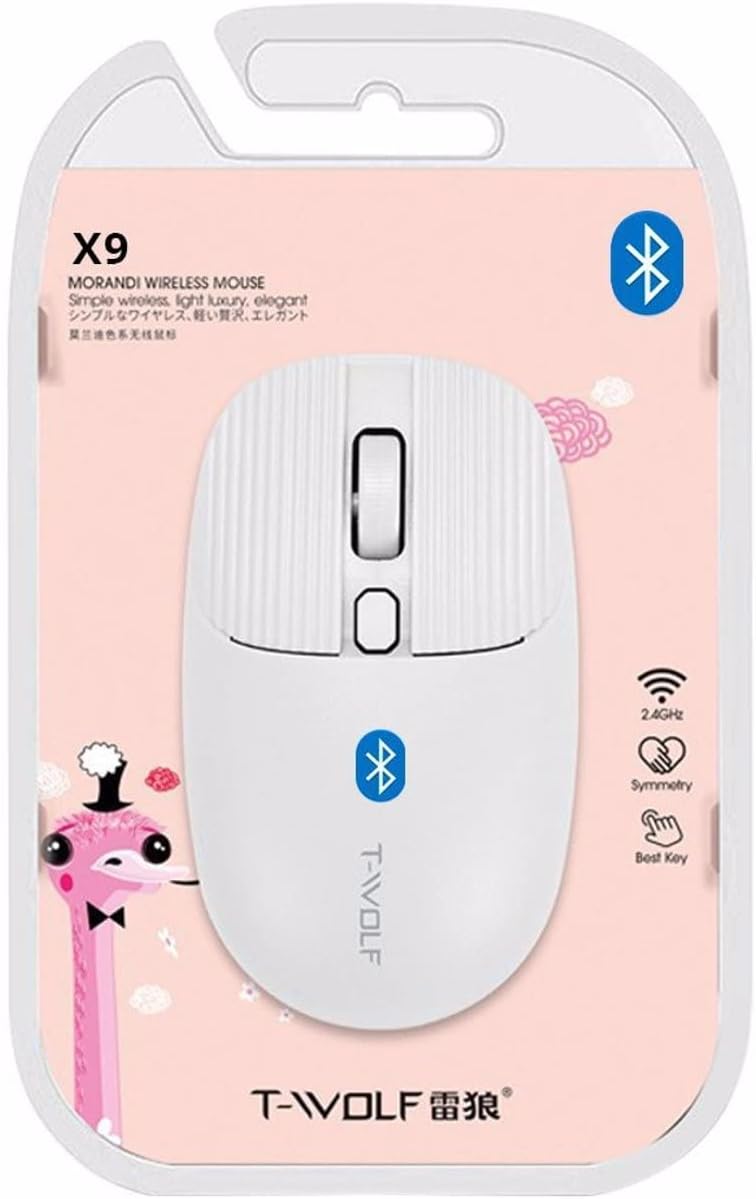
Слика 2: Packaging of the T-WOLF X9 Bluetooth Mouse, highlighting key features such as 2.4GHz (though product is Bluetooth, this might be a generic packaging element), symmetry, and "Best Key".

Слика 3: Сиде view of the T-WOLF X9 Bluetooth Mouse, illustrating its ergonomic profile and non-slip roller design.
Сетуп
1. Инсталација батерије
- Пронађите одељак за батерију на доњој страни миша.
- Отворите поклопац одељка за батерије.
- Insert the provided AA battery, ensuring correct polarity (+/-).
- Добро затворите поклопац одељка за батерије.
2. Блуетоотх упаривање
- Ensure the mouse is powered on. There may be a power switch on the underside.
- На рачунару или уређају идите до подешавања Блуетоотх-а.
- Омогућите Блутут и потражите нове уређаје.
- The mouse should appear as "T-WOLF X9" or similar. Select it to initiate pairing.
- Једном упарен, миш је спреман за употребу.
Упутство за употребу
1. DPI Switching
The T-WOLF X9 mouse features 3-gear DPI switching. Press the dedicated DPI button (located behind the scroll wheel) to cycle through the available DPI settings. Each press will change the cursor sensitivity, allowing you to adjust it to your preference for different tasks.
2. Функције дугмета
- Леви клик: Примарна селекција и интеракција.
- Десни клик: Отвара контекстуалне меније.
- Точак за померање: Помера садржај вертикално. Може се притиснути и за функцију клика средњим тастером миша.
- Дугме за прекидач DPI-ја: Подешава осетљивост курсора (DPI).
Одржавање
- Чишћење: Користите меку, суву крпу за чишћење миша. За тврдокорну прљавштину, благо обришитеampИсперите крпу водом. Избегавајте употребу јаких хемикалија или абразивних материјала.
- Замена батерије: Замените АА батерију када се перформансе миша погоршају или када престане да реагује.
- Складиштење: Чувајте миш на хладном и сувом месту када га не користите дуже време.
Решавање проблема
| Проблем | Решење |
|---|---|
| Миш не реагује |
|
| Покрет курсора је неправилан или спор |
|
| Cannot pair the mouse |
|
Спецификације
| Феатуре | Детаљ |
|---|---|
| Модел | X9 |
| Повезивање | Блуетоотх 5.2 |
| Оперативни опсег | До 10 метара |
| Дугмад | 4 (Left, Right, Scroll Wheel/Middle, DPI Switch) |
| ДПИ подешавања | 3-Gear Switching |
| Извор напајања | 1 к АА батерија |
| Оријентација руке | Амбидектроус |
| Компатибилни уређаји | Лаптоп, лични рачунар |
| Оперативни системи | Linux, Windows 7, Windows XP (and newer OS with Bluetooth support) |
| Димензије | 20 x 13 x 7.5 цм (паковање) |
| Тежина | 150 g (Package) |
Гаранција и подршка
This product is covered by a standard manufacturer's warranty. For specific warranty details, please refer to the documentation provided at the time of purchase or contact your retailer. For technical support or further assistance, please reach out to the seller or manufacturer's customer service.


