
Увод
This manual provides instructions for the proper use and maintenance of your Alecto AK-20 Alarm Clock with Thermometer. Please read these instructions carefully before operating the device and retain them for future reference. The AK-20 is designed to display time, date, day, and indoor temperature, featuring multiple alarms, a snooze function, and radio-controlled time synchronization.
Безбедносне информације
- Не излажите уређај екстремним температурама, директној сунчевој светлости или високој влажности.
- Избегавајте испуштање уређаја или излагање јаким ударима.
- Не покушавајте сами да растављате или поправљате уређај. Све сервисне радове препустите квалификованом особљу.
- Истрошене батерије одлажите одговорно у складу са локалним прописима.
Садржај пакета
Уверите се да су сви предмети присутни и у добром стању приликом распакивања:
- Alecto AK-20 Alarm Clock
- User Manual (NL/EN/DE/FR)
Производ је завршенview
The Alecto AK-20 features a clear digital display and intuitive controls for easy operation.

Слика 1: Предња страна view of the Alecto AK-20 Alarm Clock, showing the large digital display with time, date, day, and temperature, along with control buttons at the bottom.

Слика 2: Под углом view of the Alecto AK-20, highlighting the main display and the alarm ON/OFF switches on the right side.
Controls and Display Elements:
- Велики дигитални екран: Shows time (AM/PM indicator), date, day of the week, and indoor temperature.
- Дугме за ПОДЕСИВАЊЕ ВРЕМЕНА: Користи се за улазак у режим подешавања времена.
- - / + Buttons: Used to adjust values (decrease/increase).
- Дугме СЕТ АЛАРМ: Користи се за улазак у режим подешавања аларма.
- ALARM 1-4 ON/OFF Switches: Located on the side for individual alarm activation.
- Дугме СНООЗЕ/ЛИГХТ: Located on top, activates backlight and snooze function.
- AUTO LIGHT Switch: Located on the back, controls automatic backlight.
- Ресет: Located on the back, for factory reset.

Слика 3: Десна страна view of the alarm clock, showing the physical ON/OFF switches for Alarm 3 and Alarm 4.

Слика 4: Позади view of the alarm clock, showing the battery compartment, RESET button, and AUTO LIGHT switch.
Сетуп
1. Инсталација батерије
- Пронађите одељак за батерије на задњој страни будилника (погледајте слику 4).
- Отворите поклопац одељка за батерије.
- Уметните две АА батерије, водећи рачуна о исправном поларитету (+ и -).
- Добро затворите поклопац одељка за батерије.
The display will light up, and the clock will begin searching for the DCF radio signal for automatic time synchronization.
2. Initial Time and Date Synchronization (DCF)
The AK-20 is a radio-controlled clock. Upon battery installation, it will automatically attempt to synchronize with the DCF signal. This process may take several minutes. A signal icon on the display indicates successful reception.
- Place the clock near a window for better signal reception.
- Avoid placing it near electronic devices that may cause interference.
3. Manual Time and Date Setting (Optional)
If DCF synchronization is not desired or unsuccessful, you can set the time and date manually:
- Притисните и држите ВРЕМЕНСКИ СКЛОП дугме док цифре сати не почну да трепћу.
- Користите - or + дугмад за подешавање сата.
- Притисните ВРЕМЕНСКИ СКЛОП поново да бисте потврдили сат и прешли на минуте.
- Поновите поступак за минуте, годину, месец и дан.
- Притисните ВРЕМЕНСКИ СКЛОП још једном да бисте изашли из режима подешавања.
4. Избор језика
The device supports multiple languages for day display. To change the language:
- Док сте у нормалном режиму приказа времена, притисните - дугме више пута.
- The day of the week will cycle through available languages (Dutch, French, German, English, Spanish, Italian, Danish, Russian).
- Stop when your desired language is displayed.
Упутство за употребу
1. Подешавање аларма
The AK-20 allows setting up to four independent alarms.
- Притисните и држите АЛАРМ СЕТ button until the alarm time (e.g., ALARM-1) starts flashing.
- Користите - or + buttons to adjust the desired alarm hour.
- Притисните АЛАРМ СЕТ поново да бисте потврдили сат и прешли на минуте.
- Користите - or + buttons to adjust the desired alarm minutes.
- Притисните АЛАРМ СЕТ to confirm and move to the next alarm (ALARM-2, ALARM-3, ALARM-4).
- Repeat steps 2-4 for each alarm you wish to set.
- After setting all desired alarms, press АЛАРМ СЕТ to exit the alarm setting mode.
2. Activating/Deactivating Alarms
Each alarm has a dedicated ON/OFF switch on the side of the unit (refer to Figure 3).
- Slide the corresponding switch to ON to activate an alarm. An alarm icon will appear on the display.
- Померите прекидач у положај ОФФ to deactivate an alarm. The alarm icon will disappear.
3. Функција одлагања
Када се огласи аларм, притисните дугме СНООЗЕ / ЛИГХТ button on top of the clock. The alarm will temporarily stop and sound again after a few minutes (typically 5-10 minutes, depending on the model's default setting).
4. Функција позадинског осветљења
The display features a backlight for visibility in low-light conditions.
- Ручно позадинско осветљење: Кратко притисните СНООЗЕ / ЛИГХТ button to activate the backlight for a few seconds.
- Аутоматско позадинско осветљење: On the back of the unit, slide the АУТО ЛИГХТ пређите на ON. The backlight will automatically illuminate in dark environments. Slide to ОФФ to disable this feature.
5. Приказ температуре
The integrated thermometer displays the indoor temperature.
- Да бисте прелазили између Целзијуса (°C) и Фаренхајта (°F), притисните + дугме док сте у нормалном режиму приказа времена.
Одржавање
- Очистите уређај меком, сувом крпом. Не користите абразивна средства за чишћење или раствараче.
- Ако уређај неће бити коришћен дуже време, извадите батерије да бисте спречили цурење.
Решавање проблема
| Проблем | Могући узрок | Решење |
|---|---|---|
| Екран је празан или замагљен. | Батерије су празне или су неправилно уметнуте. | Замените батерије новим АА батеријама, водећи рачуна о исправном поларитету. |
| Време је погрешно. | DCF signal not received or manual time not set. | Ensure the clock is in an area with good signal reception. Manually set the time if necessary. |
| Аларм се не оглашава. | Аларм није активиран или је погрешно подешен. | Check the alarm ON/OFF switch on the side. Verify alarm time settings. |
| Позадинско осветљење не ради. | AUTO LIGHT switch is OFF or batteries are low. | Check the AUTO LIGHT switch on the back. Replace batteries if needed. |
Ако проблем и даље постоји након покушаја ових решења, обратите се корисничкој подршци.
Спецификације
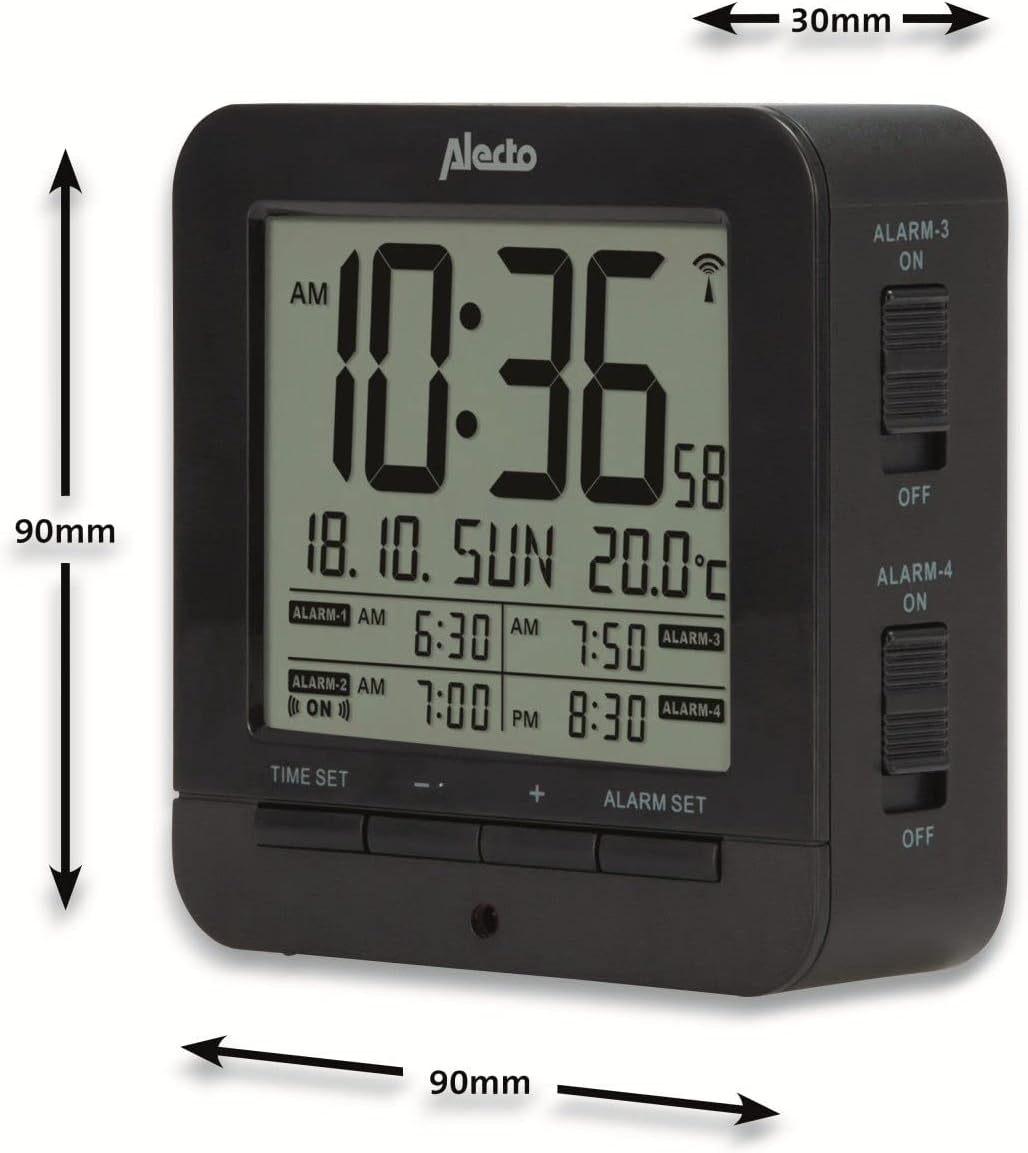
Figure 5: Alecto AK-20 Alarm Clock showing its approximate dimensions: 90mm height, 90mm width, and 30mm depth.
| Феатуре | Детаљ |
|---|---|
| Број модела | AK-20 (A003319) |
| Бранд | Алецто |
| Боја | Црно |
| Материјал | акрилонитрил бутадиен стирен (АБС) |
| Димензије (В к Ш к Д) | 9 x 9 x 3 цм (приближно 3.54 x 3.54 x 1.18 инча) |
| Димензије екрана | 6.4 x 5.4 цм (приближно 2.52 x 2.13 инча) |
| Тежина | 231 г (приближно 0.51 фунти) |
| Извор напајања | 2 к АА батерије (нису укључене) |
| Дисплаи Типе | Дигитал |
| Посебне карактеристике | Temperature Display, 4 Alarms, Snooze Function, Backlight, DCF Radio Control |
| Јединице температуре | °C / °F selectable |
| Подржани језици | Dutch, French, German, English, Spanish, Italian, Danish, Russian |
Гаранција и подршка
Alecto products are manufactured to high quality standards. For information regarding warranty terms and conditions, please refer to the documentation provided with your purchase or visit the official Alecto website. For technical support or service inquiries, please contact your retailer or the Alecto customer service department.